


 Video Converter Ultimate
 Scherm opnemer
 Videoreparatie
 Beveiligde download
Hoe het watermerk uiteindelijk te verwijderen uit door Renderforest geëxporteerde video's?
Renderforest is een volledig pakket van uitstekende geanimeerde sjablonen voor intro's, outro's, titels, advertenties en dergelijke. U kunt helemaal opnieuw beginnen of de beschikbare sjablonen hier gebruiken. Ook al ben je geen expert op het gebied van videobewerking, je kunt het toch overwinnen door dit webplatform te gebruiken. Vanwege het gebruik en het optimale voordeel kozen veel gebruikers voor dit platform om een hoogwaardig, efficiënt, compatibel en betrouwbaar ontwerp te maken als u gebruikmaakt van een abonnement.
Dus je kunt de video die je hier bewerkt gratis downloaden als je je aanmeldt, maar dan met een watermerk. Dat watermerk levert voor velen van ons een probleem op: zowel voor wie de video hier al heeft geëxporteerd als voor wie het abonnementstarief van deze tool niet kan betalen. Hieronder geven we handleidingen voor het verwijderen van het watermerk uit Renderforest met de meest waardevolle tools die we tijdens ons onderzoek hebben verzameld. We delen ze graag met je als je het volgende deel van dit artikel blijft lezen.

Deel 1. 3 effectieve manieren om een watermerk uit Renderforest-video te verwijderen
FVC Video Converter Ultimate
FVC Video Converter Ultimate is een fenomenale video‑watermerkverwijderaar die je stap voor stap kan laten zien hoe je het Renderforest‑watermerk verwijdert. Je kunt op deze tool vertrouwen om het watermerk uit je video te verwijderen zonder moeite. Als we deze ultieme tool vergelijken met andere, dan heeft deze tool de kracht om het watermerk in je video te verwijderen met de ondersteuning van AI‑technologie. Het is bovendien de beste tool om het watermerk uit je video te verwijderen, ongeacht het formaat dat je uploadt. Wat maakt deze tool uitstekend? Je hoeft geen techneut te zijn om hem te gebruiken; met de eenvoudige gids en stappen hieronder kun je het watermerk dat Renderforest aan de video toevoegt verwijderen.
Stap 1. Download de software op je desktop door op de geschikte downloadknop te klikken. Klik op het gedownloade bestand, installeer het en kies Start Now om de software direct te starten.
Gratis downloadVoor Windows 7 of nieuwerVeilige download
Gratis downloadVoor MacOS 10.7 of nieuwerVeilige download
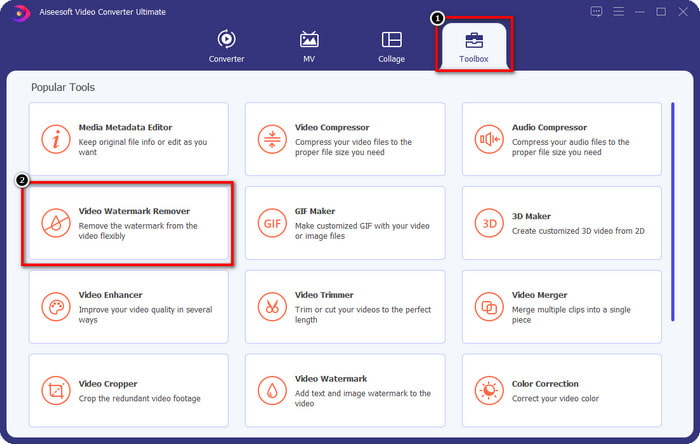
Stap 2. Na het starten van de software open je de Toolbox en klik je daaronder op Video Watermark Remover.
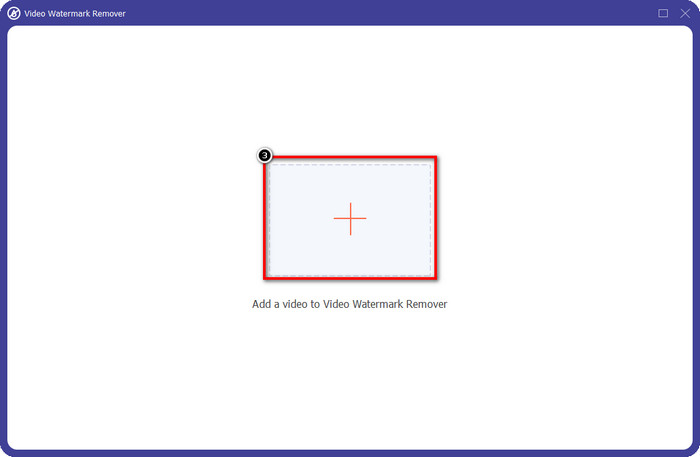
Stap 3. Klik op het +-pictogram op je scherm om de Renderforest‑video die je met watermerk hebt geëxporteerd te uploaden.
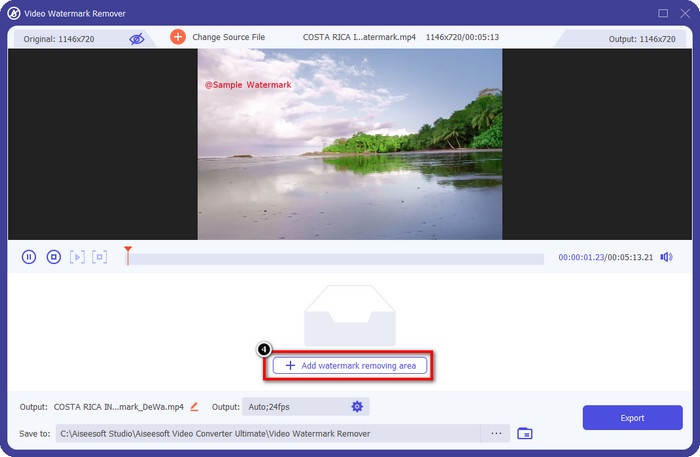
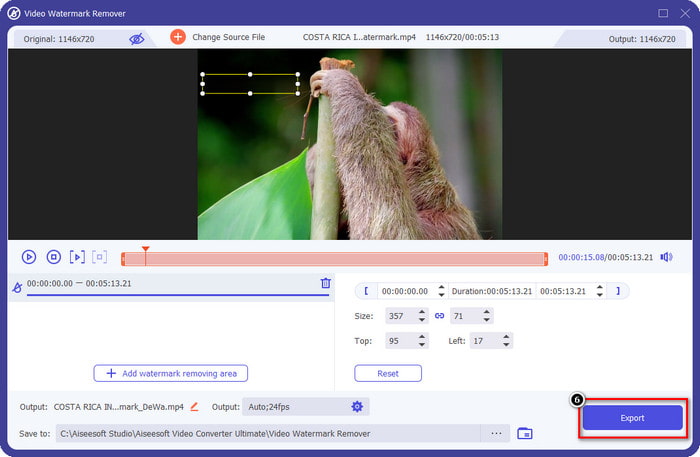
Stap 4. Druk op Add Removing Watermark Area om te beginnen met het verwijderen van het Renderforest‑watermerk.
Stap 5. Sleep in het nieuwe venster op je scherm het selectievak en pas het aan zodat het precies over het watermerk valt. Je kunt het selectievak vrij aanpassen als dat nodig is.
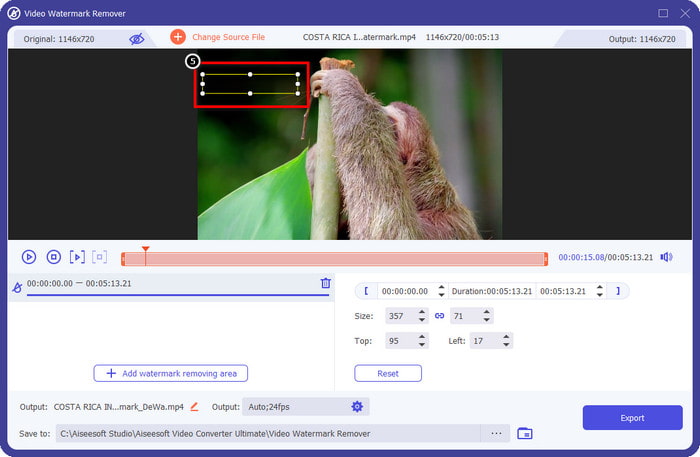
Stap 6. Nu het selectievak het watermerk in je video heeft gedetecteerd, klik je op Export om te beginnen met verwijderen en om de video zonder watermerk op te slaan. De video wordt in een mum van tijd verwerkt en je kunt de video vervolgens gebruiken zonder het storende watermerk.
Gerelateerd:
DeviantArt‑watermerk verwijderen
Video Helper‑watermerk verwijderen
Logo nu verwijderen
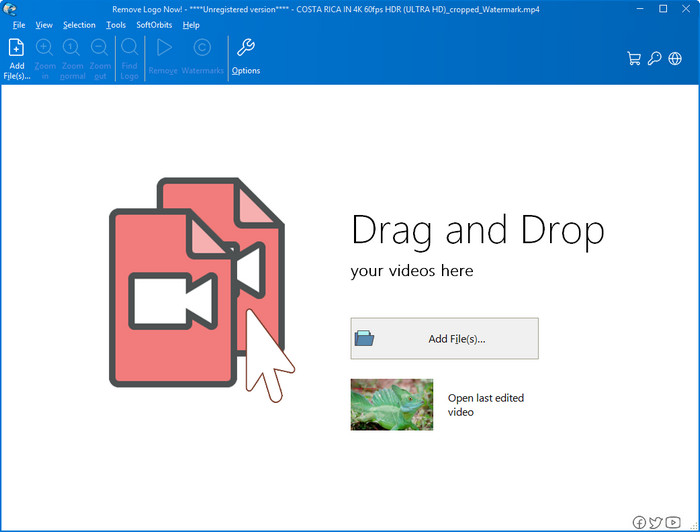
Vervolgens in onze lijst: Remove Logo Now heeft een uitstekende reputatie opgebouwd voor het verwijderen van overliggende watermerken op Windows. Met deze tool heb je geen expertise nodig om te weten hoe je het Renderforest‑watermerk op een pc verwijdert. Na het verwijderen van het watermerk zijn er, als je goed kijkt, nog sporen te zien op de plek waar het watermerk oorspronkelijk zat. Maar als je niet heel aandachtig kijkt, zul je het watermerk of de restanten ervan in de geëxporteerde video niet opmerken. De onderstaande handleiding leert je hoe je het watermerk uit je video verwijdert op je Windows‑apparaten.
Stap 1. Download en installeer Remove Logo Now op je desktop en volg vervolgens het installatieproces.
Stap 2. Start de software en klik op Add Files om de video hier te uploaden. Voor efficiënter uploaden kun je de video ook slepen en neerzetten.
Stap 3. Kies welke tool je wilt gebruiken om het watermerk te markeren. Nadat je er een hebt geselecteerd, markeer je het watermerk en klik je op Remove.
Stap 4. Klik op Start om het proces van het verwijderen van het watermerk dat deze tool biedt te starten.
Videowatermerkverwijderaar online

Wil je geen software op je desktop downloaden maar toch weten hoe je het Renderforest‑watermerk verwijdert, probeer dan de Video Watermark Remover Online. Je kunt deze volledig geautomatiseerde watermerkverwijderaar gebruiken om gratis het watermerk uit je video te verwijderen zonder iets op je desktop te downloaden. Net als bij de eerder genoemde tool kun je, zelfs als je een beginner bent in videobewerking of het verwijderen van watermerken, deze tool in enkele minuten onder de knie krijgen. Volg de onderstaande handleiding om te leren hoe je hem gebruikt.
Stap 1. Open de online watermerkverwijderaar door ernaar te zoeken in je favoriete webbrowser.
Stap 2. Klik op het pictogram met de upload‑cloud op de hoofdwebsite om de video in te voegen die je op Renderforest hebt geëxporteerd.
Stap 3. Wacht tot het uploadproces is voltooid; het watermerk wordt automatisch uit je video verwijderd. Klik daarna op Download om de video zonder watermerk op te slaan.
Deel 2. Veelgestelde vragen over het verwijderen van het Renderforst-watermerk
Hoeveel bedraagt het abonnementsgeld voor Renderforest?
Renderforest ondersteunt drie verschillende soorten prijzen waar u gebruik van kunt maken; $ 14,99 voor Lite, $24,99 voor Pro en $29,99 voor Business elke maand. Deze prijsstelling heeft wel een ander doel van elkaar; je kunt naar de hoofdwebsite gaan om te zien wat de aangeworven zijn die beschikbaar zijn voor het abonnement dat je wilt gebruiken.
Is het mogelijk om het watermerk van Renderforest Video te verwijderen zonder gereedschap?
Ja, je kunt het watermerk in je Renderforest verwijderen zonder een tool te gebruiken, en dat is door een maandelijkse of jaarlijkse vergoeding voor de software te kopen. Zodat wanneer u het videobestand exporteert, er geen watermerk aan wordt toegevoegd.
Wat is het beste plan voor Renderforest; Maandelijks of jaarlijks?
Het maandabonnement is een goede keuze als je de tool een paar keer wilt gebruiken, maar als je besluit de software voor langere tijd te gebruiken, is het beter om gebruik te maken van een Jaarplan omdat het je minder kost dan de verlenging van elke maand. Maar voordat u gebruik maakt, kunt u het Renderforest gratis gebruiken door uw account hier in te loggen en vervolgens de andere gratis sjablonen proberen te gebruiken.
Gevolgtrekking
Dit artikel levert inderdaad sterk bewijs voor het gratis verwijderen van het Renderforest-watermerk met behulp van de drie nuttigste watermerkverwijderaars die u kunt gebruiken. Als u een Windows-gebruiker bent en het watermerk op uw bureaublad wilt verwijderen, moet u proberen het logo nu verwijderen te gebruiken. Maar als u niet van het downloaden van software houdt, moet u de Video Watermark Remover Online proberen, omdat u deze tool kunt gebruiken om watermerken effectief te verwijderen.
Maar als u een Windows- of Mac-gebruiker bent die een effectieve watermerkverwijderaar wilt, dan is zonder twijfel de beste watermerkverwijderaar die u kunt gebruiken de FVC Video Converter Ultimate. Het is de ultieme watermerkverwijderaar die u kunt gebruiken om het watermerk dat uw Renderforest-video hindert efficiënt en professioneel te verwijderen.
-
 2 manieren om VSDC-watermerk snel op Windows en Mac te verwijderen
 Bent u op zoek naar een manier om het VSDC-watermerk op uw video's te verwijderen? Met dit artikel bieden we hulpmiddelen die u kunt gebruiken om van het watermerk af te komen.
-
 Verwijder het Animoto-watermerk op video's eenvoudig en effectief
 Hoe het Animoto-watermerk op de video te verwijderen? Blijf dit artikel lezen, want we hebben een volledige zelfstudie gegeven over hoe u dit moet doen.
-
 Watermerk uit video verwijderen met Final Cut Pro [Volledige gids]
 Heb je een probleem met het watermerk op video's? Zei niet meer, want we hebben een tutorial gegeven over het verwijderen van een watermerk uit video met Final Cut Pro.
