


 Video Converter Ultimate
 Scherm opnemer
 Videoreparatie
 Beveiligde download
3 Shutterstock-watermerkverwijderaars om het watermerk op video's te gebruiken en te verwijderen
Heb je hoogwaardige, gelicentieerde Shutterstock‑video’s nodig voor je project, maar staat er een Shutterstock‑watermerk op? Met behulp van de Shutterstock‑watermerkverwijderaar kun je het watermerk op de gedownloade video eenvoudig weghalen. Zowel professioneel als persoonlijk willen we geen watermerk op onze video’s, omdat dat het hele idee van de video verpest. Dus als je van het Shutterstock‑watermerk af wilt, kun je de informatie en korte handleiding in dit artikel verder lezen.

Deel 1. Shutterstock-watermerk verwijderen met de ultieme watermerkverwijderaar in Market [Editor's Choice]
FVC Video Converter Ultimate kan je nauwkeurig helpen en begeleiden bij het verwijderen van het Shutterstock‑watermerk op de video die je hebt opgeslagen. Het is een alles-in-één oplossing die je op Windows en Mac kunt downloaden om je video aan te passen, zoals het verwijderen van watermerken. Hoewel het uitgebreide software is, houdt de ontwikkelaar de gebruiksvriendelijkheid op een laagdrempelig niveau, zodat iedereen die het wil gebruiken dat kan doen zonder uitgebreide voorkennis.
Zelfs met vaardigheden op een laag niveau kun je aan het einde een eersteklas uitvoer hebben zodra je deze editor gebruikt. Nog steeds niet overtuigd met de informatie die we hebben toegevoegd? Om het te bewijzen, zullen we u leren hoe u het Shutterstock-watermerk gratis kunt verwijderen met deze video-editor.
Stap 1. Om het watermerk op de video die je hebt gedownload te verwijderen, moet je deze editor eerst downloaden door op de juiste downloadknop voor jouw besturingssysteem te klikken. Er volgt een korte installatieprocedure die je moet doorlopen; daarna kun je de software gaan gebruiken.
Gratis downloadVoor Windows 7 of nieuwerVeilige download
Gratis downloadVoor MacOS 10.7 of nieuwerVeilige download
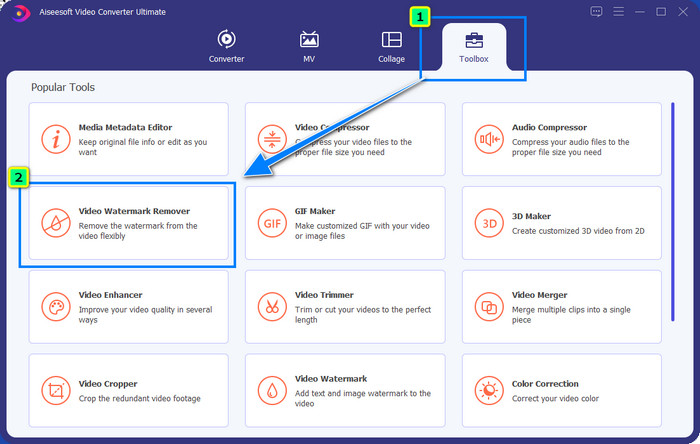
Stap 2. Gebruik vervolgens de Video Watermark Remover; je vindt deze functie onder de Toolbox. Zoals je ziet, kun je meerdere bewerkingsfuncties gebruiken om je beeld aan te passen tot de gewenste vorm.
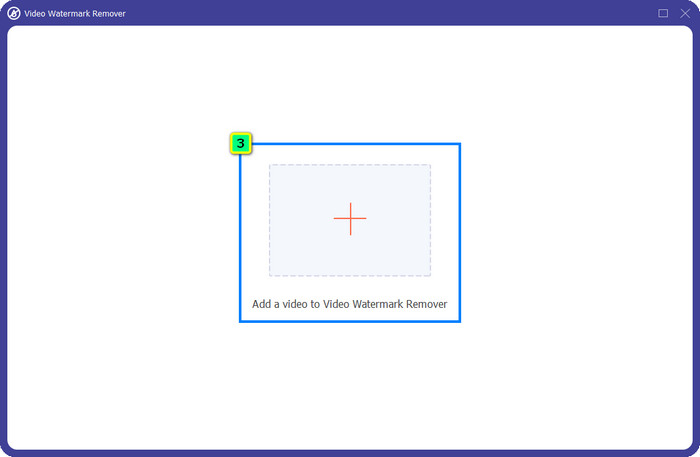
Stap 3. Klik op het plus-icoon en er verschijnt een bestandsbeheerder op je scherm. Kies het videobestand met een watermerk en klik vervolgens op Open om het te uploaden.
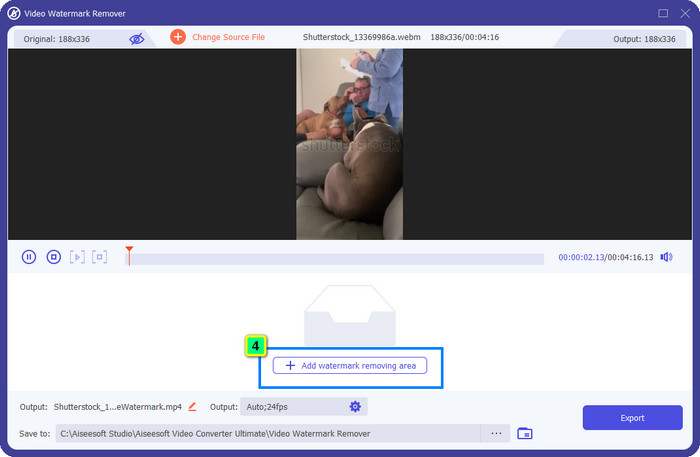
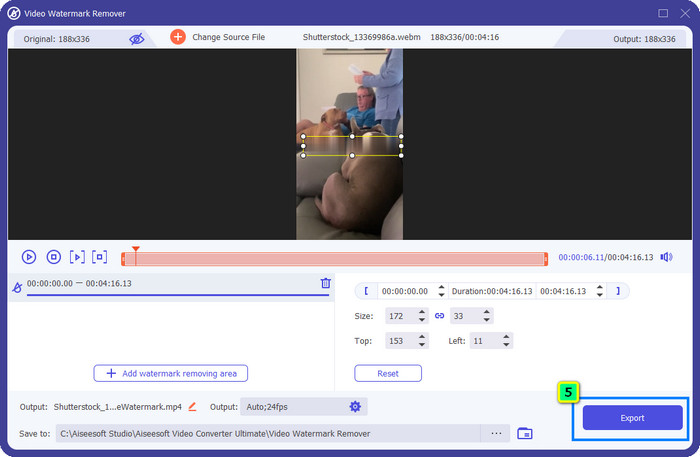
Stap 4. Om het watermerk op de video die je hebt geüpload te wissen, klik je op Add Watermark Removing Area, waarna er een nieuw venster verschijnt.
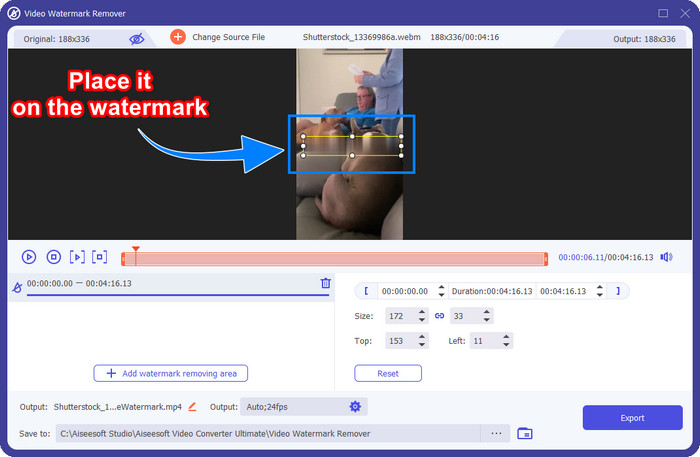
Stap 5. In dit deel verschijnt er een vierkant op je video; plaats dit op het watermerk. Je kunt het formaat wijzigen, slepen, verkleinen of vergroten, zodat het precies over het watermerk past dat je wilt verwijderen.
Stap 6. Klik ten slotte op de knop Export om het uiteindelijke resultaat van de Shutterstock‑video op je apparaat te downloaden. Je kunt er nu van genieten zonder je zorgen te maken over het watermerk, want dat is verwijderd.
Deel 2. Hoe Shutterstock-watermerk gratis online te verwijderen
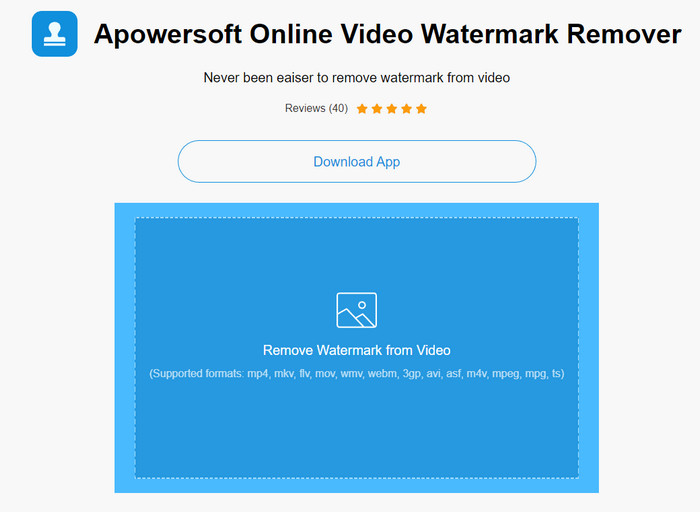
Vind je het geen goed idee om een watermerkverwijderaar op je desktop te downloaden? Dan kun je de Apowersoft Online Watermark Remover gebruiken, en wij leggen je uit hoe je hiermee het Shutterstock‑watermerk online verwijdert. Het is een uitstekende keuze voor iedereen die het watermerk op zijn video of afbeelding wil verwijderen. De reden dat we deze tool toevoegen, is dat de software eenvoudig toegankelijk is en compatibel met verschillende besturingssystemen die je gebruikt.
In tegenstelling tot offline tools, heb je een stabiele en robuuste internetverbinding nodig om ze te gebruiken. Zoals we beloven, vindt u hieronder de tutorial over het gebruik van deze watermerkverwijderaar om het watermerk te verwijderen dat Shutterstock erop achterlaat.
Stap 1. Open de officiële website van Apowersoft Online Watermark Remover via je favoriete zoekmachine en klik vervolgens op de knop + aan de rechterkant om het videobestand te uploaden.
Stap 2. Plaats het selectiekader op het Shutterstock‑watermerk in de video.
Stap 3. Klik daarna op Erase om het watermerk te verwijderen en het resultaat te bekijken.
Stap 4. Druk op Download File om de Shutterstock‑video zonder watermerk op te slaan.
Deel 3. Hoe Shutterstock-watermerk te verwijderen met Photoshop [Betaald]
Veel gebruikers vragen hoe ze het Shutterstock‑watermerk met Photoshop kunnen verwijderen, en wij helpen je daarbij! Adobe Photoshop ondersteunt een professionele functie om watermerken te verwijderen die je graag zult gebruiken. Net als de software die in dit artikel is geïntroduceerd, doet het zijn werk; de aanpak is echter beeld‑voor‑beeld. Dat betekent dat je tijd moet besteden aan het verwijderen van het watermerk per frame van de video; hoe langer de video, hoe meer frames er zijn. Als je wilt weten hoe de tool werkt, lees dan de informatieve stappen hieronder.
Stap 1. Download de applicatie op je desktop en klik vervolgens op File. Klik daaronder op Open om de video die op je computer is opgeslagen te uploaden.
Stap 2. Kies aan de linkerkant de Magic Wand Tool en klik vervolgens op het watermerk dat je wilt verwijderen. Deze functie zal het watermerk in het frame automatisch selecteren.
Stap 3. Ga naar Edit en klik op Content-Aware Fill nadat je het watermerk hebt geselecteerd.
Stap 4. Nadat je Content-Aware Fill hebt geopend, wordt het eerder geselecteerde watermerk automatisch verwijderd; klik daarna op OK.
Verder lezen:
Eenvoudige methoden om het Shootproof‑watermerk te verwijderen
Hoe verwijder je moeiteloos het Bandicam‑watermerk [3 effectieve manieren]
Deel 4. Veelgestelde vragen over het verwijderen van Shutterstock-watermerk
Hoe het Shutterstock-watermerk te verwijderen zonder Photoshop?
U kunt de FVC Video Converter Ultimate gebruiken om de Shutterphoto die aan uw video is gebonden, te verwijderen. Het heeft een krachtige watermerkwisser die je graag zou willen proberen. Volg de stappen die we in dit artikel toevoegen om het net zo effectief te doen als Photoshop.
Werkt het bijsnijden van het Shutterstock-watermerk op video?
Als u het formaat van de video wilt wijzigen door de dimensie te wijzigen, kunt u de video bijsnijden met behulp van meerdere video-editors online en offline. Aangezien het watermerk van Shutterstock zich in het midden bevindt, is het beter om de bijsnijdfuncties niet te gebruiken. Talloze watermerkverwijderaars zijn hier om te helpen; je kunt de tutorial die we toevoegen, lezen en kopiëren, zodat je deze effectief kunt wissen zonder er een vlek op achter te laten.
Is het legaal om het Shutterstock-watermerk te verwijderen?
Het verwijderen van het watermerk van Shutterstock is niet legaal, maar als u het voor niet-commerciële doeleinden wilt gebruiken, kunt u dit doen met behulp van een watermerkverwijderaar. Het is beter om de gewenste foto op Shutterstock te kopen als u deze voor commerciële doeleinden gaat gebruiken; hoewel het u zou kosten, geeft het u in ieder geval wettelijke rechten om het te gebruiken.
Gevolgtrekking
Nu weet je hoe je het Shutterstock‑watermerk verwijdert met de software die in dit artikel is genoemd. Welke software heeft je voorkeur: de betaalde, de gratis online tool of de ultieme software? Wat je ook kiest, je kunt uiteindelijk een Shutterstock‑foto krijgen zonder het productlogo. Maar als je ons vraagt wat wij zouden gebruiken, dan kiezen we zonder twijfel FVC Video Converter Ultimate, omdat die het meest bevredigende resultaat oplevert. Ondanks dat het een ultieme watermerkverwijderaar is, blijft hij eenvoudig te gebruiken. Als je deze software wilt uitproberen, kun je op de downloadknop klikken om de tool op je desktop te installeren.
-
 Ultieme tools om watermerk te verwijderen uit door Renderforest geëxporteerde video's
 Om het watermerk uit Renderforest te verwijderen, heb je een watermerkverwijderaar op je apparaat nodig, alle tools die je kunt gebruiken vind je hier.
-
 Eenvoudige stappen voor het verwijderen van het WOW-schuifregelaarwatermerk [opgelost]
 WOW Slider is een app voor het maken van een fantastische diavoorstelling. Het sluit echter watermerken in op de uitvoer. Lees hieronder hoe u het WOW Slider-watermerk verwijdert.
-
 Hoe zich te ontdoen van het Power Director-watermerk gratis [Compleet]
 Hoe kom je gratis van het Power Director-watermerk af? De beste tools om het watermerk te verwijderen zijn hier, dus leer ze door dit te lezen.
