


 Video Converter Ultimate
 Scherm opnemer
 Videoreparatie
 Beveiligde download
Beste trucs voor het verwijderen van Snapchat-tekst van screenshot
Wil je weten hoe je Snapchat-tekst van een screenshot kunt verwijderen? Dan ben je hier aan het juiste adres. In dit bericht krijg je de eenvoudigste methoden om Snapchat‑tekst uit je foto’s en video’s te verwijderen. Deze methoden zijn makkelijk te volgen, perfect en geschikt voor niet‑professionele gebruikers. Als je geïnteresseerd bent in deze eenvoudige methoden, moet je nu stoppen met wat je aan het doen bent en je concentreren op het lezen van dit informatieve artikel.

Deel 1: Snapchat-tekst en bijschriften van afbeeldingen verwijderen
Het beste wat je kunt doen om Snapchat‑tekst uit een foto te verwijderen, is een watermerkverwijderaar gebruiken. Op die manier kun je allerlei elementen uit je foto’s verwijderen, zoals teksten, logo’s, watermerken, enzovoort. Als je op zoek bent naar een uitstekende en betrouwbare tool, kun je de FVC Free Watermark Remover gebruiken. Deze kan je helpen om Snapchat‑tekst direct online uit afbeeldingen te wissen. Dankzij de gebruiksvriendelijke interface, de gedetailleerde handleiding en de eenvoudige knoppen is deze applicatie makkelijk te begrijpen.
Bovendien ondersteunt FVC Free Watermark Remover veelgebruikte invoer- en uitvoerafbeeldingsbestandsindelingen, zoals PNG, JPG, JPEG, BMP en meer. Bovendien is deze tool beschikbaar op Windows 7,8,10,11 en macOS 10.7 hierboven. Ten slotte belooft deze applicatie de privacy van elke gebruiker te garanderen, zodat u zich geen zorgen hoeft te maken over uw foto's of informatie. Als je een Snapchat-tekst van je foto's wilt verwijderen, volg dan de eenvoudige gids hieronder.
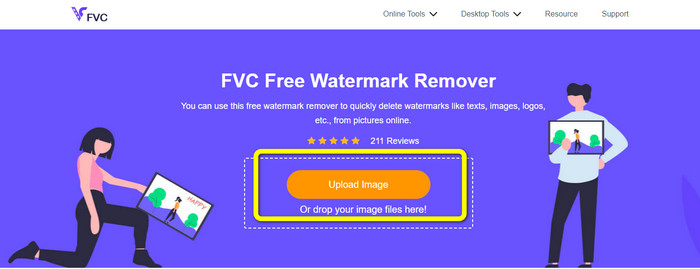
Stap 1: Ga naar de FVC Free Watermark Remover‑website. Klik op de knop Upload Image en voeg je foto toe met de Snapchat‑tekst die je wilt verwijderen.
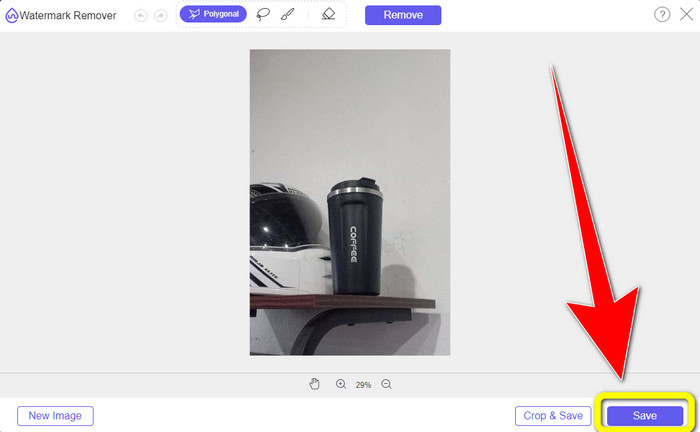
Stap 2: Nadat je je foto hebt toegevoegd, kun je de opties van de watermerkverwijderaar gebruiken: de polygoon‑tool, de lasso‑tool en de penseeltool.
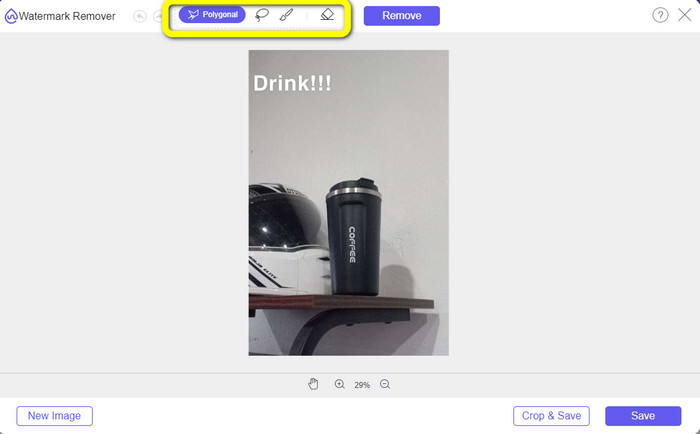
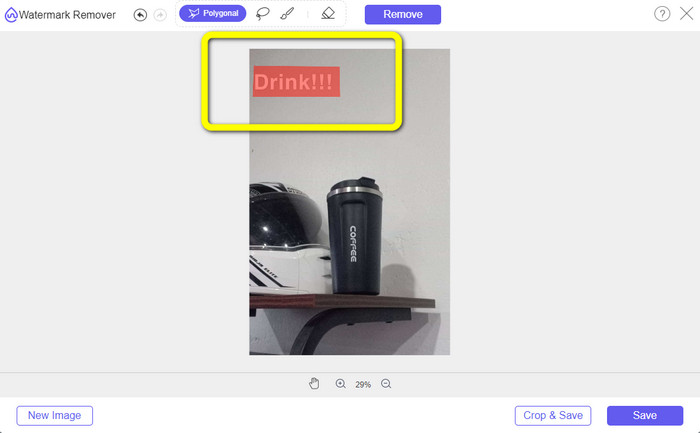
Stap 3: Met deze tools kun je de tekst markeren die je wilt verwijderen.
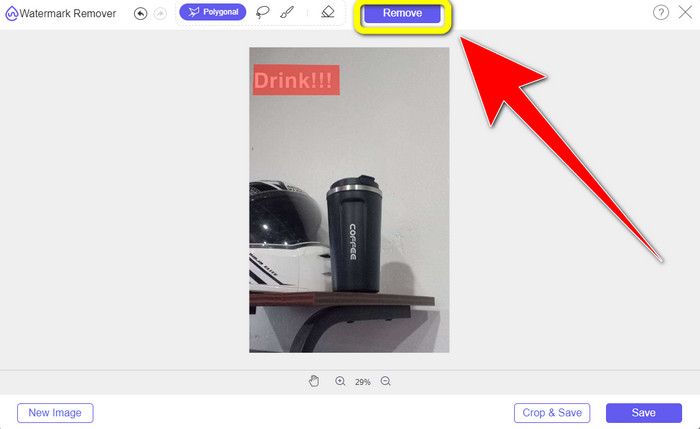
Stap 4: Wanneer je klaar bent met het markeren van de tekst op je foto, kun je op de knop Remove klikken om de tekst uit je foto te verwijderen. Wacht daarna tot het verwijderingsproces is voltooid.
Stap 5: Nadat de tekst uit je foto is verwijderd, kun je op de knop Save klikken om je foto zonder tekst te downloaden.
Deel 2: Snapchat-tekst uit video verwijderen
Nadat je Snapchat‑tekst uit je foto hebt verwijderd, kunnen we je ook helpen om te leren hoe je Snapchat‑tekst uit je video verwijdert. In dit deel is de beste applicatie die je moet gebruiken de Video Converter Ultimate. Deze applicatie kan helpen om ongewenste objecten uit je video’s te verwijderen, zoals tekst, watermerken, logo’s, enzovoort. Je kunt er de tekst op twee eenvoudige manieren mee verwijderen: met de tool Video Watermark Remover en met de videocropper‑tool. Als de Snapchat‑tekst in de hoek of aan de rand van je video staat, kun je de videocropper‑tool gebruiken. En als de tekst in het midden van de video staat, kun je de tool Video Watermark Remover gebruiken.
Bovendien heeft deze applicatie verschillende bewerkingstools waar je van kunt genieten, zoals een videoverbeteraar, videocompressor, videoomkering, het toevoegen en verwijderen van het watermerk, videotrimmer, cropper, rotator, GIF-maker en meer. Het ondersteunt ook tal van videobestandsindelingen, zoals MP4, FLV, MKV, MOV, enz. U kunt deze applicatie ook op uw Mac en Windows gebruiken, wat handig is voor de gebruikers. Als je de Snapchat-tekst op twee eenvoudige manieren uit je video's wilt verwijderen, moet je de eenvoudige stappen hieronder volgen.
De functie voor het verwijderen van videowatermerken gebruiken
Stap 1: Download Video Converter Ultimate op je Windows‑ of Mac‑computer. Start de applicatie na de installatie.
Gratis downloadVoor Windows 7 of nieuwerVeilige download
Gratis downloadVoor MacOS 10.7 of nieuwerVeilige download
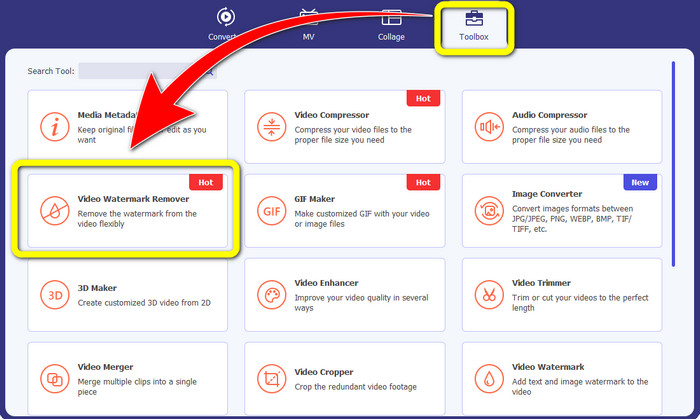
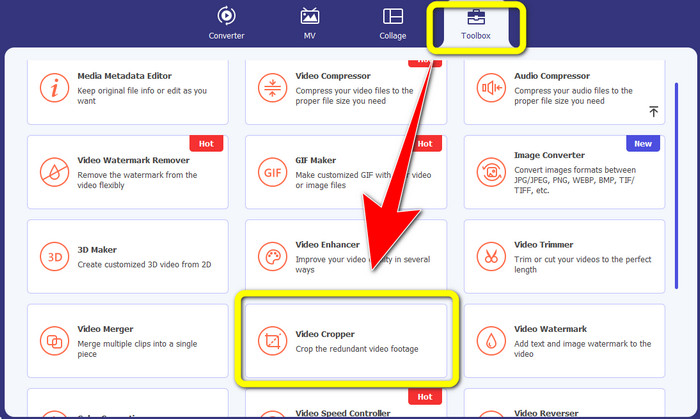
Stap 2: Daarna zie je vier opties in het bovenste deel van de interface. Klik op het paneel Toolbox en selecteer de tool Video Watermark Remover.
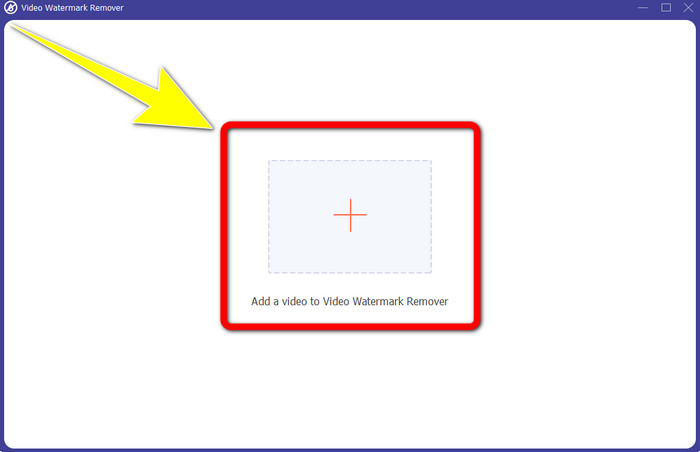
Stap 3: Vervolgens verschijnt er een nieuw venster op je scherm. Klik op het +-icoon en voeg je video met Snapchat‑tekst toe.
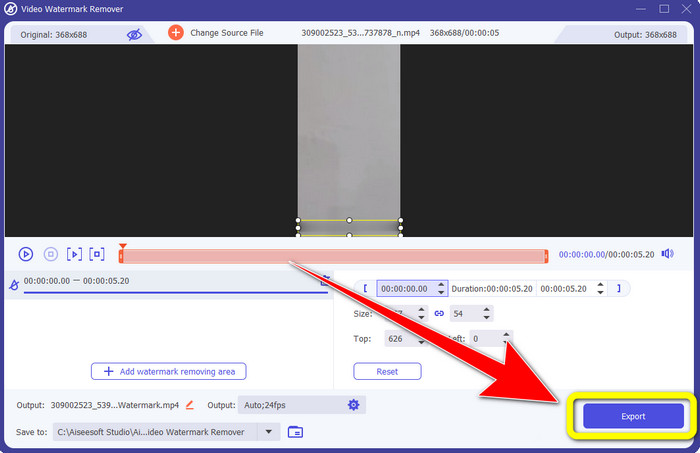
Stap 4: Wanneer je je video hebt toegevoegd, klik je op de functie Add Watermark Removing Area. Er verschijnt een klein vak op je video; sleep dit vervolgens zodat het de Snapchat‑tekst bedekt.
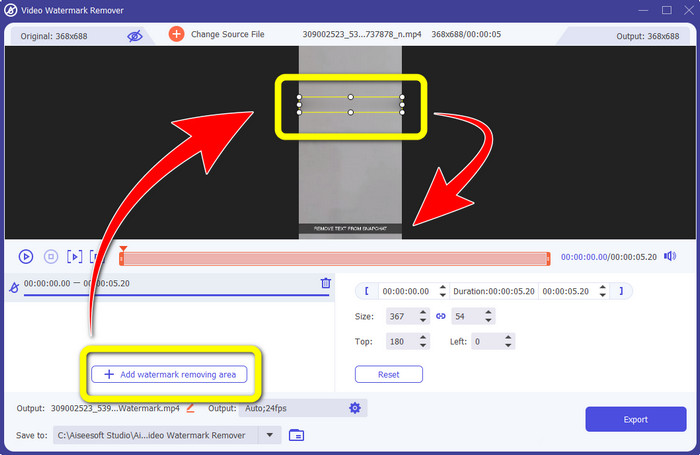
Stap 5: Nadat je het kleine vak over de Snapchat‑tekst hebt gesleept, zie je dat de tekst al verdwenen is. Klik op de knop Export om je video volledig op te slaan.
De functie Video bijsnijden gebruiken
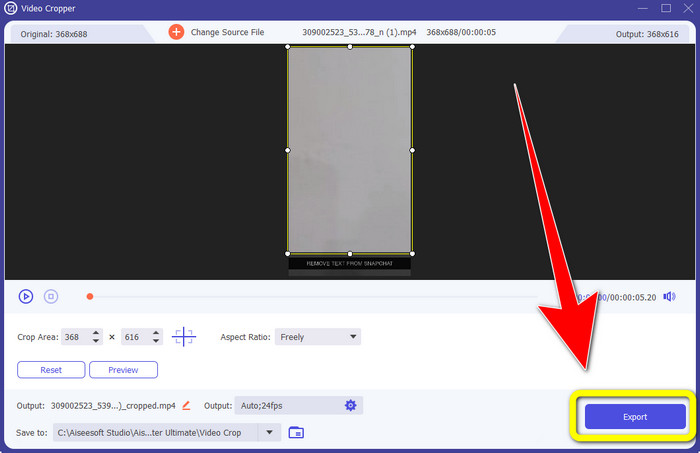
Stap 1: Start Video Converter Ultimate op je computer. Selecteer het paneel Toolbox en ga naar de tool Video Cropper.
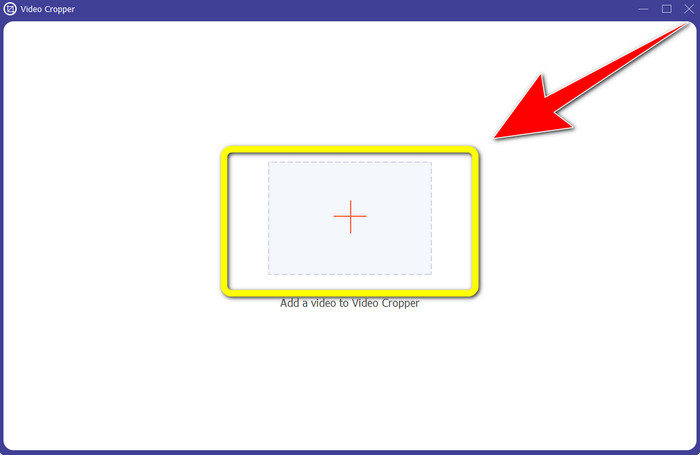
Stap 2: Nadat je op de tool Video Cropper hebt geklikt, verschijnt er een nieuwe interface op je scherm. Klik op de +‑knop om je video met Snapchat‑tekst te importeren die je wilt verwijderen.
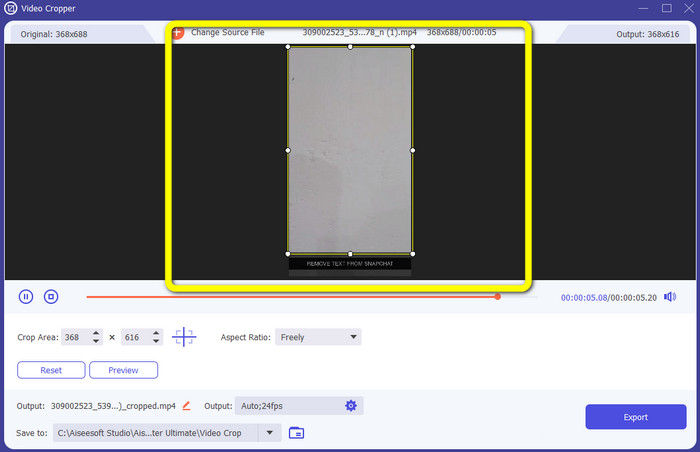
Stap 3: In dit deel kun je je video bijsnijden om de Snapchat‑tekst te verwijderen door met je muis de randlijn te slepen. Je kunt de randen van je video afsnijden.
Stap 4: Voor de laatste stap kun je nu op de knop Export klikken om je video zonder Snapchat‑tekst op te slaan.
Deel 3: Veelgestelde vragen over het verwijderen van Snapchat-tekst uit foto's en video's
Kan ik ook Snapchat-tekst van foto's verwijderen met mijn telefoon?
Ja, dat kan. U kunt veel toepassingen gebruiken met watermerkverwijderaar, zoals PicLab, Photo Retouch-Object Removal, Airbrush en meer.
Kan ik een Snapchat-tekst van mijn foto verwijderen zonder de kwaliteit van mijn afbeelding te verliezen?
Als je de kwaliteit van je foto niet wilt verliezen na het verwijderen van de Snapchat‑tekst, moet je de FVC Free Watermark Remover gebruiken. Na het verwijderingsproces behoud je nog steeds de originele kwaliteit van je afbeeldingen.
Hoe schakel ik Snapchat-bijschriften uit?
Snapchat-onderschriften worden handmatig geüpload door de uitgever, waardoor de onderschriften nauwkeuriger zijn. De spraakballonschakelaar onderaan het scherm kan worden gebruikt om de ondertiteling in of uit te schakelen.
Wat is de beste applicatie met een watermerkverwijderaar die ik voor mijn bureaublad kan gebruiken?
Als je een applicatie zoekt, kun je Video Converter Ultimate gebruiken. Met deze applicatie kun je moeiteloos watermerken uit je video’s verwijderen. Bovendien heeft het veel functies waarvan je kunt genieten.
Wat is het watermerk in de foto of video?
De watermerken zijn de handtekeningen, logo's en teksten die je op de foto of video kunt zien. Het vertelt andere mensen alleen wie de daadwerkelijke eigenaar van de afbeeldingen of video's is. Watermerk is een van de beste manieren om de foto te beveiligen en een productnaam te promoten.
Gevolgtrekking
Zoals je ziet is de beste manier om de Snapchat‑tekst te verwijderen uit je foto’s en video’s het gebruik van een uitstekende applicatie met een watermerkverwijderaar. Dit artikel laat zien hoe je Snapchat‑tekst uit foto’s verwijdert met behulp van de FVC Free Watermark Remover. Ook wordt uitgelegd hoe je Snapchat‑tekst uit video’s verwijdert met Video Converter Ultimate, dat twee opmerkelijke manieren biedt: met een video watermark remover‑tool en een videocropper‑tool.
-
 Logo van video verwijderen met Windows Movie Maker
 Als je meer wilt weten over het verwijderen van logo's uit video's met Windows Movie Maker en andere alternatieve manieren, lees dan dit artikel. We hebben gemakkelijke manieren voor u.
-
 Hoe u het VideoScribe-logo moeiteloos van video kunt verwijderen
 U hoeft zich geen zorgen meer te maken over het verwijderen van het VideoScribe-logo uit uw video's. Dit artikel geeft probleemloze methoden. Lees dit bericht voor meer informatie
-
 Snelste manier om logo van video te verwijderen in Adobe Premiere Pro
 Probeer deze eenvoudige en snelste manieren om logo's uit een video te verwijderen in Adobe Premiere Pro. Dit artikel biedt u de beste manieren om uw apparaat te gebruiken.
