


 Video Converter Ultimate
 Scherm opnemer
 Videoreparatie
 Beveiligde download
Hoe het watermerk effectief uit de Origin-grafiek op de grafiek te verwijderen
Misschien moet je Origin Graph gebruiken om een sjabloon te maken voor wiskundige of wetenschappelijke gegevens die te ingewikkeld zijn om in woorden uit te drukken. Deze software heeft al studenten, onderzoekers, professoren, zakenmensen en anderen geholpen die hun eigen grafiek moeten maken. Met de reeks sjablonen waaruit je kunt kiezen, kun je een aantrekkelijke grafiek maken die de aandacht van de kijkers trekt. Het probleem waar je waarschijnlijk tegenaan loopt als je de gratis versie gebruikt, is dat er een tekstwatermerk wordt toegevoegd aan het eindresultaat. Heb je moeite met het verwijderen van het watermerk? Geen paniek! Wij helpen je verder. Hier geven we handige tips voor het verwijderen van het watermerk uit Origin Graph, zodat je het vervolgens in je Word- of PowerPoint-presentatie kunt gebruiken.

Deel 1. Watermerk verwijderen uit Origin Graph met de Online Image Watermark Remover
FVC Free Watermark Remover Online is een eersteklas tool voor het verwijderen van tekstwatermerken, waarmee je het Origin Graph-watermerk kunt weghalen. Deze tool is uiterst efficiënt in het verwijderen van elk object op je afbeeldingen, zodat ze er nog professioneler uitzien zodra je het watermerk hebt verwijderd. Hiermee kunnen we je verzekeren dat het een gespecialiseerde watermerkverwijderaar is waarop je kunt vertrouwen wanneer je met dit probleem te maken krijgt. Vraag je je af of deze tool eenvoudig te gebruiken is? Geen paniek! Hieronder vind je de stappen die je kunt volgen om het tekstwatermerk op de afbeelding dat Origin Graph toevoegt, te verwijderen.
Stap 1. Klik op deze link om de online watermerkverwijderaar voor afbeeldingen te openen; er wordt direct een nieuw tabblad geopend waarin je toegang hebt tot de tool.
Stap 2. Druk op Upload Image om de foto met een watermerk toe te voegen, zoek het fotobestand in de map en klik op Open om het met succes te uploaden.
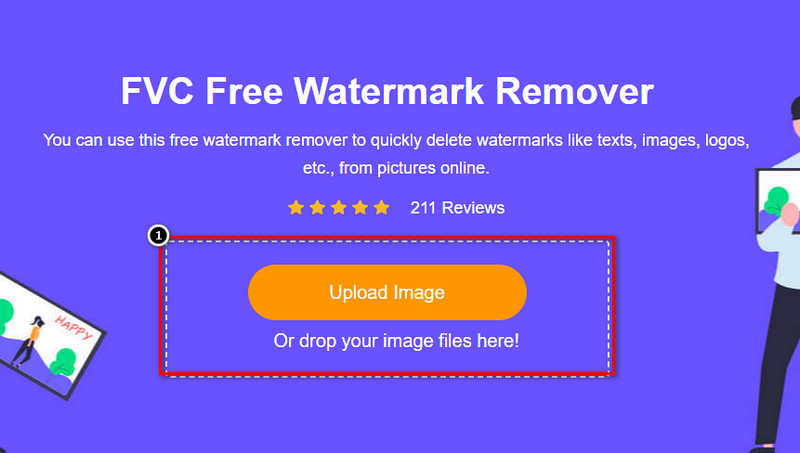
Stap 3. Je kunt drie tools gebruiken om het watermerk te markeren; hoewel ze anders werken, is hun effectiviteit gelijk. Kies één tool en markeer vervolgens het gedeelte van de afbeelding waar het watermerk op staat.
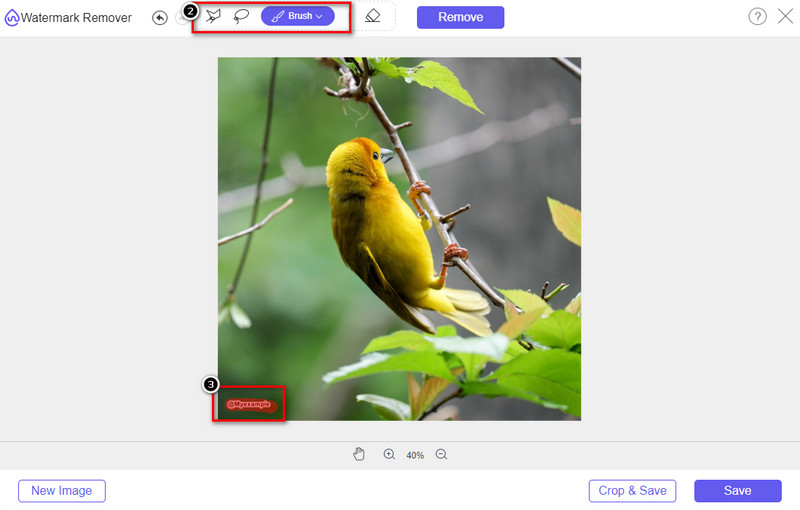
Stap 4. Zorg ervoor dat je op het pictogram Remove klikt nadat je het watermerk met de tool hebt gemarkeerd. Deze stap is essentieel, zodat de afbeelding geen watermerk meer heeft wanneer je deze exporteert.
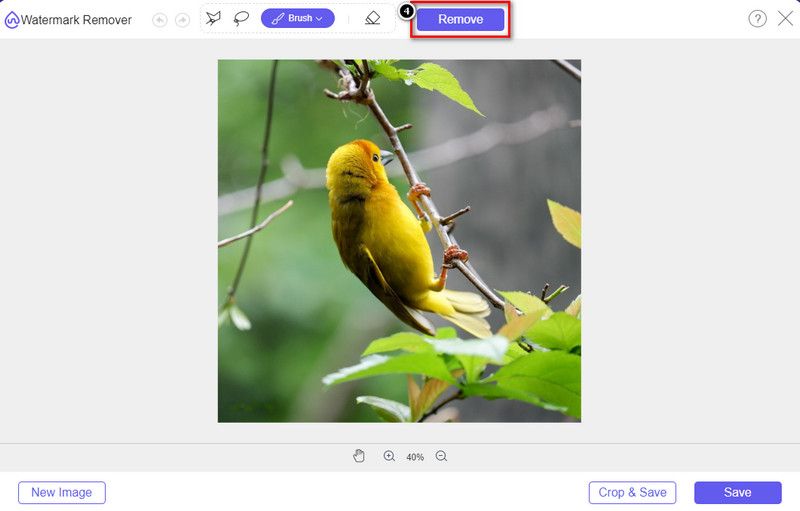
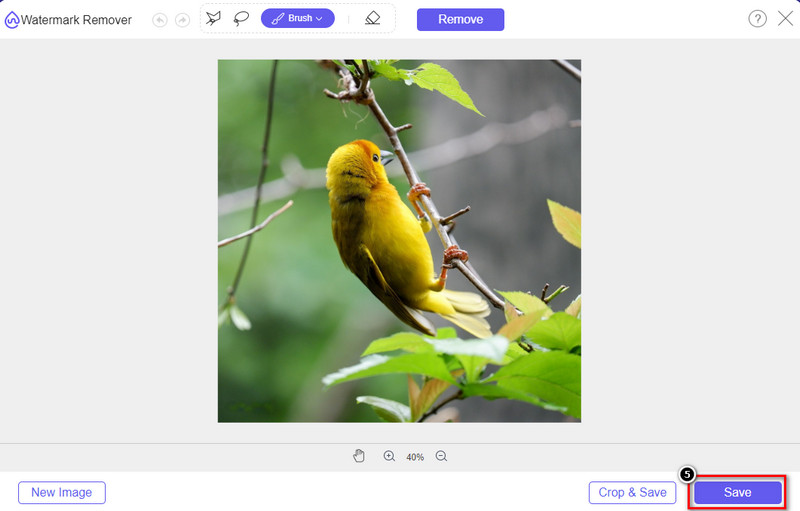
Stap 5. Klik op de knop Save om het exportproces te starten. Wacht tot het proces is voltooid en je kunt de afbeelding vervolgens bekijken zonder dat het watermerk van Origin Graph nog zichtbaar is.
Voordelen
- Een gratis webgebaseerde afbeeldingswatermerkverwijderaar waartoe u toegang hebt.
- Het werkt efficiënt bij het verwijderen van het watermerk met ondersteuning voor AI-technologie.
- Het ondersteunt een breed scala aan afbeeldingsindelingen die u mogelijk op uw lokale schijf hebt staan.
- Er wordt geen watermerk toegevoegd aan geëxporteerde afbeeldingen.
Nadelen
- Internetverbinding nodig om te functioneren.
- De focus ligt op het verwijderen van het watermerk en niets anders.
Deel 2. Grafieken kopiëren van Origin naar Word of PowerPoint zonder het watermerk
In dit deel van het artikel geven we je de procedure die je moet kennen om de grafiek toe te voegen die je op Origin Graph hebt gemaakt zonder het watermerk. Volg het dienovereenkomstig om de grafiek met succes toe te voegen die u maakt op Microsoft Word en PowerPoint zonder watermerk.
U moet minimaal 1,9 GB vrijmaken vanwege de enorme bestandsgrootte. In het bestand van 1,9 GB kun je de hulp vinden die je nodig hebt, maar als je geen hulp wilt, kun je de versie van 652 MB downloaden via .zip of .exe.
Stappen voor het maken van een grafiek op Origin Graph zonder het watermerk:
Stap 1. Download eerst Origin Graph op je besturingssysteem via de officiële website. Open de tool om te beginnen met het maken van de gewenste grafiek.
Stap 2. Voeg na het starten van de software de waarden van de tabel toe die je nodig hebt. Je kunt hier meer variabelen en dat aantal grafieken toevoegen.
Extra: Je kunt op Plot klikken om andere grafieken te bekijken die je kunt gebruiken, zoals Basic 2D, Bar, Statistical en meer.
Stap 3. Klik op File en druk vervolgens op Save om de grafiek die je hier hebt gemaakt te exporteren.
Stap 4. Je kunt de stappen volgen die we in deel 1 hebben gegeven en de tutorial volgen over het verwijderen van het watermerk uit Origin Graph met behulp van FVC Free Watermark Remover Online.
Hoe de grafiek op Word te gebruiken zonder watermerk:
Stap 1. Open de Word-app op je desktop en klik op Leeg document. Als je al Word-documenten hebt gemaakt, open dan dat bestand.
Stap 2. Ga naar het gedeelte Insert en klik vervolgens op Pictures. Zoek het grafiekbestand op je lokale schijf, klik er eenmaal op en druk op Open om het in Word te uploaden.
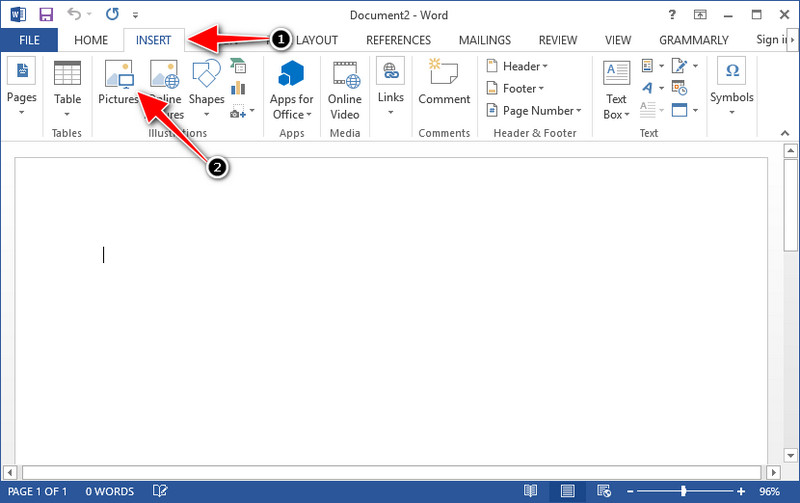
Stap 3. Het wordt automatisch geladen in het Word-document dat je hebt geopend of gemaakt; je kunt de grafiek nu plaatsen door deze in Word vast te houden en te verslepen.
Hoe de grafiek op Powerpoint te gebruiken zonder watermerk:
Stap 1. Start PowerPoint op je computer en klik op Lege presentatie. Je kunt ook aan de linkerkant de recente presentaties bekijken die je hebt gemaakt. Als daar het bestand staat waaraan je de grafiek wilt toevoegen, klik je erop om het te openen.
Stap 2. Druk op Insert en klik op Picture om de grafiekafbeelding in te voegen die je in Origin Graph hebt gemaakt.
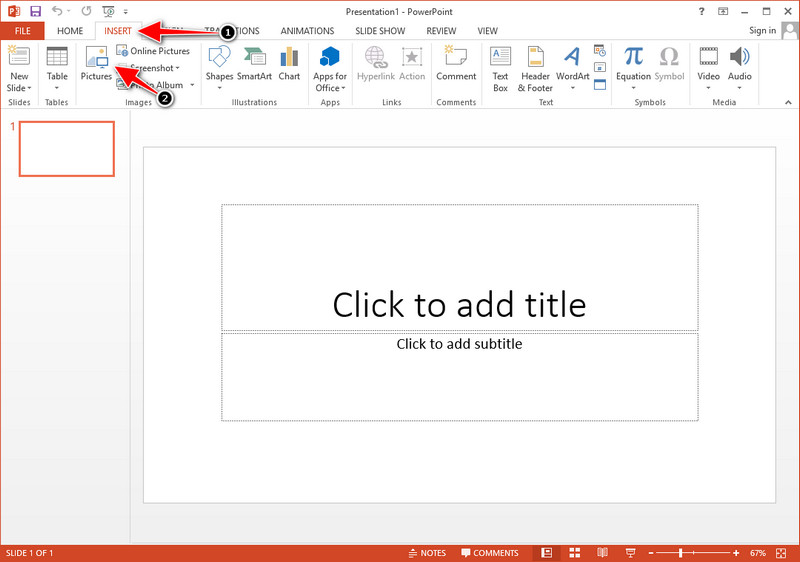
Stap 3. Pas de grafiekafbeelding aan en plaats deze op de dia.
Verder lezen:
Hoe verwijder je het B612-watermerk uit je afbeeldingen
Hoe verwijder je gratis het WOW Slider-watermerk
Deel 3. Veelgestelde vragen over het verwijderen van watermerk uit Origin Graph
Hoeveel kost de Origin Pro?
Voor de individuele gebruikers kun je vanaf $435 de premiumversie van Origin Graph krijgen. Je kunt de officiële winkel op Origin Lab bezoeken.
Waar kan ik de Origin Graph officieel downloaden?
Bezoek het Origin Lab om de Origin Graph te downloaden. Voordat u de software op uw desktop kunt downloaden, worden er vragen gesteld. Daarna zijn er twee opties om het bestand te downloaden, of je het nu met hulp wilt downloaden of niet, in de vorm van .exe of zip.
Zijn Excel en Origin hetzelfde?
Excel en Origin hebben een spreadsheetachtige GUI voor het ordenen van de gegevens, het berekenen en het definiëren van labels. Excel richt zich echter op het bevatten van veel kolommen en rijen die u kunt gebruiken. Maar met Origin is het voor het rangschikken van attributen die een kolomformule gebruiken in plaats van een celformule zoals wat Excel ondersteunt.
Gevolgtrekking
Nu je hebt geleerd hoe je het watermerk uit Origin Graph kunt verwijderen, is het jouw tijd om de grafiek die je hebt gemaakt te gebruiken en deze professioneel te presenteren. Als het uw doel is om het in Word of Powerpoint te gebruiken, kunt u deel 2 lezen om te leren hoe u dit moet doen. Het verwijderen van het watermerk met deze tool is verreweg het meest gewild bij iedereen die het watermerk op afbeeldingen wil verwijderen. Het probleem is opgelost met deze tool. Als dit artikel je heeft geholpen, laat dan hieronder een 5-sterren achter.
-
 Watermerk verwijderen met Pixlr in gedetailleerde stappen [Effectief]
 Wil je weten hoe je een watermerk verwijdert met Pixlr? Als dat zo is, lees dan hieronder verder om te weten hoe u dit moet doen en welke alternatieven u kunt gebruiken.
-
 Verwijder Animotica-watermerk op geëxporteerde video's met 3 bewezen manieren
 Heb je je ooit afgevraagd of het mogelijk is om het Animotica-watermerk te verwijderen op video's die je hebt geëxporteerd? Dit artikel geeft een how-to-do.
-
 Gratis manieren om het VideoShop-watermerk op video's te verwijderen [moeiteloos]
 Om het VideoShop-watermerk te verwijderen, heeft uw apparaat een watermerkverwijderaar nodig. Om te weten wat dit zijn, lees dit artikel.
