


 Video Converter Ultimate
 Scherm opnemer
 Videoreparatie
 Beveiligde download
Snelste en gemakkelijkste manieren om video in te korten met de beste tools
Het inkorten of inkorten van een video is belangrijk omdat alleen de noodzakelijke clips uit uw video worden gemarkeerd. Bij het trimmen van een video wordt het begin van het einde van een videoclip verwijderd. Dit fundamentele element van het bewerken is nodig, zodat u de aandacht van uw publiek niet verliest. Dus als je je lange video wilt inkorten of inkorten, leer je in dit artikel hoe je een video kunt inkorten.

Deel 1. 2 Methoden om een video op een trimmer in te korten met de beste app
FVC Video Converter Ultimate is het beste desktopprogramma om je video te trimmen. Deze tool heeft een intuïtieve software‑interface en is gratis te gebruiken. Met deze offline converter kun je segmenten aan je videobestand toevoegen. Daarnaast heeft het een functie waarmee je je video snel kunt splitsen in verschillende gewenste delen. En als je op zoek bent naar een tool die meerdere bestandsindelingen kan samenvoegen tot één bestand, dan kan deze applicatie dat voor je doen.
Bovendien biedt deze tool veel geavanceerde functies, zoals een GIF‑maker, videocombineerder, watermerkverwijderaar voor video, enzovoort. En wat het nog beter maakt, is dat het talloze bestandsformaten ondersteunt, waaronder MP4, WMV, FLV, AVI, MPG, WebM, MKV en meer dan 1000 andere formaten. Dus als je deze app wilt gebruiken om je video in te korten, hebben we twee methoden die je kunt volgen.
Methode 1. Gebruik de videotrimmer van FVC
Stap 1. Download eerst FVC Video Converter Ultimate door op de knop Downloaden hieronder te klikken. Volg het installatieproces en start vervolgens de app.
Gratis downloadVoor Windows 7 of nieuwerVeilige download
Gratis downloadVoor MacOS 10.7 of nieuwerVeilige download
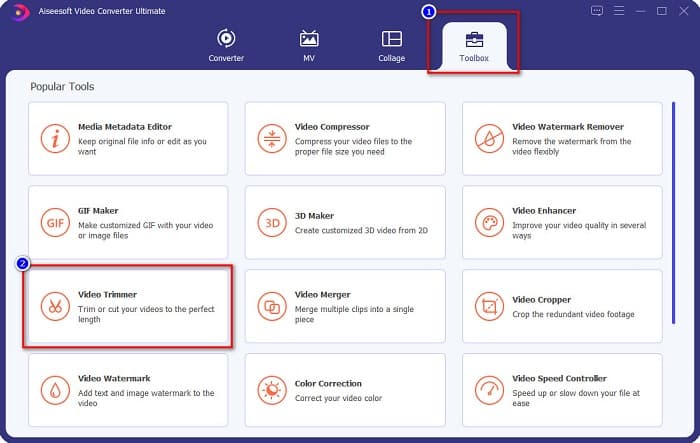
Stap 2. Selecteer daarna het paneel Toolbox dat zich boven de software‑interface bevindt. Klik vervolgens in het toolbox‑paneel op Video Trimmer.
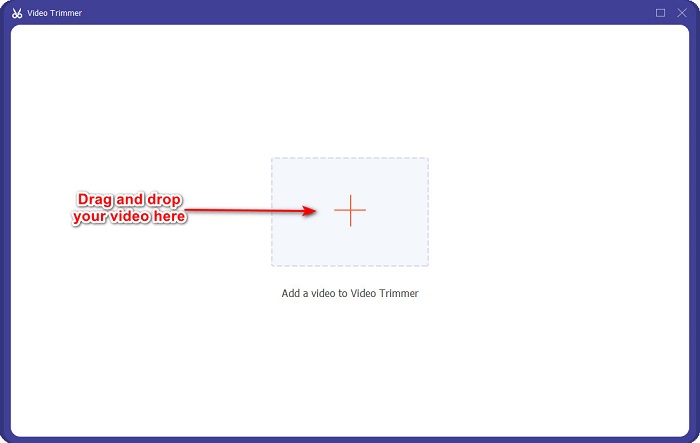
Stap 3. Klik vervolgens in de volgende interface op de knop met het +-teken of sleep en zet neer je video op het +‑teken.
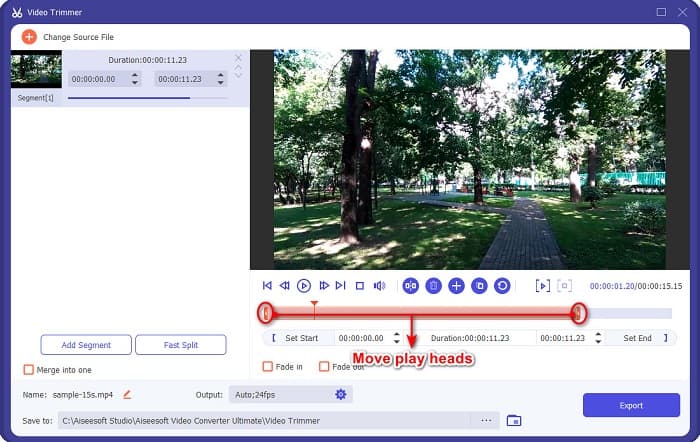
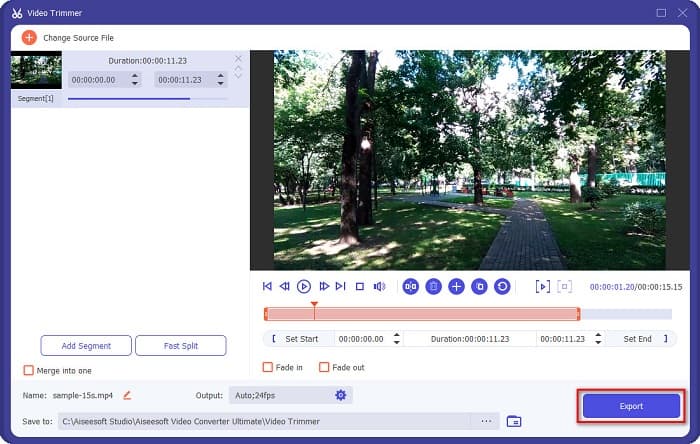
Stap 4. Verplaats vervolgens de playhead‑knoppen naar de gewenste lengte. De pijl geeft de positie van de preview van je video aan. En de playheads geven de lengte van je video aan. Je kunt de tijdelijke wijzigingen in je video in de preview bekijken.
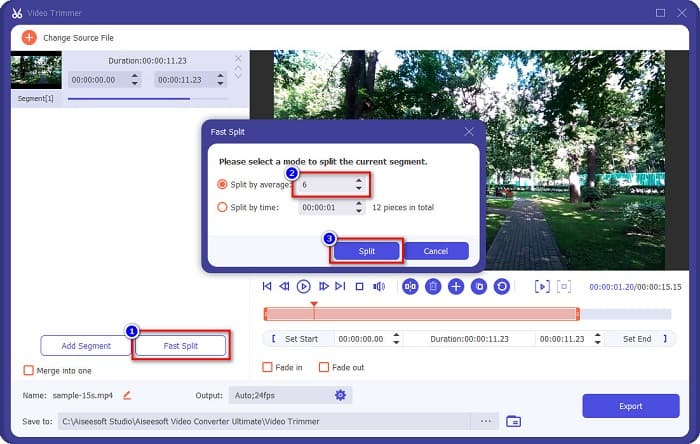
Optioneel. Als je een eenvoudigere manier wilt om je video in segmenten te splitsen:
1. Klik op de knop Fast Split.
2. Selecteer het aantal segmenten dat je in je video wilt hebben en druk vervolgens op Split.
3. Als u uw video niet wilt splitsen, gaat u verder met de volgende stap.
Stap 5. Klik ten slotte op de knop Exporteren om de wijzigingen op je video toe te passen. Je uitvoer wordt dan automatisch in de bestanden op je computer opgeslagen.
Methode 2. Gebruik de videosnelheidswisselaar van FVC
FVC Video Converter Ultimate heeft ook een functie waarmee u de snelheid van uw video kunt wijzigen met snelheden van 0,125x, 0,25x, 0,5x, 0,75x, 1,25x, 1,5x, 2x, 4x en 8x. En als u de lengte van uw video wilt inkorten, stelt u uw video in op een hoge snelheid. Volg de onderstaande gids voor meer gedetailleerde stappen.
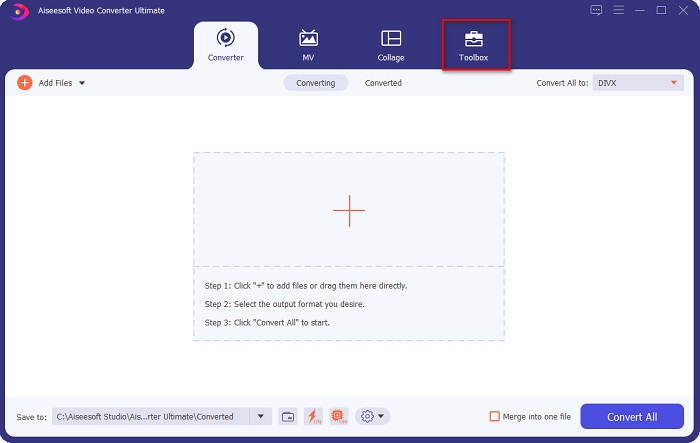
Stap 1. Open FVC Video Converter Ultimate. En klik in de hoofdinterface van de software op de optie Toolbox.
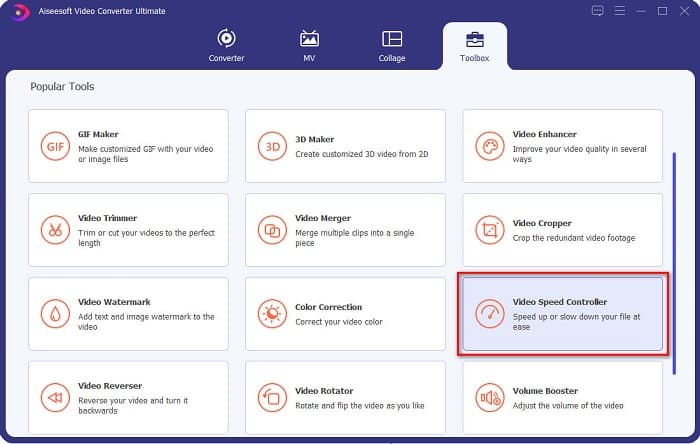
Stap 2. Klik vervolgens op Video Speed Controller en ga door naar de volgende stap.
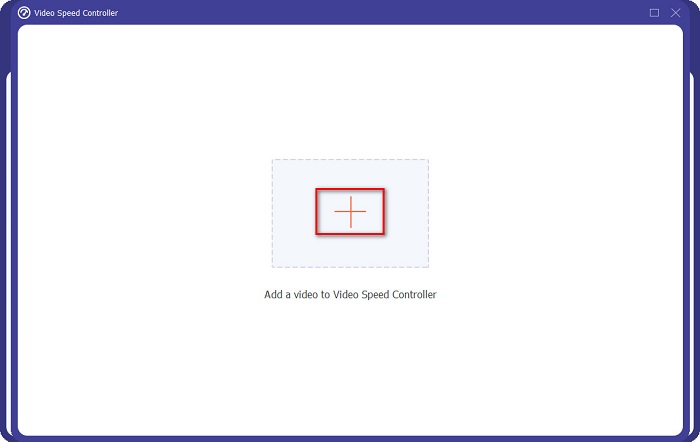
Stap 3. Klik daarna op de knop met het +-teken om de video te uploaden die je wilt trimmen. Je computermappen verschijnen, waar je de video selecteert en uploadt naar de interface van de software.
Stap 4. Om je video te verkorten, kies je een snelheid tussen 1,25x en 8x snelheid.
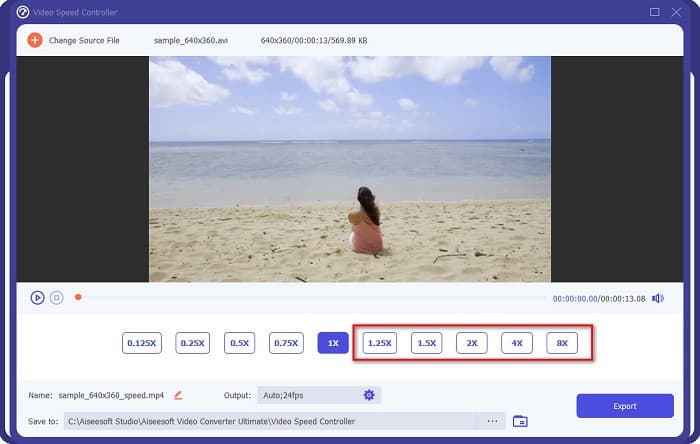
Stap 5. Klik voor de laatste stap op de knop Exporteren om de wijzigingen in je video op te slaan. Je uitvoer wordt vervolgens automatisch in de bestanden op je computer opgeslagen.
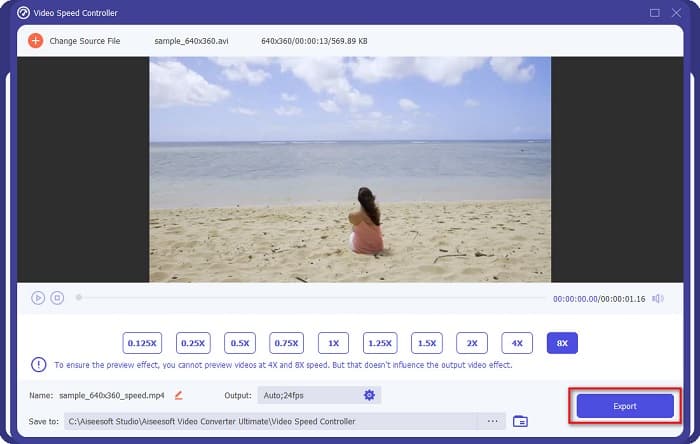
Selecteer de 8x snelheid voor een kortere videolengte.
Voordelen
- Het ondersteunt tal van bestandsformaten, waaronder MOV, MKV, AVI, MP4, WMV, WMA, MPEG en 1000+ formaten.
- Het heeft een gebruiksvriendelijke software-interface.
- Hiermee kunt u uw video snel splitsen met slechts een paar klikken.
- Downloadbaar op alle crossmedia-platforms, zoals Windows, Mac en Linux.
Nadelen
- Koop eerst de app voordat u toegang krijgt tot de andere functies.
Deel 2. 2 Online Video Trimmer om te proberen
Als je je video wilt inkorten zonder iets te downloaden, zijn er online videotrimmers die je kunt gebruiken. We hebben de beste online videotrimmers vermeld die veel mensen in dit deel gebruiken.
Video bijsnijden
Trim Video is een online videotrimtool die eenvoudig te gebruiken is dankzij de intuïtieve gebruikersinterface. Het is een handig hulpmiddel omdat het, in tegenstelling tot sommige andere online tools, geen installatie vereist. Daarnaast heeft het een functie waarmee je je video 90, 180 of 270 graden kunt roteren. Bovendien hoef je je geen zorgen te maken over de beveiliging van je gegevens, want deze tool is privacy‑beschermd. Omdat het echter een webgebaseerde applicatie is, bevat het advertenties die je kunnen afleiden.
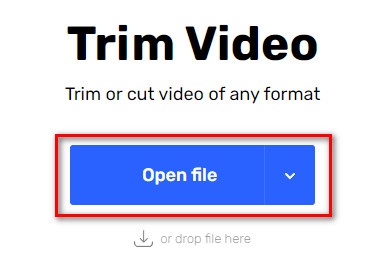
Stap 1. Zoek in je browser naar online video trimmer. Klik vervolgens op de site Trim Video. Klik in de hoofdinterface van de software op de knop Open File.
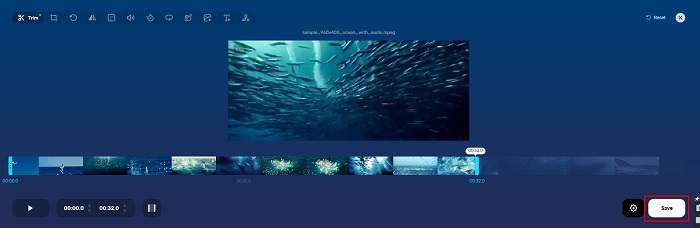
Stap 2. Stel daarna de playhead-knoppen in op de gewenste lengte.
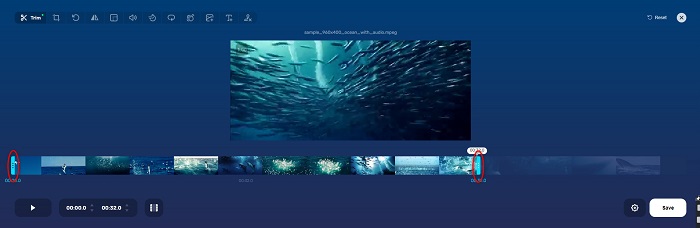
Stap 3. Klik op de knop Save om de lengte van je video aan te passen.
Voordelen
- Het heeft een gebruiksvriendelijke GUI.
- Het heeft functies om je video bij te snijden en te draaien.
- Het is veilig in gebruik.
Nadelen
- Het bevat vervelende advertenties.
- Het heeft een langzaam laad- en uploadproces.
Clideo
Een andere online videotrimtool is Clideo. Deze online tool heeft een eenvoudige gebruikersinterface, waardoor het een gebruiksvriendelijke tool is. Het ondersteunt ook de meeste standaardbestandsformaten, zoals AVI, MP4, VOB, MPG, MOV, enzovoort. Bovendien hanteert deze tool een hoog beveiligingsniveau, wat betekent dat je gegevens veilig zijn en niet door anderen kunnen worden bekeken. Daarnaast bevat Clideo geen advertenties die je kunnen afleiden.
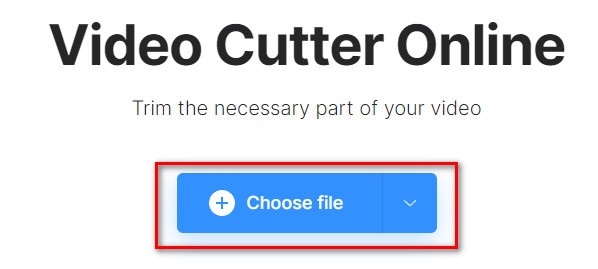
Stap 1. Zoek in de browser die je gebruikt naar Clideo video trimmer. Klik in de eerste interface van de software op de knop Choose File. Je computermappen verschijnen, waar je de video selecteert die je wilt inkorten.
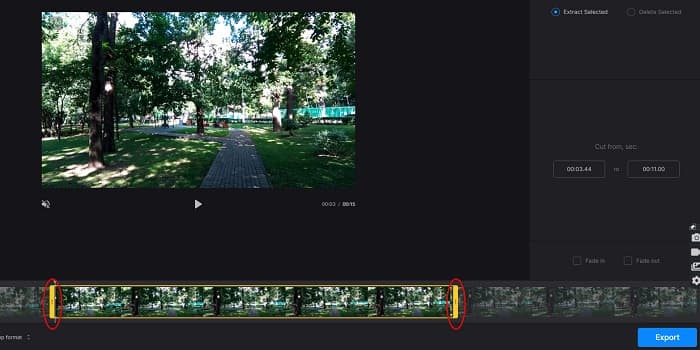
Stap 2. Verplaats de playhead-knoppen naar de lengte die je voor je video wilt hebben.
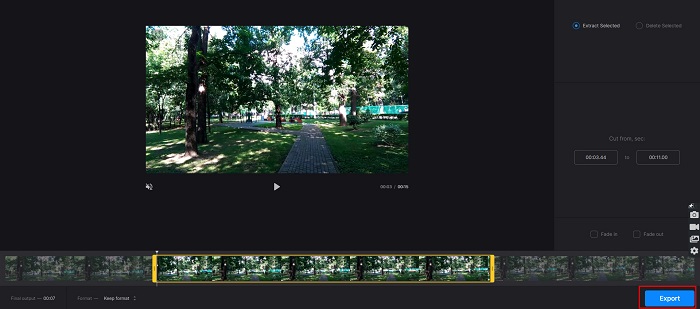
Stap 3. Klik voor de laatste stap op de knop Export om de lengte van je video aan te passen.
Voordelen
- Het heeft een gebruiksvriendelijke interface.
- Het is veilig in gebruik.
- Het bevat geen advertenties.
Nadelen
- U kunt een traag proces ervaren wanneer uw internetverbinding traag is.
Deel 3. Veelgestelde vragen over het inkorten van video
Hoe video in te korten op de iPhone?
Open eerst de Foto-app en selecteer de video die je wilt bijsnijden. Tik vervolgens op Bewerken. Verplaats daarna de schuifregelaars naar de gewenste videolengte en tik op Gereed om de wijzigingen van uw video op te slaan.
Heeft het trimmen van je video invloed op de kwaliteit?
Nee. De meeste trimhulpmiddelen hebben geen invloed op de kwaliteit van je video. Maar als u zeker bent van een tool die de kwaliteit niet beïnvloedt wanneer u uw video inkort, gebruik dan FVC Video Converter Ultimate.
Heeft het inkorten van je video invloed op de bestandsgrootte?
Ja. Hoe korter je video, hoe kleiner de bestandsgrootte. Als uw video daarentegen lang is, bevat deze een enorme bestandsgrootte.
Gevolgtrekking
Dat is alles over hoe je een video kunt inkorten met een trimmer en een snelheidsregelaar voor video. Alle genoemde tools leveren uitstekende resultaten en verzekeren je van optimale prestaties. Maar als je op zoek bent naar de beste tool met veel functies en die bovendien zeer populair is voor het inkorten van video’s, dan is FVC Video Converter Ultimate de beste tool voor jou.
-
 Nummers online knippen en samenvoegen - 4 beste manieren die u moet weten
 Als je online nummers wilt knippen en samenvoegen om een muziekstuk te maken, kun je meer te weten komen over de 4 beste online tools om de nummers te knippen en bestanden uit het artikel te combineren.
-
 Ontdek de beste MP4-trimmer met procedure en informatie
 Wil je leren hoe je video's kunt knippen zoals de vloggers die je bekijkt? Lees dan dit bericht verder om te weten welke MP4-trimmers je kunt gebruiken.
-
 5 MP3-snijders om elke audio gemakkelijk te knippen [2022 bijgewerkt]
 Heb je een MP3-snijder nodig om de audio bij te snijden? Lees in dat geval dit artikel, want we bieden de tools waarop u kunt vertrouwen en die de audio gemakkelijk knippen.
