


 Video Converter Ultimate
 Scherm opnemer
 Videoreparatie
In gedetailleerde recensies over de top 5 toegankelijke apps voor geluidsversterkers
Alle mensen in het hele universum houden van muziek, of het nu pop, metal, rock, jazz enzovoort is. Maar niet alle luidsprekers leveren zo’n goed geluid dat je er kippenvel van krijgt. Bovendien kost het kopen van versterkers al snel meer dan honderd dollar, of zelfs meer dan duizend. Dat is toch duur, niet? Maar we kunnen voorkomen dat we veel geld uitgeven als we deze beste versterkers gebruiken die op alle platforms beschikbaar zijn. En nu, als je een geluidsversterker-app wilt gebruiken, lees dan de onderstaande lijst met opties die je minder kosten dan het hierboven genoemde bedrag en toch een geweldige versterking bieden.

Deel 1. Fenomenale geluidsversterker beschikbaar op pc en Mac
Als je een 8D- of 16D‑effect wilt bereiken zonder veel geld uit te geven aan geluidsversterker‑apparatuur, probeer dan de Video Converter Ultimate. In tegenstelling tot aparte versterkerapparatuur besteed je met deze tool minder geld en hoef je niets op te bouwen of een dik handboek te lezen om te weten hoe je hem gebruikt. Bovendien is deze desktopsoftware uitstekend in het verbeteren van je video, audio, GIF’s en meer. Hoewel de tool betaald is, is hij toch heel prettig te gebruiken zonder complicaties, en biedt hij geavanceerde functies die je eenvoudig op je video en audio kunt toepassen. Dus als je nu wilt weten hoe je de software gebruikt, is het een must om de onderstaande stappen te volgen.
Stappen voor het gebruik van de volumebooster van Video Converter Ultimate:
Stap 1. Download eerst de software op de schijf van je pc of Mac. Installeer hem vervolgens op je computer en doorloop handmatig de eenvoudige set‑up.
Gratis downloadVoor Windows 7 of nieuwerVeilige download
Gratis downloadVoor MacOS 10.7 of nieuwerVeilige download
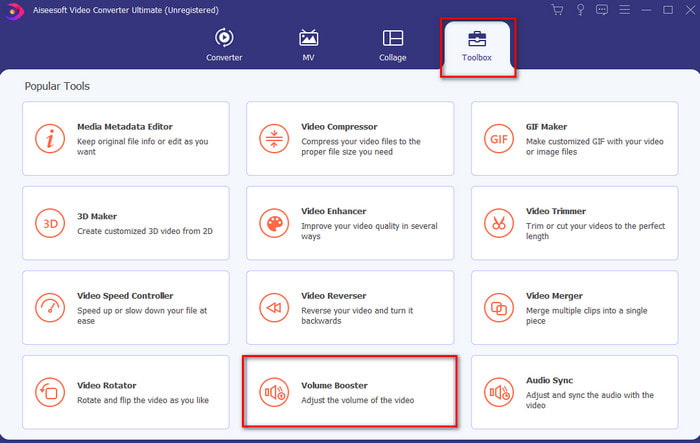
Stap 2. Klik onder de sectie Toolbox op Volume Booster.
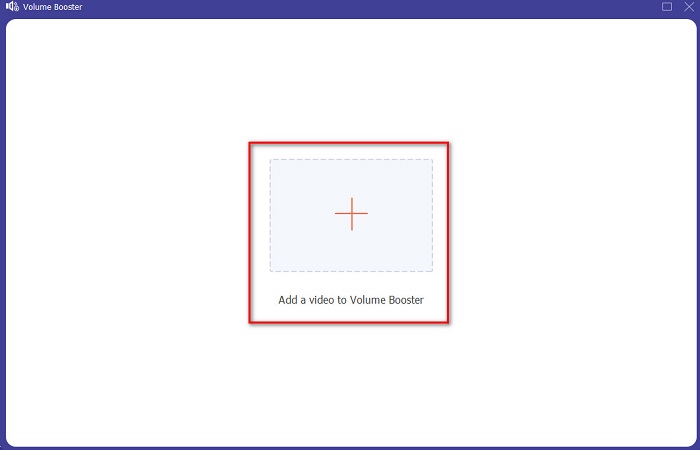
Stap 3. Klik op de knop + om het bestand te kiezen waarvan je het geluid wilt versterken. Druk daarna op Open om verder te gaan.
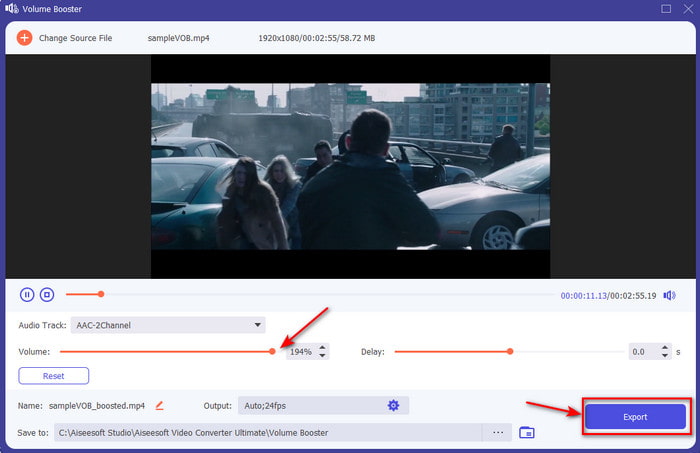
Stap 4. In de interface kun je nu de volumeschuifregelaar verslepen om het geluid hard en duidelijk te maken. Als de aanpassing van het geluid klaar is, klik je op Export.
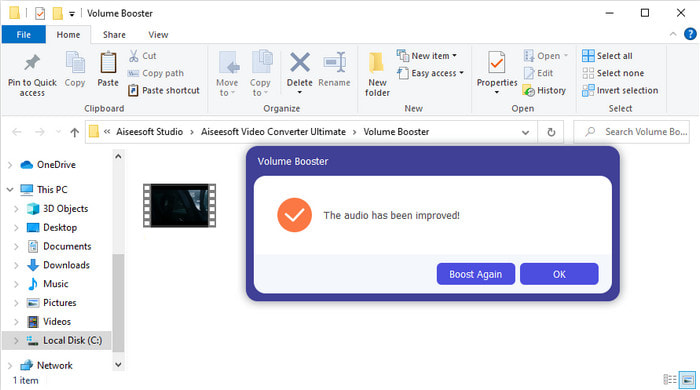
Stap 5. Wacht enkele seconden tot het proces is voltooid. Als het klaar is, verschijnt er een bestandsbeheerder op je scherm met het bestand dat je hebt versterkt; klik op het bestand om ernaar te luisteren.
Voordelen
- Deze software is gemakkelijk te gebruiken en kan uw audio fenomenaal laten klinken.
- De prestaties van de software worden door haar klanten enorm gewaardeerd.
- Het is beschikbaar en kan gemakkelijk worden gedownload op pc en Mac.
Nadelen
- Deze software ondersteunt geen mobiele apparaten.
- Deze tool is betaald, maar is niet zo duur in vergelijking met de andere desktoptools.
Gerelateerd:
Hoe de MP4‑videovolume verhogen
Deel 2. 4 van de beste geluidsversterker-app die beschikbaar is op mobiele iOS- en Android-telefoons
1. Volume Boost – Geluidsversterker 4+ (iOS)
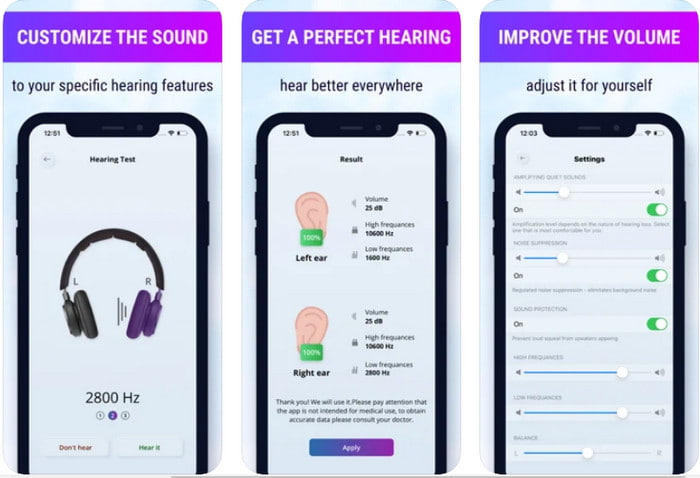
iOS‑gebruikers kunnen eenvoudig gratis Volume Boost- Sound Amplifier 4+ downloaden. Met deze app kun je geluid gemakkelijk versterken zonder gedoe dankzij de automatische aanpassing, maar je kunt ook handmatig ingrijpen. Bovendien is de app goed te gebruiken als versterker, alleen werkt hij niet met Bluetooth‑luidsprekers en oordopjes of pods. Ook kun je met deze app te maken krijgen met veel vastlopers en onvermijdelijke advertenties zodra je hem opent. Hoewel de app gratis te downloaden is, zijn er toch in‑app aankopen nodig om de advertenties te verwijderen en andere functies te gebruiken.
Voordelen
- Gratis te downloaden op alle iOS-apparaten.
- Versterk het geluid van uw luidspreker eenvoudig tot 30 dB.
- Intuïtieve interface en configuratie.
Nadelen
- Ervaar veel crashes, bevriezingen en bugs zijn nog steeds aanwezig in deze app.
- Advertenties zijn veel te vermijden.
2. Extra Volume Booster - luidspeaker (Android)
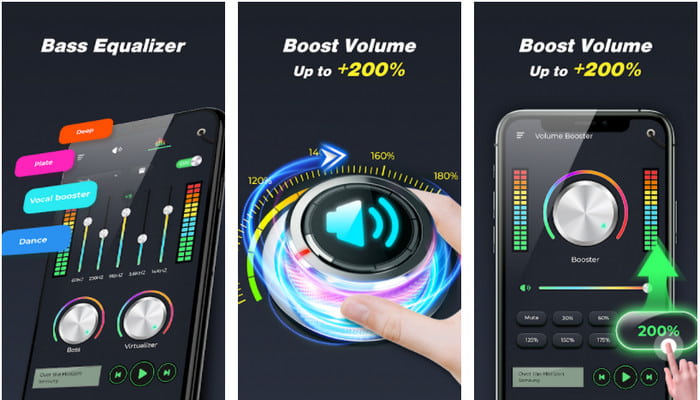
Als iOS‑gebruikers al een geluidsversterker op hun telefoon hebben, dan moeten Android‑gebruikers ook iets vergelijkbaars hebben, zoals de Extra Volume Booster. Veel gebruikers zijn al tevreden over de prestaties van deze app, omdat hij uitstekend is in versterken en boosten. Maar als je deze app opent, worden alle geluiden die je telefoon produceert – zoals beltoon, alarmen, meldingen en meer – versterkt. Dat betekent dat er geen aparte instellingen voor die functies zijn. Hoewel de tool gratis is, is hij toch op sommige punten beter dan andere betaalde apps op Android of zelfs iOS. Maar als je het volume op 200% zet, kun je een beschadiging van je ingebouwde of Bluetooth‑luidsprekers verwachten die een volume van 200% niet aankunnen.
Voordelen
- Vereenvoudigde versie van de versterker die u kunt downloaden op Android-apparaten.
- Hoewel de app-interface niet veel is, is het geweldig.
- Verschillende versterking en boosting zijn beschikbaar in deze app.
Nadelen
- Verwacht tijdens het gebruik van de app talloze advertenties tegen te komen.
- Tijdens het gebruik van de tool bestaat de kans dat de CPU of de telefoon warm wordt.
3. Speaker Boost: Volume Booster & Geluidsversterker 3D (Android)
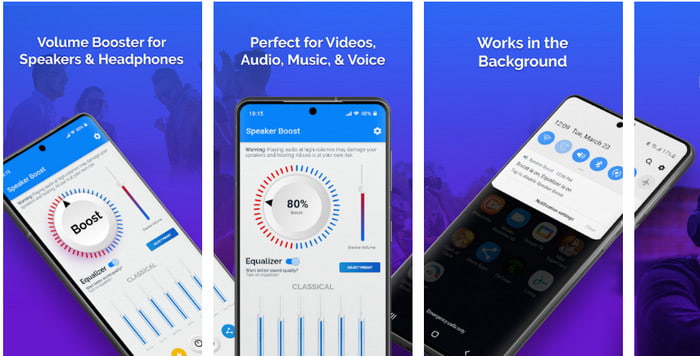
Een andere Android‑app die je kunt gebruiken en die een geweldige surround‑soundversterker levert, is Speaker Boost. Net als Extra Volume Booster is deze app heel trefzeker en veel eenvoudiger te gebruiken, zelfs als je geen ervaring hebt. Je kunt deze tool ook gratis downloaden, maar er zijn in‑app aankopen die je waarschijnlijk interessant vindt, zoals het verwijderen van vervelende advertenties en meer. Hoewel de tool op zich prima te gebruiken is, kost het kopen van de in‑app aankopen in deze app je veel geld vergeleken met andere software in deze lijst. Een ander punt waar veel gebruikers zich zorgen over maken, is dat de app achter de ad‑blocker werkt en dat er een kans is dat deze app spyware is.
Voordelen
- On-point om het geluid gemakkelijk te versterken en toch is het krachtig in gebruik.
- Download de tool gratis zonder gedoe met het versterken van de geluiden.
- Doe de handmatige override op de equalizer.
Nadelen
- Deze tool is onvolledig, wat in feite betekent dat het experimenteel is.
- Wanneer u het geluid verhoogt, zijn er enkele vervormingen die u zult horen.
4. Boom: Bass Booster & Equalizer 4+ (iOS)
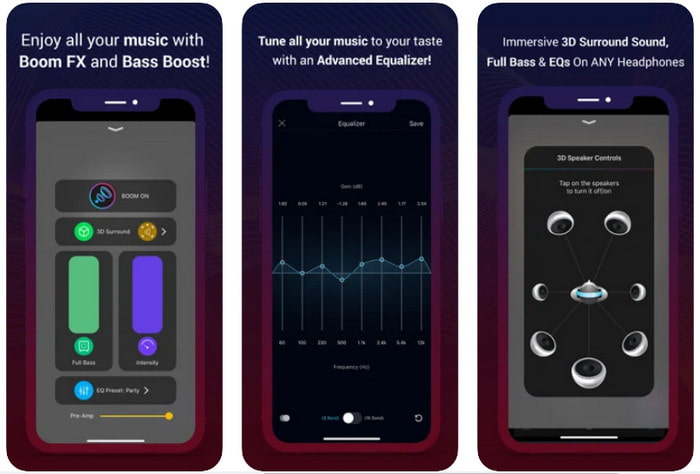
Als je op zoek bent naar een geavanceerde geluidsversterker‑app, dan is Boom: Bass Booster een uitstekende keuze. Deze app is echter alleen beschikbaar op iOS‑apparaten en je vindt hem niet op Android‑toestellen. Tot nu toe heeft deze tool al veel lof gekregen van gebruikers, maar sommige formaten worden niet ondersteund om te versterken. Ook moet je, wanneer je deze app gebruikt, rekening houden met bugs en crashes tijdens het gebruik. Bovendien is de app misleidend voor nieuwe gebruikers. Hoewel de prestaties van deze app redelijk lijken, moet hij toch nog worden verbeterd om de app beter te maken.
Voordelen
- Enkele van de geavanceerde functies zijn hier beschikbaar.
- Draagbare versterkers die u gemakkelijk kunt gebruiken.
- De app krijgt een 4,1 ster van de 5 sterren.
Nadelen
- Niet de beste keuze voor beginners vanwege de verwarrende interfacestructuur.
- De meeste audioformaten worden niet ondersteund om te worden versterkt met deze app.
- Problemen met bugs en vertragingen doen zich nog steeds voor met de app.
Deel 3. Veelgestelde vragen over geluidsversterkers
Wat is db?
Db betekent decibel en dit is de maateenheid om de luidheid of kracht van de geluidsgolf uit te drukken. Ook kunnen we met behulp van decibel gemakkelijk bepalen welk geluid we veilig kunnen horen in een lange tijd. En alle 85 decibel hieronder zijn heel veilig om te horen.
Wat zijn de nadelen van hard geluid?
Het is heel gewoon voor ons dat wanneer we worden blootgesteld aan harde geluiden, het gehoor kan worden beschadigd. Maar wist je dat dit kan resulteren in misselijkheid, hoofdpijn, stress, vermoeidheid en meer. Dus als u op het punt staat een versterker te gebruiken, gebruik hem dan op de juiste manier en gebruik hem niet te veel om de onvermijdelijke schadelijke effecten te vermijden.
Waarom hoor ik wat barsten in mijn luidsprekers?
Dit probleem is heel gebruikelijk bij de speakers die met een zeer beperkte hertz overweg kunnen. Dus als je het geluid verhoogt, zorg er dan voor dat de luidspreker het aankan. En als je wat gekraak hoort, moet je het geluid onmiddellijk verlagen. Als u echter wat kraken hoort, zelfs als u het geluid lager zet, is het te laat.
Gevolgtrekking
Alle apps en software die hier zijn gepresenteerd, zijn uitstekend te gebruiken als versterker. Hoewel de hierboven genoemde programma’s enkele verschillen hebben, zijn hun functies vergelijkbaar. Maar als je op zoek bent naar de beste geluidsversterker voor pc en Mac, dan moet Video Converter Ultimate het wel zijn. Omdat hij fenomenale, geavanceerde functies biedt die je eenvoudig kunt gebruiken. Dus als je je afvraagt of dit de beste keuze is, download hem dan eerst op de schijf van je computer en volg de hierboven gegeven stappen.
Gratis downloadVoor Windows 7 of nieuwerVeilige download
Gratis downloadVoor MacOS 10.7 of nieuwerVeilige download
-
 [Eenvoudig] Hoe audio en video niet synchroon te lopen
 Stel dat u uw stream voor morgen gaat plannen, maar wanneer u uw instellingen controleert, lopen de audio en video niet synchroon. Lees dit artikel voor meer informatie over deze zorg.
-
 7 eenvoudige stappen voor het oplossen van problemen met OBS-audiovertraging [opgelost]
 Heb je moeite om je videoclip te bekijken na het opnemen vanwege de audiovertraging bij het gebruik van OBS Studio? Lees het onderstaande artikel om te leren hoe u niet-gesynchroniseerde audio effectief kunt herstellen.
-
 Hoe u gratis audio en muziek aan video kunt toevoegen op uw computer / telefoon
 Dit artikel toont 4 eenvoudige manieren om gratis audio aan video toe te voegen. Welke audiotrack u ook aan uw video wilt toevoegen, u kunt hier bevredigende resultaten krijgen.
