


 Video Converter Ultimate
 Scherm opnemer
 Videoreparatie
Wat zijn de beste WMV-tag-editors om WMV-metadata te bewerken [Foolproof]
WMV is een native bestandsformaat dat je zult tegenkomen als je een Windows‑gebruiker bent. Met dit bestand kun je animaties, videoclips en afleveringen van tv‑series in hoge definitie opslaan met behulp van een of meer van Microsofts videocompressietechnieken. Hoewel het al deze informatie kan bewaren, moeten sommige tags in WMV worden gecorrigeerd. Hoewel je de metadata van een WMV‑bestand in Windows Media Player kunt bekijken, kun je ze niet aanpassen om ze te corrigeren. Welk hulpmiddel moet je dus op Windows gebruiken? In dit artikel geven we een onbevooroordeelde beoordeling van vier WMV‑tageditors die je kunt gebruiken.

Deel 1. Fenomenale WMV Tag Editor voor Windows & Mac [Aanbevolen]
FVC Video Converter Ultimate is betrouwbare software die je de allerbeste functies biedt die je nodig hebt om WMV‑metadata moeiteloos te bewerken. Dit programma is beschikbaar op elk Windows‑ en Mac‑besturingssysteem. Terwijl je deze tool gebruikt, ervaar je een nieuw niveau van verwijderen, bewerken en bijwerken van tags, volledig naadloos, voor meer dan 1000 formaten die deze software ondersteunt. Voor beginners biedt deze tool een intuïtieve interface, zodat zij alle functies van de tool goed begrijpen. Maar hij is ook ideaal voor professionals die geavanceerde videobewerking willen doen. Is dat niet indrukwekkend? Of je nu geen of juist wel ervaring hebt met het bewerken van tags, je kunt op deze tool vertrouwen. Wil je geweldige metadata‑bewerking doen met de software? Zo ja, dan zullen de volgende details zich richten op het gebruik van deze fantastische WMV‑tageditor, maar download hem eerst op je Windows of Mac en installeer hem.
Voordelen van het gebruik van de Ultimate WMV Tag Editor
- 1. Het kan snel de tags bewerken voor WMV, AVI, MP4, MKV, MOV en de andere 1000+ beschikbare formaten.
- 2. Het ondersteunt een alles-in-één Toolbox waarop u video kunt trimmen, knippen, samenvoegen, knippen, omkeren en meer.
- 3. Het is de beste keuze voor beginners en professionals die een multifunctioneel hulpmiddel nodig hebben.
- 4. Download de ultieme tool op uw Windows & Mac met dezelfde geavanceerde functies.
Gratis downloadVoor Windows 7 of nieuwerVeilige download
Gratis downloadVoor MacOS 10.7 of nieuwerVeilige download
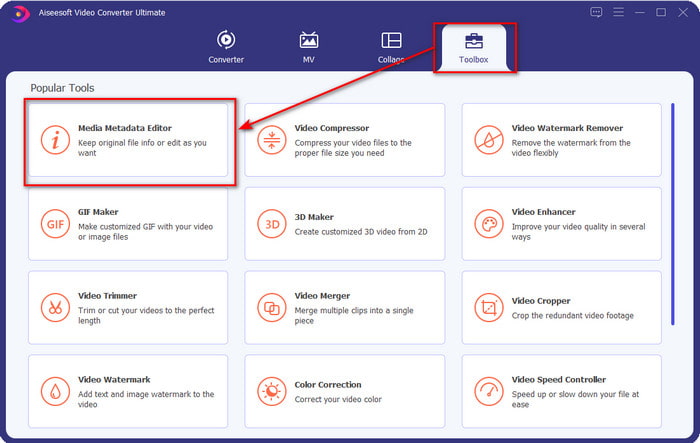
Stap 1. Start de tool direct nadat je deze succesvol hebt geïnstalleerd. Ga in de interface van de tool naar de sectie Toolbox en zoek naar de Media Metadata Editor; klik erop om deze te openen.
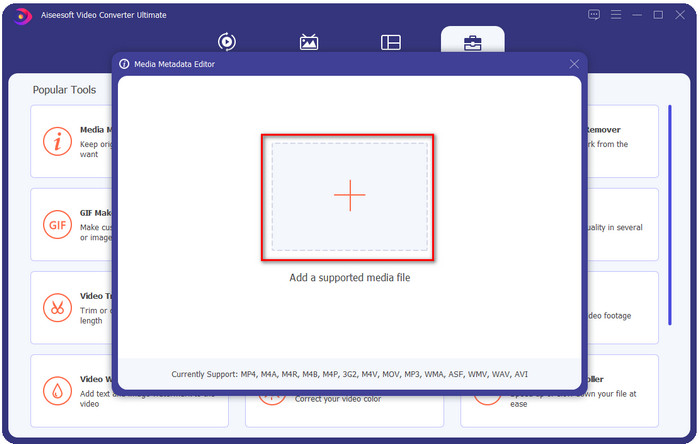
Stap 2. Klik op het +-icoon nadat je de editor hebt geopend en selecteer het WMV‑bestand in de map die op je scherm verschijnt. Klik op Openen zodra je het bestand hebt gekozen.
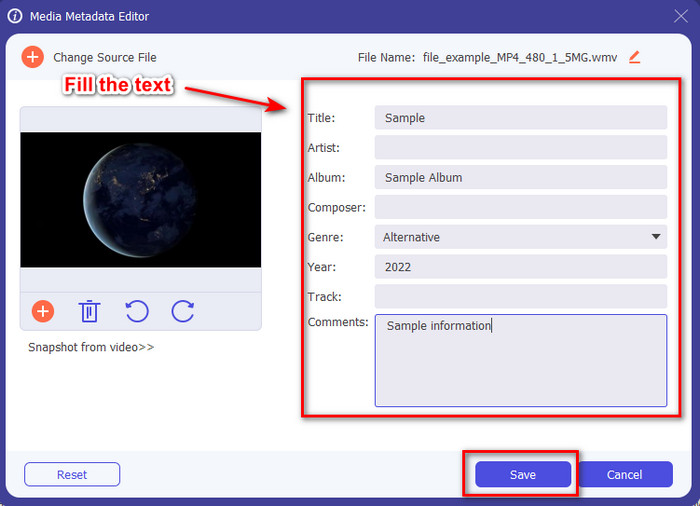
Stap 3. Vul het tekstvak in naar wens en klik vervolgens op Opslaan om de tags toe te passen die je aan het bestand hebt toegevoegd.
Gerelateerd:
Deel 2. Nog 3 Beste Tag Editors op Windows
Machete Video Editor Lite
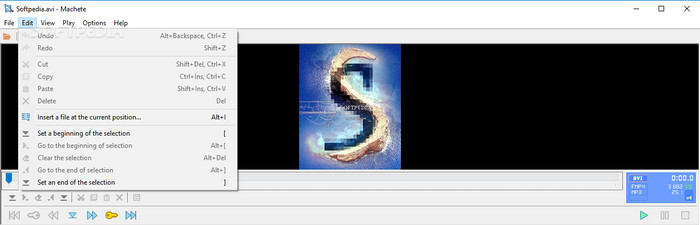
Machete Video Editor Lite is een op Windows gebaseerde WMV‑metadata‑editor die je op je pc kunt downloaden. Met deze tool kun je tags bewerken voor alleen AVI en MKV; andere formaten dan deze twee worden niet ondersteund. Het is een speciale metadata‑editor voor Windows, dus je hoeft je geen zorgen te maken als je deze tool probeert te gebruiken, want hij helpt je bij de genoemde taak. Ondanks dat het een goede metadata‑editor is, is de GUI verouderd en heeft deze een modernere uitstraling nodig om te kunnen concurreren met metadata‑editors met een betere GUI op de markt. Bovendien ondersteunt deze tool slechts twee formaten, AVI en MKV; dit is mogelijk het grootste nadeel van de tool, omdat andere tageditors een grote verscheidenheid aan formaten ondersteunen om bestanden eenvoudig te kunnen uploaden.
TigoTago
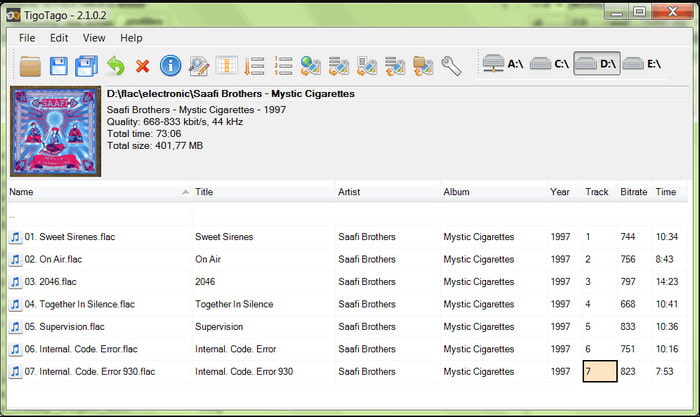
Een andere gespecialiseerde WMV‑tageditor die beschikbaar is op Windows is TigoTago. In tegenstelling tot Machete Video Editor Lite ondersteunt deze tool drie videoformaten, zoals MP4, WMV en AVI. Als je audiotags wilt bewerken, kun je elk MP3‑, WMA‑, WAV‑bestand en nog veel meer uploaden. De GUI van de tool lijkt sterk op een spreadsheet, waarin je verschillende kolommen ziet voor verschillende tags van je bestand. Ondanks de spreadsheetachtige GUI is er nog steeds een update nodig, omdat het lijkt alsof de tool al lange tijd geen updates heeft gekregen. Tijdens het gebruik van de tool kwamen we enkele verwarrende functies tegen, wat het bewerken van tags tijdrovend en enigszins lastig maakte. Hoewel deze problemen kunnen optreden, kun je hem nog steeds gratis downloaden op Windows.
Eigenschappen op Windows
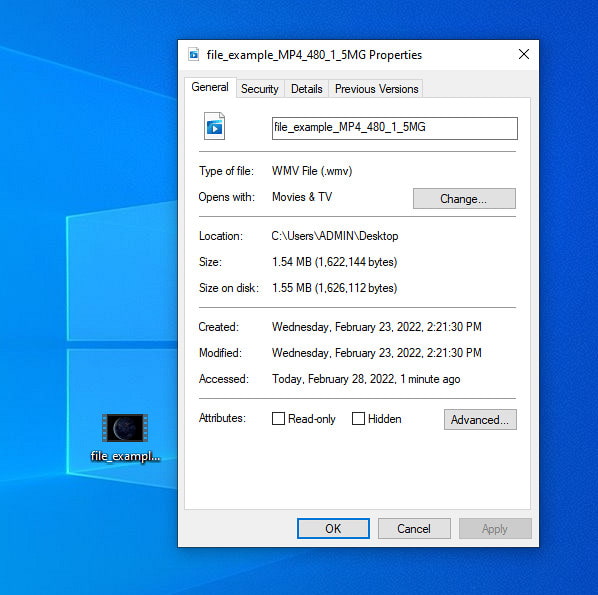
Eigenschappen in Windows is een unieke functie die je gratis kunt gebruiken op elk Windows‑besturingssysteem. Deze functie is niet te downloaden of via het web toegankelijk, wat een groot voordeel is. Met deze functie kun je eenvoudig tags bijwerken van elk mediabestand, zoals WMV, met slechts een paar klikken. De laatste tijd vinden sommige gebruikers, waaronder wijzelf, het echter onhandig om deze functie te gebruiken. Toen we namelijk probeerden de metadata van het bestand bij te werken naar het originele bestand, werden de tags niet opgeslagen. Dat is ook te verwachten, omdat het geen professionele metadata‑editor is. Maar als je WMV‑metadata wilt bijwerken, kun je deze nog steeds gemakkelijk bewerken.
Deel 3. Veelgestelde vragen over WMV Tag Editor
Kan ik WMV-metadata op Mac bewerken?
Helemaal, ja, dat kan. Met behulp van de ultieme tool die we hierboven presenteren, is deze taak eenvoudig. Dus als u een Mac-gebruiker bent, downloadt u de tool op uw apparaat door op de downloadknop voor Mac te klikken en volgt u dezelfde procedure. De afbeeldingen kunnen echter een beetje anders zijn voor de functie op Mac, maar de tag die je hebt toegevoegd, is met succes opgeslagen zonder enig zweet te breken.
Worden WMV-metadata weergegeven bij het kijken op Windows Media Player?
Tijdens het afspelen op de Windows Media Player, de native mediaspeler op Windows, worden de tags niet op het scherm weergegeven. Maar u kunt ze openen door met de rechtermuisknop op het bestand te klikken, op Eigenschappen te klikken en een minivenster zal laten zien waar u de tags op uw WMV-bestand kunt zien. Onthoud dat u ze kunt bekijken, maar niet kunt bewerken volgens uw behoeften.
Verliest de overdracht van WMV op het web de metadata?
Dit probleem doet zich heel natuurlijk voor in de meeste mediabestanden. De metadata gaan onderweg verloren omdat het type app dat je hebt gebruikt de metadata moet verwijderen om de bestandsgrootte te verkleinen voor een soepele zeiloverdracht. Het is dus beter om de metadata te kopiëren en apart te verzenden om dit probleem te voorkomen.
Gevolgtrekking
Uiteindelijk zijn alle tools die we hebben gekozen de meest effectieve WMV‑metadata‑editors die je kunt downloaden of gratis kunt gebruiken op elke Windows‑versie die het uploaden van WMV ondersteunt. Hoewel de tools je kunnen helpen, kunnen sommige je ook teleurstellen; dus het kiezen van de perfecte tageditor is essentieel om verdere problemen of schade te voorkomen. Als je je nog steeds afvraagt naar welke tool we verwijzen die een ideale tageditor, een multifunctionele Toolbox en gebruiksvriendelijkheid combineert, dan verklaren we vol trots dat al deze behoeften vervuld worden door FVC Video Converter Ultimate. In tegenstelling tot de concurrentie op de markt is deze tool erop gericht gebruikers te helpen bij hun dagelijkse videoproblemen, zoals converteren, tags bewerken, video’s bewerken, enzovoort. Ongelooflijk, nietwaar? Maar dat is precies wat de ultieme tool je kan bieden.
-
 Wat zijn metadata: leer de basisinformatie over metadata
 Wat is metagegevens? Is dit belangrijk? Wat zijn de onderdelen van metadata? Heb je dezelfde vraag? In dit artikel leert u de basisinformatie over metadata.
-
 4 van de beste online en offline metadataviewers [bijgewerkt 2025]
 Kan ik de metadata van mijn bestand controleren? Ja, dat kan, met behulp van dit bericht zullen we u kennis laten maken met de verschillende metadataviewers die u kunt gebruiken.
-
 Snelle en gemakkelijke tips om WMV naar MOV te converteren [bewezen]
 Wilt u weten wat de beste en gebruiksvriendelijke converters zijn die WMV naar MOV converteren? Ga door met het lezen van dit artikel, aangezien het alle mogelijke keuzes bespreekt die u moet overwegen.
