


 Video Converter Ultimate
 Nagrywarka ekranu
 Naprawa wideo
Konwerter WTV na MP4: Jak przekonwertować WTV na MP4
WTV, jako następca formatu DVR-MS, jest rozwijany przez Microsoft do przechowywania treści telewizyjnych nagranych przez Windows Media Center. Zakodowany w standardzie MPEG-2 i MPEG-4 oraz MPEG-1 Layer II lub Dolby Digital AC-3, WTV jest obsługiwany przez kilka programów, takich jak FFMPEG, Windows Media Center, CyberLink PowerDVD 12, Nero 12, HandBrake, CCextractor itp.

Jeśli chcesz wygodnie odtwarzać lub udostępniać pliki WTV, najlepiej je przekonwertować z WTV na MP4, czyli do najpopularniejszego formatu obsługiwanego praktycznie przez każde urządzenie.
Przeszukaliśmy Internet w poszukiwaniu konwertera WTV na MP4 i znaleźliśmy 2 najlepsze darmowe konwertery WTV na MP4, dzięki którym zamienisz WTV na MP4.
Część 1. Darmowy konwerter wideo - Konwertuj WTV na MP4 Online
Konwersja WTV na MP4 jest bardzo prosta. Najłatwiejszym sposobem zmiany WTV na MP4 jest wykonanie tego online. Free Online Video Converter to darmowe narzędzie do konwersji WTV na MP4 oraz inne popularne formaty wideo i audio. To bezpłatne narzędzie online jest kompatybilne z Windows 10/8/7 oraz Mac OS X 10.7 lub nowszym, a WTV na MP4 możesz łatwo przekodować w kilku krokach.
Aby usprawnić proces, postępuj zgodnie z instrukcjami:
1. Kliknij przycisk Add Files to Convert, aby wgrać pliki WTV z komputera.
2. Zaznacz MP4 w polu wyboru.
3. Kliknij Convert, aby automatycznie przekonwertować i pobrać pliki WTV.
Teraz jesteśmy tutaj, aby przeprowadzić Cię przez szczegółową konwersję WTV na MP4.
Krok 1. Dodaj pliki WTV
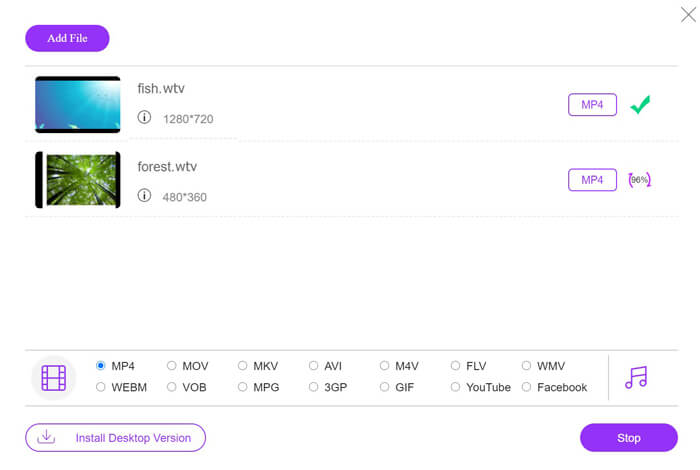
Otwórz ten darmowy konwerter WTV na MP4 w przeglądarce. Kliknij przycisk Add Files to Convert, a pojawi się okno z prośbą o pobranie i zainstalowanie programu uruchamiającego. Po prostu go pobierz, a po pomyślnej instalacji wyświetli się okno open-source. Następnie możesz wybrać nagrania WTV na swoim komputerze do przesłania. Ten darmowy program obsługuje konwersję wsadową, więc możesz dodać więcej niż jeden plik WTV online.

Krok 2. Wybierz MP4
Zaznacz pole wyboru MP4 na dole, gdzie znajdziesz różne opcje wyjściowe, takie jak MKV, AVI, M4V, FLV, VOB, GIF, YouTube, Facebook, MP3, AAC, WMA, WAV, FLAC itd.
Dodatkowo możesz kliknąć ikonę Settings obok pola wyjściowego MP4, aby dostosować koder, liczbę klatek na sekundę, rozdzielczość, przepływności i inne parametry.

Krok 3. Konwertuj WTV na MP4
Gdy wszystko będzie gotowe, kliknij przycisk Convert i pojawi się okno, w którym musisz wybrać miejsce docelowe zapisu przekonwertowanych plików MP4. Wybierz folder docelowy i wróć do tego darmowego konwertera online, ponownie kliknij Convert, aby rozpocząć konwersję i automatyczne pobieranie plików MP4. Na bieżąco możesz śledzić procentowy postęp konwersji.
Część 2. HandBrake - Konwertuj WTV na MP4 na PC / Mac
Innym darmowym sposobem konwersji WTV na MP4 jest użycie HandBrake. HandBrake to nieliczne programy, które mogą czytać pliki WTV. Poza tym może również transkodować WTV do MP4 / MKV na komputerze z systemem Windows i Mac.
HandBrake to oprogramowanie komputerowe typu open source, dlatego najpierw pobierz ten darmowy konwerter na komputer.
Ponownie, proste kroki konwersji WTV na MP4 w HandBrake są następujące:
1. Dodaj pliki WTF lub cały folder do HandBrake.
2. Niestandardowy profil MP4 w HandBrake.
2. Wyświetl podgląd i przekonwertuj WTV na MP4.
Oto obszerny przewodnik po zmianie WTV na MP4 w HandBrake.
Krok 1. Dodaj pliki WTV do HandBrake
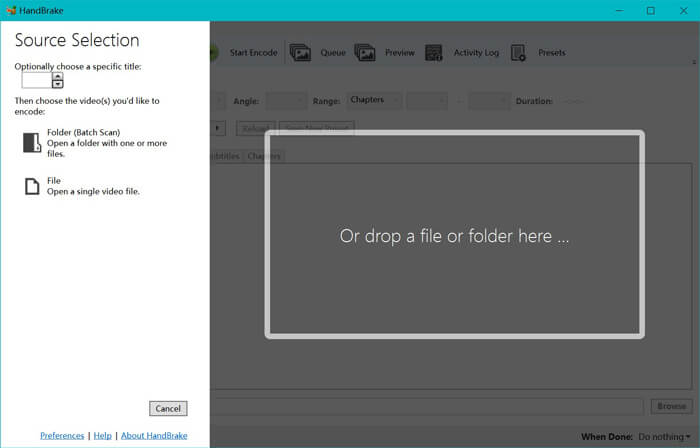
Po zainstalowaniu HandBrake na komputerze, domyślnie pojawi się okno otwierania źródła. Tutaj możesz kliknąć Folder lub File, aby wybrać pliki WTV lub folder w głównym oknie. Alternatywnie możesz też przeciągnąć i upuścić pliki WTV do tego programu.
Krok 2. Wybierz format MP4
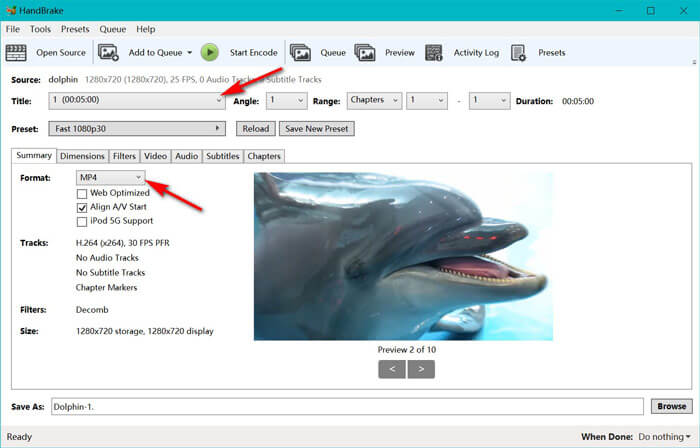
Po załadowaniu plików WTV możesz wybrać konkretny plik WTV z rozwijanej listy Title. Następnie w zakładce Summary wybierz MP4 jako format wyjściowy dla wybranego pliku WTV. Ponadto HandBrake pozwala dostosować wymiary, filtry, kodek/jakość wideo, ścieżkę audio itd. Oprócz MP4 może on również konwertować inne formaty, jak AVI, MOV, M2TS itd., na MKV.
Krok 3. Podgląd i konwersja WTV na MP4
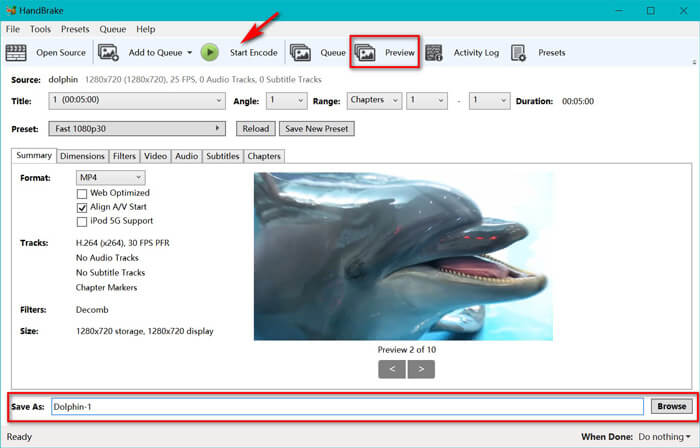
Funkcja podglądu HandBrake na pasku narzędzi pozwala zobaczyć, jak będzie wyglądać nowe wideo MP4 przed jego zakodowaniem. Gdy wszystkie ustawienia będą odpowiednie, nadaj nazwę przekonwertowanym plikom MP4 i wybierz lokalizację nowych filmów, klikając przycisk Browse na dole. Na koniec kliknij przycisk Start Encode na pasku narzędzi, aby przekonwertować WTV na MP4.
Część 3. Często zadawane pytania dotyczące WTV do MP4
Dlaczego HandBrake zapisuje MP4 jako M4V?
W przypadku plików MP4 HandBrake automatycznie utworzy pliki MP4 przy użyciu rozszerzenia M4V, jeśli wybierzesz napisy audio AC3 i SRT lub masz znaczniki rozdziałów do dostosowywania pliku MP4. Ale możesz bezpośrednio zmienić rozszerzenie .m4v na .mp4.
Czy odtwarzacz VLC może odtwarzać pliki WTV?
VLC nie może bezpośrednio odtwarzać plików WTV. Powinieneś zainstalować pakiet K-Lite Code Pack, aby zainstalować pakiet kodu WTV, a następnie odtwarzać pliki WTV na VLC.
Czy mogę konwertować chronione pliki WTV?
Tak, możesz. Jednak tylko MCEBuddy obsługuje edycję i konwersję chronionych komercyjnych plików WTF. Musisz użyć tego oprogramowania, aby skopiować i przekonwertować chronione pliki WTV.
Wniosek
Aby wygodnie korzystać z plików WTV nagranych w programie Window Media Center, należy najpierw przekonwertować WTV na MP4. W tym poście udostępniono 2 bezpłatne sposoby konwersji WTV na MP4 online za pośrednictwem bezpłatnego internetowego konwertera wideo i HandBrake. Darmowy internetowy konwerter wideo umożliwia konwersję WTV do MP4 i innych popularnych formatów, a HandBrake zapewnia większą kontrolę nad edycją z ograniczonymi opcjami formatu wyjściowego.
Który sposób jest Twoim ulubionym?
A może masz lepszy konwerter WTV na MP4?
Tak czy inaczej, chciałbym usłyszeć od ciebie. Więc śmiało zostaw komentarz poniżej.
-
 Jak przekonwertować MXF na MP4 za pomocą bezpłatnego konwertera
 Ten post jest szczegółowym przewodnikiem po konwersji MXF na MP4 na komputerze. Możesz uzyskać 4 darmowe konwertery MXF na MP4, aby transkodować kamerę MXF na MP4 w prostych krokach.
-
 Najlepsze sposoby 3 na bezpłatną konwersję MP4 na MOV
 Jak przekonwertować MP4 na MOV na Macu? Czy jest jakiś darmowy sposób na konwersję MP4 na MOV bez utraty jakości? W tym poście przedstawiono 3 proste sposoby, które pomogą Ci dokonać konwersji wideo z MP4 na MOV na komputerach Mac, Windows PC i online.
-
 Jak przekonwertować M2TS na WMV w systemie Windows / Mac / Online (całkowicie za darmo w użyciu)
 Oto 3 proste sposoby konwertowania filmów M2TS na WMV. Możesz szybko zmienić format wideo z M2TS na WMV za darmo na Windows, Mac i online. Obsługiwana jest konwersja wsadowa.
