


 Video Converter Ultimate
 Nagrywarka ekranu
 Naprawa wideo
Jak przekonwertować MP3 na MP4 z obrazem na Windows 10 i Mac
MP3 to standardowy format audio opracowany przez Moving Picture Experts Group. Wykorzystuje standaryzacje MPEG-1 i MPEG-2. MP3 jest uważany za najpopularniejszy format audio na stronach internetowych i odtwarzaczach multimedialnych. Cóż, MP4 to najpopularniejszy format wideo wśród użytkowników w każdym wieku.
For many times, you want to add a matched picture to the MP3 file as a background. Here are 3 free and quick solutions to convert MP3 to MP4 on Windows and Mac. After that, you can upload and share the converted video to YouTube or Facebook.
Część 1. Jak przekonwertować MP3 na MP4 online za darmo
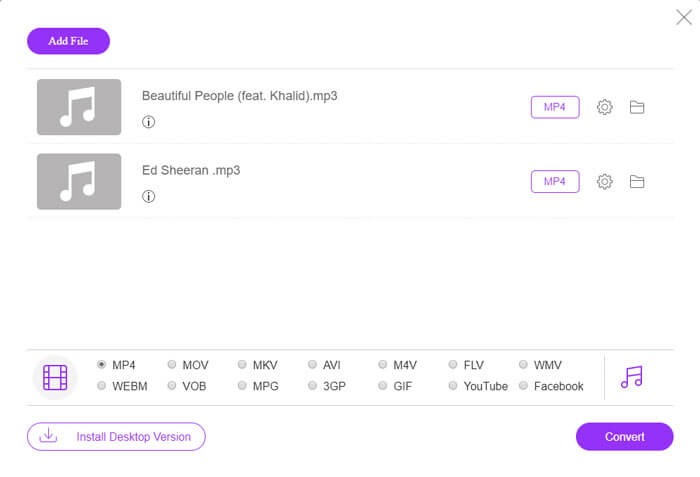
FVC Free Online Video Converter can easily convert any audio or video file to MP4, MOV, MKV, AVI, M4V, FLV, WMV, WEBM, VOB, etc. for free on Windows and Mac. It also allows you to batch convert MP3 to MP4 by uploading multiple MP3 files. This free online tool also supports adjusting video encoder, frame rate, resolution, bitrate, audio encoder and channel. It’d be your best choice if you don’t want to install the third-party software.
Step 1. Click Add Files to Convert button to download the launcher. In the pop up window, select and upload your MP3 files. You can upload more than one MP3 files.
Step 2. Select MP4 at the bottom of this online MP3 converter. You can click the gear icon to set the video and audio settings.
Step 3. After all preferences are set, click Convert button and select the output folder. Then the MP3 to MP4 conversion will start automatically.
Po pomyślnej konwersji folder wyjściowy pojawi się od razu, aby można było przeglądać lub udostępniać przekonwertowany plik, jak chcesz. To darmowe oprogramowanie tworzy plik MP4 z czarnym tłem.
Część 2. Jak zrobić MP3 w MP4 z VLC
VLC Media Player to darmowy odtwarzacz multimedialny typu open source, który odtwarza wszystkie pliki multimedialne, takie jak DVD, VCD, różne pliki wideo i audio. Jest to również darmowy konwerter MP3 na MP4 dla użytkowników systemów Windows, Mac, Linux, Android, a także iOS. Tutaj pokażemy, jak przekonwertować MP3 na MP4 za pomocą VLC Media Player.
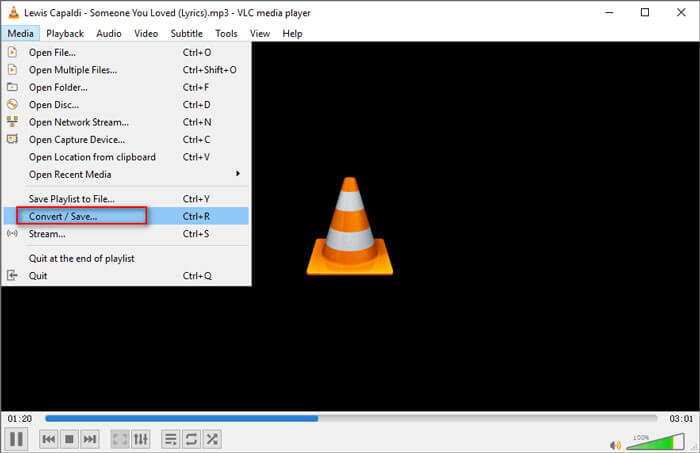
Step 1. Open VLC on your computer. Click Media, then click Open File and import your MP3 file.
Step 2. Click Media, then click Convert/Save. In the pop up window, select Convert under the drop-down button of Convert/Save.
Step 3. Click the drop-down button next to Profile, and select Video - H.264 + MP3 (MP4) as the output format.
Step 4. Click Browse button to select the output folder. Then click Start button to begin converting MP3 to MP4 with black background for free. (How to convert MP4 to MP3?)
Część 3. Profesjonalny sposób na konwersję MP3 do MP4 z obrazem
The above methods bring a black background to your MP3 file after conversion. If you want to add a cover to the converted MP4 file, you can use a professional MP3 to MP4 converter. FVC Free MP3 to MP4 Converter provides a more professional way to convert your MP3 music to MP4 with colorful picture.

Darmowy konwerter MP3 na MP4
113,435+ pliki do pobrania- Konwertuj plik muzyczny MP3 na MP4, AVI, MOV, MKV, WMV i inne.
- Zapewnij kolorowe motywy dla pliku MP3, dostosuj otwarcie i zakończenie.
- Wyświetl podgląd przekonwertowanych plików MP4 przed konwersją za pomocą wbudowanego odtwarzacza.
- Obsługa konwersji wsadowej plików MP3 na MP4 z wysoką jakością wideo.
Free DownloadFor Windows 7 or laterSecure Download
Free DownloadFor MacOS 10.7 or laterSecure Download
Krok 1. Dodaj plik MP3
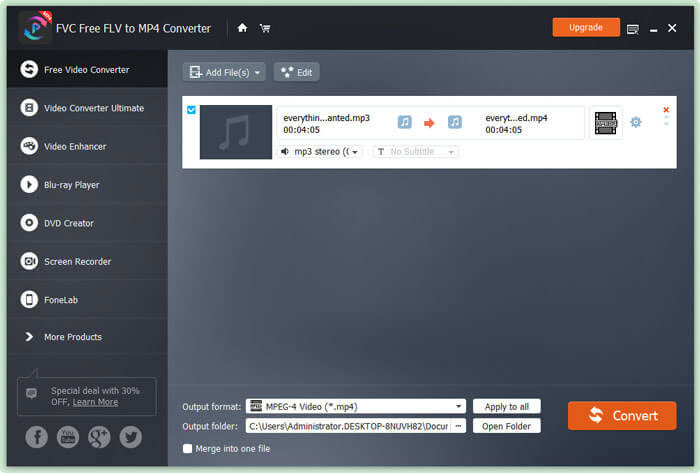
Free download, install and launch this MP3 to MP4 converter on your Windows computer. Click Add File(s) button to import the MP3 file to this converter. This free MP3 to MP4 converter is equipped with a batch conversion feature which allows you to convert one or more MP3 files at a time.
Krok 2. Wybierz motyw
Select your MP3 file and click Edit button to add the theme. Here are several different types of themes for you to choose from. Then click Next button to edit the opening and ending of the video.

Krok 3. Konwertuj MP3 na MP4
Select MP4 as your target format from the drop-down list of Output format. Then click Convert button to start converting MP3 to MP4 with picture for free.

With the adoption of the latest accelerate technology, it enables you to convert MP3 to MP4 in a super-fast converting speed. What’s more, it guarantees that there won’t be any quality loss during the audio conversion. (Find more MP4 players)
Część 4. Często zadawane pytania dotyczące konwersji MP3 do MP4
Czy mogę eksportować z iTunes do MP3?
Tak. Otwórz iTunes i przejdź do Edytuj ›Preferencje. Na karcie Ogólne znajdź i kliknij opcję Importuj ustawienia. Następnie wybierz Koder MP3 z rozwijanego przycisku obok Importuj używając i kliknij OK, aby zapisać zmiany. Podświetl muzykę, którą chcesz przekonwertować i przejdź do Plik ›Konwertuj› Utwórz wersję MP3. Następnie muzyka iTunes zostanie przekonwertowana na MP3.
Czy utwory iTunes są MP3 czy MP4?
Żadne z nich. Muzyka zakupiona w iTunes ma format AAC (m4a). Możesz przekonwertować format AAC na MP3 w celu odtwarzania na innych urządzeniach.
Czy mogę przekonwertować MP3 na MP4 za pomocą Audacity?
Tak. Sam Audacity nie obsługuje eksportowania MP4 z MP3. Możesz jednak zainstalować opcjonalną bibliotekę FFmpeg, aby wyeksportować więcej formatów audio, takich jak AC3, MP4, M4A, WMA, AMR.
Czy HandBrake może eksportować MP4 z MP3?
Nie. HandBrake to transkoder wideo typu open source, który konwertuje do iz wielu formatów audio i wideo. Niestety, nie obsługuje żadnej konwersji tylko audio, takiej jak konwersja MP3 na MP4.
Wniosek
We mainly introduced 3 free ways to convert MP3 to MP4 with image on Windows and Mac. FVC Free Online Video Converter is the most convenient way to change MP3 music file to MP4. If you have any better suggestions, please don’t hesitate to leave us a comment.
-
 MOV VS MP4 - który z nich jest lepszy
 MOV VS MP4, który z nich jest lepszy? Ten post wyjaśnia różnicę między MP4 i MOV, dzięki czemu możesz uzyskać lepszy wybór do wykorzystania w plikach wideo.
-
 Jak przekonwertować MOV na MP4 bez utraty jakości
 Chcesz przekonwertować pliki MOV (Apple QuickTime Movie) na MP4? W tym poście udostępniono bezpłatne metody 4 do konwersji plików wideo MOV do formatu MP4 w systemie Windows 10/8/7 / XP i Mac OS X.
-
 Najlepsze sposoby 4 na konwersję WMA na MP3
 Czy można przekonwertować WMA na MP3 za pomocą programu Windows Media Player? Jak przekonwertować WMA na MP3 za darmo? W tym poście są 4 proste metody, które pomogą Ci dokonać konwersji dźwięku z WMA na MP3 na komputerach Mac, Windows PC i online.
