


 Video Converter Ultimate
 Nagrywarka ekranu
 Naprawa wideo
Poznaj 3 sposoby konwersji VOB do AVI online i offline
Pliki VOB służą do przechowywania prywatnych strumieni i wykorzystują stratną kompresję wideo, taką jak MPEG-2. Poza tym mają prawie taką samą strukturę, gdybyśmy mieli je porównać. Jednak pliki .vob mają ograniczenia i specyfikację, zanim będzie można ich użyć. Z tego powodu nie można łatwo odtwarzać pliku VOB na lokalnym odtwarzaczu multimedialnym. Więc teraz, aby zaoszczędzić czas na szukaniu, jak go otworzyć, sugerujemy przekonwertowanie go, wybierając konwerter poniżej. W takim przypadku przedstawiamy najlepszy konwerter, jaki możemy wymyślić, i nauczymy się konwertować VOB do AVI online lub offline za pomocą narzędzi znajdujących się na liście.
Część 1. Jak przekonwertować VOB na AVI Online
Jeśli masz ograniczony budżet, sugerujemy skorzystanie z bezpłatnego narzędzia, którego możesz używać samodzielnie. Podczas przeszukiwania internetu odkryliśmy, że istnieje narzędzie uznawane za najlepszy internetowy konwerter – jest nim FVC Free Video Converter. Co więcej, to narzędzie zapewnia każdemu użytkownikowi prostotę obsługi i wszyscy, którzy już z niego korzystali, są pod wrażeniem tego, jak dobrze działa. Jeśli więc chcesz się również przekonać, jak dobry jest ten konwerter, spróbuj zmienić plik VOB na format AVI, postępując zgodnie z poniższymi krokami.
Krok 1. Aby od razu przejść na stronę konwertera, kliknij ten link.
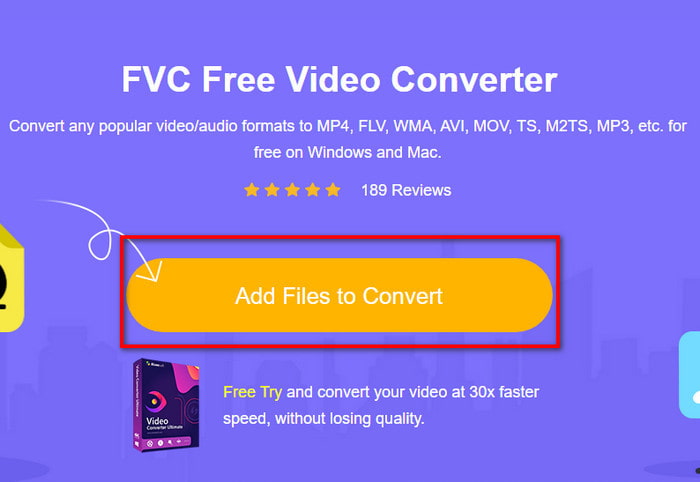
Krok 2. Na stronie internetowej kliknij Add Files to Convert, aby pobrać instalator. Nie musisz się martwić, ponieważ ma on tylko kilka kB. Następnie kliknij go ponownie, aby uruchomić narzędzie i zlokalizuj plik w folderze; gdy już go znajdziesz, kliknij dalej Open.
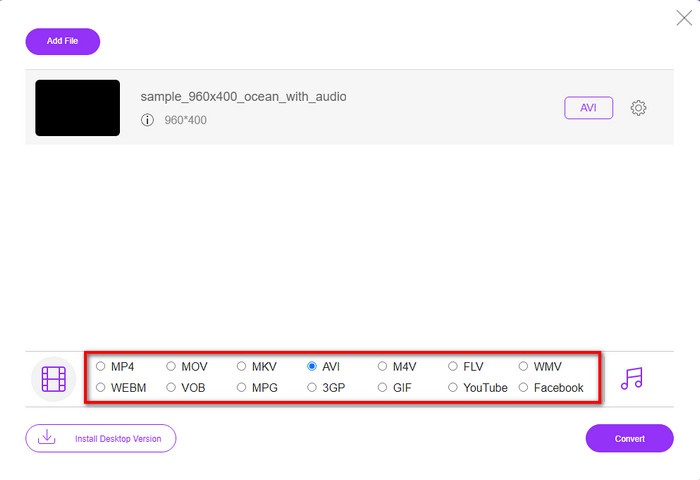
Krok 3. Na ekranie pojawi się nowy interfejs FVC. Na liście poniżej wybierz format AVI lub dowolny inny format, do którego chcesz przekonwertować plik.
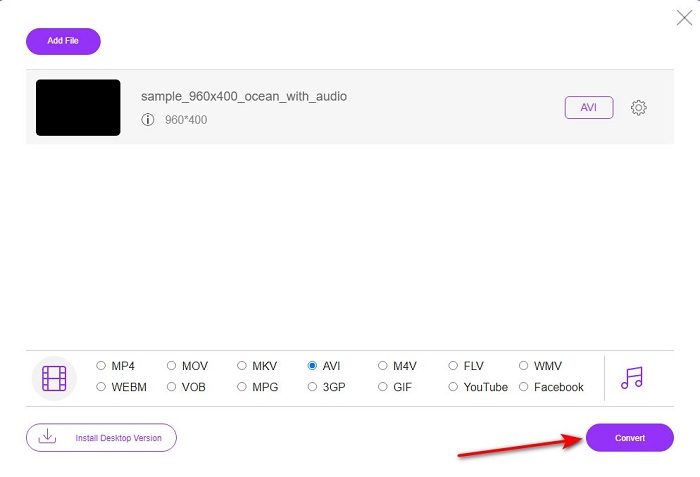
Krok 4. Po wybraniu formatu rozpocznij konwersję pliku, klikając Convert.
Krok 5. Zajmie to szacunkowo mniej niż minutę; gdy proces konwersji zostanie zakończony, pojawi się folder z nowo przekonwertowanym plikiem.
Część 2. Jak przekonwertować VOB na AVI na Windows i Mac?
Użyj fenomenalnego konwertera: FVC Video Converter Ultimate
Jeśli chcesz pobrać konwerter VOB na AVI, musi to być najlepszy z najlepszych wyborów, jakie chciałbyś dokonać. FVC Video Converter Ultimate zawsze zasługuje na swoją nazwę jako najlepsze narzędzie, które rozwiązuje każdą ostateczną sytuację, jaką możesz wymyślić, zwłaszcza podczas konwersji. To oprogramowanie znacznie różni się od dwóch wymienionych narzędzi. Może zastanawiasz się dlaczego, a to tylko dlatego, że idealnie pasuje do każdego, niezależnie od tego, czy jesteś profesjonalistą, czy początkującym. Ogólna wydajność, jakiej doświadczamy, gdy wypróbowujemy to narzędzie, jest już niesamowita i jesteśmy pod wrażeniem, jak szybko można przeprowadzić konwersję. A teraz, jeśli chcesz doświadczyć fenomenalnego nawrócenia, o którym mówimy, wykonaj wskazane poniżej kroki.
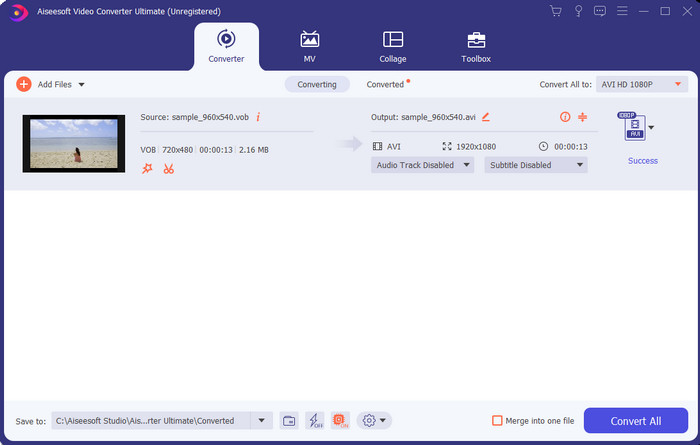
Krok 1. Zanim będziesz mógł z niego korzystać, musisz go najpierw pobrać. Po zakończeniu pobierania zainstaluj program, wykonaj konfigurację i kliknij Start Now.
Bezpłatne pobieranieDla Windows 7 lub nowszegoBezpieczne pobieranie
Bezpłatne pobieranieDla MacOS 10.7 lub nowszegoBezpieczne pobieranie
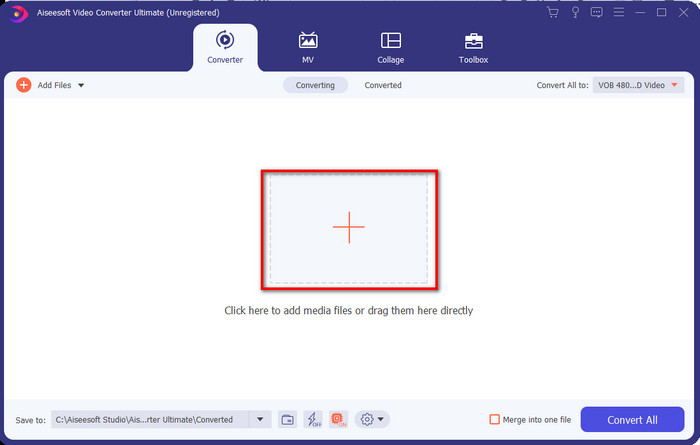
Krok 2. Gdy instalacja zostanie ukończona, otwórz program. Na środku interfejsu kliknij przycisk „+”, a na ekranie pojawi się okno folderu. Kliknij Open, aby przejść do następnego kroku procesu.
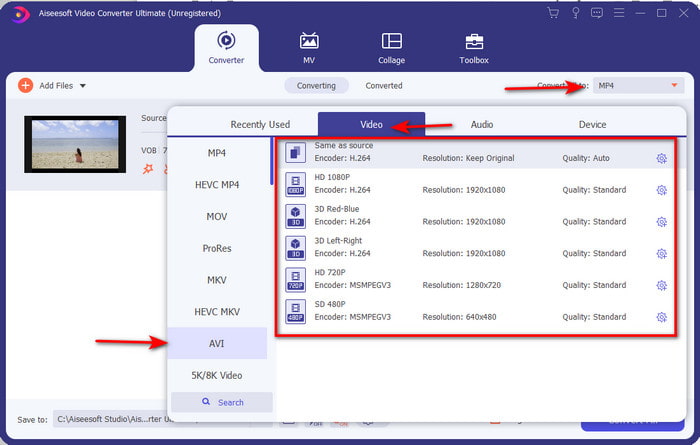
Krok 3. Kliknij przycisk Convert All w górnym lewym rogu interfejsu i wybierz format AVI z listy kategorii wideo.
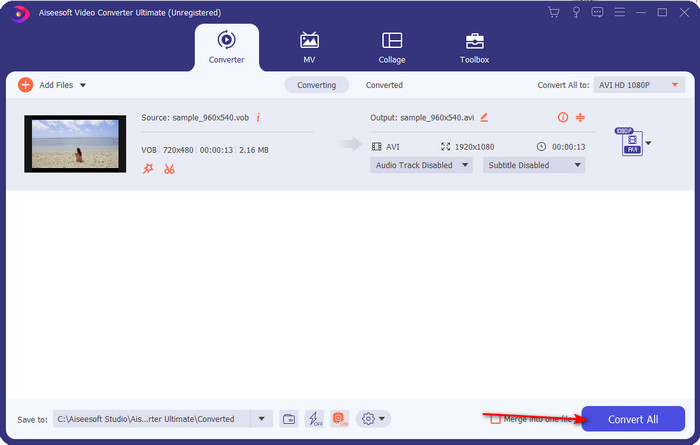
Krok 4. Po zakończeniu wyboru formatu kliknij Convert All, aby rozpocząć konwersję.
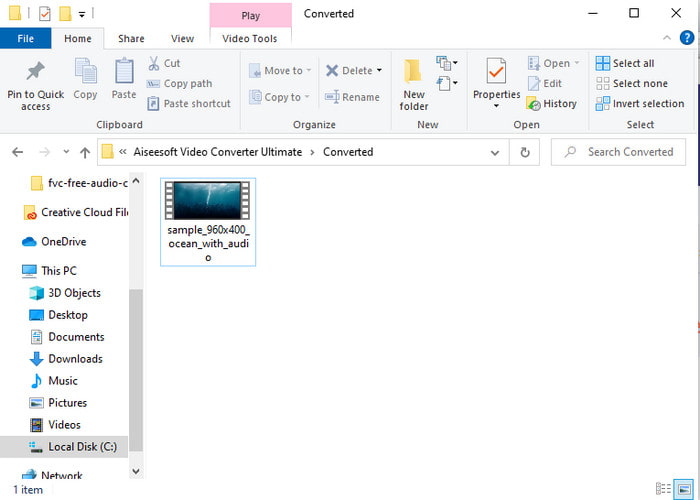
Krok 5. Nie musisz się martwić długim oczekiwaniem, ponieważ może to zająć tylko kilka sekund. Następnie na ekranie automatycznie otworzy się folder z przekonwertowanym plikiem multimedialnym, który utworzyłeś przed chwilą. Kliknij go, aby obejrzeć i cieszyć się nową wersją swojego pliku .vob.
Użyj darmowego narzędzia: HandBrake
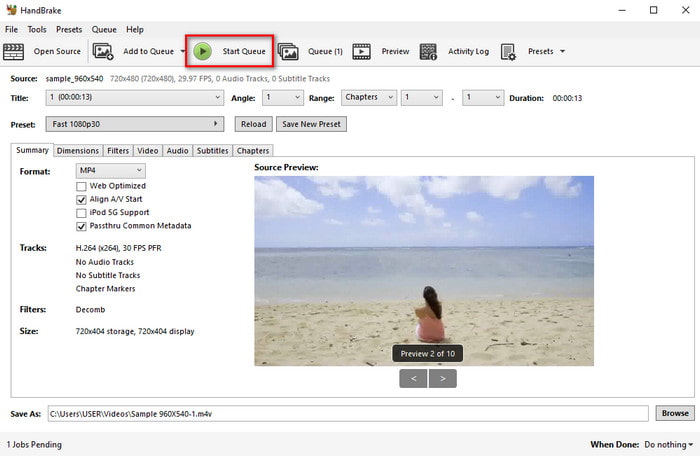
Jeśli szukasz darmowego narzędzia, to HandBrake będzie w tym pomocny i, podobnie jak FVC Video Converter Ultimate, nie wymaga połączenia z internetem do działania. Jest też bezpłatny do pobrania i używania przez każdego, kto ma komputer stacjonarny w domu, w pracy lub gdziekolwiek indziej. Jednak po pobraniu programu musisz dodatkowo pobrać osobny plik o nazwie .NET 5.0, zanim w ogóle będziesz mógł go używać. Niektórzy użytkownicy uważają to za trochę irytujące, ponieważ po pobraniu narzędzia trzeba jeszcze raz pobierać kolejny plik. Jeśli jednak chcesz przeprowadzić skuteczny i darmowy proces konwersji, spróbuj użyć HandBrake do konwersji VOB na AVI i postępuj zgodnie z poniższymi krokami.
Krok 1. Najpierw zainstaluj narzędzie na dysku swojego komputera.
Krok 2. Kliknij File i zlokalizuj plik .vob w swoim folderze.
Krok 3. Kliknij Format i wybierz z dostępnej listy, a następnie kliknij Start Queue.
Część 3. Jaki jest najlepszy konwerter do konwersji plików VOB na format AVI?
| Cechy | Darmowy konwerter wideo FVC | FVC Video Converter Ultimate | Hamulec ręczny |
| Konwersja formatu |  | | |
| Przyspieszenie sprzętu i konwersji |  | | |
| Łączność z Internetem | | | |
| Wzmacniacz wideo lub edycja | | | |
| Obsługiwany program | Narzędzie internetowe | Narzędzie oparte na komputerach stacjonarnych | Narzędzie oparte na komputerach stacjonarnych |
Część 4. Często zadawane pytania dotyczące VOB i AVI
Jakie inne pliki może zawierać VOB?
VOB jest wielopoziomowym formatem DVD, dzięki czemu może zawierać nie tylko wideo i audio, ale także napisy, treści nawigacyjne i menu.
Dlaczego nie mogę odtwarzać plików VOB na moim odtwarzaczu multimedialnym?
Jednym z powodów, dla których pliki VOB nie są odtwarzane w twoim odtwarzaczu multimedialnym, jest to, że format ten jest obsługiwany przez bardzo niewielką liczbę odtwarzaczy. Możesz kliknąć tutaj, aby uzyskać dostęp do dostępnych odtwarzaczy VOB. Jeśli nadal masz ten problem, jednym z możliwych rozwiązań jest konwersja za pomocą konwerterów opisanych powyżej.
Dlaczego pliki VOB są za duże?
Jedynym powodem, dla którego ten format jest tak duży, jest to, że zawiera inne dane, jakie powinna mieć płyta DVD. Nie możemy również pominąć możliwości długości filmu. Lub kliknij tutaj, aby dowiedzieć się, jak kompresować pliki VOB.
Wniosek
Więc teraz, jeśli chcesz przekonwertować plik VOB, możesz to łatwo zrobić za pomocą narzędzi dostępnych powyżej. Poza tym FVC Video Converter Ultimate to konwerter, który naprawdę wyróżnia się spośród innych wymienionych narzędzi online i offline. Ponieważ możesz łatwo przekonwertować VOB na AVI w systemie Windows, a nawet na Macu. Jeśli nadal nie masz pojęcia, czego użyć, zdecydowanie zalecamy pobranie tego fenomenalnego narzędzia, aby doświadczyć wyraźnych wyników i być zdumiony.
-
 VOB na MP4 - 3 sposoby konwertowania plików VOB na MP4 za darmo luzem
 W tym artykule przedstawiono 3 bezpłatne konwertery VOB na MP4 i powiązane samouczki. Możesz bezpłatnie konwertować pliki VOB na MP4 za darmo w systemie Windows / Mac / online.
-
 Najlepsze sposoby konwersji VOB na FLV [za darmo i online]
 Chcesz przekonwertować plik VOB na plik FLV? Możesz łatwo wykonać zadanie za pomocą konwerterów stacjonarnych lub online. Przeczytaj ten przewodnik i dowiedz się, jak łatwo i szybko przekształcić VOB na FLV.
-
 Co to jest plik VOB i jak za darmo przekształcić plik VOB w GIF
 Czy chcesz dowiedzieć się więcej o plikach VOB i jak je udostępnić po zgraniu? lub Dlaczego musisz przekonwertować VOB na GIF? Przeczytaj uważnie ten artykuł.
