


 Video Converter Ultimate
 Nagrywarka ekranu
 Naprawa wideo
Proces konwersji offline i online: najlepszy sposób na konwersję OGV na FLV
Podczas korzystania z filmów OGV ten stratny format kompresji wideo może Cię irytować, ponieważ materiał staje się rozmyty po wprowadzeniu ustawień. Sytuacja zdecydowanie się poprawi, jeśli przed udostępnieniem w sieci najpierw przekonwertujesz OGV na FLV; jedynym wyzwaniem może być znalezienie łatwego w obsłudze, a jednocześnie zaawansowanego programu do konwersji wideo. Na szczęście mamy dla Ciebie najlepsze rozwiązanie do pracy offline i online, które pozwala łatwo konwertować OGV do FLV. Dla Twojej wygody wystarczy, że zastosujesz się do kroków opisanych w tym artykule.

Część 1. Jak łatwo przekonwertować OGV na FLV [Offline]
Szczerze mówiąc, w internecie jest mnóstwo konwerterów wideo, ale tylko nieliczne z nich obsługują konwersję plików OGV. Ponieważ ten format nie jest powszechny wśród większości użytkowników wideo, twórcy konwerterów często nie dodają go do listy obsługiwanych formatów. Właśnie z tego powodu tak przydatny jest Video Converter Ultimate. W pełni obsługuje on pliki wejściowe OGV i umożliwia szybkie konwertowanie filmów OGV do formatu FLV. Warto również zaznaczyć, że program potrafi nie tylko przekształcać Twoje nagrania OGV, ale też je edytować za pomocą praktycznych narzędzi. Wszystko, czego potrzebujesz, znajdziesz w Video Converter Ultimate. Dlatego przygotowaliśmy dla Ciebie najprostsze możliwe kroki do wykonania:
Krok 1: Zanim będziesz mógł korzystać z oprogramowania, musisz je najpierw zainstalować na swoim komputerze. Zrobisz to, klikając jeden z przycisków Free Download poniżej, w zależności od używanego systemu operacyjnego. Poczekaj, aż plik .exe lub .dmg zostanie pobrany, a następnie otwórz go, aby rozpocząć instalację. Po zakończeniu możesz uruchomić program, klikając Start Now.
Bezpłatne pobieranieDla Windows 7 lub nowszegoBezpieczne pobieranie
Bezpłatne pobieranieDla MacOS 10.7 lub nowszegoBezpieczne pobieranie
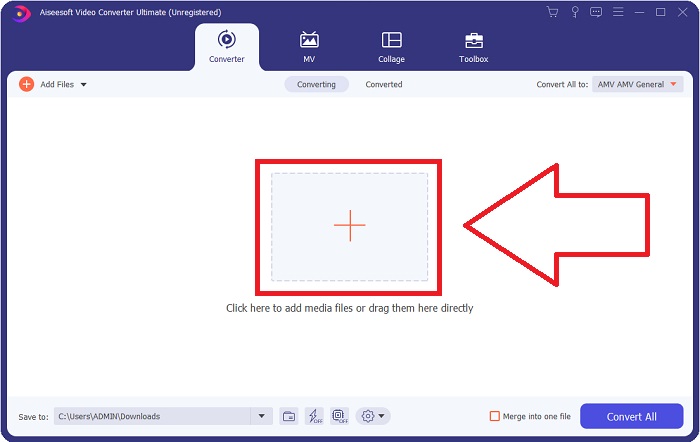
Krok 2: Gdy okno programu się pojawi, zobaczysz interfejs z przyciskiem z symbolem + pośrodku. Aby zaimportować plik wideo, który chcesz przekonwertować, kliknij ten przycisk lub przeciągnij i upuść plik bezpośrednio do programu.
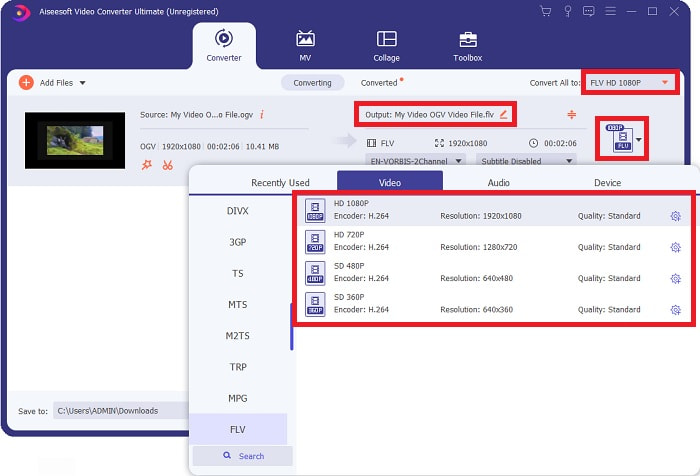
Krok 3: Po prawej stronie wyświetlany jest aktualny format pliku Twojego wideo. Kliknij go, a pojawi się lista wszystkich dostępnych formatów. W tym przypadku przewiń listę i wybierz FLV lub po prostu wyszukaj go w polu wyszukiwania poniżej. Po prawej stronie karty możesz również wybrać jakość wideo dla pliku wynikowego.
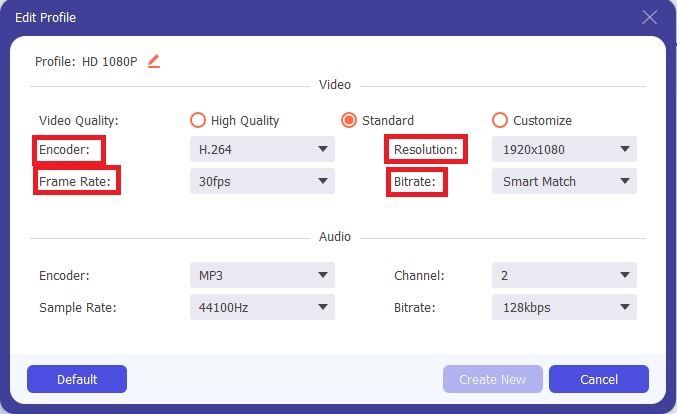
Krok 4: Jeśli szukasz większej liczby opcji, znajdziesz je po kliknięciu ikony koła zębatego obok wybranej jakości wideo. Dzięki temu możesz dodatkowo edytować rozdzielczość wideo oraz inne parametry, takie jak liczba klatek na sekundę, częstotliwość próbkowania, bitrate i kodek. Gdy wszystko będzie ustawione, kliknij przycisk Create New w prawym dolnym rogu, aby zapisać zmiany.
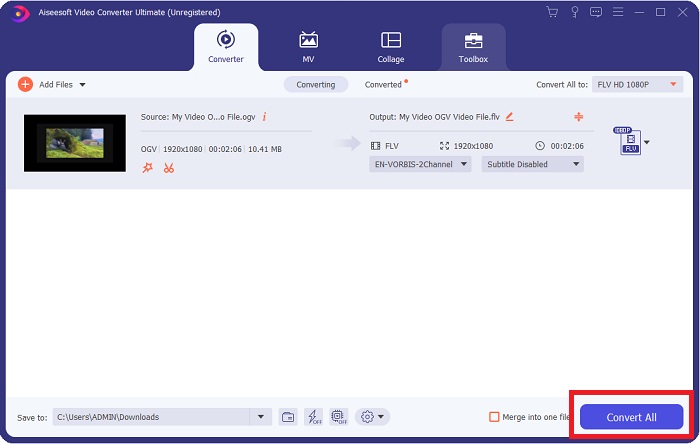
Krok 5: Po zakończeniu wprowadzania wszystkich ustawień możesz rozpocząć właściwą konwersję, klikając przycisk Convert All w prawym dolnym rogu i poczekać na zakończenie procesu.
Część 2. Inna dostępna metoda konwersji OGV na FLV [Online]
Jeśli nie masz zbyt wiele czasu i musisz jak najszybciej przekonwertować plik OGV na FLV, nie musisz się martwić – nadal mamy dla Ciebie rozwiązanie. Możesz skorzystać z internetowej wersji wspomnianego programu, która również zapewnia maksymalną wygodę i płynny przebieg konwersji. FVC Free Video Converter Online to narzędzie webowe, które z łatwością zamieni pliki OGV na FLV, oferując przy tym te same opcje dotyczące rozdzielczości i jakości dźwięku. Aby z niego skorzystać, wykonaj następujące kroki:
Krok 1: Kliknij ten link, a zostaniesz przekierowany bezpośrednio do konwertera online. Na środku strony znajduje się przycisk z napisem Add Files to Convert. Kliknij go, aby pobrać launcher, którego potrzebujesz do zaimportowania pliku wideo, który chcesz przekonwertować.
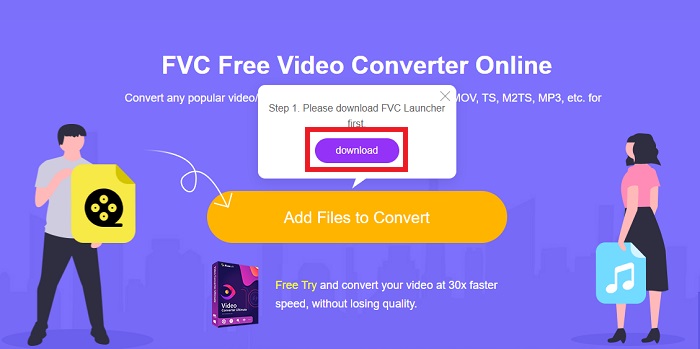
Krok 2: Po zakończeniu możesz ponownie kliknąć wspomniany przycisk, aby wgrać swój plik. Jeśli przesyłanie się powiedzie, pojawi się odpowiednie okno. W dolnej części okna możesz następnie wybrać format FLV spośród innych dostępnych formatów.
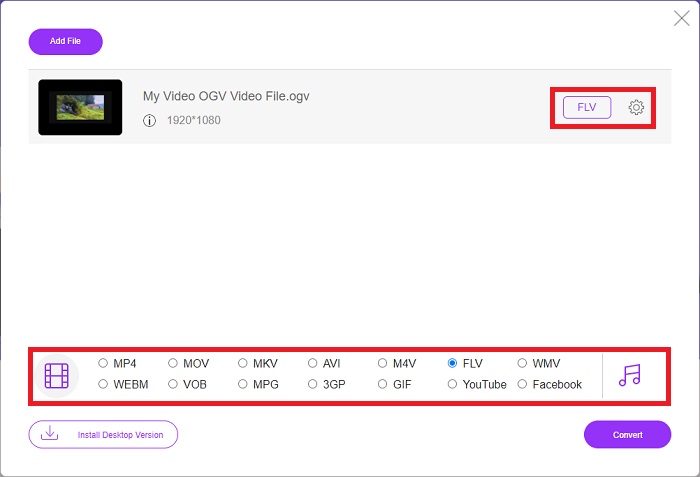
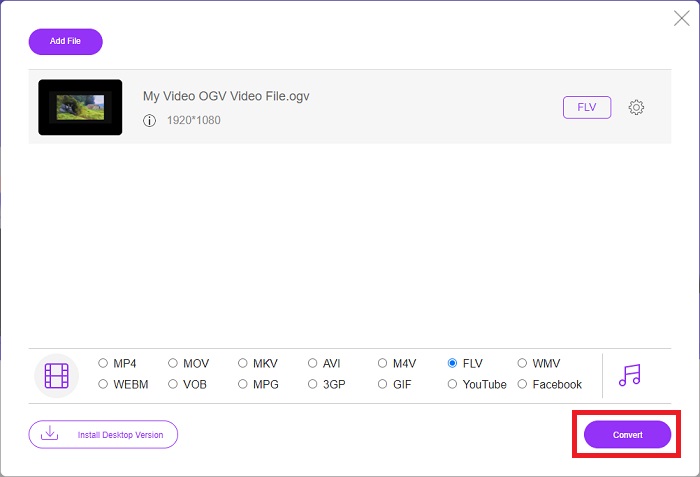
Krok 3: Podobnie jak w wersji desktopowej, po prawej stronie znajdziesz ikonę koła zębatego, dzięki której możesz dodatkowo edytować swoje wideo. Po jej kliknięciu pojawią się ustawienia wideo i audio, gdzie możesz zmienić kodeki, rozdzielczość, liczbę klatek na sekundę i inne parametry. Kliknij OK, a następnie przycisk Convert w prawym dolnym rogu, aby rozpocząć proces konwersji.
Część 3. Rozszerzona wiedza na temat OGV i FLV
Jeśli chcesz dowiedzieć się więcej o dwóch porównywanych plikach, tutaj podajemy wszystkie niezbędne informacje, które możesz chcieć przeczytać:
Metoda kodowania wideo Ogg Vorbis może najczęściej łączyć się z plikami o rozszerzeniu .ogv. Ogg Vorbis to otwarty, nieopatentowany format kompresji dźwięku. Format kontenera dla plików audio, wideo i informacji jest znany jako Ogg, a technologia kompresji dźwięku Vorbis nosi nazwę. Format pliku OGV to kontener na pliki wideo. Strumienie wideo połączone z co najmniej jednym kodekiem wideo, takim jak Theora i DivX, można znaleźć w plikach OGV. Korzystając z tych plików, użytkownicy mogą odtwarzać nagrany materiał w pliku treści na kilku urządzeniach multimedialnych.
Z drugiej strony plik wideo przechowywany w formacie kontenera Adobe Flash Video (FLV) jest plikiem FLV. Adobe Flash Player używa go głównie do oferowania treści wideo online, takich jak filmy i odcinki telewizyjne. Należy również pamiętać, że jest to otwarty format obsługiwany przez różne aplikacje firm innych niż Adobe/Macromedia. Dla bardziej szczegółowego porównania tych dwóch przygotowaliśmy stół specjalnie dla Ciebie.
| Ogg Vorbis (OGV) | Adobe Flash wideo (FLV) | |
| Rozszerzenie pliku | .ogv | .flv |
| Deweloper | Fundacja Xiph.Org | Zawiera oprogramowanie Adobe |
| Programy wspierające | MPlayer Classic, VLC Media Player, Jriver Media Center, MPUI | RealPlayer, Apple QuickTime Player, Mplayer, VLC Media Player |
| Zalety | OGG ma tę zaletę, że jest wolny od patentów, powszechnie uznawany i natywnie obsługiwany przez większość przeglądarek. W rezultacie, jeśli chcesz przesłać film do swojej witryny, ten format jest dobrym rozwiązaniem. | Piękno Flasha polega na tym, że może pomóc stronom internetowym, które chcą zawierać ruch i treści interaktywne. Procedura jest prosta i ostatecznie może mieć znaczący wpływ. Wszyscy używali również Flasha do podstawowych gier w swoim najlepszym wydaniu. |
| Niedogodności | Pomimo powszechnego stosowania format wideo OGG ma kilka wad. Na przykład Safari i Internet Explorer obsługują go tylko częściowo; w związku z tym użytkownicy mogą niepoprawnie wyświetlać Twój film w tych przeglądarkach. | Wadą jest oczywiście to, że format FLV stał się mniej popularny w ostatnich latach. Tworzenie zawartości FLV może zająć dużo czasu i być kosztowne. Kolejną wadą jest to, że materiału Flash nie można odtwarzać na urządzeniach z systemem iOS, co poważnie ogranicza jego zdolność do przyciągania nowych obserwujących. |
Część 4. Często zadawane pytania dotyczące konwersji OGV i FLV
Czy OGG i OGV to to samo?
Jest to odpowiedni podzbiór nośnika wideo typu Ogg/Ogg z rozszerzeniem pliku. ogv. Inne aplikacje Ogg wykorzystują rozszerzenie pliku. ogv z typem nośnika application/ogg od. ogx to nadzbiór wideo/ogg.
Czy jakość FLV jest lepsza niż MP4?
Przyjmuje się, że MP4 zawiera wysokiej jakości kodowanie cyfrowe wideo i audio. Opinia publiczna na temat FLV jest mniej jednoznaczna, choć zalety i wady FLV rzadko koncentrują się na samej jakości formatu. Dzięki wyższemu stopniowi kompresji MP4 charakteryzuje się mniejszą utratą jakości. Tutaj możesz sprawdzić sposoby, aby konwertować pliki FLV do MP4.
Czy FLV jest bezstratny czy stratny jak OGV?
Format pliku FLV dla Flash Video obsługuje dwie wersje kodeka współdzielenia ekranu (wideo z ekranu), który jest metodą kodowania screencastu. Formaty te są oparte na kafelkach bitmapowych i są stratne, gdy głębie kolorów są zmniejszane i kompresowane za pomocą Zlib.
Wniosek
Bez względu na to, ile czasu masz na konwersję plików wideo, zarówno oprogramowanie, jak i jego odpowiednik w postaci narzędzia online zapewnią Ci najwygodniejsze rozwiązanie. Krótko mówiąc, Video Convert Ultimate i Free Video Converter to te, które muszą być pierwszą rzeczą, o której myślisz, jeśli chodzi o konwersję wideo, aby zaoszczędzić czas na przeglądaniu Internetu i znajdowaniu najlepszego. Tutaj oddajemy to, co najlepsze.
-
 Najlepsze sposoby konwersji VOB na FLV [za darmo i online]
 Chcesz przekonwertować plik VOB na plik FLV? Możesz łatwo wykonać zadanie za pomocą konwerterów stacjonarnych lub online. Przeczytaj ten przewodnik i dowiedz się, jak łatwo i szybko przekształcić VOB na FLV.
-
 Najlepsze 4 darmowe aplikacje RMVB do FLV Converter na komputerze lub w Internecie
 W tym artykule dowiesz się, jakie jest najlepsze oprogramowanie do konwersji RMVB na FLV i aplikacje internetowe, które mogą konwertować pliki RMVB (RealMedia Variable Bitrate) na wideo FLV.
-
 Jak skompresować plik OGV bez utraty jakości
 Nie możesz wysłać innym osobom dużych plików OGV? Cóż, ten artykuł przedstawi 2 proste sposoby, które pomogą Ci łatwo skompresować pliki OGV.
