


 Video Converter Ultimate
 Nagrywarka ekranu
 Naprawa wideo
Dowiedz się, jak zwiększyć głośność w AirPods i Aid Pods Pro za pomocą kroków
Dzięki AirPods i AirPods Pro możesz sterować Siri, słuchać ulubionej muzyki, odbierać połączenia telefoniczne i robić więcej. Kolejną świetną rzeczą w posiadaniu Air Pod jest to, że jest ona bezprzewodowa, co oznacza, że nie będziesz mieć trudności z usunięciem zawiązanego drutu ze słuchawek. Możesz także łatwo zmienić głośność, nakazując Siri zwiększenie lub zmniejszenie głośności.
But there are times that Siri can't detect your voice, so the best to change the volume is to do it manually. Below are the best ways to turn your volume up and the steps indicated between the functions. All of these functions are tested and do great on changing the volume of the sound. Let's learn how to turn up the volume on AirPods or AirPods Pro without further ado.
Część 1. Jak zwiększyć głośność w AirPods / AirPods Pro na urządzeniach z systemem iOS?
All these techniques that we provide will help you if you need to increase the audio on your AirPods. Although some of them are not new to us, we still include them. But before anything else, ensure that your AirPods or Air Pod Pro is connected to your phone via Bluetooth. If you don't know how to connect it, you can bring your AirPods or AirPods Pro next to your iOS device; make sure that it is under 30 meters. Open the case, press and hold the button on the case's back. Immediately a prompt will be on your screen; tap Connect. Once connected, the light on the case will blink, then permanently turn into solid. You can now play the sound on your AirPods after that.
Sposób 1. Użyj przycisku zwiększania głośności
Jest to najczęstszy sposób na zwiększenie głośności dowolnego dźwięku odtwarzanego w systemie iOS, a to za pomocą twardych klawiszy głośności. Te twarde klawisze znajdują się po lewej stronie urządzeń z systemem iOS. Dowiedzmy się, jak zwiększyć głośność w Aird Pods Pro lub AirPods bez opóźnień.
Step 1. Once the AirPods or AirPods Pro is connected, you can play the sound on your iOS. After playing, click the volume up key on your phone to increase the audio.
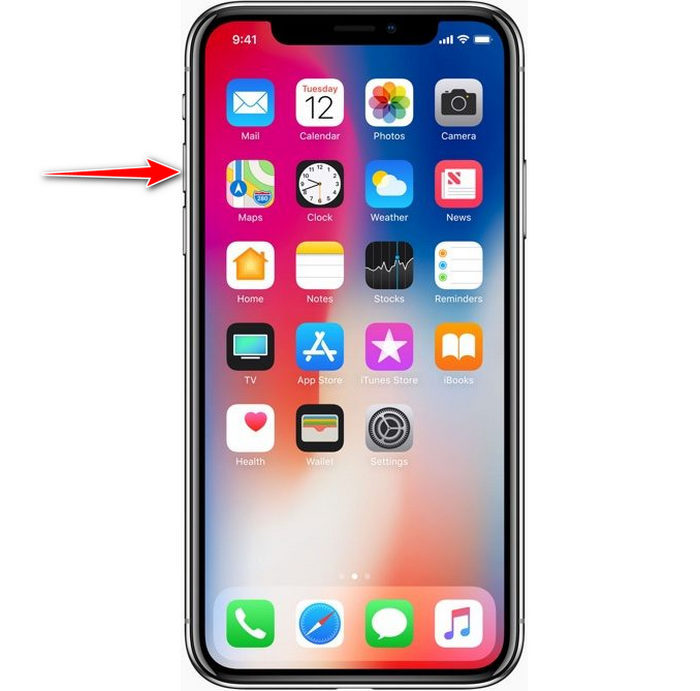
Step 2. If you feel that the sounds became high, click the volume down key to balance it.
Sposób 2. Użyj Centrum sterowania
Poniższa technika jest podobna do pierwszej; jednak użycie tego jest niezwykłe, ponieważ pierwsza technika jest znacznie łatwiejsza. Jest to jednak przydatne, jeśli klawisze głośności są zepsute lub nie mogą. Jeśli więc chcesz wypróbować tę technikę, możesz wykonać następujące kroki.
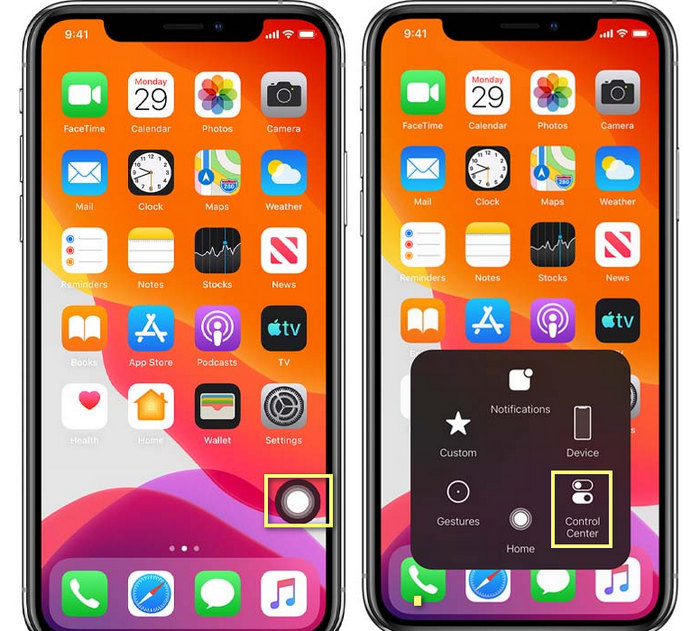
Step 1. Click the System Touch presented on your iOS devices, and click Control Center.
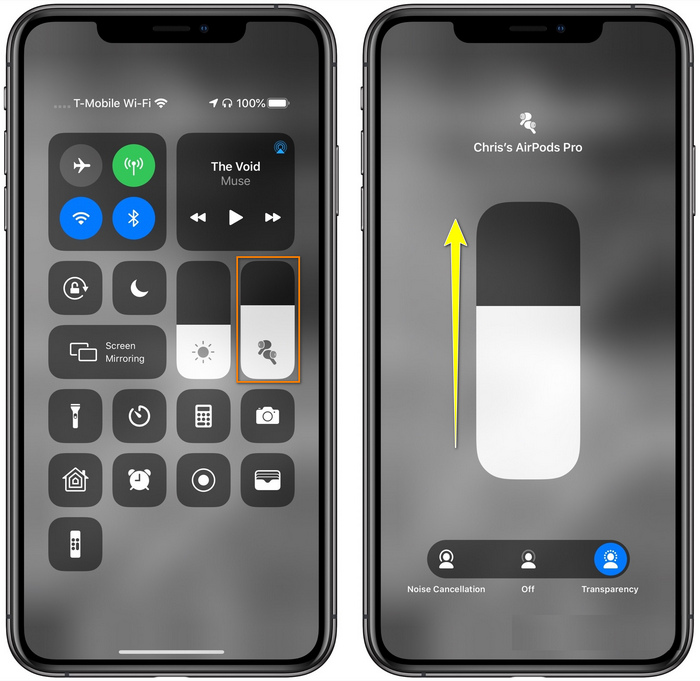
Step 2. At the Control Center, tap and hold the audio slider, adjust the slider up on the next function you will see on the screen, in this area, you can turn on the noise cancellation and transparency if you need.
Sposób 3. Użyj ustawień
Did you know you can make a major adjustment on your volume if you go to the Settings of your iOS. However, this step only works if you stream music on your AirPods. Also, the volume will change a little bit, but it will increase. So, if you are ready to dig into how to turn up the volume on AirPods thru Settings, you can follow the steps below.
Step 1. Open the Settings, find Music, and click it.
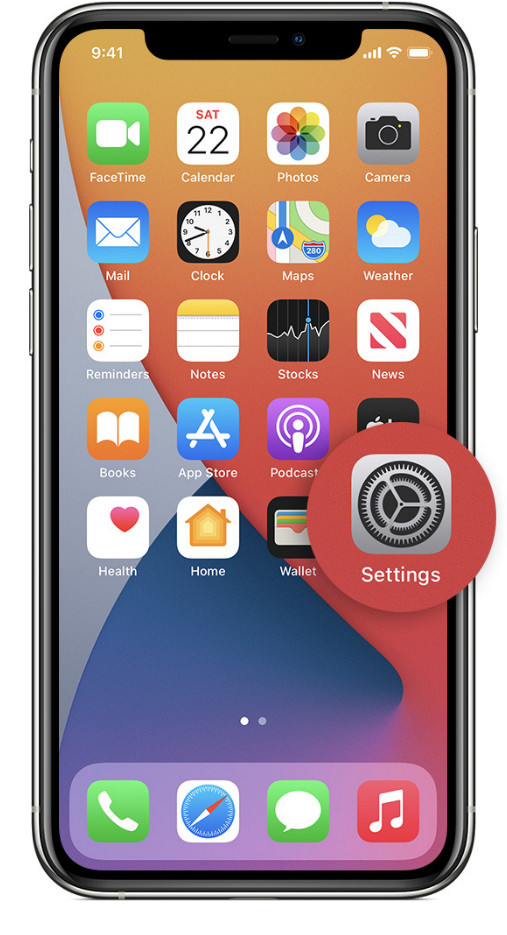
Step 2. Under Playback options, click the EQ choose one of the equalizers you want to add to your music.
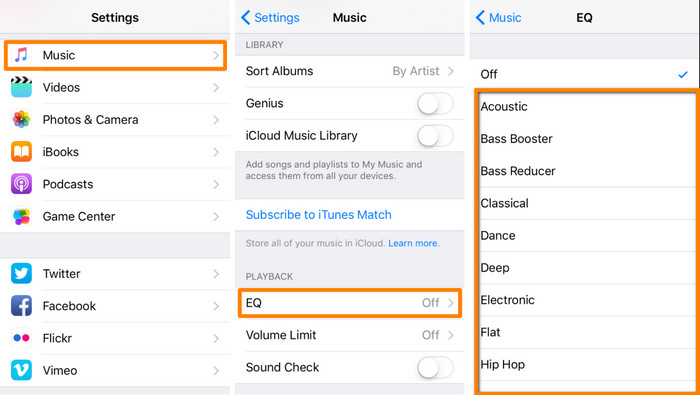
Step 3. After choosing, you can now click the volume key up on your phone to increase.
Bonus: jak zwiększyć głośność swoich filmów za pomocą najlepszego wzmacniacza głośności na Windows i Mac
Not satisfied with the volume techniques we taught above? In that case, you can use the FVC Video Converter Ultimate to increase the volume of the file to hear it loud and clear. With this tool, you can extend the volume of the video file before you watch it first. But the downside of it is that it is not available on any mobile devices, and it can only increase one file audio.
Co więcej, jeśli chcesz tutaj zwiększyć głośność, usłyszysz różnicę między oryginalnym dźwiękiem a wzmocnionym; możesz wykonać podane kroki. Ale przede wszystkim pamiętaj, aby przesłać plik audio, który chcesz zwiększyć głośność. Postępuj zgodnie z instrukcjami podanymi poniżej, aby dowiedzieć się, jak zwiększyć głośność w AirPods.
Step 1. Download the software on your desktop, install it, then follow the installation process, and press Start Now to run the tool on your system.
Bezpłatne pobieranieDla Windows 7 lub nowszegoBezpieczne pobieranie
Bezpłatne pobieranieDla MacOS 10.7 lub nowszegoBezpieczne pobieranie
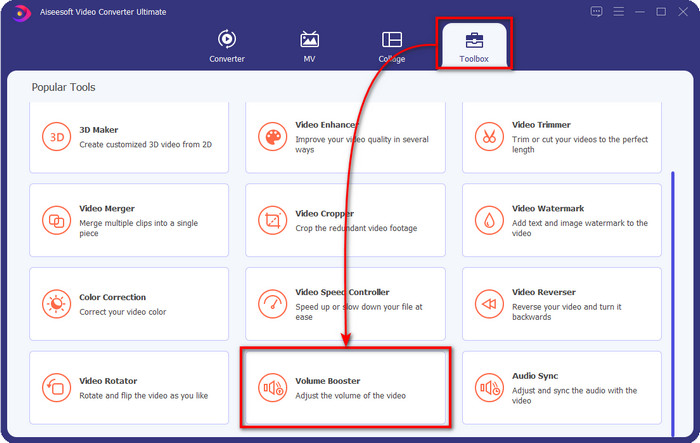
Step 2. Go to the Toolbox tab, look for the Volume Booster, and click it.
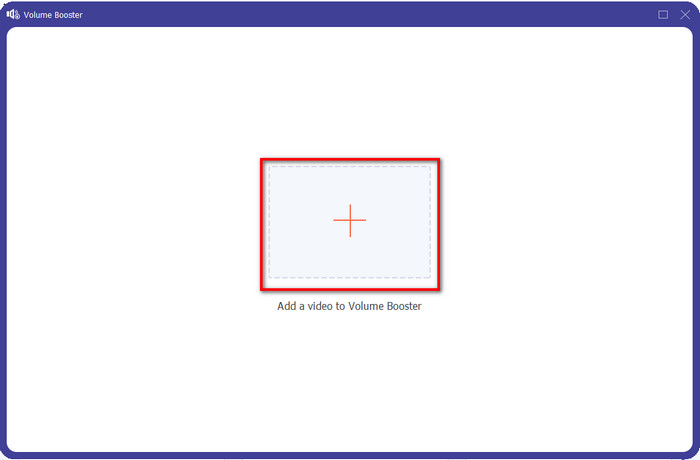
Step 3. A new window will show; click the add button to insert the file to increase the volume. Browse for the file, and press Open.
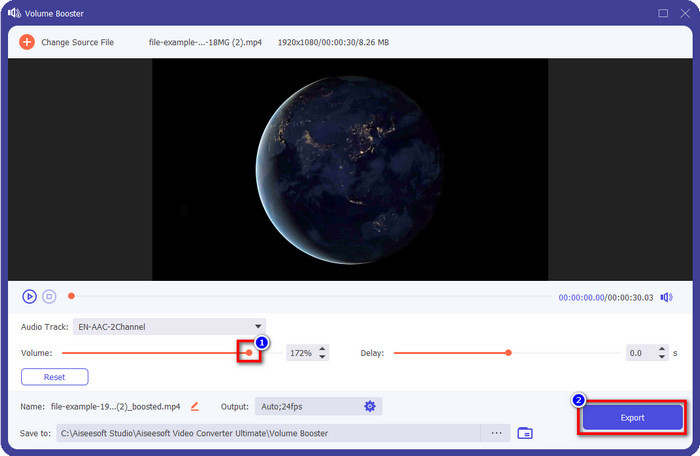
Step 4. After that, go to the Volume and adjust it by dragging the slider to the right to increase volume. Once you've done, click Export to proceed. With that, you have already increased the volume of the video you want.
Powiązane:
Część 2. Często zadawane pytania dotyczące zwiększania głośności w AirPods
Czy słuchanie głośnych dźwięków jest dobre?
Nie, nie nadaje się do twojego ucha. Choć słuchanie muzyki na maksymalnym poziomie jest dla nas dobre, to nie dla naszych uszu. Upewnij się, że nie jesteś nadmiernie wystawiony na 70 decybeli, aby uniknąć utraty słuchu i innych trwałych uszkodzeń, zwłaszcza jeśli używasz słuchawek lub AirPods. Ogólnie rzecz biorąc, nie ma to natychmiastowego wpływu na ucho, ponieważ nasz zestaw słuchawkowy nie może wytworzyć ogłuszającego dźwięku, takiego jak eksplozja. Ale na dłuższą metę wynik będzie zły. Więc zanim to się stanie, musisz temu zapobiec.
Dlaczego muszę wzmocnić dźwięk?
W niektórych przypadkach będziesz musiał zwiększyć głośność, aby lepiej słyszeć dźwięk, zwłaszcza aby posłuchać niektórych szczegółów krewnych, które są częścią dźwięku lub obrazu. Pamiętaj jednak, aby nie narażać ucha na głośny dźwięk, aby uniknąć komplikacji, które mogą prowadzić do trwałego uszkodzenia.
Dlaczego moje AirPods mają brzęczenie?
Istnieje wiele możliwych powodów, dla których Twoje AirPods mogą zacząć brzęczeć. Jednym z powodów jest to, że mocno naciskasz na AirPods podczas zbyt długiego odtwarzania dźwięku na basie. Brzęczenie nastąpi po ciągłym nacisku na AirPods. Aby tego uniknąć, musisz prawidłowo używać głośności i nie za głośno.
Wniosek
Now we have learned how to turn up the volume on AirPods on your iOS devices quickly. Although the technique we present can help you increase the volume, it is sometimes not enough. So, if you are still not satisfied with the volume, you can use the FVC Video Converter Ultimate with the ways we taught. With this tool, you can quickly increase the volume of your audio within a few clicks. Today is your lucky day because you can download it right away by clicking the download button below. What are you waiting for? No need to worry; it is safe to download for everyone.
-
 Jak zwiększyć głośność i cieszyć się najlepszą jakością dźwięku [2021]
 Masz trudności, ponieważ głośność oglądania jest bardzo niska? Następnie przeczytaj ten artykuł, ponieważ zawieramy sztuczki, jak zwiększyć głośność i narzędzie, którego możesz użyć.
-
 Szybkie i łatwe sposoby synchronizacji dźwięku i wideo w programie Adobe Premiere Pro
 Czy chcesz wiedzieć, jak zsynchronizować dźwięk i wideo w programie Premiere Pro? Wtedy ten artykuł będzie odpowiadał Twoim potrzebom. Ponieważ sami próbujemy, jak zsynchronizować, aby zapewnić tylko prawdziwe i proste kroki.
-
 Najlepsze rozwiązania 3 dotyczące rozwiązywania problemu z opóźnieniem dźwięku [2021]
 Czy chcesz wiedzieć, jak naprawić opóźnienie dźwięku w swoim filmie? Jesteś we właściwym miejscu, ponieważ wyjaśniamy, jakie są czynniki i jak to naprawić.
