


 Video Converter Ultimate
 Nagrywarka ekranu
 Naprawa wideo
Dowiedz się, jakie są 7 popularnych edytorów tagów muzycznych dostępnych w Reach
Odtwarzacz multimediów ma wbudowany edytor metadanych, który pozwala edytować lub dodawać tagi muzyczne, uzupełniając nazwę wykonawcy, tytuł i gatunek. Jednak większość z nich mocno ogranicza to, co oferuje, aby pomóc użytkownikom w dodawaniu tagów lub metadanych. Czy to nie frustrujące? Na szczęście najlepszym sposobem na edycję metadanych jest użycie edytora metadanych w telefonie. Tylko które aplikacje warto używać? Która aplikacja najlepiej odpowiada Twoim potrzebom w zakresie edycji metadanych? Jeśli zadajesz sobie to samo pytanie, nie musisz się martwić. Dziś omawiamy sześć najlepszych aplikacji, których możesz użyć do edycji na swoich urządzeniach – przeczytaj uważnie, aby poznać kolejne aplikacje do edycji metadanych muzyki, które możesz pobrać i używać.

Część 1. Ultimate Music Tag Editor dostępny do użycia w systemach Windows i Mac
Jeśli masz Windows lub Mac do edycji metadanych, to jakiego narzędzia powinieneś użyć? Sugerujemy, abyś skorzystał z FVC Video Converter Ultimate. W przeciwieństwie do prostych edytorów tagów, to narzędzie zapewnia wszystkie funkcje, jakich możesz potrzebować, aby dodać lub zmienić metadane w kilku kliknięciach. Wyobraź sobie: wszystkie funkcje, jakie mogą oferować inne aplikacje, masz w jednym narzędziu, z wyjątkiem automatycznego tagowania. Co ważniejsze, możesz edytować, usuwać i aktualizować wszystkie tagi w pliku audio, wykonując poniższe kroki. Aby więc edytować tagi muzyczne w Windows 10/11 lub na Macu, skorzystaj z poniższego samouczka.
Krok 1. Aby pobrać edytor metadanych na Windows lub Mac, naciśnij odpowiedni przycisk poniżej. Gdy pobieranie się zakończy, kliknij plik, aby zainstalować aplikację, postępuj zgodnie z instrukcjami, a następnie uruchom narzędzie.
Bezpłatne pobieranieDla Windows 7 lub nowszegoBezpieczne pobieranie
Bezpłatne pobieranieDla MacOS 10.7 lub nowszegoBezpieczne pobieranie
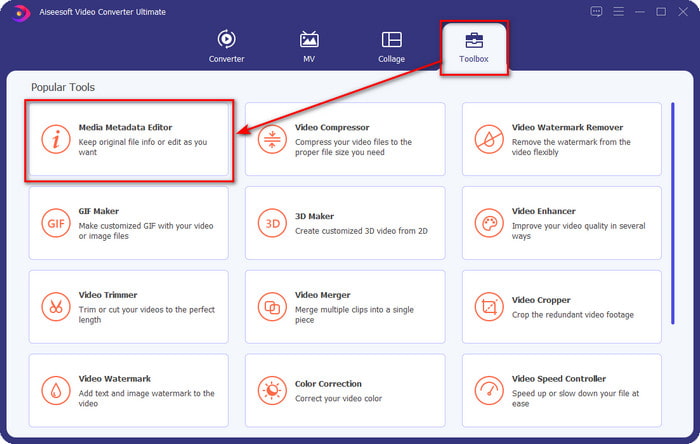
Krok 2. Przejdź do sekcji Toolbox, odszukaj i kliknij na liście Media Metadata Editor.
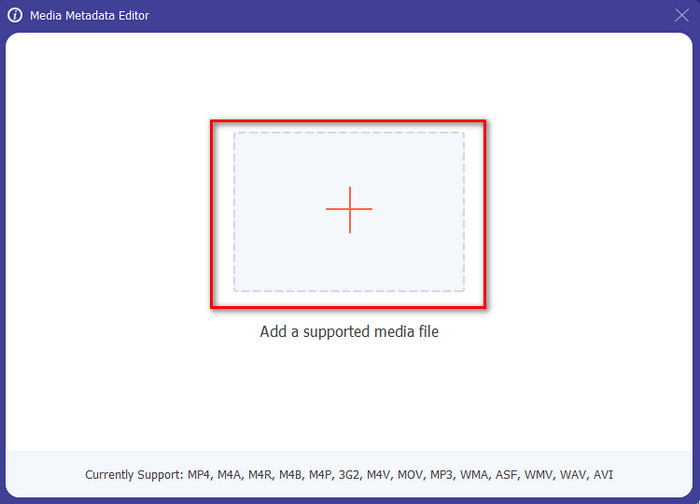
Krok 3. Naciśnij ikonę +, a na ekranie pojawi się okno folderu; znajdź plik audio, który chcesz edytować, i kliknij Open, aby przejść do następnego kroku.
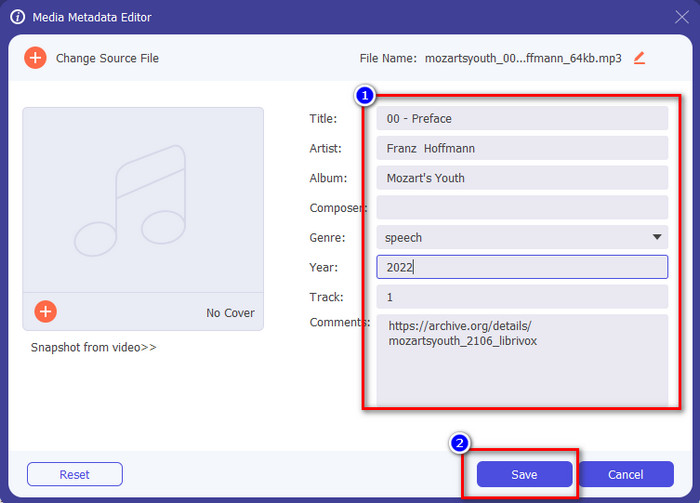
Krok 4. Zaktualizuj tag pliku audio, wpisując nowe dane w polu tekstowym. Następnie kliknij Zapisz, a wszystkie zmienione tagi zostaną zaktualizowane. Nawet jeśli przeniesiesz plik na telefon, tagi pozostaną zapisane w pliku audio.
Powiązane:
Najlepsze przeglądarki metadanych
Część 2. 6 najlepszych aplikacji do edycji tagów muzycznych na urządzeniach z Androidem i iOS
Automatyczny edytor tagów
Obsługiwane urządzenia: Android
Ocena w Play Store: 4,4 gwiazdki
Recenzje lub oceny: 81 332 osoby
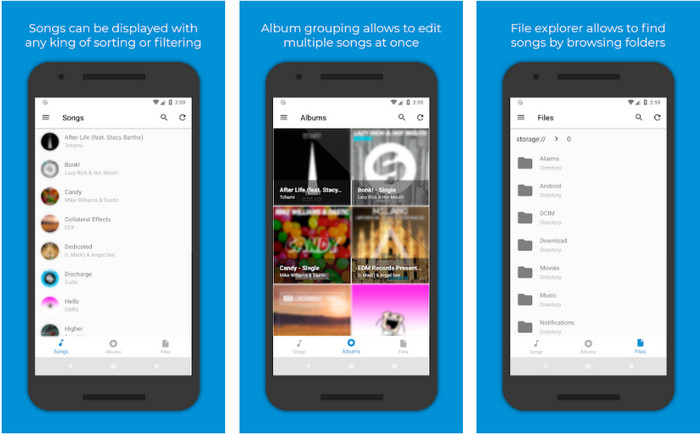
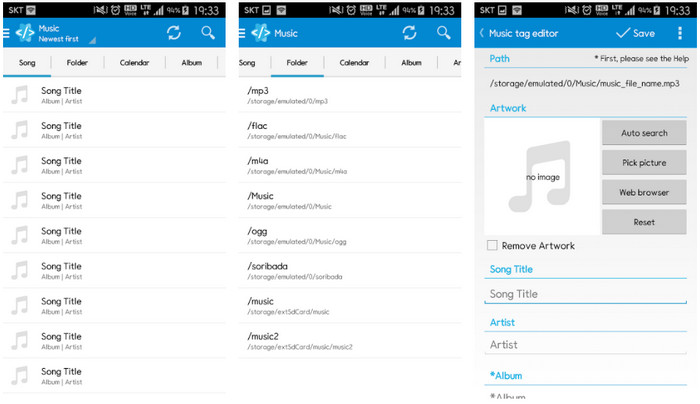
Jeśli jesteś użytkownikiem Androida, możesz skorzystać z aplikacji Automatic Tag Editor, jednego z najlepszych edytorów metadanych muzyki. Ta aplikacja idealnie nadaje się do edycji tagów w plikach audio w mniej niż minutę. Kolejną zaletą jest to, że posiada automatyczny edytor metadanych do uzupełniania lub aktualizowania danych w plikach, zwłaszcza jeśli kupiłeś ich cyfrową wersję. Obsługuje wiele tagów, które może wypełnić, takich jak tytuł, gatunek, rok i wiele innych, abyś mógł jeszcze lepiej rozpoznawać swoje pliki. W ostatniej aktualizacji wielu użytkowników zauważyło jednak występowanie błędów i usterek podczas używania aplikacji na Androidzie. Obsługuje też popularne formaty muzyczne, które możesz wczytać, takie jak MP3, M4A, OGG, FLAC, WMA i WAV.
Edytor tagów muzyki gwiazd
Obsługiwane urządzenia: Android
Ocena w Play Store: 4,0 gwiazdki
Recenzje lub oceny: 293 598 osób
Star Music Tag Editor to kolejny edytor tagów muzycznych, który możesz pobrać z Play Store. Ta aplikacja jest świetna, ponieważ oferuje prosty interfejs graficzny, dzięki czemu jest łatwiejsza w obsłudze niż wiele innych. Podobnie jak pierwsze narzędzie, obsługuje automatyczne wyszukiwanie, które skutecznie uzupełnia tagi muzyczne. Choć aplikacja jest łatwa w użyciu i ma wiele do zaoferowania, zdarzają się sytuacje, gdy nie działa tak skutecznie, jak twierdzą niektórzy użytkownicy. Gdy testowaliśmy edycję metadanych w tej aplikacji, zdarzało się, że zmiany nie były zapisywane. Ponadto przy próbie zapisania metadanych może pojawić się wyskakujący komunikat o nieprawidłowej ramce audio (invalid audio frame exception) przy nowym utworze z powodu uszkodzonego pliku. Część użytkowników nie ma jednak takich problemów, więc jeśli chcesz, możesz pobrać tę aplikację w Play Store i wypróbować ją samodzielnie.
Edytor tagów muzycznych - Tagger Mp3 | Darmowy edytor muzyki
Obsługiwane urządzenia: Android
Ocena w Play Store: 3,8 gwiazdki
Recenzje lub oceny: 11 378 osób
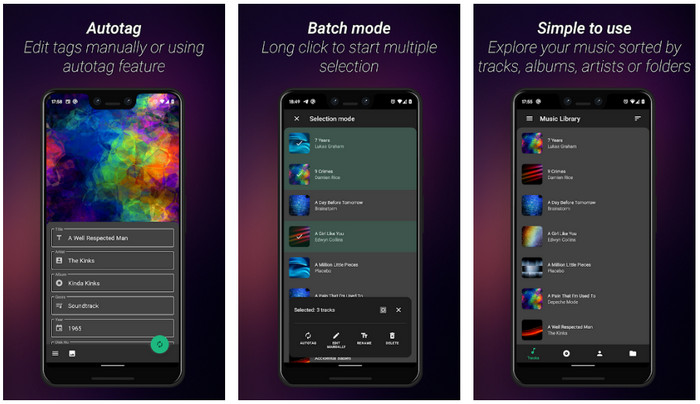
Jeśli masz problem z błędnymi tagami, użyj aplikacji Music Tag Editor - Mp3 Tagger | Free Music Editor, aby szybko naprawić metadane muzyczne. Narzędzie to może uzupełnić pozostałe dane, jeśli najpierw wpiszesz tytuł utworu i nazwę wykonawcy, aby poprawnie wyszukać odpowiednie tagi. Dzięki tej aplikacji możesz z łatwością dodawać tagi do wielu plików audio jednocześnie. Jednak automatyczne wyszukiwanie tagów trwa dość długo, a czasem zwraca niepowiązane tagi. Dodatkowo, gdy chcesz dodać obraz do ścieżki audio, obraz nie zostaje dołączony do edytowanego utworu.
Ever Tag: Edytor tagów muzycznych 4+
Obsługiwane urządzenia: iOS
Ocena w App Store: 4,7 gwiazdki
Recenzje lub oceny: 1,1 tys. osób
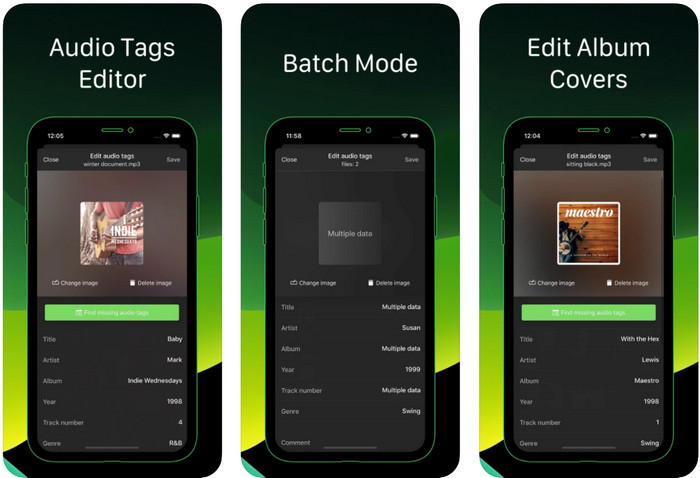
Naucz się edytować tagi muzyczne na iPhonie za pomocą aplikacji Ever Tag: Music Tag Editor 4+. Ta aplikacja na iOS obsługuje wiele formatów audio, więc dodawanie metadanych jest łatwiejsze niż kiedykolwiek, podobnie jak ich edycja. Co więcej, aplikacja oferuje różne zestawy tagów metadanych, które możesz dodać do pliku audio, uzupełniając je pojedynczo – od tytułu aż po oceny. Minusem korzystania z aplikacji jest to, że nie potrafi automatycznie uzupełniać tagów poprzez wyszukiwanie online, tak jak robią to niektóre narzędzia na Androida. Mimo że aplikacja deklaruje obsługę przetwarzania wsadowego przy edycji metadanych, w praktyce nie da się tego zrobić. Jeśli jednak chcesz ją wypróbować, pobierz ją teraz z App Store.
Generator tagów muzycznych
Obsługiwane urządzenia: iOS
Ocena w Play Store: 4,5 gwiazdki
Recenzje lub oceny: 55 osób
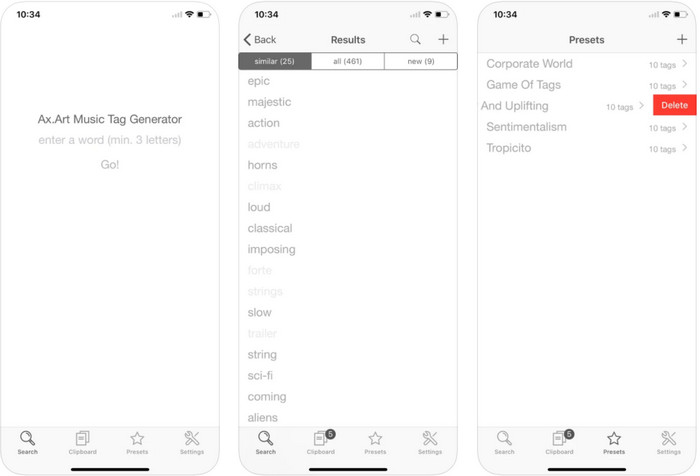
Choć popularność aplikacji Music Tag Generator nie dorównuje innym edytorom, nadal możesz w niej podejrzeć i edytować tagi muzyczne. To takie małe narzędzie użytkowe do wyszukiwania i porządkowania utworów według tagów. Oprócz porządkowania tagów możesz także zmieniać metadane zgodnie ze swoimi potrzebami i je organizować. Mimo że aplikacja pomaga w edycji, wciąż nie jest tak dobra jak inne edytory opisane w tym artykule. Ma prosty interfejs, ale jej funkcje są mniej rozbudowane, niż można by oczekiwać.
iTunes
Obsługiwane urządzenia: iOS
Ocena w Play Store: 4,9 gwiazdki
Recenzje lub oceny: 1,4 tys. osób
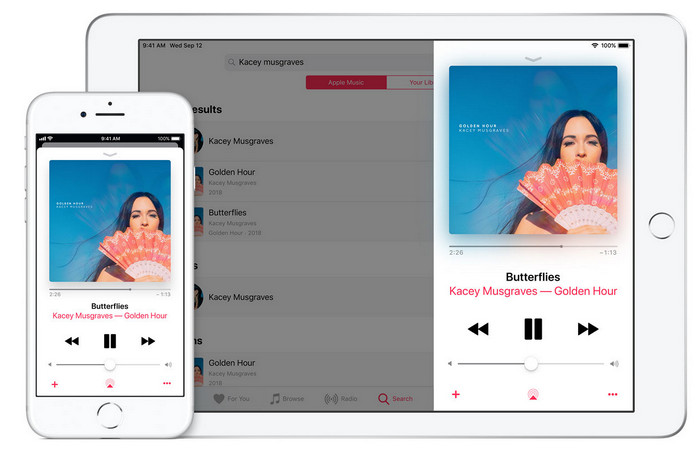
Ta aplikacja ma wbudowaną bibliotekę muzyczną, którą możesz kupować, pobierać i używać. iTunes nie jest typową aplikacją do edytowania metadanych, której można używać na iOS, ponieważ ta aplikacja jest znana z przechowywania muzyki, takiej jak to, co oferuje Spotify. Chociaż muzyka, którą można znaleźć w tej aplikacji, zawiera metadane i tagi, nadal możesz zmieniać lub aktualizować tagi zgodnie z własnymi potrzebami. Jednak nie można łatwo edytować ani aktualizować tagów za pomocą tej aplikacji, ponieważ istnieje wymóg, który będzie potrzebny, zanim nauczysz się oznaczać muzykę w iTunes.
Większość wspomnianych tutaj aplikacji ma automatyczny tag, który może pomóc w automatycznym dodawaniu tagów lub metadanych do posiadanego pliku audio. Ta funkcja ma jednak wady, w przeciwieństwie do ręcznego dodawania niepowiązanych tagów do pliku. Jeśli chcesz uniknąć tych błędów, przejdźmy do najlepszego edytora tagów muzycznych na PC, czytając część 2.
Część 3. Często zadawane pytania dotyczące edytora tagów muzycznych
Co to jest znacznik ID3?
Możesz zobaczyć te tagi ID3 często w muzyce, ponieważ przechowują dane o pliku multimedialnym, w szczególności audio. Dodając znaczniki ID3 do pliku audio, możesz uporządkować plik w oparciu o używany odtwarzacz multimedialny.
Czy nagrywanie dźwięku na telefonach ma tagi?
Tak, zawiera tagi i metadane. Jednak tagi nie są wyczerpujące, jak inne pliki multimedialne.
Dlaczego mój plik audio ulega uszkodzeniu po dodaniu metadanych?
Powodem uszkodzenia dźwięku nie są metadane, które dodajesz lub usuwasz, ale narzędzie użyte do edycji tagów pliku. Jeśli więc chcesz uniknąć tej okoliczności, musisz wybrać idealne narzędzie, które pomoże Ci łatwo dodawać lub usuwać metadane. I pamiętaj, jeśli proces się rozpocznie, upewnij się, że nie anulujesz procesu edycji metadanych,
Wniosek
Teraz musisz wybrać aplikację, której będziesz używać do edycji swoich metadanych muzyki. Upewnij się, że wybierasz program dostępny na Twojej platformie, aby łatwo pobrać go z Play Store lub App Store. Jeśli jednak potrzebujesz narzędzia o najlepszej wydajności, powinieneś skorzystać z wersji desktopowej. FVC Video Converter Ultimate oferuje najlepszy sposób na łatwe dodawanie tagów do muzyki. Zanim jednak zaczniesz z niego korzystać, musisz go pobrać i postępować zgodnie z instrukcjami przedstawionymi w części 2. Aby dowiedzieć się więcej, przeczytaj je uważnie.
-
 5 najłatwiejszych sposobów na usunięcie metadanych z dowolnych plików multimedialnych
 Jak usunąć metadane? Czy trudno to zrobić? Czy muszę kupić lub użyć bezpłatnego narzędzia do usuwania tagów? Wszystkie te pytania mają odpowiedzi w tym artykule.
-
 5 najlepszych ekstraktorów metadanych dostępnych online i offline [2022]
 Na rynku można znaleźć wiele ekstraktorów metadanych, ale dzisiaj wybieramy tylko pięć najczęściej wybieranych ekstraktorów tagów według odbiorców.
-
 Najlepsi edytorzy metadanych wideo 5 na rok 2022 [Bezstronna recenzja]
 Czy chcesz wyświetlić metadane swojego filmu? Jeśli tak, przeczytaj poniższe szczegóły, aby w pełni zrozumieć temat i dowiedzieć się, które narzędzie najlepiej do Ciebie pasuje.
