


 Video Converter Ultimate
 Nagrywarka ekranu
 Naprawa wideo
Najprostsze sposoby konwersji MPG na MKV przy użyciu najlepszych konwerterów [za darmo]
Niestety pliki MPG nie zawierają ścieżek napisów; możesz jednak przekonwertować swój plik na format, który przechowuje wiele ścieżek napisów w różnych językach. A jeśli szukasz prostego sposobu na konwersję pliku MPG do MKV, przedstawiamy proste kroki, jak przekonwertować MPG na MKV online i offline – przeczytaj ten artykuł do końca.

Część 1. Po co konwertować MPG na MKV
Format plików MPG jest jednym z najczęściej używanych formatów plików w Internecie. Ten format pliku został opracowany przez MPEG lub Moving Pictures Expert Groups. Ponadto ten typ pliku może przechowywać wideo, audio i metadane. Co więcej, prawie wszystkie odtwarzacze multimedialne szeroko obsługują tego typu pliki. Natomiast pliki MKV lub Matroska to kontener plików multimedialnych, który przechowuje ścieżki wideo, audio i napisów w jednym pliku. Ten typ pliku jest również znany entuzjastom filmów, ponieważ może obsługiwać ścieżki audio w różnych językach.
Część 2. Najszybszy sposób na konwersję MPG na MKV w trybie offline
Na rynku jest wiele konwerterów, które potrafią zmienić MPG na MKV. Jeśli jednak potrzebujesz programu do ultraw szybkiej konwersji, FVC Video Converter Ultimate jest najlepszym narzędziem. A jeśli chcesz usunąć znak wodny ze swoich filmów, ten konwerter ma funkcję, która to umożliwia. Co więcej, obsługuje konwersję wsadową, aby połączyć wiele formatów plików w jeden. Chcesz poznać zalety korzystania z tego konwertera MPG na MKV? Przeczytaj szczegóły poniżej.

FVC Video Converter Ultimate
5,689,200+ pobrań- Edytuj i ulepszaj swój film bezpośrednio.
- W tym konwerterze dostępny jest ultraszybki proces konwersji.
- Może konwertować pliki MPG na MKV, WMV, AVI, MP4 i inne formaty plików 1000+.
- Dostępne we wszystkich systemach operacyjnych, takich jak Windows i macOS.
Bezpłatne pobieranieDla Windows 7 lub nowszegoBezpieczne pobieranie
Bezpłatne pobieranieDla MacOS 10.7 lub nowszegoBezpieczne pobieranie
Wykonaj poniższe czynności, aby przekonwertować plik MPG na MKV.
Krok 1. Pobierz FVC Converter Ultimate, klikając przycisk Pobierz poniżej dla Windows lub macOS. Następnie postępuj zgodnie z instrukcjami instalacji i uruchom aplikację.
Bezpłatne pobieranieDla Windows 7 lub nowszegoBezpieczne pobieranie
Bezpłatne pobieranieDla MacOS 10.7 lub nowszegoBezpieczne pobieranie
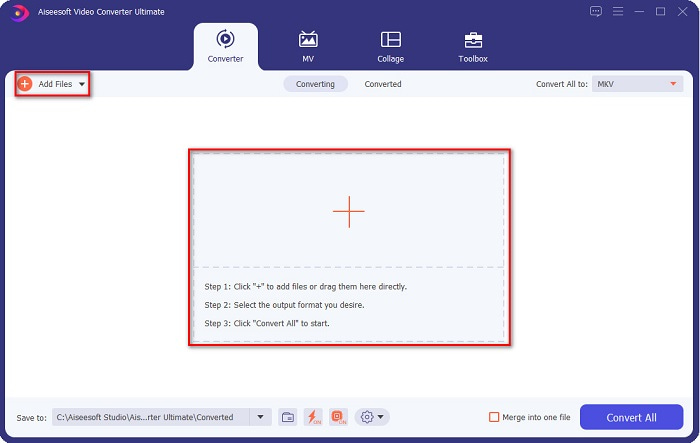
Krok 2. W kolejnym kroku kliknij przycisk Dodaj pliki lub ikonę +, aby wczytać plik MPG do głównego interfejsu programu.
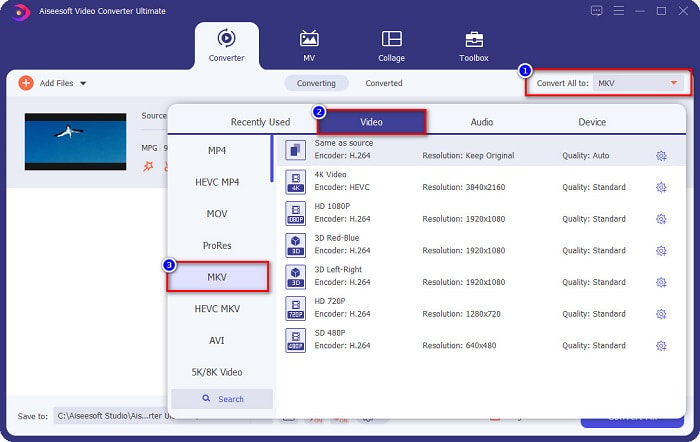
Krok 3. Po zaimportowaniu pliku MPG wybierz format wyjściowy, klikając przycisk Konwertuj wszystko na. W tym przypadku wybierz format pliku MKV.
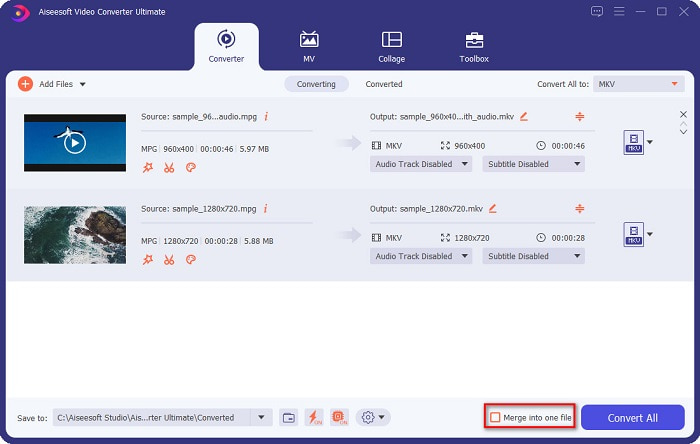
Opcjonalnie. Jeśli chcesz przekonwertować wiele plików MPG do jednego, zaznacz okienko Scal w jeden plik. Jeśli nie, przejdź do następnego kroku.
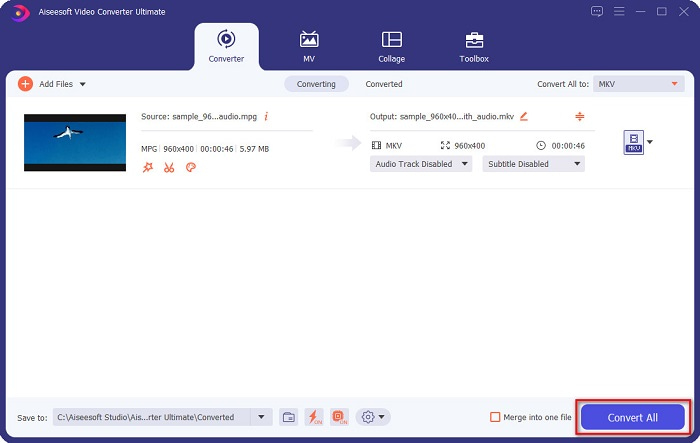
Krok 4. Aby zakończyć, kliknij przycisk Konwertuj wszystko, aby przekonwertować plik MPG na plik MKV. Poczekaj kilka sekund i to wszystko! To naprawdę takie proste – w łatwy sposób możesz przekonwertować MPG na MKV.
Część 3. Konwertuj MPG na MKV za pomocą bezpłatnego narzędzia
Zastanawiasz się, jakie jest najlepsze darmowe narzędzie do konwersji MPG na MKV? Zauważyliśmy, że wielu użytkowników jako pierwszy wybór stosuje HandBrake. Ten darmowy program potrafi konwertować MPG do plików MKV, WebM i MP4. Ponadto ma prosty w obsłudze interfejs, co jest dużą zaletą dla początkujących. Obsługuje jednak tylko ograniczoną liczbę formatów plików. Mimo to nadal jest skutecznym narzędziem do konwersji MPG na MKV.
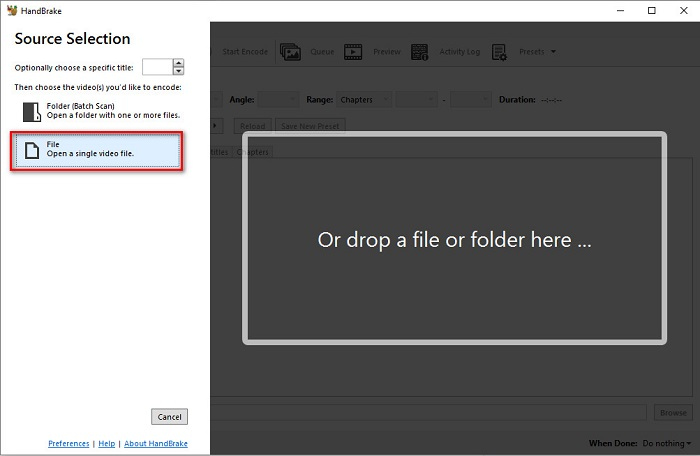
Krok 1. Pobierz HandBrake na swoje urządzenie, a następnie uruchom aplikację. Po otwarciu programu kliknij opcję File (Plik) po prawej stronie interfejsu. Gdy pojawią się pliki z komputera, wybierz swój plik MPG.
Krok 2. Następnie wybierz żądany format wyjściowy na przycisku rozwijanym obok Format. Potem, klikając przycisk Browse (Przeglądaj), wskaż folder docelowy dla pliku.
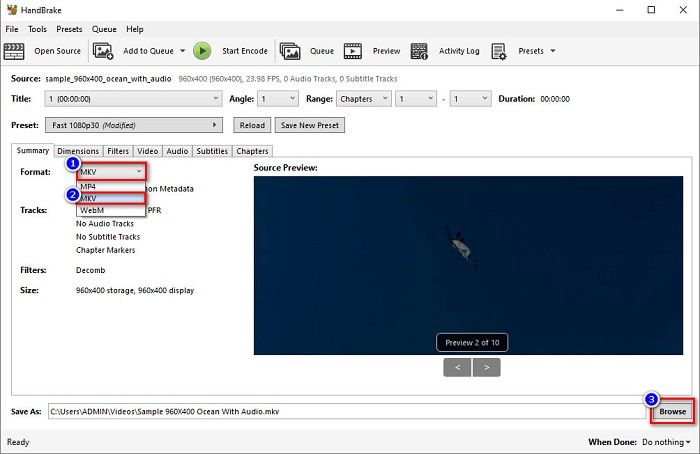
Krok 3. Na koniec kliknij przycisk Start Encode, aby przekonwertować plik MPG na format MKV.
Możesz przekonwertować MPG na MKV za pomocą darmowego konwertera, wykonując proste czynności opisane powyżej.
Część 4. Metody 2 do konwersji MPG na MKV Online
Konwersja za pomocą konwerterów online może być najwygodniejszą opcją. Co więcej, nie musisz niczego pobierać, korzystając z konwerterów online. Zamiast tego możesz bezpośrednio przekonwertować online. Jednak szybkość konwersji będzie zależeć od szybkości połączenia internetowego. Niemniej jednak wymieniliśmy poniżej dwie najlepsze metody konwersji pliku MPG na MKV.
Metoda 1. Użyj darmowego internetowego konwertera wideo FVC
FVC Free Online Video Converter to darmowy konwerter online, który wygodnie konwertuje różne formaty plików. Obsługuje formaty takie jak MPG na MKV, AVI, MP4, MOV, MP3 i wiele innych. Jest również przyjazny dla początkujących, ponieważ ma prosty w obsłudze interfejs. Ponadto umożliwia zmianę bitrate wideo i audio w pliku. Jeśli więc interesuje Cię ten internetowy konwerter MPG na MKV, postępuj zgodnie z poniższymi krokami.
Krok 1. W przeglądarce wyszukaj FVC Free Online Video Converter lub przejdź bezpośrednio na stronę, klikając ten link. Następnie uruchom aplikację sieciową.
Krok 2. Po uruchomieniu aplikacji kliknij przycisk Add Files to Convert (Dodaj pliki do konwersji). Pojawią się pliki z Twojego komputera – wybierz swój plik MPG.
Pobierz Wersję desktopową, aby konwertować pliki w trybie wsadowym.
Krok 3. Następnie wybierz MKV jako format wyjściowy.
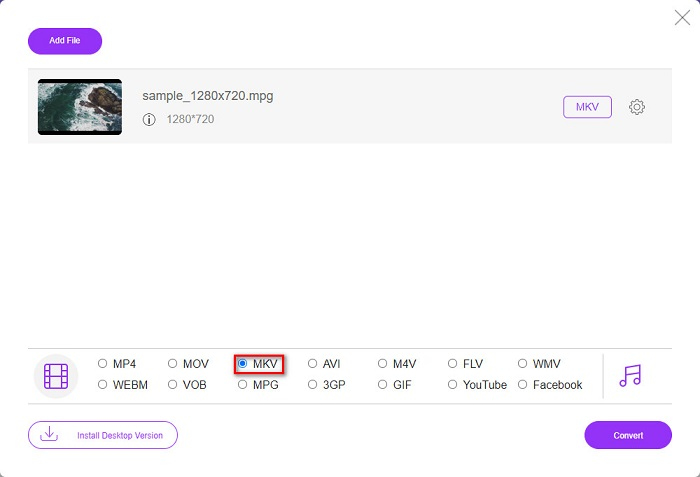
Krok 4. W ostatnim kroku kliknij przycisk Convert (Konwertuj). Rozpocznie się konwersja z MPG na MKV.
Metoda 2. Użyj CloudConvert
Innym konwerterem online, z którego możesz skorzystać, jest CloudConvert. Ten konwerter jest bardzo wygodny w użyciu dzięki prostemu interfejsowi. Dodatkowo możesz za jego pomocą kompresować pliki. Obsługuje jednak tylko ograniczoną liczbę formatów. Mimo to wiele osób nadal korzysta z tego konwertera ze względu na wygodę.
Krok 1. W przeglądarce wyszukaj CloudConvert. Gdy znajdziesz się już na stronie, kliknij przycisk Select Files (Wybierz pliki). Gdy pojawią się pliki z komputera, wybierz swój plik MPG.
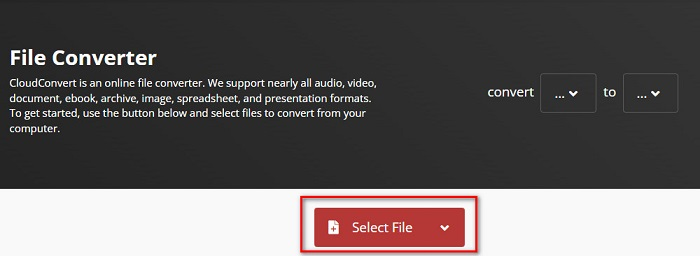
Krok 2. Następnie wybierz plik MKV jako format wyjściowy na przycisku rozwijanym.
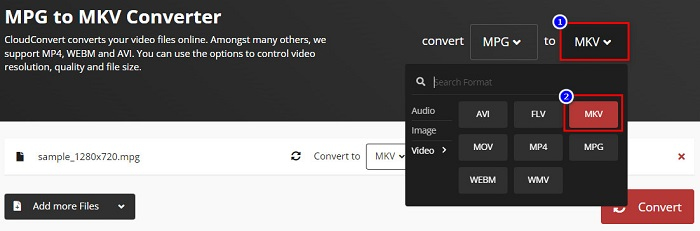
Krok 3. Na koniec kliknij przycisk Convert (Konwertuj). Poczekaj, aż Twój plik zostanie przekonwertowany, i gotowe! Dzięki tym trzem prostym krokom możesz zmienić MPG na MKV.
MPG kontra MKV
Stworzony przez Moving Picture Experts Group (MPEG), MPG jest popularnym cyfrowym formatem wideo do przechowywania informacji wideo, audio i metadanych. Jest to bardzo przydatne przy tworzeniu filmów do udostępniania w Internecie. Te pliki w MPG zwykle zawierają kompresję wideo/audio MPEG-1 lub MPEG-2.
Format kontenera multimedialnego Matroska, wydany w 2002 roku, jest formatem typu open source, który może zawierać wiele ścieżek wideo, audio, obrazów i napisów. Dzięki temu możesz go używać do łatwego przechowywania krótkich klipów wideo, programów telewizyjnych i filmów. Jest dość popularny wśród fanów anime.
Część 5. Często zadawane pytania dotyczące konwersji MPG na MKV
Czy konwersja MPG do MKV wpływa na rozmiar pliku?
Tak, chociaż nie ma to większego wpływu na konwersję pliku MPG do MKV, rozmiar pliku wzrasta.
Który ma większy rozmiar pliku?
Pliki MKV mają większy rozmiar w porównaniu do plików MPG, ponieważ pliki MKV zawierają wideo, audio i wiele ścieżek napisów w jednym pliku.
Czy możesz kompresować pliki MKV?
Możesz skompresować pliki MKV, używając narzędzia do kompresji plików. FVC Video Converter Ultimate ma funkcję, która umożliwia kompresję dużych plików wideo.
Wniosek
Ten artykuł jest pomocny, jeśli szukasz najlepszych sposobów na konwersję plików MPG na MKV. Wszystkie przedstawione powyżej konwertery wykazują obiecującą wydajność podczas konwersji plików. Ale jeśli szukasz konwertera z wieloma wyjątkowymi funkcjami, możesz spróbować użyć FVC Video Converter Ultimate jako pierwszej linii. Jeśli nie jesteś jeszcze przekonany, pobierz go, aby wypróbować najlepszy konwerter, którego możesz użyć.
-
 3 proste sposoby konwersji MPG na MOV na komputerze Mac/Windows/Online
 Chcesz przekonwertować pliki MPG, a później przenieść je na iOS, iPoda, iPada lub Maca? Ten artykuł pomoże dowiedzieć się, jak przekonwertować MPG na MOV za pomocą kroków.
-
 Jak przekonwertować MPG na FLV bez utraty jakości [Sprawdzone]
 Musisz obejrzeć swój ulubiony film na tym odtwarzaczu multimedialnym, ale nie obsługuje on MPG. Spróbuj przekonwertować plik MPG na FLV za pomocą konwerterów przedstawionych w tym artykule.
-
 2 Ultimate MPG konwertery do konwersji MPG na WMV za darmo
 Czy chcesz przekonwertować MPG na WMV za darmo? W takim przypadku masz szczęście, ponieważ dowiedzieliśmy się, że istnieją dwa narzędzia, których możesz użyć do konwersji plików MPG.

