


 Video Converter Ultimate
 Nagrywarka ekranu
 Naprawa wideo
Jak przekonwertować MP4 na 3GP online i offline
MP4 to popularny format wideo, który można odtwarzać na odtwarzaczach MP4, telefonach komórkowych i tabletach. Filmy, które pobieramy ze strony internetowej, zwykle pozostają w formacie MP4. Jednak niektóre telefony komórkowe obsługują tylko odtwarzanie filmów 3GP. Ten artykuł pokaże Ci 3 bezpłatne konwertery MP4 na 3GP i możesz bezproblemowo przekonwertować MP4 na 3GP.

Część 1. Jak przekonwertować MP4 na 3GP w systemie Windows i Mac
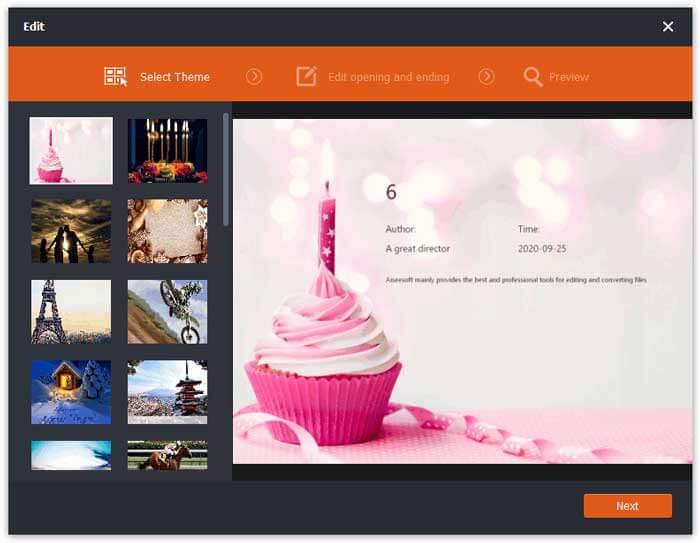
Jeśli chcesz przekonwertować MP4 na 3GP w trybie offline, możesz użyć desktopowego konwertera MP4 na 3GP. FVC Free FLV to 3GP Converter to darmowe i łatwe w użyciu oprogramowanie do konwersji wideo dla systemów Windows i Mac. Może z łatwością konwertować różne formaty wideo, takie jak FLV, MP4, MOV, MKV, MTS, M2TS itd. na 3GP. Co więcej, oferuje funkcje edycji umożliwiające dodawanie motywów oraz dostosowanie autora, czasu i dostawcy na początku/końcu nagrania.

- Konwertuj filmy w MP4, MKV, AVI, MOV, MP3, AAC, AIFF itp. Na 3GP.
- Eksportuj filmy 3GP i bezstratny plik audio z pliku MP4 jednym kliknięciem.
- Pozwól użytkownikom edytować dostawcę, tytuł, autora, czas i dodać motyw.
- Batch konwertuje MP4 na 3GP do odtwarzania na niektórych telefonach komórkowych.
Darmowe pobieranieDla Windows 7 lub nowszegoBezpieczne pobieranie
Darmowe pobieranieDla MacOS 10.7 lub nowszegoBezpieczne pobieranie
Krok 1. Bezpłatnie pobierz, zainstaluj i uruchom FVC Free FLV to 3GP Converter na swoim komputerze z Windows lub Mac. Kliknij przycisk Add Files, aby załadować pliki MP4 z komputera. Możesz konwertować jednocześnie więcej niż jeden plik MP4.
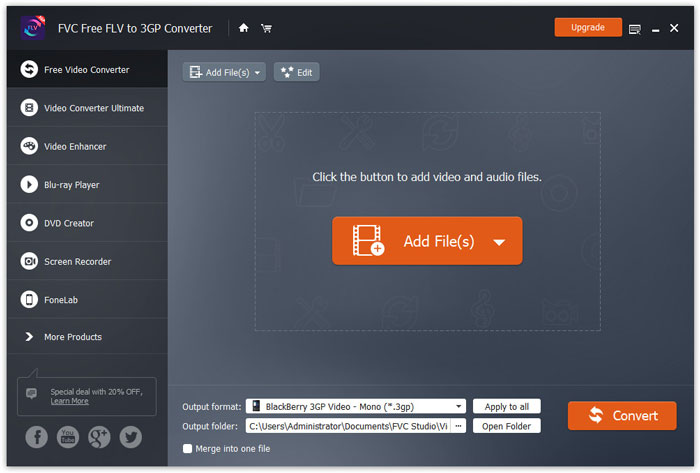
Krok 2. Kliknij swój plik MP4 i naciśnij przycisk Edit. Możesz dodać motyw do pliku MP4 oraz edytować zawartość otwarcia i zakończenia. Następnie kliknij Next, aby podejrzeć i zapisać zmiany.
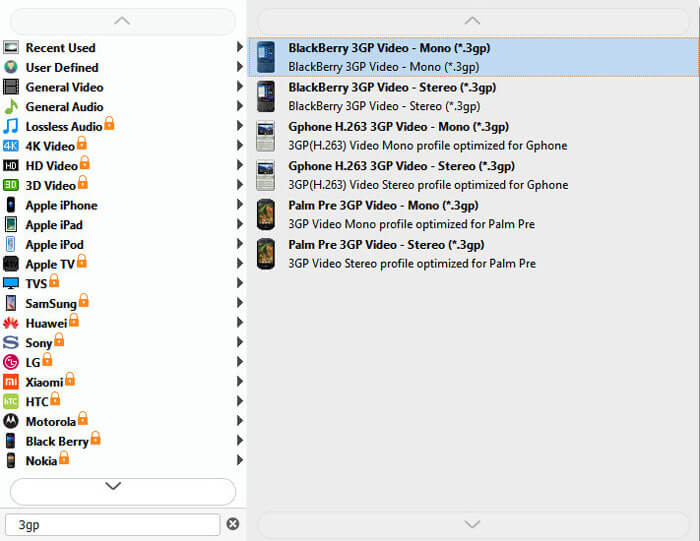
Krok 3. Wybierz 3GP z rozwijanego menu Output format na dole. Możesz wybrać BlackBerry 3GP Video - Mono (*.3gp) lub inną opcję, której potrzebujesz.
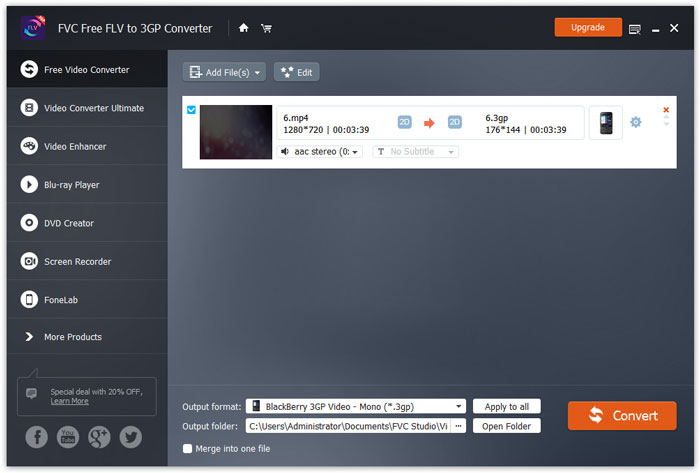
Krok 4. Na koniec wskaż folder wyjściowy na swoim komputerze i kliknij przycisk Convert, aby rozpocząć zmianę MP4 na 3GP.
Część 2. Eksport 3GP z MP4 za pomocą 2 internetowych konwerterów 3GP
W porównaniu z instalacją stacjonarnego konwertera 3GP, użycie konwertera internetowego jest znacznie prostsze i łatwiejsze do konwersji MP4 na 3GP. W tej części udostępnimy 2 konwertery 3GP online, które pomogą Ci przekonwertować MP4 na 3GP bez trudności.
1. Darmowy internetowy konwerter wideo FVC
FVC Free Online Video Converter to dobrze znana platforma konwersji wideo, na której możesz konwertować popularne formaty wideo i audio do 3GP, MKV, MOV, WMV, AVI, MP3 i wielu innych.
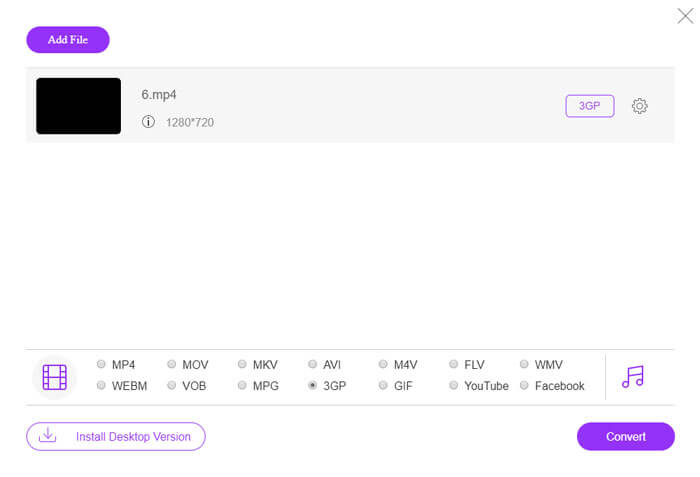
Krok 1. Przejdź na oficjalną stronę FVC Free Video Converter. Kliknij przycisk Add Files to Convert, aby pobrać i zainstalować launcher.
Pobierz Wersję desktopową, aby konwertować pliki w trybie wsadowym.

Krok 2. Wybierz pliki MP4 z lokalnego komputera. Możesz kliknąć ikonę koła zębatego, aby dostosować bitrate wideo, częstotliwość próbkowania, liczbę klatek na sekundę, rozdzielczość i głośność.

Krok 3. Ustaw format wyjściowy na 3GP na dole. Następnie kliknij przycisk Convert, aby rozpocząć konwersję MP4 na 3GP. Możesz jednocześnie konwertować wsadowo kilka plików MP4 do 3GP.
2. Zamzar
Zamzar to internetowy konwerter wideo, konwerter audio, konwerter obrazów i konwerter eBooków. Wygodne jest przekonwertowanie MP4 na wiele innych formatów za pomocą Zamzar. Poniżej przedstawiono proste kroki, aby przekonwertować MP4 na 3GP.
Krok 1. Przejdź na stronę zamzar.com/convert/mp4-to-3gp/ i kliknij przycisk Add Files, aby przesłać swoje pliki MP4.
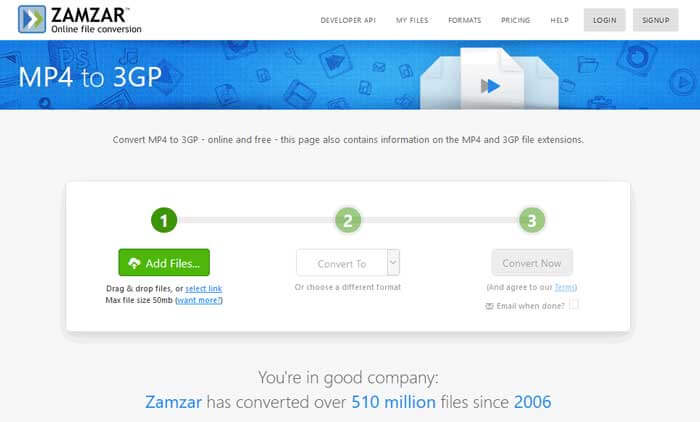
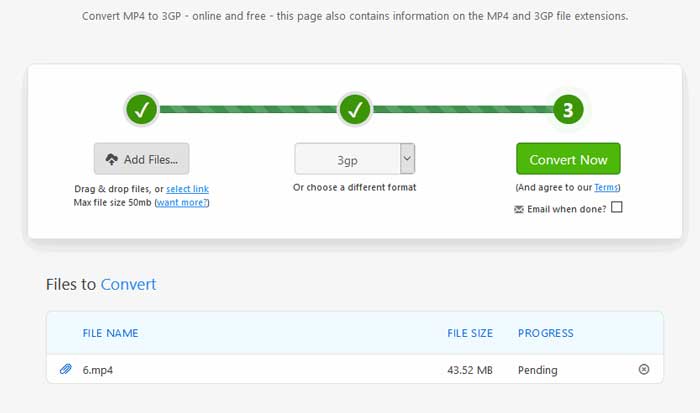
Krok 2. Możesz wybrać inny format wyjściowy. Zwykle 3gp zostanie ustawiony jako domyślny format wyjściowy. Kliknij przycisk Convert Now, aby rozpocząć konwersję MP4 na 3GP.
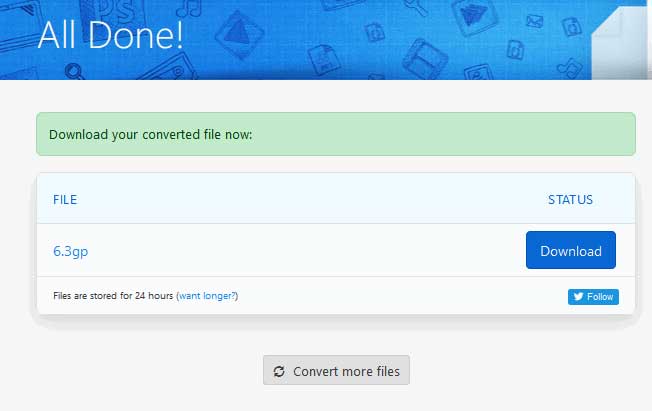
Krok 3. Następnie nastąpi przejście do innej strony. Możesz kliknąć przycisk Download, aby zapisać przekonwertowany plik 3GP na komputerze.
Co w sytuacji, gdy Twój plik MP4 ma duży rozmiar? Zobacz tutaj, jak kompresować pliki MP4.
MP4 kontra 3GP
Wydany przez Moving Picture Experts Group (MPEG) w 2001 roku format MP4 może pomóc w zapisaniu danych wideo, audio, napisów i obrazów na osobnych ścieżkach. Jest to skrót od MPEG-4 Part 14. Ponadto jest to jeden z najpopularniejszych formatów używanych do przesyłania strumieniowego i udostępniania filmów.
Projekt Partnerski Trzeciej Generacji (3GPP) stworzył format 3GP/3GPP jako format kontenera multimedialnego. W rzeczywistości jest oparty na formacie pliku multimedialnego ISO. Często używamy go do zapisywania strumieni wideo/audio, które są przesyłane między telefonami komórkowymi 3G i online.
Część 3. Często zadawane pytania dotyczące konwersji MP4 na 3GP
1. Czy 3GP jest lepsze niż MP4?
3GP został zaprojektowany dla telefonów komórkowych w sieciach 3G. Pliki 3GP możesz odtwarzać w odtwarzaczach takich jak QuickTime, VLC i RealPlayer. MP4 jest znacznie bardziej kompatybilny niż 3GP. Jest powszechnie obsługiwany przez wiele przenośnych odtwarzaczy multimedialnych i smartfonów.
2. Co to jest 3GP?
3GP to format kontenera multimedialnego zdefiniowany przez 3. generację. Może przechowywać wideo i strumienie audio odtwarzane na telefonach komórkowych 3G, ale może być również odtwarzane na niektórych telefonach 2G lub 4G.
3. Jak przekonwertować MP4 na FLV?
Dzięki pomocy FVC Free Online Video Converter możesz z łatwością konwertować MP4 na FLV online. Przejdź na tę stronę online i kliknij przycisk Add Files to Convert, aby zainstalować launcher. Następnie wybierz pliki MP4 z komputera i zaznacz FLV jako format wyjściowy. Kliknij przycisk Convert, aby przekonwertować MP4 na FLV.
Wniosek
Rozmawialiśmy głównie o 3 metodach konwersji MP4 na 3GP na Windows i Mac. Jeśli wolisz rozwiązanie online, możesz wypróbować FVC Free Online Video Converter lub Zamzar online. Jeśli chcesz edytować plik MP4 w celu dalszej perfekcji, możesz zamiast tego użyć Free FLV to 3GP Converter. Jeśli masz jakieś lepsze rozwiązania, nie wahaj się zostawić komentarza.
-
 Najlepsze bezpłatne sposoby 3 na szybką konwersję MP4 na VOB
 Jak przekonwertować MP4 na VOB na Windows PC i Mac? Aby rozwiązać ten problem, w tym poście udostępnimy najlepsze sposoby 3, które pomogą Ci bezpłatnie przekonwertować MP4 na VOB.
-
 Darmowe | Najlepsze metody 3 do konwersji MP4 na WMV bez utraty jakości
 W tym poście opisano, jak przekonwertować wideo MP4 na format WMV na komputerze Mac lub Windows. Oferujemy również kilka opcji, w tym zarówno oprogramowanie komputerowe, jak i internetowe konwertery online. Gotowy poznać najlepsze narzędzia do konwersji MP4 na WMV?
-
 Metody 3 do konwersji MP3 na MP4 z obrazem
 Jak przekonwertować MP3 na MP4 w wysokiej jakości? Ten post pokazuje wydajne i bezpłatne metody 3 do zmiany MP3 na MP4 ze zdjęciami w systemie Windows i Mac.

