


 Video Converter Ultimate
 Nagrywarka ekranu
 Naprawa wideo
Usuń znak wodny Bandicam za pomocą 3 najlepszych narzędzi do usuwania znaków wodnych
Bandicam to narzędzie, które wszyscy lubią używać, zwłaszcza do nagrywania każdej akcji podczas grania, spotkań, oglądania itp. W przeciwieństwie do innych konkurencyjnych rejestratorów ekranu, ten program pozwala nagrywać wideo w 480 FPS z wykorzystaniem podpięcia DirectX/OpenGL/UWP/Vulkan oraz innej zaawansowanej technologii przyspieszania. Nawet jeśli nie wykupiłeś wersji premium, wciąż możesz z niego korzystać i nagrywać wideo w 60 lub 120 FPS, najlepiej w wysokiej jakości, lecz z znakiem wodnym. Sposobem na zapisanie wideo w Bandicamie bez znaku wodnego jest zakup pełnej wersji programu.
Na szczęście narzędzia zawarte w tym artykule mogą usunąć znak wodny, który Bandicam dodaje do eksportowanego wideo. Chcesz wiedzieć, co to jest? W takim razie musisz dalej czytać ten artykuł, aby zrozumieć ten pomysł!

Część 1. Jak usunąć znak wodny Bandicam za pomocą 3 najskuteczniejszego narzędzia do usuwania znaków wodnych?
FVC Video Converter Ultimate
Najskuteczniejszym sposobem usunięcia znaku wodnego Bandicam jest użycie narzędzia pomocniczego, takiego jak FVC Video Converter Ultimate. To narzędzie potrafi wykryć znak wodny w Twoim wideo po umieszczeniu pola zaznaczenia na znaku wodnym, a potem – puf – znika. Działa to jak magia; po wyeksportowaniu pliku na wideo nie będzie żadnych śladów znaku wodnego. Możesz wreszcie cieszyć się oglądaniem nagrania z Bandicama bez przeszkadzającego logo.
Najbardziej prawdopodobnymi funkcjami tego narzędzia są konwertery, wzmacniacze, edytory w Toolbox i inne. Możesz mieć wszystkie te funkcje i funkcje, jeśli użyjesz tego narzędzia i pobierzesz je teraz na swój pulpit. Aby nauczyć się, jak usunąć znak wodny Bandicam za pomocą tego najlepszego oprogramowania, możesz skorzystać z pełnego pisemnego samouczka, który dodamy poniżej.
Krok 1. Przede wszystkim musisz pobrać oficjalne oprogramowanie na swój komputer, klikając przycisk pobierania, który tu dodaliśmy. Nie musisz się martwić, ponieważ link do pobrania jest bezpieczny dla użytkowników Windows i Mac. Po pobraniu pliku kliknij go, aby zainstalować program, postępuj według kreatora instalacji WinRAR, a następnie kliknij Start Now, aby uruchomić narzędzie.
Bezpłatne pobieranieDla Windows 7 lub nowszegoBezpieczne pobieranie
Bezpłatne pobieranieDla MacOS 10.7 lub nowszegoBezpieczne pobieranie
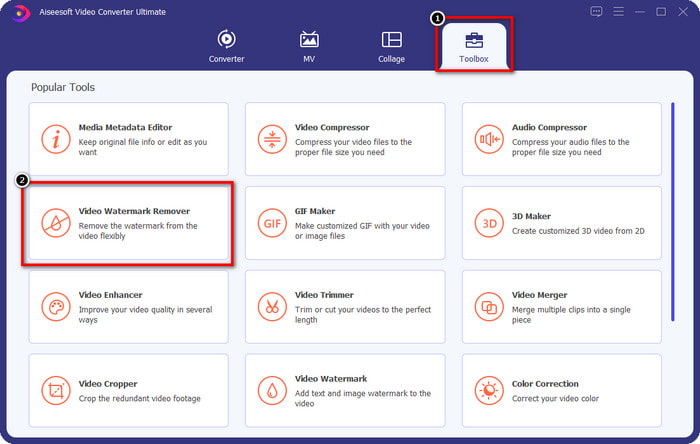
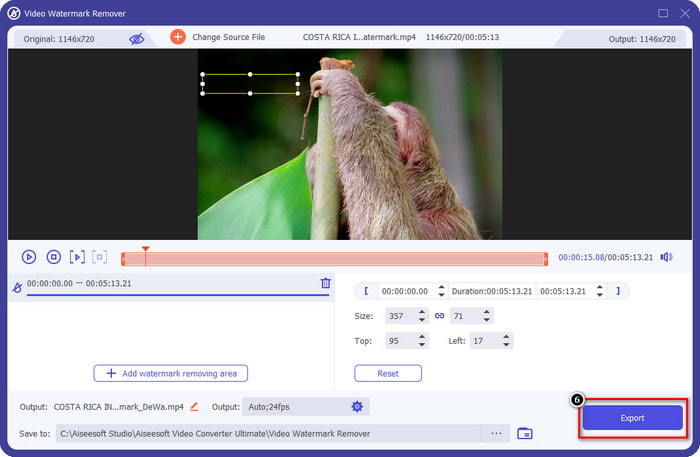
Krok 2. Na głównym interfejsie narzędzia przejdź do zakładki Toolbox, a pod nią zobaczysz Video Watermark Remover; kliknij, aby otworzyć tę funkcję.
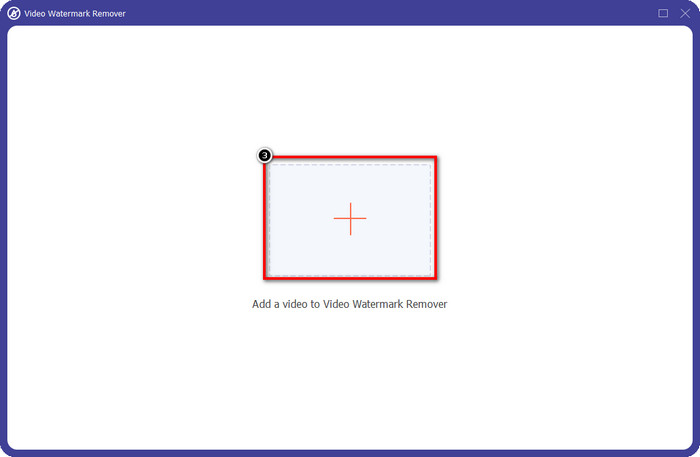
Krok 3. Na ekranie pojawi się nowe okno; kliknij ikonę +, aby wgrać plik wideo ze znakiem wodnym. Znajdź wideo na swoim dysku lokalnym, a następnie kliknij Open.
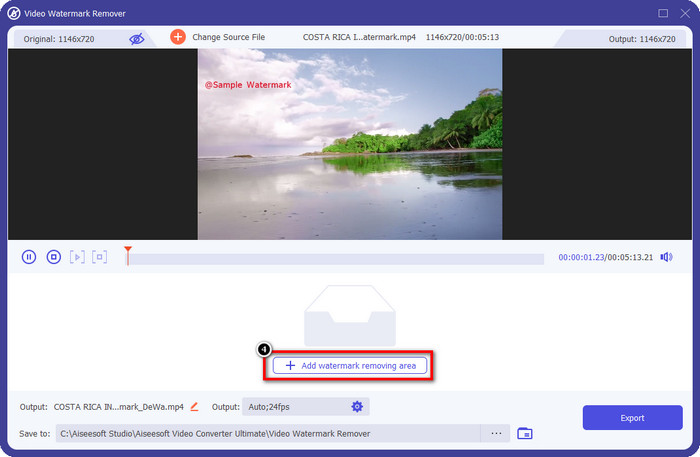
Krok 4. Po wykonaniu tych czynności kliknij Add Watermark Removing Area, aby rozpocząć usuwanie, tak by mieć nagrania z Bandicama całkowicie bez znaku wodnego.
Krok 5. W podglądzie umieść pole zaznaczenia na znaku wodnym; możesz zmieniać jego rozmiar, aby dobrze dopasować je do obszaru znaku wodnego.
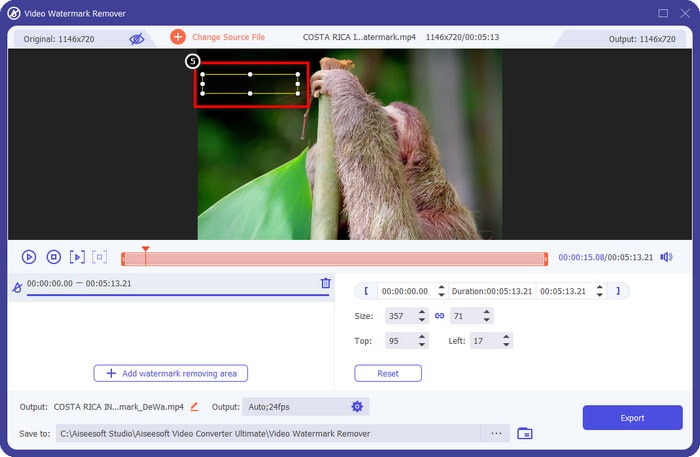
Krok 6. Po ustawieniu pola zaznaczenia na znaku wodnym kliknij Export, aby pobrać wideo bez znaku wodnego, który Bandicam do niego dodaje.
Usuń logo teraz!
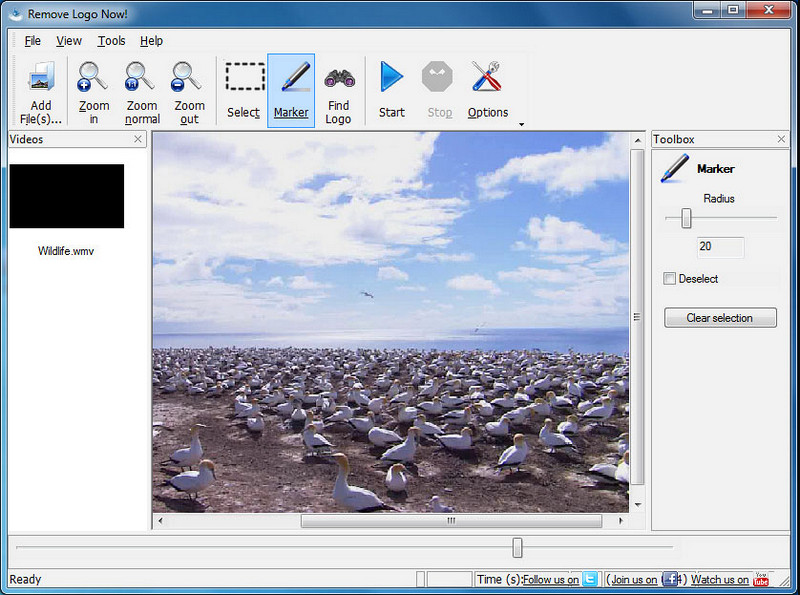
Remove Logo Now! to kompletne narzędzie do usuwania znaków wodnych, którego możesz użyć do eliminowania logotypów trwale osadzonych w Twoich filmach. Program potrafi automatycznie wykryć znak wodny dzięki zastosowanym algorytmom, ale możesz też ręcznie obrysować obszar znaku wodnego. Możesz skorzystać z tego narzędzia, aby usunąć dowolny typ znaku wodnego bez wysiłku. Oprogramowanie jest jednak dostępne wyłącznie dla użytkowników systemu Windows, a jego interfejs jest nieco przestarzały. Jeśli jednak chcesz wypróbować je na swoim komputerze z Windows, pokażemy Ci, jak usunąć znak wodny Bandicam za darmo.
Krok 1. Wejdź na stronę internetową, aby pobrać Remove Logo Now! Upewnij się, sprawdzając zabezpieczenia witryny, że jest to oficjalna strona tego narzędzia.
Krok 2. Otwórz zainstalowane oprogramowanie, a następnie kliknij File, aby wgrać wideo z Bandicama ze znakiem wodnym.
Krok 3. Gdy wideo zostanie już wczytane, kliknij opcję Find Logo, aby automatycznie wykryć znak wodny na Twoim nagraniu.
Opcjonalnie: Jeśli Find Logo nie wykryje znaku wodnego na Twoim wideo, powinieneś użyć narzędzia Marker, aby ręcznie zaznaczyć znak wodny, a następnie kliknąć Clear Selection, by go usunąć.
Krok 4. Kliknij opcję Start, aby wyeksportować wideo i uzyskać wersję nagrania bez znaku wodnego Bandicam.
Narzędzie do usuwania znaków wodnych online Apowersoft
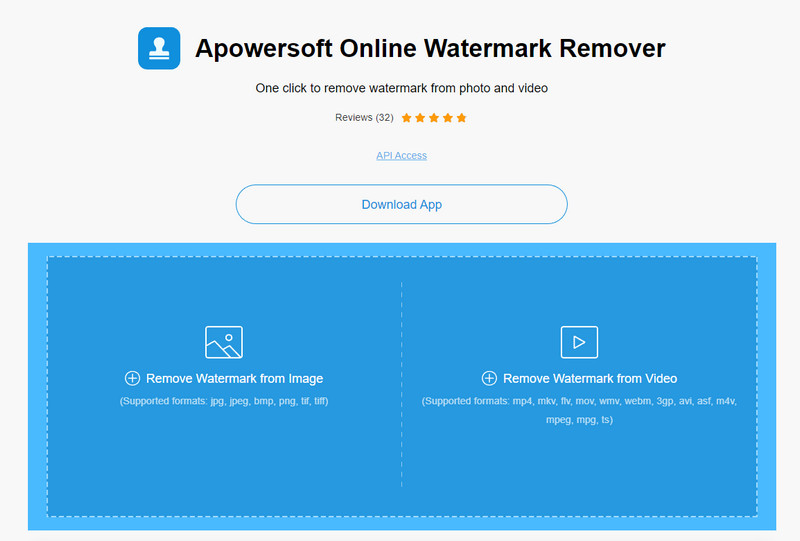
Apowersoft Online Watermark Remover to niezawodne, niewymagające instalacji narzędzie, którego możesz użyć do skutecznego usuwania znaków wodnych z obrazów i filmów. Program jest dobrze znany z funkcji usuwania znaków wodnych, ponieważ wykonuje to zadanie bez pozostawiania śladów na wyeksportowanym wideo. Mimo że jest to narzędzie webowe, po eksporcie nie powinno dojść do obniżenia jakości nagrania. Zamiast kupować pełną wersję Bandicama pozbawioną znaku wodnego, możesz przejść do poniższych kroków i usunąć go samodzielnie.
Krok 1. Otwórz swoją ulubioną przeglądarkę i wyszukaj nazwę tego internetowego narzędzia do usuwania znaków wodnych.
Krok 2. Pojawią się dwie dostępne opcje: kliknij Remove Watermark from Video. Wybierz plik wideo z logo Bandicam na swoim dysku, a następnie naciśnij Open. Poczekaj na zakończenie procesu przesyłania; może to potrwać, szczególnie w przypadku długich nagrań.
Krok 3. Narysuj na filmie pole zaznaczenia i upewnij się, że znak wodny mieści się w prostokątnym obszarze.
Krok 4. Kliknij Erase, aby pobrać plik wideo – tym razem już bez znaku wodnego.
Powiązane:
Jak usunąć znak wodny z filmów wyeksportowanych z Renderforest
Jak usunąć znak wodny Viva Video z nagrań wideo
Część 2. Często zadawane pytania dotyczące usuwania znaku wodnego Bandicam
Czy Bandicam ma znak wodny?
Dla użytkowników korzystających z bezpłatnej wersji próbnej po wyeksportowaniu pojawi się znak wodny. Aby uniknąć tego problemu, możesz kupić narzędzie na oficjalnej stronie Bandicam.
Czy istnieją ograniczenia w korzystaniu z bezpłatnej wersji Bandicam?
Istnieje wiele ograniczeń, jeśli korzystasz z bezpłatnej wersji Bandicam, 10 minut nagrywania, dodawania znaku wodnego, obsługiwanych od 60 do 120 klatek na sekundę, formatów plików i szybkości przetwarzania. Chociaż może to stanowić problem dla większości, nadal jest uważany za jeden z najlepszych rejestratorów ekranu, których można używać w systemie Windows.
Jak usunąć znak wodny na Bandicam?
Nie ma innego sposobu na usunięcie znaku wodnego na Bandicam i to wszystko, kupując jego wersję pro. Otwórz oficjalną stronę Bandicam, kliknij Pobierz pełną wersję, wybierz żądaną licencję i kliknij Kup teraz.
Wniosek
Rzeczywiście, Bandicam to najwyższej klasy rejestrator ekranu, z którego możesz korzystać za darmo. Ale jedno jest pewne; skorzystanie z darmowej wersji doda znak wodny do eksportowanego wideo. Dzięki sposobom, które dodaliśmy w tym artykule, możesz z powodzeniem usunąć znak wodny za pomocą idealnego narzędzia do usuwania znaków wodnych, które może być Twoim wyborem. Co zrobić, jeśli nie chcesz używać narzędzia do usuwania znaku wodnego? Następnie sugerujemy zakup Bandicam, aby usunąć znak wodny z filmów. Będzie to kosztować, ale warto skorzystać z wersji pro. Mamy nadzieję, że ten artykuł zawiera informacje potrzebne do usunięcia znaku wodnego na Bandicam.
-
 Kompletny przegląd skutecznych środków do usuwania znaków wodnych PlaceIt [2022]
 Narzędzie do usuwania znaków wodnych PlaceIt, które tutaj sprawdzamy, to skuteczne narzędzia, których możesz użyć do usunięcia znaku wodnego z filmu eksportowanego na PlaceIt.
-
 5 sposobów na usunięcie znaku wodnego B612 za pomocą najlepszych narzędzi
 Chcesz wiedzieć, jak usunąć znaki wodne B612 ze swoich zdjęć? Korzystając z tych wyjątkowych narzędzi, możesz bez wysiłku usunąć znak wodny B612 ze swoich zdjęć.
-
 Proste kroki, jak usunąć znak wodny suwaka WOW [rozwiązany]
 WOW Slider to aplikacja do tworzenia fantastycznego pokazu slajdów. Jednak osadza znaki wodne na swoim wyjściu. Przeczytaj poniżej, aby dowiedzieć się, jak usunąć znak wodny WOW Slider.
