


 Video Converter Ultimate
 Nagrywarka ekranu
 Naprawa wideo
Jak szybko rozpikselować obraz za pomocą 3 najlepszych rozwiązań
Odostrzanie obrazu to rozwiązanie, którego potrzebujesz, aby odmienić zdjęcie, które okazało się rozpixelowane, lub jeśli Twój obraz ma bitmapową strukturę z małymi kwadratami. Wielu użytkowników uważa, że modyfikowanie, dostosowywanie, zmienianie i ulepszanie obrazu jest kłopotliwe; szczerze mówiąc – kiedyś tak było, ale to już przeszłość. Dzięki zaawansowanej technologii, do której mamy dostęp, zadanie to stało się bardzo proste, o ile użyjesz właściwego narzędzia.
Nie masz odpowiedniego narzędzia do usuwania pikselizacji na zdjęciu? Na szczęście w tym artykule znajdziesz trzy najlepsze programy, które znaleźliśmy, które mogą pomóc w edycji pikselizacji zdjęcia, oraz samouczek dotyczący każdego z nich, aby rozwiązać problem.

Część 1. Jak rozpikselować obraz online za pomocą najlepszego edytora zdjęć [Zalecane]
FVC Free Image Upscaler to w pełni zautomatyzowane narzędzie online, którego możesz użyć, aby za darmo odpixelować obrazy w sieci. Możesz je otworzyć w dowolnej przeglądarce internetowej, którą masz pod ręką – nie ma potrzeby pobierania żadnego programu startowego, więc możesz korzystać z tego narzędzia od razu po wejściu na stronę. Chociaż to oprogramowanie działa w przeglądarce, jego moc i skuteczność w usuwaniu pikselizacji dorównują najbardziej profesjonalnym edytorom graficznym, z których możesz korzystać zarówno online, jak i offline. Być może myślisz, że korzystanie z tego narzędzia będzie kłopotliwe, ale tak nie jest. Nadal masz wątpliwości? W takim razie przeczytaj lub wykonaj poniższy samouczek, który krok po kroku pokaże ci, jak łatwo z niego korzystać.
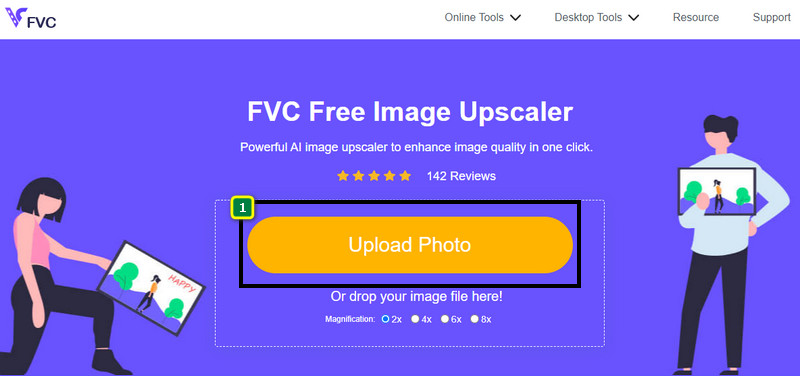
Krok 1. Możesz otworzyć to narzędzie sieciowe w dowolnej przeglądarce zainstalowanej na twoim urządzeniu, wyszukując jego nazwę lub klikając ten link, aby przejść do strony głównej.
Krok 2. Gdy znajdziesz się już w narzędziu, kliknij Add Image, aby wgrać rozpixelowany obraz. Na ekranie pojawi się okno z folderami – odszukaj obraz zapisany na dysku lokalnym, a następnie kliknij Open, aby go przesłać.
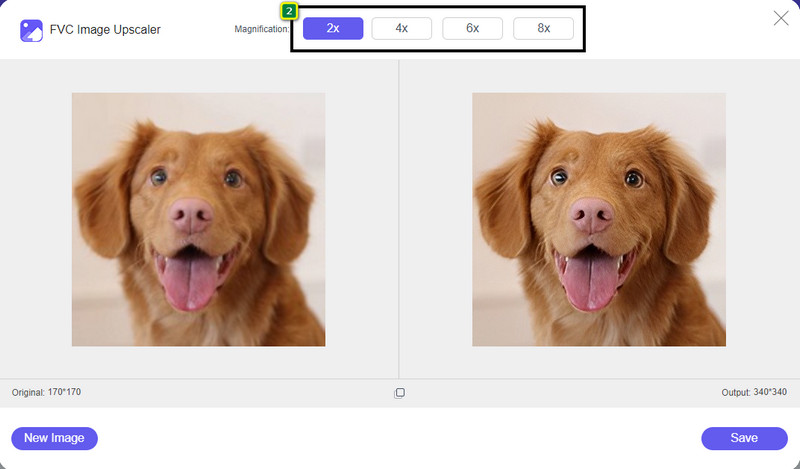
Krok 3. Następnie wybierz stopień powiększenia, jaki chcesz zastosować do obrazu, aby wygładzić jego wygląd tak, by nie wyglądał już jak bitmapa z małymi kwadracikami.
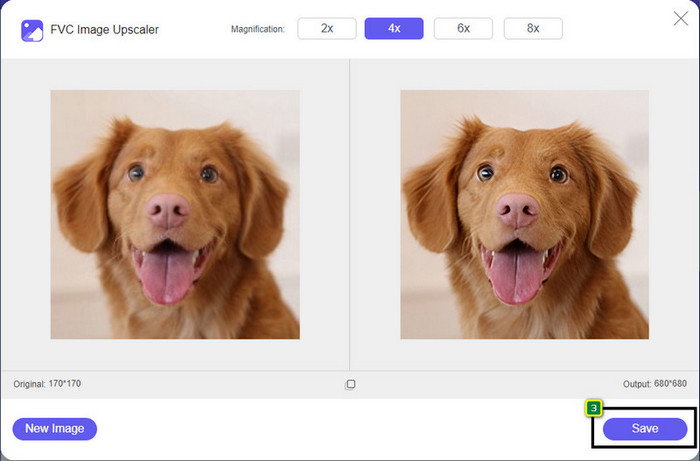
Krok 4. To takie proste – kliknij Save, aby pobrać odpixelowaną wersję na swój dysk lokalny.
Część 2. Jak rozpikselować obraz offline za pomocą 2 sposobów w systemach Windows i Mac [Łatwe]
Pixbim — rozpikseluj zdjęcia w systemie Windows
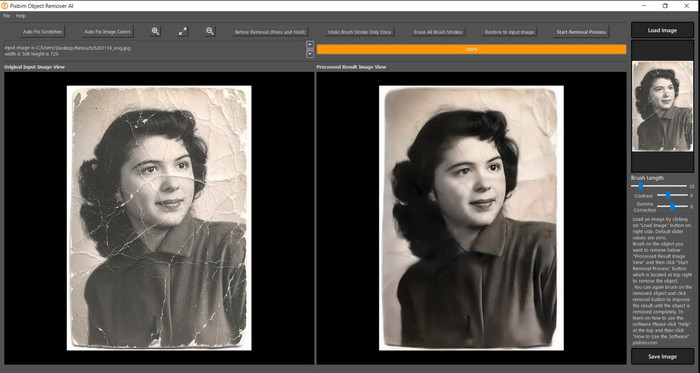
Pixbim to jeden z najpotężniejszych, wspieranych przez AI programów do usuwania pikselizacji, który możesz pobrać na Windows, aby rozwiązać ten problem. Ten edytor zasługuje na wzmiankę w tym artykule, ponieważ bardzo szybko i skutecznie naprawia rozpixelowane obrazy. Dzięki niemu sztuczna inteligencja automatycznie dostosowuje parametry, więc nie będziesz mieć trudności z obsługą programu. Ze względu na funkcje i możliwości konieczny jest zakup klucza licencyjnego, aby kontynuować korzystanie z programu po zakończeniu darmowego okresu próbnego. Dla wielu osób, które chcą mieć go na swoim komputerze, może to być kosztowne.
Krok 1. Po pobraniu programu uruchom go, abyśmy mogli przejść do następnego kroku.
Krok 2. Kliknij Load Image, aby dodać rozpixelowany obraz, który chcesz tutaj poprawić.
Krok 3. Następnie dostosuj parametry, przeciągając wskaźniki suwaków zgodnie z wartościami, które chcesz uzyskać.
Krok 4. Gdy skończysz dostosowywać obraz, zapisz efekt, aby go wyeksportować.
Edytor zdjęć Movavi [Windows i Mac]
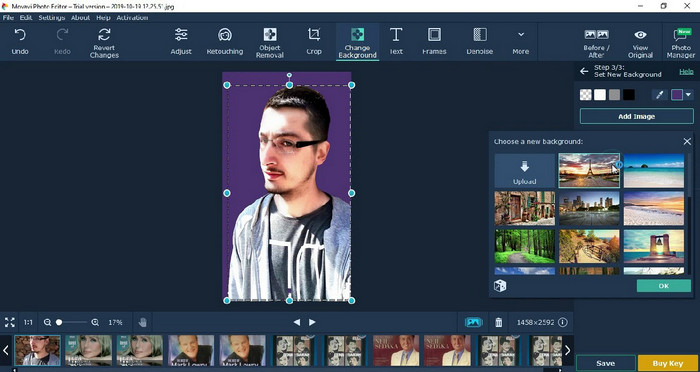
Wielu użytkowników wypróbowało już Movavi Photo Editor ze względu na jego wszechstronność w edycji zdjęć. Podobnie jak Pixbim, potrafi on przywracać utracone piksele obrazu z pomocą sieci neuronowych sztucznej inteligencji. Mając ten edytor, możesz wykonywać podstawowe i zaawansowane operacje na wyglądzie zdjęcia, takie jak kadrowanie, obracanie, nakładanie filtrów, naprawa pikseli i wiele więcej. Jednak nie uzyskasz dostępu do wszystkich funkcji, jeśli nie kupisz wersji premium na komputer.
Ma prawie podobną cenę do Pixbima, który dla wielu jest dość drogi. Ale jeśli masz budżet na zakup edytora, może to być ten, którego potrzebujesz. Dowiedz się, jak rozpikselować obrazy za pomocą tej aplikacji, postępując zgodnie z instrukcjami.
Krok 1. Pobierz aplikację na system Windows lub Mac OS.
Krok 2. Uruchom program, a następnie wgraj zdjęcie, które chcesz odpixelować.
Krok 3. Gdy obraz zostanie wczytany, kliknij Magic Enhance, aby automatycznie poprawić zdjęcie za pomocą AI.
Krok 4. Wyeksportuj obraz i ciesz się efektem.
Część 3. Często zadawane pytania dotyczące upixelowania obrazu
Dlaczego na wyeksportowanym obrazie bez pikseli jest znak wodny?
Jeśli korzystasz z bezpłatnej wersji próbnej aplikacji, istnieje prawdopodobieństwo, że po wyeksportowaniu pozostawi ona znak wodny. Tak więc, jeśli chcesz wyeksportować obraz bez znaku wodnego, możesz kupić licencję na aplikację lub skorzystać z FVC Free Image Upscaler, ponieważ nie pozostawi znaku wodnego na wyeksportowanym obrazie.
Jaka jest różnica między rozmytym a pikselowanym?
Wiele artykułów dowiodło, że rozmyte i piksele to nie to samo z powodu pewnych czynników. Rozmyte obrazy są powodem, dla którego rejestrujesz szybki ruch lub robisz zdjęcie trzęsącym się aparatem. Po pikselowaniu, gdy powiększysz migawkę, rozpocznie się pikselacja, a zobaczysz bitmapę z małym kwadratem.
Co powoduje, że obraz jest pikselowany?
Niektóre powody zamieniają obrazy w piksele; częstą przyczyną jest powiększanie obrazu rastrowego. Formaty rastrowe, takie jak PNG, JPG, GIF i inne, składają się z małych kwadratów, które budują wygląd obiektu przechowywanego w tych kontenerach. Zwykle po powiększeniu obrazu widać kwadraty, zwane pikselami, które zawierają dane kolorów, które stają się wizualnie prezentowane. Może to stanowić problem dla wielu redaktorów, zwłaszcza gdy dochodzi do pikselizacji.
Jak mogę naprawić szum obrazu?
To kolejny powszechny problem, na który możesz natrafić przy zdjęciach, a rozwiązanie, którego potrzebujesz, znajdziesz w tym artykule. Kliknij ten link, aby w prosty sposób przeczytać, zrozumieć i nauczyć się, jak usuwać szum z obrazu.
Wniosek
To wszystko – teraz możesz z łatwością odpixelować obraz przy pomocy najlepszego edytora zdjęć, który możesz pobrać lub używać w przeglądarce. Problem rozwiązany! Jeśli więc kiedykolwiek znów napotkasz kłopot z pikselizacją, możesz oprzeć się na tym artykule. Najlepsze narzędzie, jakiego możesz potrzebować, jest tutaj i czeka, by ci pomóc, na przykład FVC Free Image Upscaler. Najlepiej jest skorygować pikselizację w wyglądzie obrazu, aby nie rzucała się w oczy innym. Pożegnaj pikselizację, korzystając z tego internetowego edytora obrazów.
-
 7 skalerów obrazu, których możesz użyć do ulepszenia i ulepszenia każdego obrazu [2022]
 Potrzebujesz upscalera obrazu? Na szczęście w tym artykule opisano najlepsze oprogramowanie, do którego możesz uzyskać dostęp i pobrać na swój komputer.
-
 5 ulepszeń rozdzielczości obrazu, których musisz użyć w 2022 r. [Ostatnie wybory]
 Nie wiesz, jakiego wzmacniacza rozdzielczości obrazu użyć? Przeczytaj ten artykuł, gdy przejrzymy pięć narzędzi do używania i zwiększania rozdzielczości obrazów.
-
 4 aplikacje zwiększające rozdzielczość obrazu na urządzeniach mobilnych [Najlepszy wybór]
 Będziesz potrzebować aplikacji, aby zwiększyć rozdzielczość zdjęć, jeśli chcesz osiągnąć 1080p, 4k lub podobne. Z poniższą listą możesz to zrobić łatwo!
