


 Video Converter Ultimate
 Nagrywarka ekranu
 Naprawa wideo
3 narzędzia do usuwania znaku wodnego Shutterstock do używania i usuwania znaku wodnego z filmów
Potrzebujesz wysokiej jakości, licencjonowanych filmów Shutterstock do swojego projektu, ale na materiałach widnieje znak wodny Shutterstock? Z pomocą narzędzia do usuwania znaku wodnego Shutterstock możesz łatwo wymazać znak wodny z pobranego wideo. Zarówno zawodowo, jak i prywatnie nie lubimy, gdy nasze filmy mają znak wodny, ponieważ niszczy to cały zamysł wideo. Jeśli więc chcesz pozbyć się znaku wodnego Shutterstock, czytaj dalej informacje i krótki samouczek, które przedstawiamy w tym artykule.

Część 1. Jak usunąć znak wodny Shutterstock za pomocą najlepszego narzędzia do usuwania znaków wodnych na rynku [Wybór redaktora]
FVC Video Converter Ultimate może dokładnie pomóc i krok po kroku poprowadzić Cię, jak usunąć znak wodny Shutterstock z zapisanego filmu. To kompleksowe rozwiązanie, które możesz pobrać na systemy Windows i Mac, aby edytować swoje wideo, między innymi usuwając znaki wodne. Mimo że jest to wszechstronny program, jego twórcy zadbali o to, by poziom skomplikowania interfejsu był niski, dzięki czemu każdy, kto chce z niego korzystać, może to zrobić bez posiadania rozległej wiedzy.
Nawet przy niskich umiejętnościach możesz uzyskać najlepsze wyniki na końcu, gdy użyjesz tego edytora. Nadal nie jesteś przekonany do informacji, które dodaliśmy? Aby to udowodnić, nauczymy Cię, jak bezpłatnie usunąć znak wodny Shutterstock za pomocą tego edytora wideo.
Krok 1. Aby usunąć znak wodny z pobranego filmu, najpierw pobierz ten edytor, klikając odpowiedni przycisk pobierania dla swojego systemu operacyjnego. Przejdziesz przez krótki proces instalacji, a następnie możesz od razu zacząć korzystać z programu.
Bezpłatne pobieranieDla Windows 7 lub nowszegoBezpieczne pobieranie
Bezpłatne pobieranieDla MacOS 10.7 lub nowszegoBezpieczne pobieranie
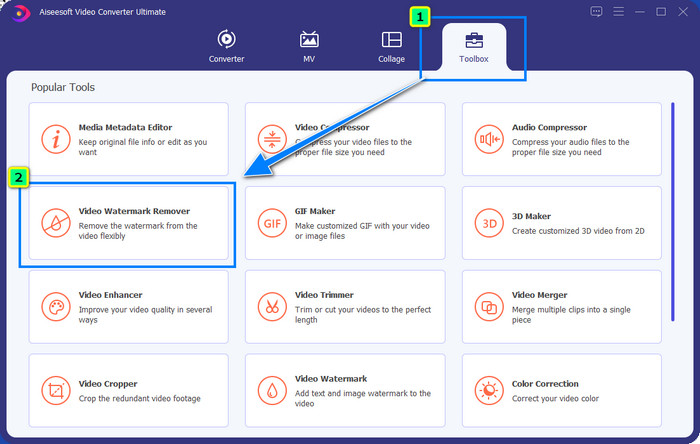
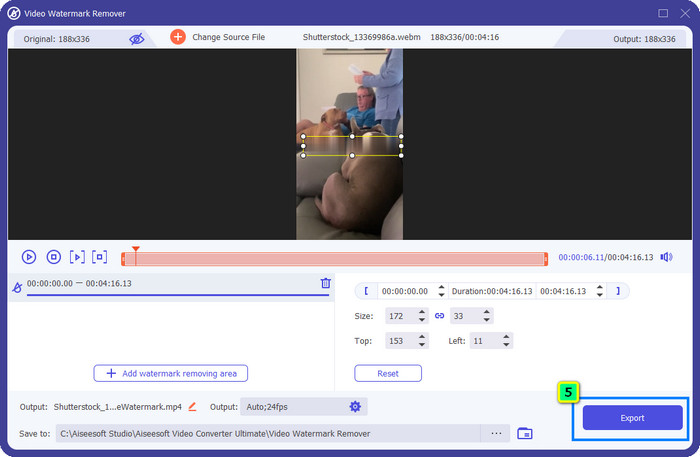
Krok 2. Następnie skorzystaj z funkcji Video Watermark Remover, którą znajdziesz w zakładce Toolbox. Jak widać, możesz użyć wielu funkcji i narzędzi edycyjnych, aby dopasować obraz do preferowanego efektu.
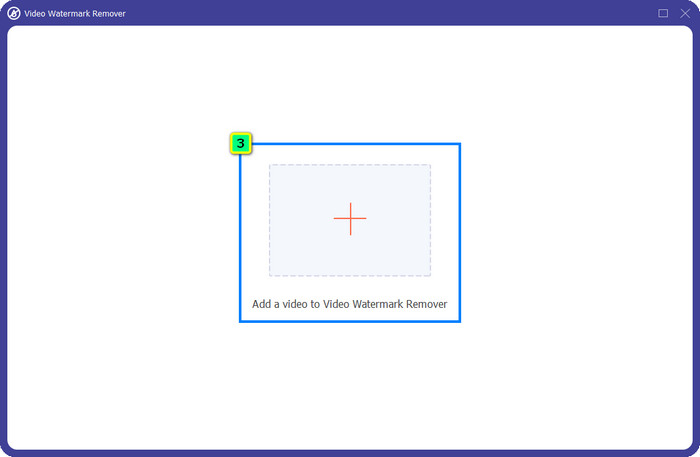
Krok 3. Kliknij ikonę plus, a na ekranie pojawi się menedżer plików. Wybierz plik wideo ze znakiem wodnym, a następnie kliknij Open, aby go wczytać.
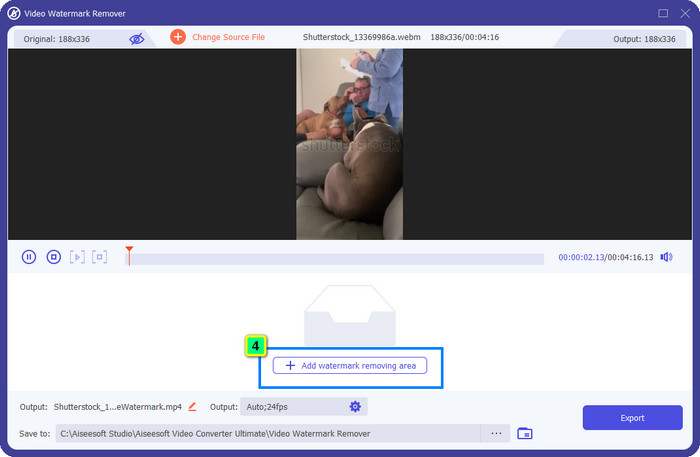
Krok 4. Aby wymazać znak wodny z załadowanego filmu, naciśnij Add Watermark Removing Area; pojawi się nowe okno.
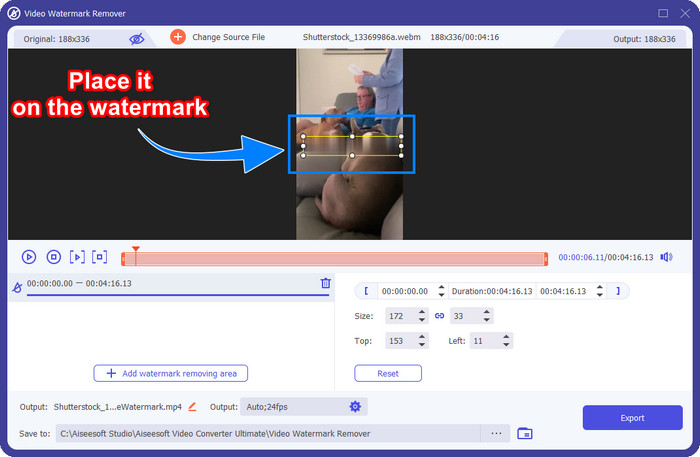
Krok 5. W tym etapie na Twoim filmie pojawi się kwadrat; umieść go na znaku wodnym. Możesz go zmieniać – przeskalować, przeciągnąć, zmniejszyć lub powiększyć – tak, aby dokładnie zakrył znak wodny, który chcesz usunąć.
Krok 6. Na koniec kliknij przycisk Export, aby pobrać ostateczną wersję filmu Shutterstock na swoje urządzenie. Teraz możesz się nim cieszyć bez martwienia się o znak wodny, ponieważ został usunięty.
Część 2. Jak usunąć znak wodny Shutterstock online za darmo
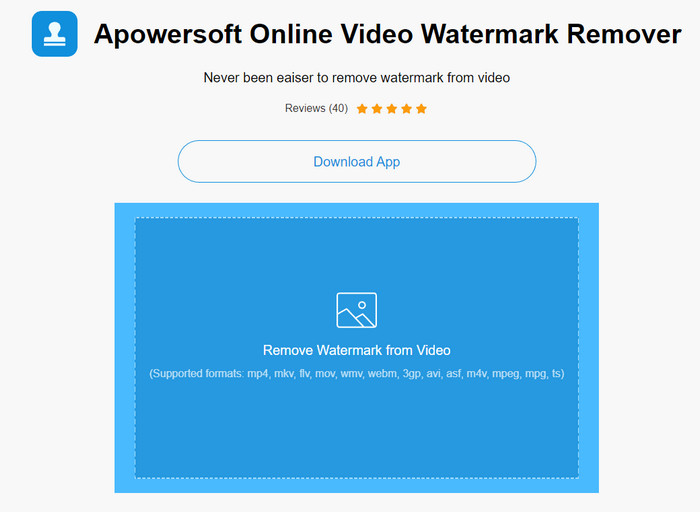
Nie podoba Ci się pomysł pobierania programu do usuwania znaków wodnych na komputer? W takim razie możesz użyć Apowersoft Online Watermark Remover, a my pokażemy Ci, jak usunąć znak wodny Shutterstock online. To świetny wybór dla każdego, kto musi usunąć znak wodny z posiadanego filmu lub obrazu. Powodem, dla którego je polecamy, jest to, że narzędzie jest łatwo dostępne i kompatybilne z różnymi systemami operacyjnymi, z których korzystasz.
W przeciwieństwie do narzędzi offline, aby z nich korzystać, potrzebujesz stabilnego i solidnego połączenia internetowego. Jak obiecujemy, poniżej znajduje się samouczek dotyczący używania tego narzędzia do usuwania znaków wodnych w celu usunięcia znaku wodnego pozostawionego przez Shutterstock.
Krok 1. Otwórz oficjalną stronę Apowersoft Online Watermark Remover w swojej ulubionej wyszukiwarce, a następnie kliknij przycisk + po prawej stronie, aby wczytać plik wideo.
Krok 2. Ustaw selection box na znak wodny Shutterstock w filmie.
Krok 3. Następnie kliknij Erase, aby usunąć znak wodny i zobaczyć efekt.
Krok 4. Naciśnij Download File, aby pobrać film Shutterstock bez znaku wodnego.
Część 3. Jak usunąć znak wodny Shutterstock za pomocą programu Photoshop [płatny]
Wielu użytkowników pyta, jak usunąć znak wodny Shutterstock za pomocą Photoshopa, i właśnie w tym chcemy pomóc! Adobe Photoshop oferuje profesjonalną funkcję usuwania znaków wodnych, z której z przyjemnością skorzystasz. Podobnie jak programy przedstawione w tym artykule, Photoshop wykonuje zadanie, jednak jego sposób działania polega na usuwaniu znaku wodnego klatka po klatce. Oznacza to, że musisz poświęcić czas na eliminowanie znaku wodnego na każdej klatce wideo – im dłuższy film, tym więcej klatek. Jeśli chcesz się dowiedzieć, jak działa to narzędzie, zapoznaj się z poniższymi instrukcjami.
Krok 1. Pobierz aplikację na komputer, a następnie kliknij File. W tym menu wybierz Open, aby wczytać zapisany na komputerze film.
Krok 2. Po lewej stronie wybierz Magic Wand Tool, a następnie kliknij znak wodny, który chcesz usunąć. Funkcja ta automatycznie zaznaczy znak wodny na klatce.
Krok 3. Przejdź do Edit i kliknij Content-Aware Fill po zaznaczeniu znaku wodnego.
Krok 4. Po otwarciu okna Content-Aware Fill program automatycznie usunie wcześniej zaznaczony znak wodny, a następnie naciśnij OK.
Dalsza lektura:
Łatwe metody usuwania znaku wodnego Shootproof
Jak bez wysiłku usunąć znak wodny Bandicam [3 skuteczne sposoby]
Część 4. Często zadawane pytania dotyczące usuwania znaku wodnego Shutterstock
Jak usunąć znak wodny Shutterstock bez Photoshopa?
Możesz użyć FVC Video Converter Ultimate, aby usunąć Shutterphoto powiązany z twoim filmem. Ma potężną gumkę do znaku wodnego, którą chciałbyś wypróbować. Wykonaj kroki, które dodaliśmy w tym artykule, aby zrobić to tak skutecznie, jak w Photoshopie.
Czy przycinanie znaku wodnego Shutterstock będzie działać na wideo?
Jeśli chcesz zmienić rozmiar wideo, zmieniając wymiar, możesz przyciąć wideo za pomocą wielu edytorów wideo online i offline. Ponieważ znak wodny Shutterstock znajduje się pośrodku, lepiej nie używać funkcji przycinania. Liczne narzędzia do usuwania znaków wodnych są tutaj, aby pomóc; możesz przeczytać i skopiować samouczek, który dodaliśmy, abyś mógł go skutecznie wymazać bez pozostawiania na nim smug.
Czy usunięcie znaku wodnego Shutterstock jest zgodne z prawem?
Usunięcie znaku wodnego Shutterstock jest niezgodne z prawem, ale jeśli chcesz go używać w celach niekomercyjnych, możesz to zrobić za pomocą narzędzia do usuwania znaków wodnych. Lepiej jest kupić zdjęcie, które chcesz na Shutterstock, jeśli zamierzasz używać go do celów komercyjnych; chociaż będzie cię to kosztować, przynajmniej pozwoli ci mieć prawa do korzystania z niego.
Wniosek
Teraz wiesz, jak usunąć znak wodny Shutterstock za pomocą programów opisanych w tym artykule. Które oprogramowanie wybierzesz: płatne, darmowe online czy wersję ultimate? Niezależnie od wyboru, możesz uzyskać obraz Shutterstock bez logo produktu. Jeśli jednak zapytasz nas, czego użyć, bez wahania wskażemy FVC Video Converter Ultimate, ponieważ najlepiej radzi sobie z tym zadaniem. Mimo że jest to zaawansowane narzędzie do usuwania znaków wodnych, nadal pozostaje proste w obsłudze. Jeśli chcesz je wypróbować, kliknij przycisk pobierania, aby zainstalować ten program na swoim komputerze.
-
 Najlepsze narzędzia do usuwania znaku wodnego z eksportowanych filmów Renderforest
 Aby usunąć znak wodny z Renderforest, potrzebujesz narzędzia do usuwania znaków wodnych na swoim urządzeniu, wszystkie narzędzia, których możesz użyć, są tutaj.
-
 Proste kroki, jak usunąć znak wodny suwaka WOW [rozwiązany]
 WOW Slider to aplikacja do tworzenia fantastycznego pokazu slajdów. Jednak osadza znaki wodne na swoim wyjściu. Przeczytaj poniżej, aby dowiedzieć się, jak usunąć znak wodny WOW Slider.
-
 Jak pozbyć się znaku wodnego Power Director za darmo [Complete]
 Jak za darmo pozbyć się znaku wodnego Power Director? Najlepsze narzędzia do usuwania znaku wodnego są tutaj, więc naucz się ich, czytając to.
