


 Video Converter Ultimate
 Nagrywarka ekranu
 Naprawa wideo
Niekwestionowane metody usuwania logo iSkysoft z wideo
iSkysoft to doskonała aplikacja z wieloma znakomitymi funkcjami, które sprawiają, że wyróżnia się na tle innych. To proste narzędzie, które pozwala konwertować format wideo na inny oraz wykonywać podstawową edycję wideo. Jednak najgorsze w tym programie jest to, że po jego użyciu na filmach pojawia się duży znak wodny iSkysoft. Oglądanie wideo z dużym znakiem wodnym/logo jest zupełnie niesatysfakcjonujące. Na szczęście dostępne są niezawodne programy, dzięki którym usuniesz przeszkadzające elementy, takie jak logo/znak wodny iSkysoft. Jeśli chcesz poznać najlepsze metody, aby usunąć logo iSkysoft z nagrania wideo, koniecznie przeczytaj ten artykuł.

Część 1: Usuń logo iSkysoft z wideo na pulpicie
Logo iSkysoft na ekranie jest naprawdę irytujące, zwłaszcza gdy oglądasz swoje ulubione filmy. Nie musisz się jednak dłużej martwić. Możesz pozbyć się tego logo, korzystając z Video Converter Ultimate. To niezawodne oprogramowanie pomaga usunąć logo iSkysoft z filmów na dwa proste sposoby: za pomocą narzędzia Video Watermark Remover oraz narzędzia Video Cropper. Dzięki tym narzędziom z łatwością usuniesz logo iSkysoft z nagrania. Jeśli logo iSkysoft znajduje się w rogu wideo, zaleca się użycie narzędzia Video Cropper. Natomiast gdy logo umieszczone jest na środku, możesz skorzystać z narzędzia Video Watermark Remover. W ten sposób obejrzysz swoje ulubione filmy lub klipy bez irytującego logo.
Ponadto, oprócz usuwania znaków wodnych z twoich filmów, Video Converter Ultimate ma więcej funkcji. Ma wzmacniacz wideo, łączenie wideo, przycinanie, trymer, rotator, konwerter i wiele innych. Dodatkowo jedną z głównych funkcji tej aplikacji jest konwersja różnych formatów plików wideo. Nieprofesjonalni użytkownicy mogą również korzystać z tej aplikacji, ponieważ ma prosty interfejs. Jeśli chcesz dowiedzieć się, jak usunąć logo iSkysoft ze swojego filmu, pokażemy Ci dwa proste sposoby, jakie zapewnia ta aplikacja.
Korzystanie z narzędzia do usuwania znaków wodnych wideo
Krok 1: Najpierw pobierz program Video Converter Ultimate na komputer, aby skorzystać z tego znakomitego oprogramowania. Po pobraniu przejdź przez proces instalacji i uruchom aplikację.
Bezpłatne pobieranieDla Windows 7 lub nowszegoBezpieczne pobieranie
Bezpłatne pobieranieDla MacOS 10.7 lub nowszegoBezpieczne pobieranie
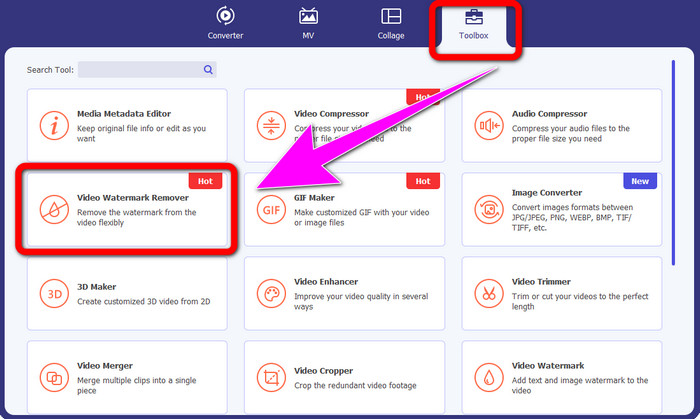
Krok 2: Po uruchomieniu programu przejdź do panelu Toolbox i wybierz narzędzie Video Watermark Remover. Na ekranie pojawi się nowe okno.
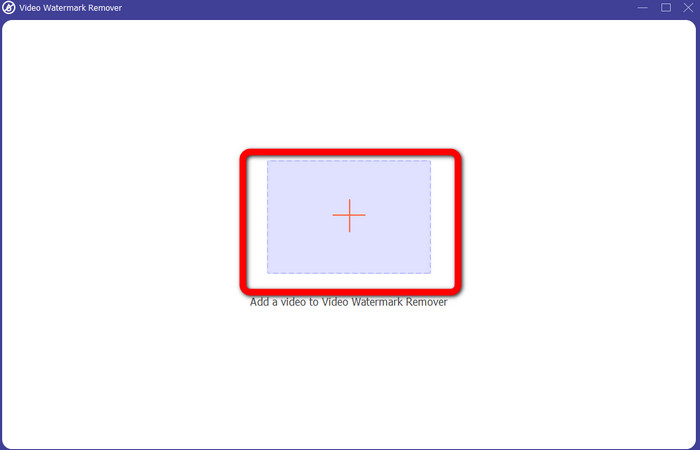
Krok 3: Gdy zobaczysz nowe okno, kliknij ikonę plusa i dodaj wideo z logo iSkysoft, które chcesz usunąć.
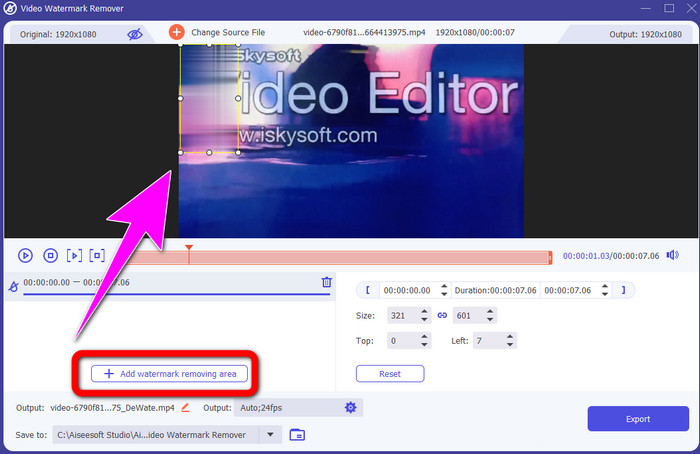
Krok 4: Następnie kliknij przycisk Add Watermark Removing Area. Przesuń ramkę na swoim wideo i zakryj nią logo iSkysoft.
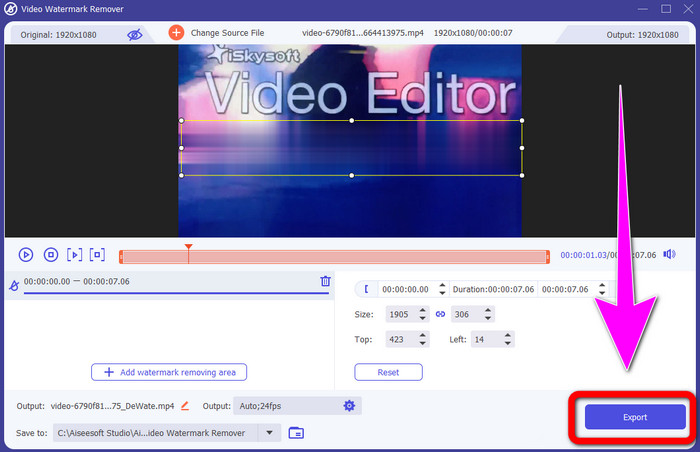
Krok 5: Na koniec kliknij przycisk Export, aby zapisać gotowy film.
Korzystanie z narzędzia do przycinania wideo
W tej części pokażemy, jak usunąć logo iSkysoft z filmu za pomocą narzędzia Video Cropper.
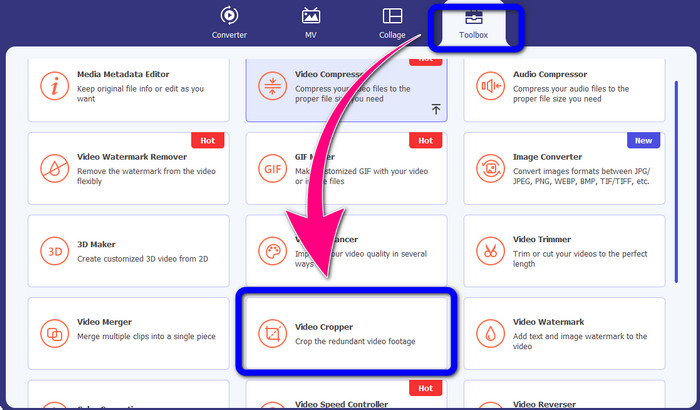
Krok 1: Uruchom aplikację na komputerze. W panelu Toolbox kliknij narzędzie Video Cropper. Podobnie jak w poprzednim narzędziu, na ekranie pojawi się nowe okno.
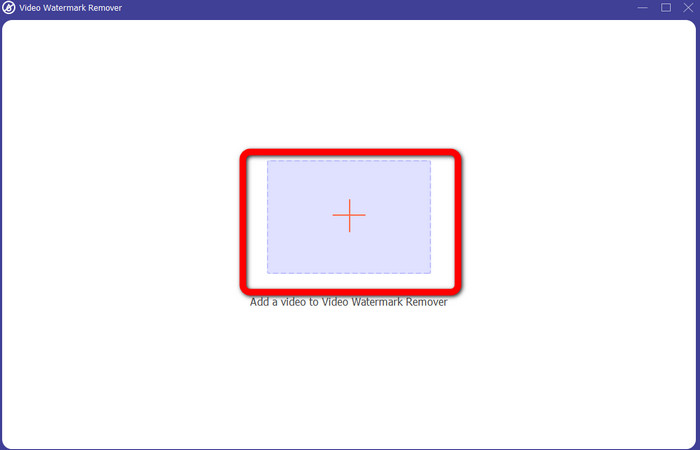
Krok 2: Kliknij przycisk z symbolem Plus, aby zaimportować wideo z logo iSkysoft.
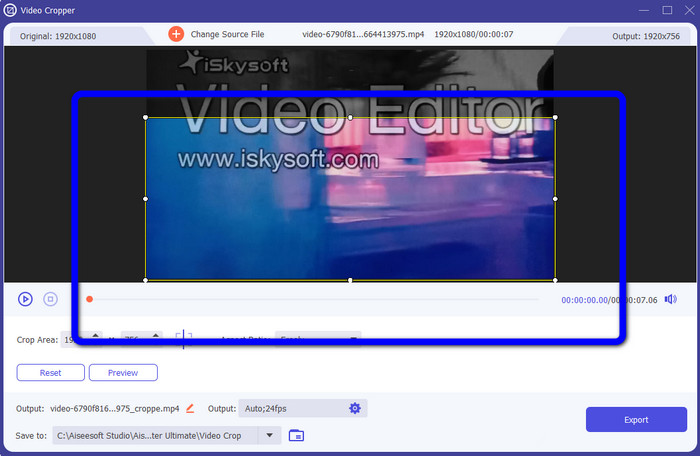
Krok 3: W tym kroku możesz już przyciąć wideo, aby usunąć logo iSkysoft z nagrania. Użyj myszy, aby przesuwać krawędzie obrazu.
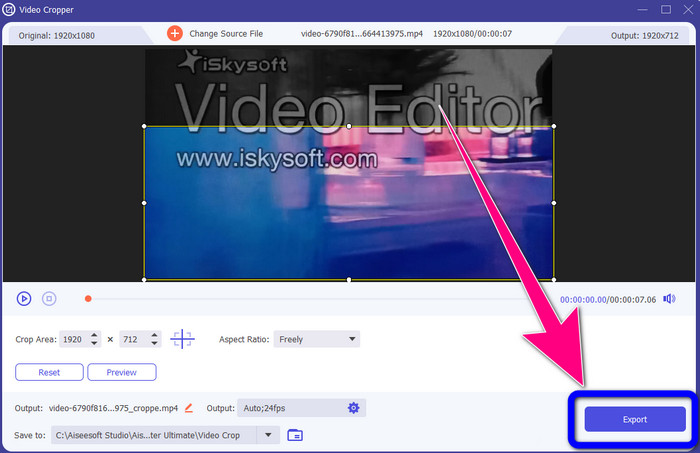
Krok 4: Na zakończenie kliknij przycisk Export i zapisz efekt swojej pracy na komputerze.
Część 2: Jak usunąć logo iSkysoft z wideo online
Za pomocą HitPaw
Logo iSkysoft możesz usunąć także online. Jednym z najlepszych narzędzi do tego celu jest HitPaw. Ta aplikacja online umożliwia łatwe usuwanie logo z filmu. Możesz korzystać z niej zarówno na komputerze, jak i w przeglądarce, co jest wygodne dla każdego. Dodatkowo HitPaw jest bezpieczny w użyciu – gwarantuje, że filmy mogą być edytowane i oglądane wyłącznie przez Ciebie. Co więcej, nie musisz martwić się ograniczeniami tego programu – nie ma limitu w usuwaniu logo z filmów. Nie musisz kupować tej aplikacji, ponieważ jest darmowa. Jednak jeśli usuwasz logo lub inne
niepotrzebnych elementów z Twojego filmu, musisz jeszcze trochę poczekać. Ta aplikacja ma powolną procedurę usuwania, która jest czasochłonna dla użytkowników. Ponadto zależy to od połączenia internetowego. Będzie działać dobrze, jeśli masz szybkie łącze. Ale jeśli masz wolne połączenie, spodziewaj się pewnego opóźnienia. Wykonaj poniższe proste czynności, aby usunąć logo iSkysoft ze swoich filmów.
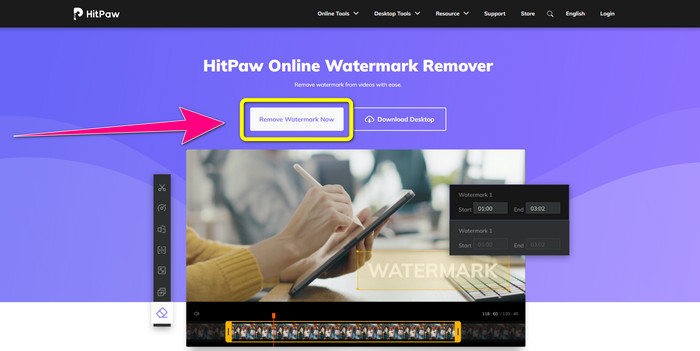
Krok 1: Wejdź na stronę HitPaw. Kliknij przycisk Remove Watermark Now - Choose File, aby wstawić wideo z logo iSkysoft, którego chcesz się pozbyć.
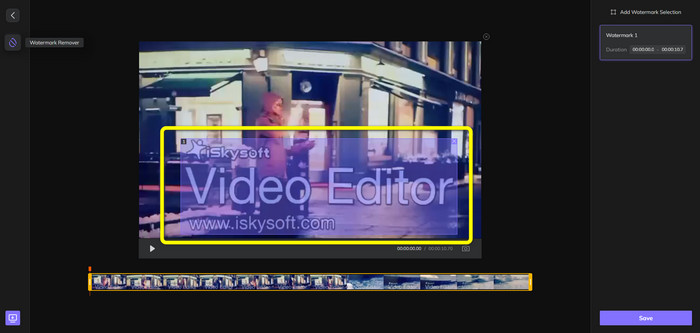
Krok 2: Po dodaniu pliku wideo na ekranie pojawi się niebieskie pole. Użyj go, aby zakryć logo iSkysoft. Możesz zmieniać rozmiar tego pola.
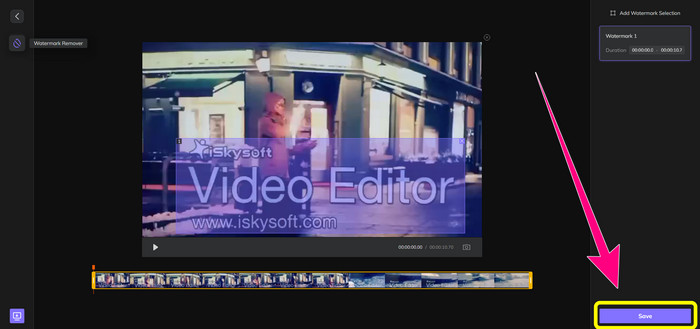
Krok 3: Gdy skończysz zakrywać logo iSkysoft na filmie, kliknij przycisk Save. Poczekaj na zakończenie procesu usuwania i zapisz wideo.
Korzystanie z narzędzia do usuwania znaków wodnych wideo online
Innym narzędziem online, z którego możesz skorzystać, jest Video Watermark Remover Online. Za pomocą tej aplikacji usuniesz logo iSkysoft ze swoich filmów. To także łatwy w obsłudze program, odpowiedni dla użytkowników bez doświadczenia. Możesz usuwać z nagrań wszystkie irytujące elementy bez utraty jakości wideo. W darmowej wersji obowiązuje jednak ograniczenie dotyczące usuwania znaków z filmów – możesz usunąć logo lub znaki wodne maksymalnie z 5 nagrań. Jeśli chcesz przetworzyć więcej wideo w Video Watermark Remover Online, musisz wykupić subskrypcję. Ponadto nie możesz zapisać efektu w innym formacie – zapis jest możliwy tylko w tym samym formacie, co nie jest zbyt wygodne. Na końcu warto dodać, że przetwarzanie plików jest dość wolne. Skorzystaj z poniższej, prostej instrukcji, aby usunąć logo iSkysoft z filmów.
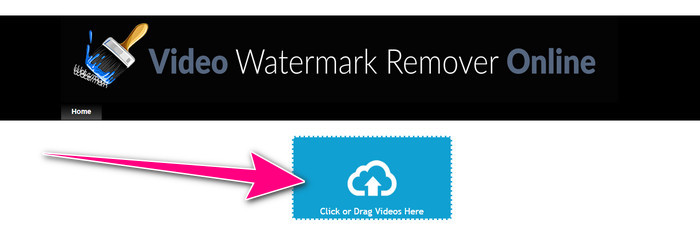
Krok 1: Przejdź na stronę Video Watermark Remover Online. Kliknij przycisk Click or Drag Videos Here, aby zaimportować plik wideo z logo iSkysoft, które chcesz usunąć.
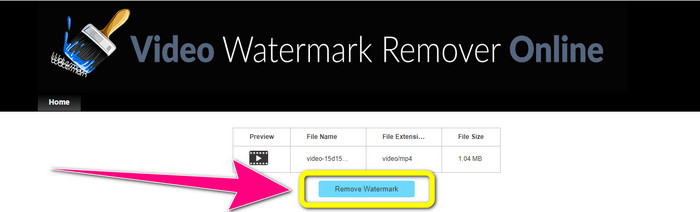
Krok 2: Następnie kliknij przycisk Remove Watermark i poczekaj na zakończenie procesu usuwania.
Powiązane z:
Najszybszy sposób na usunięcie logo z wideo w Adobe Premiere Pro
Jak usunąć logo z wideo za pomocą Windows Movie Maker
Część 3: Często zadawane pytania dotyczące usuwania logo iSkysoft
Czy można usunąć logo ze zdjęcia?
Tak, możesz użyć narzędzia FVC Free Watermark Remover, aby łatwo i szybko usunąć logo ze zdjęcia.
Czy usunięcie znaku wodnego jest nielegalne?
Zgodnie z amerykańską ustawą o prawie autorskim, sekcja 1202, usuwanie znaków wodnych bez zgody właściciela jest nielegalne.
Jak bezpłatnie usunąć logo?
Możesz skorzystać z bezpłatnej wersji próbnej Video Converter Ultimate, aby bezpłatnie usunąć logo ze swojego filmu.
Wniosek
W tym artykule przedstawiono znakomite metody, aby usunąć logo iSkysoft z nagrania wideo za pomocą narzędzi na komputer i online. Jeśli jednak szukasz naprawdę świetnego programu do usuwania logo, pobierz Video Converter Ultimate. Aplikacja oferuje szybki proces usuwania i jest dostępna dla wszystkich użytkowników.
-
 8 wyjątkowych narzędzi do usuwania znaków wodnych wideo online i offline
 Jeśli szukasz najlepszego bezpłatnego oprogramowania do usuwania znaków wodnych wideo, którego możesz używać na telefonach z systemem Windows, Mac, iPhone i Android, ten artykuł jest dla Ciebie
-
 Najlepsze metody usuwania Biteable Watermark z wideo
 W tym artykule znajdziesz najbardziej niezawodny i fantastyczny środek do usuwania znaków wodnych, który można gryźć. Te wspaniałe aplikacje pomogą Ci rozwiązać tego rodzaju problem
-
 Łatwe do nauczenia procedury usuwania logo z wideo
 Szukasz najlepszego i łatwego narzędzia do usuwania logo wideo? W takim razie ten artykuł jest dla Ciebie dobry. Skorzystaj z okazji, aby dowiedzieć się, jak usunąć logo z filmu.
