


 Video Converter Ultimate
 Nagrywarka ekranu
 Naprawa wideo
Najszybsze procedury konwersji VOB na M4V w systemach Windows i Mac
Płyty DVD zazwyczaj wykorzystują format pliku VOB (Video Object). Taki plik jest często przechowywany w katalogu głównym DVD, w folderze VIDEO_TS. Obecnie jednak w internecie funkcjonuje ogromna liczba plików multimedialnych. Dodatkowo, płyty DVD są dziś mniej powszechne i nie są szeroko obsługiwane przez urządzenia oraz programy. Jeśli to jest powód, potrzebujesz formatu obsługiwanego przez wiele urządzeń i aplikacji, takiego jak M4V. Będziesz zadowolony, ponieważ poznasz najskuteczniejsze metody, aby konwertować VOB na M4V z użyciem narzędzi online oraz programów do pobrania.

Część 1: Różnice między VOB a M4V
| VOB | M4V | |
| Pełne imię i nazwisko | Obiekt wideo | Wideo MPEG-4 |
| Rozszerzenie pliku | .vob | .m4v |
| Opis | Wideo, audio, napisy, menu DVD i inne treści są zawarte w jednym pliku przy użyciu formatu kontenera VOB. Format VOB, oparty na systemowych strumieniach MPEG-2, który może być odtwarzany na wielu urządzeniach multimedialnych, jest zwykle przechowywany w folderze VIDEO TS w katalogu głównym płyty. | Firma Apple stworzyła format kontenera wideo M4V, który służy do dystrybucji treści audio i wideo za pośrednictwem iTunes. Z wyjątkiem możliwości korzystania z ochrony przed kopiowaniem DRM w celu zabezpieczenia własności odcinków telewizyjnych, filmów i innych materiałów multimedialnych ze sklepu iTunes, pliki M4V są identyczne z plikami MP4. |
| Opracowany przez | Forum DVD | jabłko |
| Typ MIME | wideo/DVD wideo/mpeg | wideo/x-m4v |
| Kodek wideo | MPEG-1 MPEG-2 | H.264 |
| Kodeki dźwięku | MP2 AC-3 DTS | AAC Dolby Digital |
| Powiązane programy | Media Player Classic Windows Media Player Vlc media player Potplayer GOMPlayer | QuickTime Player iTunes Media Player Classic Odtwarzacz multimedialny K MPlayer Vlc media player |
Część 2: Dlaczego musisz przekonwertować VOB na M4V
Głównym powodem, dla którego musisz przekonwertować VOB na M4V, jest to, że wiele aplikacji nie obsługuje pliku VOB. Bez względu na wszystko, jeśli masz wideo VOB na komputerze Mac, możesz mieć problemy. Wrzuć go do QuickTime do odtwarzania lub iMovie/FCP do edycji. Dlatego musisz przekonwertować plik.vob na format obsługiwany przez komputery Mac, na przykład M4V.
Część 3: Jak przekonwertować VOB na M4V na komputerze Mac
Najlepszym konwerterem, którego możesz użyć do konwersji VOB na M4V na Macu, jest FVC Video Converter Ultimate. Ten konwerter różni się od innych, które znajdziesz w internecie. Inne konwertery oferują jedynie standardową prędkość konwersji. W tej aplikacji doświadczysz znacznie ciekawszych możliwości. Video Converter Ultimate zapewnia ultraszybką konwersję – do 30 razy szybszą niż przeciętna. Ponadto, jeśli chcesz konwertować dwa lub więcej plików, ta aplikacja jest dla Ciebie. Umożliwia konwersję wsadową, dzięki czemu możesz dodać wiele plików i przekonwertować je w jednym procesie. Dzięki temu zaoszczędzisz sporo czasu. Co więcej, w trakcie konwersji możesz nadal edytować swój film. Możesz ulepszać, edytować i przycinać nagranie, ponieważ podczas procesu konwersji dostępnych jest wiele dodatkowych opcji. Dodatkowo możesz poprawić jakość swojego pliku VOB, korzystając z tego konwertera.
Funkcje
◆ Konwertuj ponad 100 formatów plików wideo, w tym MP4, VOB, M4V, WMV, MKV, AVI, FLV, MTS itp.
◆ Oferuje twórcę kolaży z dostępnymi szablonami i filtrami.
◆ Możliwość tworzenia teledysków z darmowymi motywami. Może łączyć filmy i obrazy.
◆ Zawiera Toolbox z wieloma narzędziami do edycji, takimi jak wzmacniacz wideo, trymer, przycinanie itp.
◆ Konwertuj pliki graficzne, takie jak PNG, JPG, BMP, TIFF i inne.
◆ Twórz niestandardowe wideo 3D z 2D.
◆ Może zwalniać oraz przyspieszać wideo od 0,125x do nawet 8x szybciej.
Postępuj zgodnie z poniższymi podstawowymi procedurami, aby przekonwertować VOB na M4V na komputerze Mac za pomocą FVC Video Converter Ultimate.
Krok 1: Wyszukaj w przeglądarce FVC Video Converter Ultimate. Możesz też kliknąć przycisk Pobierz poniżej. Wybierz wersję na Maca, a następnie uruchom aplikację.
Bezpłatne pobieranieDla Windows 7 lub nowszegoBezpieczne pobieranie
Bezpłatne pobieranieDla MacOS 10.7 lub nowszegoBezpieczne pobieranie
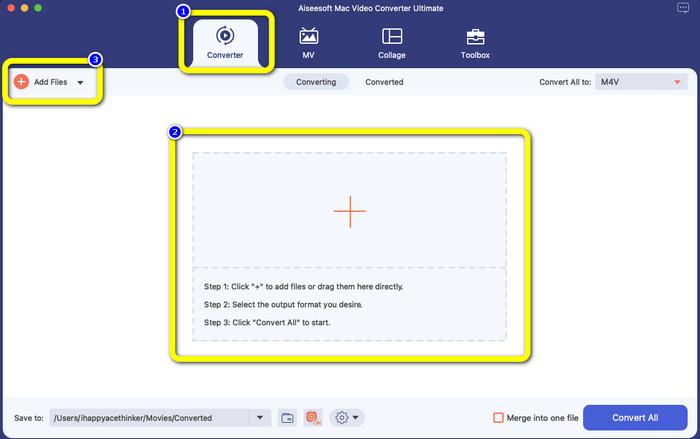
Krok 2: Gdy interfejs się pojawi, wybierz panel Converter. Kliknij ikonę Plus lub przycisk Add Files, aby dodać plik VOB. Możesz też przeciągnąć plik wideo bezpośrednio do wyznaczonego pola.
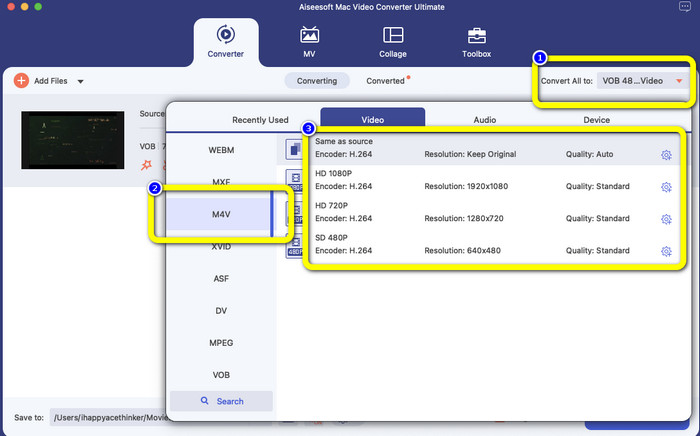
Krok 3: Kliknij przycisk Convert All, aby zobaczyć dostępne formaty. Następnie wybierz format M4V. Możesz także wybrać rozdzielczość wideo od 480p do 1080p albo pozostać przy oryginalnej jakości.
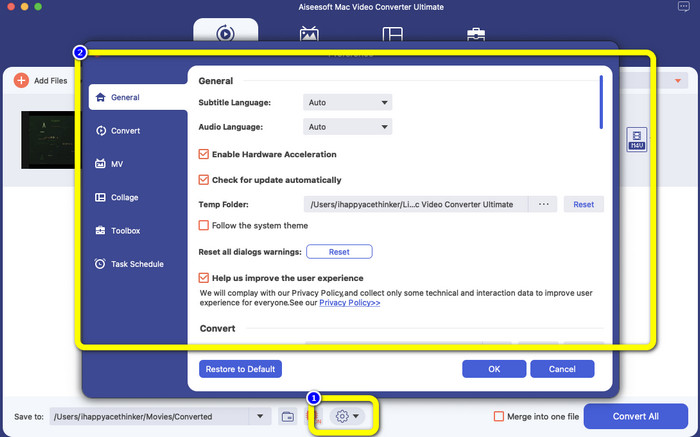
Krok 4: Przed konwersją możesz edytować swoje wideo, na przykład dodać napisy, ścieżkę audio w innym języku i inne elementy, klikając ikonę Preference w dolnej części interfejsu.
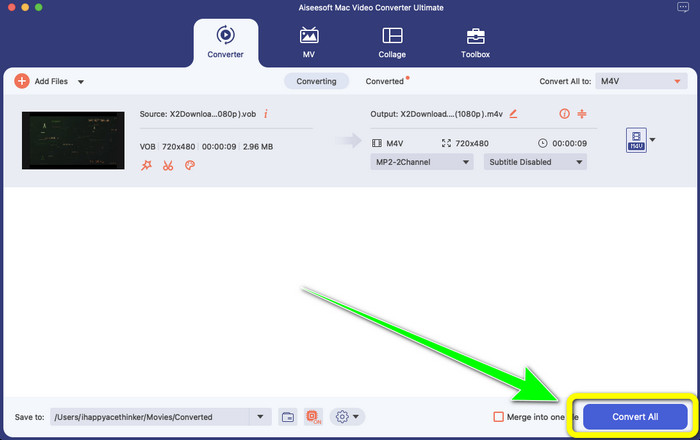
Krok 5: Gdy zakończysz wprowadzanie zmian w swoim wideo VOB, kliknij przycisk Convert, aby przekonwertować plik VOB do formatu M4V. Następnie zapisz wideo na komputerze Mac.
Część 4: Proste sposoby bezpłatnej konwersji VOB na M4V online
Jeśli chcesz za darmo online przekonwertować VOB na M4V, możesz wypróbować FreeFileConvert. Ten konwerter online z łatwością przekształca różne typy plików. Aby przekonwertować plik wideo VOB do formatu M4V, wystarczą tylko trzy kroki, co czyni go idealnym dla użytkowników nieprofesjonalnych. Ponadto wszystkie przekonwertowane pliki są usuwane z serwera po 24 godzinach i nie są już dostępne. Możesz także samodzielnie usunąć plik, korzystając z przycisku Delete po zakończeniu konwersji. Co więcej, FreeFileConvert nadaje się nie tylko do konwersji wideo. Umożliwia także konwersję obrazów, dokumentów, grafik wektorowych, audio, archiwów, e-booków i prezentacji, co jest bardzo wygodne dla użytkowników. Wadą jest jednak wolniejszy proces konwersji, więc musisz poświęcić na to więcej czasu. Do działania narzędzia wymagane jest też połączenie z internetem.
Krok 1: Wejdź na stronę internetową FreeFileConvert.
Krok 2: Kliknij przycisk Choose File, aby dodać swój plik wideo VOB.
Krok 3: Kliknij przycisk Convert File, aby wyświetlić dostępne formaty i wybierz format M4V.
Krok 4: Na koniec wybierz przycisk Convert. Po zakończeniu procesu konwersji pobierz gotowe wideo.
Część 5: Często zadawane pytania dotyczące konwersji VOB na M4V
1. Jaki jest wspólny format pliku do konwersji pliku VOB?
Ponieważ MP4 jest popularnym rozszerzeniem plików multimedialnych i formatem kontenera do przechowywania danych wideo, audio i napisów, byłby to najlepszy format wideo do konwersji nieobsługiwanych plików wideo VOB. Wiele urządzeń przenośnych, w tym produkty Apple, obsługuje format MP4.
2. Jak przekonwertować format pliku VOB bez utraty jakości?
Możesz użyć FVC Video Converter Ultimate. To narzędzie offline może konwertować wiele plików bez zmiany jakości wideo.
3. Czy pliki VOB można odtwarzać na urządzeniach z Androidem?
Nie. Filmy na płytach DVD są przechowywane w kontenerze VOB (Video Object). Pliki VOB zazwyczaj nie są obsługiwane przez Androida. Jeśli chcesz odtwarzać takie nagrania na smartfonach lub tabletach z Androidem, musisz przekonwertować VOB na MP4 lub inny format wideo obsługiwany przez urządzenia z Androidem.
Wniosek
Teraz poznałeś różnice między formatami VOB i M4V. Ten artykuł przedstawia także najprostsze procedury konwersji VOB na M4V. Jeśli zależy Ci na aplikacji z szybkim procesem konwersji, możesz użyć FVC Video Converter Ultimate. Ten konwerter może przekształcać różne pliki nawet 30 razy szybciej niż inne narzędzia.
-
 Jak skompresować pliki VOB online i za darmo [bez pobierania]
 Szukasz metod kompresji plików VOB? Z tego artykułu dowiesz się, jak najlepiej zmniejszyć rozmiar plików VOB
-
 Konkretny przewodnik po dołączeniu do plików M4V na Windows i Mac za darmo
 Jeśli szukasz rozwiązania do łączenia plików wideo M4V w jeden, nigdy nie przegap tego fragmentu. Tutaj porozmawiamy o dwóch najlepszych metodach łączenia plików wideo M4V
-
 Konwertuj VOB na 3PG w systemach Windows i Mac za darmo [bezstratnie]
 Jak przekonwertować VOB na 3GP w systemach Windows i Mac? Ten artykuł zawiera najlepsze rozwiązania do konwersji VOB na 3GP
