


 Video Converter Ultimate
 Nagrywarka ekranu
 Naprawa wideo
Najprostsze metody konwertowania M2TS na format pliku M4V
Wiele formatów, takich jak M2TS, z czasem otrzymuje coraz słabsze wsparcie. W tym formacie wciąż używany jest oryginalny kontener Blu-ray Audio Video, który przesyła dane za pomocą strumienia MPEG-2. Niektóre urządzenia, w tym iPhone’y, iPody i Android, nie potrafią odczytać struktury tego formatu. Dlatego nie można na nich odtwarzać tego typu plików. Jeśli jednak nadal je posiadasz, przekonwertuj je na inne formaty plików, takie jak M4V. A jeśli chcesz to zrobić, przeczytaj ten artykuł. Pokażemy Ci najlepsze metody, dzięki którym nauczysz się, jak konwertować M2TS na M4V.

Część 1: Darmowy sposób na konwersję M2TS na M4V
Nie musisz się już martwić, jak konwertować swoje pliki M2TS, jeśli użyjesz programu FVC Free M2TS Converter. Za pomocą tego bezpłatnego narzędzia możesz konwertować pliki M2TS do wielu standardowych formatów wideo, w tym M4V, MP4 (HD H.264/MPEG-4 AVC), MOV, AVI, TS, VOB, MKV, FLV, SWF, ASF, WMV, MP3, M4A, OGG, WAV, WMA, FLAC i innych. Dodatkowo narzędzie oferuje funkcję konwersji wsadowej. Oznacza to, że możesz jednocześnie błyskawicznie przekonwertować wiele plików. Co więcej, program zapewnia ultraszybką konwersję – może konwertować pliki nawet 50 razy szybciej niż inne typowe konwertery.
Co więcej, FVC Free M2TS Converter jest nie tylko niezawodny w konwertowaniu wielu plików. Oferuje również wbudowany edytor wideo. Ułatwia jednoczesne ładowanie wielu plików M2TS i łączenie ich w jeden. Dodatkowo możesz wybrać konkretny motyw dla każdego pliku wideo, na przykład urodziny, rodzina, jedzenie, otoczenie, sport lub festiwal, taki jak Halloween. W ten sposób możesz mieć pewność, że otrzymasz atrakcyjny i fantastyczny film. Wreszcie, to narzędzie jest bezpieczne w użyciu. Zapewni to uniknięcie utraty dźwięku i obrazu podczas procesu konwersji.
Funkcje
◆ Konwertuj różne pliki wideo, takie jak M2TS, M4V, MP4, MOV, AVI, FLV, WMV i inne.
◆ Oferuje szybki proces konwersji, do 50 razy szybszy niż średnia prędkość konwersji.
◆ Konwertuj wiele plików jednocześnie.
◆ Oferuje funkcję ulepszania wideo w celu ulepszenia filmów.
◆ Połącz wiele filmów, aby utworzyć jeden element.
Postępuj zgodnie z poniższą prostą procedurą, aby dowiedzieć się, jak zamienić wiele plików M2TS w jeden M4V za pomocą FVC Free M2TS Converter.
Krok 1: Pobierz program FVC Free M2TS Converter na swój komputer, klikając poniższy przycisk Download. Następnie przejdź przez proces instalacji i uruchom aplikację.
Bezpłatne pobieranieDla Windows 7 lub nowszegoBezpieczne pobieranie
Bezpłatne pobieranieDla macOS 10.7 lub nowszegoBezpieczne pobieranie
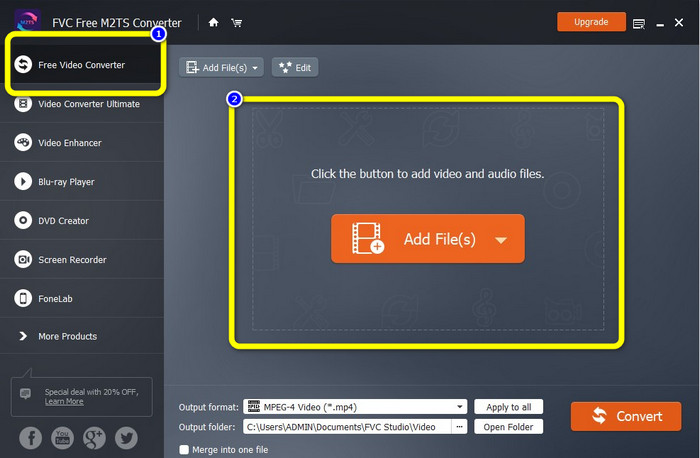
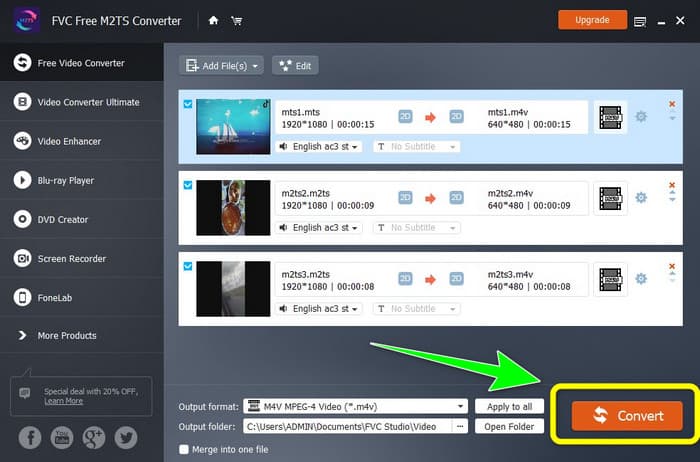
Krok 2: Wybierz opcję Free Video Converter po lewej stronie interfejsu. Następnie kliknij przycisk Add File, aby dołączyć plik wideo M2TS, który chcesz przekonwertować.
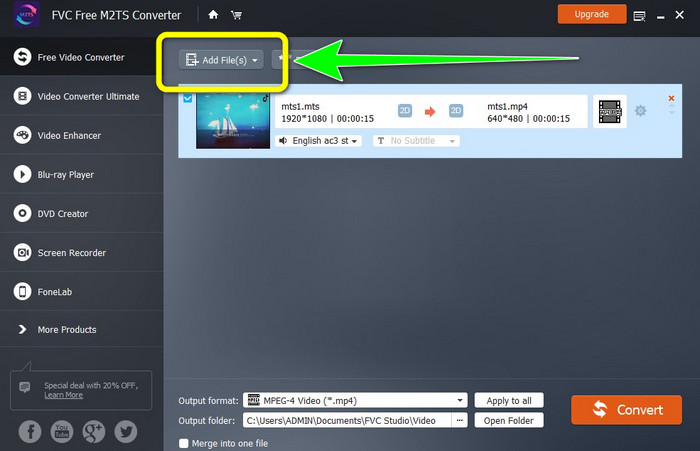
Krok 3: Jeśli chcesz dodać wiele plików wideo M2TS, kliknij przycisk Add Files.
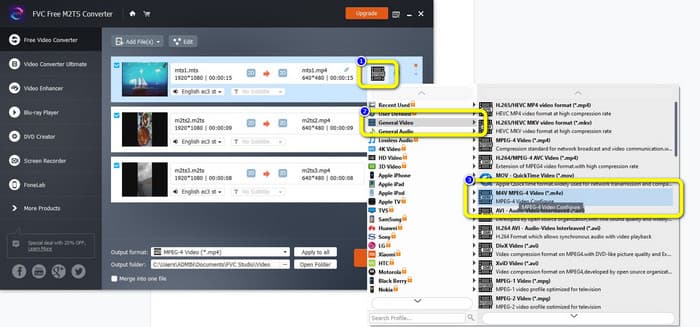
Krok 3: Przejdź do symbolu Video po prawej stronie interfejsu. Wybierz opcję General Video i wskaż docelowy format pliku, czyli M4V.
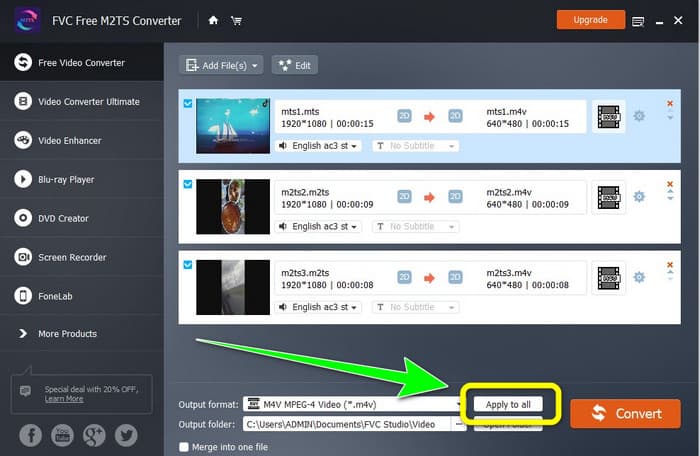
Krok 4: Tę samą procedurę możesz zastosować, aby zmienić format wyjściowy innych plików M2TS. Możesz też kliknąć przycisk Apply to all, aby natychmiast zmienić ich format wyjściowy na M4V.
Krok 5: Po zmianie wszystkich plików M2TS na format M4V kliknij przycisk Convert. Poczekaj na zakończenie procesu konwersji i zapisz swoje filmy w wybranej lokalizacji.
Część 2: Najlepsza metoda bezstratnej konwersji M2TS na M4V
Jeśli chcesz skorzystać z innej znakomitej metody łączenia wielu plików M2TS w jeden plik M4V, możesz wypróbować program Video Converter Ultimate. Dzięki tej aplikacji do pobrania z łatwością przekonwertujesz M2TS na M4V bez utraty jakości, ponieważ obsługuje ona konwersję wsadową. Dodatkowo oferuje prędkość konwersji 30 razy wyższą niż inne konwertery. Dzięki temu możesz przetwarzać więcej plików bez marnowania czasu. Co więcej, Video Converter Ultimate ma intuicyjny interfejs i zapewnia proste kroki konwersji plików, co czyni go odpowiednim dla wszystkich użytkowników.
Co więcej, ten konwerter oferuje również więcej wspaniałych funkcji. Jeśli chcesz połączyć wiele filmów M2TS i połączyć je w jeden element, możesz użyć tej aplikacji, ponieważ ma ona narzędzie do łączenia wideo. W ten sposób możesz łatwo łączyć swoje filmy M2TS. To narzędzie umożliwia również tworzenie kolaży, w których można łączyć obrazy i filmy. Możesz także skorzystać z wielu bezpłatnych szablonów i filtrów. Możesz więc zrobić piękny kolaż. Jest więcej funkcji, z których możesz korzystać za pomocą Video Converter Ultimate.
Funkcje
◆ Konwertuj ponad 100 formatów plików wideo, w tym M4V, M2TS, MP4, AVI, FLV, MKV, WMV, VOB, MOV, SWF itp.
◆ Stwórz wspaniały kolaż z darmowymi filtrami i szablonami.
◆ Oferta twórca teledysków.
◆ Udostępnia Zestaw narzędzi do edycji wideo.
◆ Oferuje proces konwersji wsadowej z 30-krotnie większą szybkością konwersji.
Wykonaj poniższe szczegółowe kroki, aby przekonwertować wiele plików M2TS jednocześnie za pomocą FVC Video Converter Ultimate.
Krok 1: Pobierz program Video Converter Ultimate na swój komputer. Aby go pobrać, kliknij poniższy przycisk Download. Następnie uruchom aplikację.
Bezpłatne pobieranieDla Windows 7 lub nowszegoBezpieczne pobieranie
Bezpłatne pobieranieDla MacOS 10.7 lub nowszegoBezpieczne pobieranie
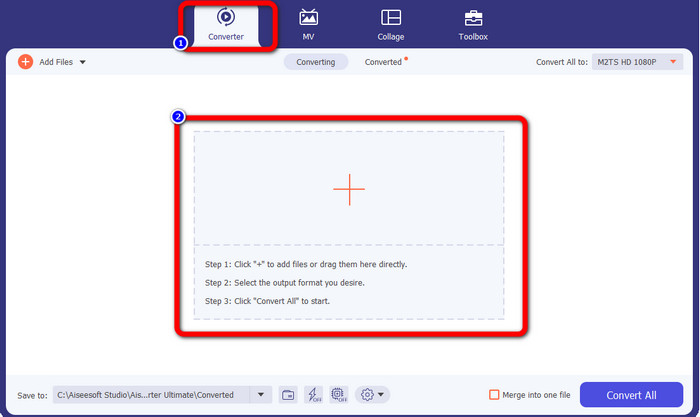
Krok 2: Wybierz panel Converter i kliknij przycisk z ikoną Plus, aby dodać swoje pliki M2TS.
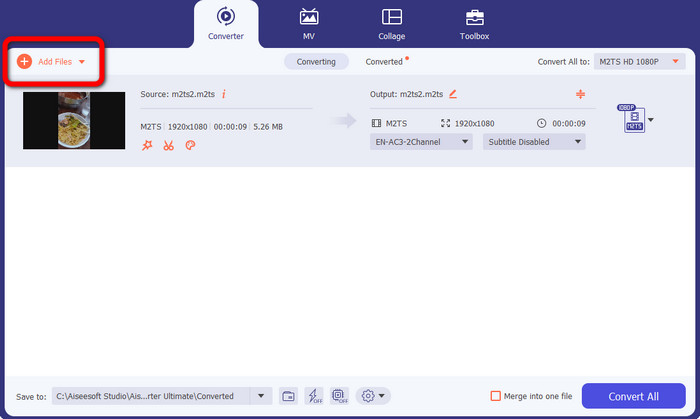
Krok 3: Kliknij przycisk Add File po lewej stronie interfejsu, aby wstawić więcej plików M2TS.
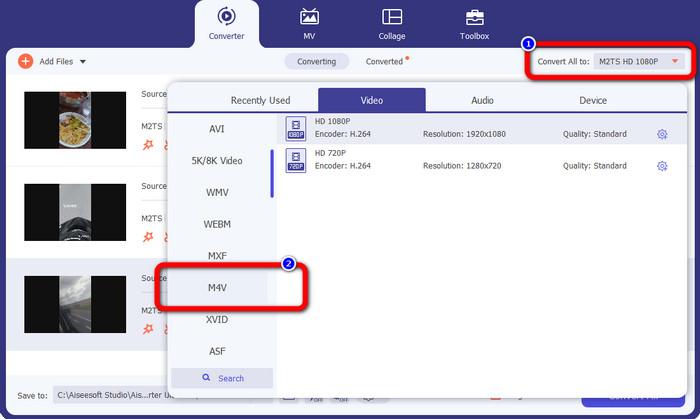
Krok 4: Aby przekonwertować je do pliku M4V, kliknij przycisk Convert All to, aby wyświetlić dostępne formaty. Następnie wybierz format pliku M4V.
Krok 4: Aby edytować swoje filmy, kliknij poniższe narzędzia edycji. Możesz ulepszać obraz, edytować, dodawać filtry i efekty oraz przycinać nagrania. Po zakończeniu edycji kliknij OK.
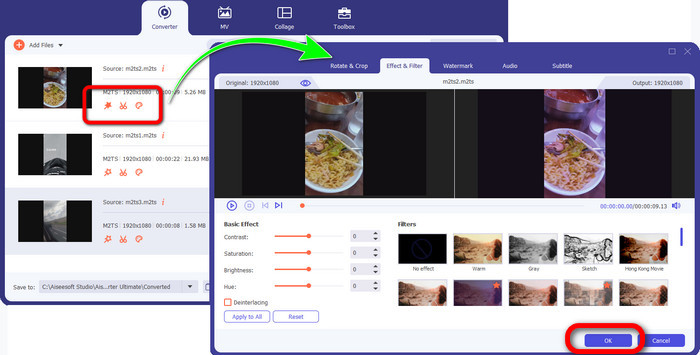
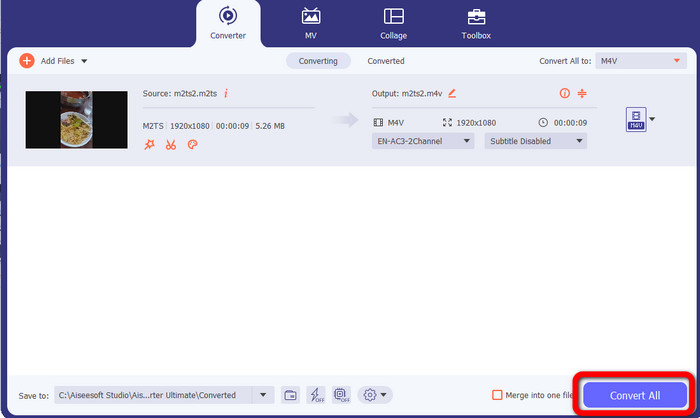
Krok 5: Po edycji wideo możesz je przekonwertować, klikając przycisk Convert All. Po zakończeniu procesu konwersji zapisz swoje wideo.
Część 3: Co to jest M2TS?
Rozszerzenie pliku: .m2ts
Format pliku kontenera Blu-ray Disc Audio-Video (BDAV) MPEG-2 Transport Stream (M2TS) wykorzystuje rozszerzenie nazwy pliku M2TS. Jest używany do wielu strumieni audio, wideo i innych. Jego podstawą jest kontener strumienia transportowego MPEG-2. Na płytach Blu-ray i AVCHD ten typ kontenera jest często używany do przechowywania wideo wysokiej jakości. Stowarzyszenie Blu-ray Disc Association opracowało M2TS. Wszystkie powiązane programy to All Player, VLC Media Player, Pot Player i MPlayer.
Część 4: Co to jest M4V?
Rozszerzenie pliku: .m4v
Firma Apple stworzyła format pliku M4V, format kontenera wideo podobny do standardu MP4. Podstawowa różnica polega na tym, że pliki M4V mogą mieć ochronę przed kopiowaniem. W sklepie iTunes Store firma Apple koduje pliki wideo w formacie M4V. Powiązane programy dla tego formatu to Apple QuickTime Player, Apple iTunes, Media Player Classic, KMPlayer, Real Player, Zoom Player i VLC Media Player.
Dalsza lektura:
Jak konwertować M2TS na AVI za pomocą najlepszych konwerterów online i na komputer
Wyjątkowa metoda konwersji M2TS na FLV online i offline
Część 5: Często zadawane pytania dotyczące konwersji M2TS na M4V
Czy M2TS jest lepszy niż MP4?
Ponieważ M2TS oszczędza więcej pamięci i ma wysoką rozdzielczość, wymaga więcej miejsca. MP4 jest lepszy niż M2TS pod względem oszczędności miejsca do przechowywania.
Jak użyć hamulca ręcznego do konwersji M2TS na M4V?
Pobierz Hamulec ręczny. Następnie przejdź do open source i dodaj plik M2TS. Następnie przejdź do opcji formatu i wybierz M4V. Następnie kliknij przycisk Rozpocznij kodowanie.
Czy MTS to to samo co M2TS?
Pod względem funkcjonalności pliki MTS i M2TS są identyczne. Oba te pliki HD są połączone z formatem wideo AVCHD. Możliwa jest zmiana rozszerzenia pliku M2TS na rozszerzenie pliku MTS i odwrotnie.
Wniosek
Powyższy opis pomaga lepiej zrozumieć, jak konwertować M2TS na M4V. Te dwie aplikacje do pobrania to najlepsze konwertery, jakich możesz użyć do zmiany formatu plików. Oferują szybką i bezstratną konwersję.
-
 Różne metody zmiany formatu pliku MOV na M4V
 Czy chcesz skutecznej metody konwersji pliku MOV do formatu M4V? W takim razie ten artykuł spełni twoje pragnienie. Oto najlepsze konwertery, których możesz użyć.
-
 Doskonałe techniki natychmiastowej konwersji GIF na M4V
 Ten przewodnik zawiera najskuteczniejsze strategie konwersji GIF na M4V. Ponadto przedstawimy Ci dwa najlepsze konwertery, które możesz wypróbować.
-
 Prosty proces efektywnej konwersji SWF do M4V
 Nie przegap tej okazji, aby poznać nieskomplikowane metody konwersji SWF do M4V online i za pomocą aplikacji do pobrania. Przeczytaj ten post, aby się dowiedzieć!
