


 Video Converter Ultimate
 Nagrywarka ekranu
 Naprawa wideo
2 najlepsze godne uwagi metody konwersji OGV na M4V na komputerach Mac i Windows
Nie masz pomysłu, jak przekonwertować OGV na M4V? W takim razie przejdź do tego poradnika, a odkryjesz inne istotne informacje, których potrzebujesz. Ten artykuł przedstawi bezproblemowe procedury konwersji OGV na M4V na komputerach Mac i z systemem Windows. Jesteś ciekawy tych metod? W takim razie przeczytaj cały artykuł!

Część 1: Wprowadzenie do OGV i M4V
| Imię | OGV | M4V |
| Nazwa pliku | Plik wideo OGG Vorbis | Wideo PEG-4 |
| Rozszerzenie pliku | .ogv | .m4v |
| Opracowany przez | Xiph.org | Apple Inc. |
| Opis | Microsoft Media Player jest przede wszystkim odpowiedzialny za pliki OGV. Pliki wideo OGG mają rozszerzenie nazwy pliku „OGV”. Podczas odtwarzania multimediów plik OGV może zawierać wiele strumieni wideo, audio, tekstu, prezentacyjnych danych tekstowych i metadanych. Theora jest często używana do kodowania filmów, które są zapisywane jako pliki OGV. Wysokiej jakości filmy mogą być przechowywane przy niskich przepływnościach dzięki kodekowi Theora. Jest to otwarta, stratna metoda kompresji wideo. W pliku OGV można również zintegrować kodeki wideo Daala, Tarkin i Dirac. Strumienie audio OGV można kodować za pomocą FLAC, Opus, Vorbis lub Speex. Pliki OGV można oglądać i odtwarzać w odtwarzaczach wideo, takich jak VLC i inne. | Firma Apple opracowała format wideo M4V. Jest to metoda przechowywania filmów i jest podobna do formatu MP4. Jednak tym razem ochrona przed kopiowaniem DRM może dotyczyć plików M4V, co robi różnicę. Apple używa standardu kodowania M4V w swoim iTunes Store. Ochrona przed kopiowaniem FairPlay firmy Apple pomaga zapobiegać niepożądanemu kopiowaniu plików M4V. QuickTime odnosi się do filmów M4V z FairPlay DRM jako „AVC0 Media”. |
| Szczegóły techniczne | Wstecznie kompatybilny nadzbiór sprawia, że format kompresji wideo Theora jest zasadniczo kompatybilny z formatem kompresji wideo VP3. VP3 i Theora można łączyć bez ponownej kompresji, ponieważ Theora jest nadzbiorem VP3. | Pliki M4V można chronić za pomocą ochrony przed kopiowaniem FairPlay firmy Apple, aby zapobiec nieautoryzowanej replikacji. Tylko komputery zatwierdzone (przez iTunes) z kontem użytym do zakupu wideo mogą odtwarzać plik M4V chroniony przez FairPlay. |
| Powiązane programy | FFmpeg MPlayer Vlc media player | Apple iTunes Apple QuickTime Player Vlc media player Zoom Player Media Player Classic Odtwarzacz multimedialny K Prawdziwy gracz |
| Typ MIME | wideo/ogg | wideo/x-m4v |
Część 2: Jak przekonwertować OGV na M4V za pomocą narzędzia online
Aby łatwo przekonwertować OGV do formatu M4V, potrzebujesz jedynie niezawodnego konwertera. W tej części pokażemy więc, jak przekonwertować OGV na M4V za pomocą narzędzia FVC Free Video Converter Online. Korzystając z tego narzędzia, możesz konwertować różne pliki, takie jak MP4, MOV, VOB, MOV, AVI, FLV i inne. Obsługuje ono także konwersję wsadową, dzięki czemu możesz bezstratnie konwertować wiele plików jednocześnie. Dodatkowo, za pomocą zaledwie kilku kliknięć możesz już przekonwertować swoje pliki, ponieważ program ma intuicyjny interfejs. Na podstawie tych podstawowych procedur można stwierdzić, że ten konwerter wideo jest odpowiedni dla początkujących. Możesz również dostosować rozdzielczość do 1920x1080. Możesz także zmienić bitrate do 20000 kb/s. Wreszcie, możesz zmienić liczbę klatek na sekundę do 60 fps. Ponadto możesz edytować dźwięk, przechodząc do ustawień audio. Możesz dostosować bitrate i częstotliwość próbkowania dźwięku. Obsługuje on również formaty audio, takie jak FLAC, MP3, AC3, AAC i inne.
Funkcje
◆ Konwertuj różne formaty wideo, takie jak OGV, M4V, MP4, AVI, FLV, MKV i inne.
◆ Oferuje konwersję wsadową.
◆ Edytuj szybkość transmisji wideo, liczbę klatek na sekundę i rozdzielczość.
◆ Obsługuje formaty audio, takie jak MP3, AC3, AAC, FLAC, WAV itp.
◆ Edytuj szybkość transmisji i częstotliwość próbkowania dźwięku.
Konwertuj plik OGV do formatu M4V za pomocą darmowego konwertera wideo FVC online. Postępuj zgodnie z poniższą prostą procedurą.
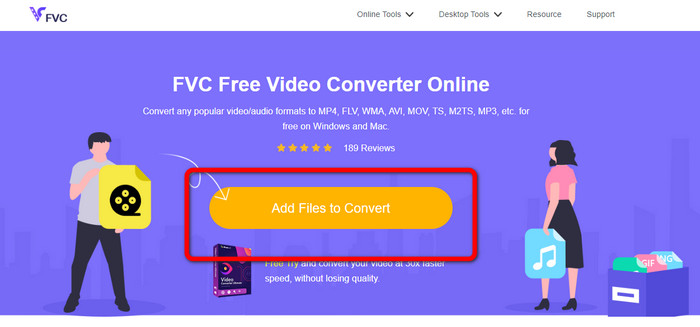
Krok 1: Przejdź na stronę FVC Free Video Converter Online. Następnie, aby wczytać plik wideo OGV, kliknij przycisk Add Files to Convert. Na ekranie pojawi się folder, z którego wybierz wideo, które chcesz przekonwertować.
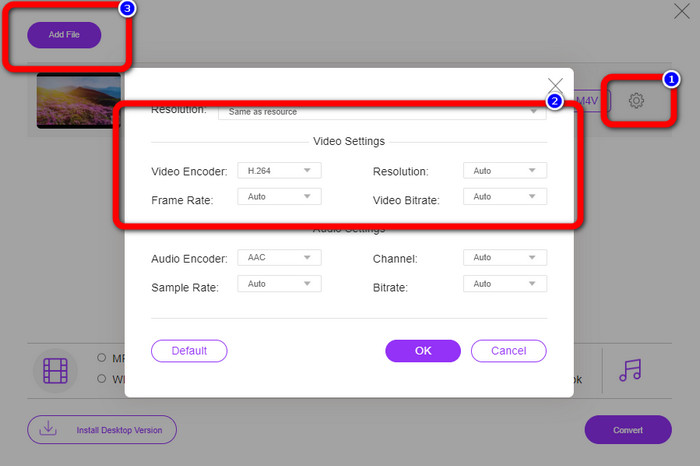
Krok 2: Po wczytaniu pliku wideo OGV możesz zmienić bitrate, liczbę klatek na sekundę i rozdzielczość, klikając ikonę Setting. Następnie kliknij OK. Jeśli chcesz dodać więcej plików, możesz kliknąć przycisk Add File w górnej lewej części interfejsu.
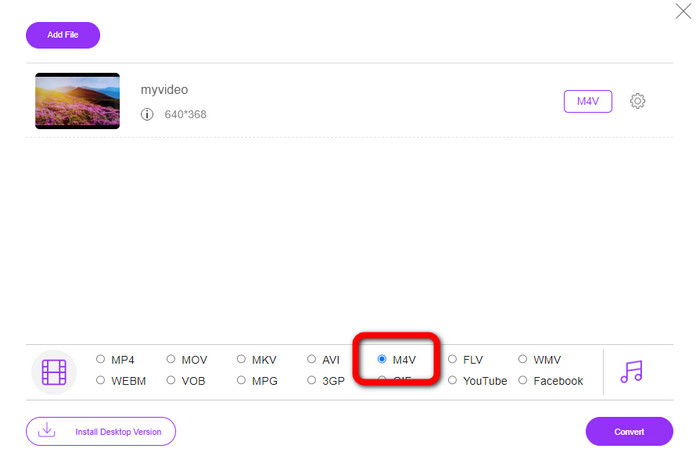
Krok 3: Po wprowadzeniu zmian w pliku wideo OGV wybierz format pliku M4V z opcji formatu w dolnej części interfejsu. Następnie zapisz wideo w wybranej lokalizacji.
Część 3: Łatwy przewodnik po konwersji OGV na M4V offline
Jeśli chodzi o aplikację offline, możesz użyć Video Converter Ultimate do konwersji OGV na M4V na komputerach Mac i Windows. To narzędzie jest najwyższej klasy konwerterem do pobrania. Może łatwo konwertować wiele plików, ponieważ umożliwia użytkownikom konwersję wsadową. Ponadto ma ultraszybki proces konwersji, który jest 30 razy szybszy niż inne konwertery. W ten sposób możesz samodzielnie konwertować wiele filmów. Ponadto, nawet jeśli konwertujesz swoje filmy, nadal możesz je dostosowywać lub edytować za pomocą narzędzi do edycji wideo. Możesz dodawać filtry, wycinać filmy, ulepszać filmy i nie tylko.
Ponadto Video Converter Ultimate oferuje więcej funkcji, z których możesz skorzystać. Możesz zsynchronizować dźwięk z obrazem, ponieważ posiada funkcję Audio Sync. Jeśli planujesz zwiększyć głośność wideo, jest to również możliwe. Możesz podbić ją do 200%, ponieważ narzędzie oferuje funkcję Volume Booster. Musisz sam odkryć więcej funkcji, korzystając z tego konwertera wideo.
Funkcje
◆ Konwertuj pliki wideo, takie jak M4V, OGV, SWF, MP4, AVI, FLV, MOV, VOB, MKV, WMV i inne.
◆ Potrafi stworzyć atrakcyjny kolaż.
◆ Oferuje narzędzia do edycji wideo do ulepszania wideo, takie jak wzmacniacz wideo, korekcja kolorów, przycinanie, usuwanie znaków wodnych i inne.
◆ Dostępne jest tworzenie teledysku.
◆ Dostosuj prędkość wideo.
◆ Oferuje kompresor wideo i audio
◆ Dostosuj wideo 3D z 2D
Krok 1: Jeśli chcesz pobrać Video Converter Ultimate, kliknij przycisk Download poniżej. Następnie uruchom aplikację po zakończeniu instalacji.
Bezpłatne pobieranieDla Windows 7 lub nowszegoBezpieczne pobieranie
Bezpłatne pobieranieDla MacOS 10.7 lub nowszegoBezpieczne pobieranie
Krok 2: Wybierz panel Converter i kliknij przycisk z ikoną Plus, aby dodać plik wideo OGV. Możesz również kliknąć przycisk Add Files lub upuścić plik bezpośrednio w oknie.
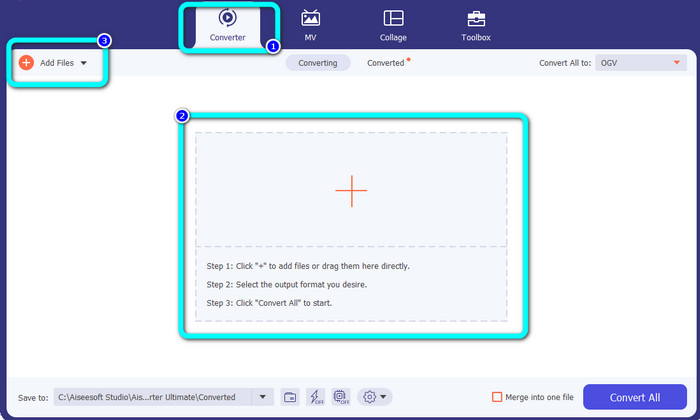
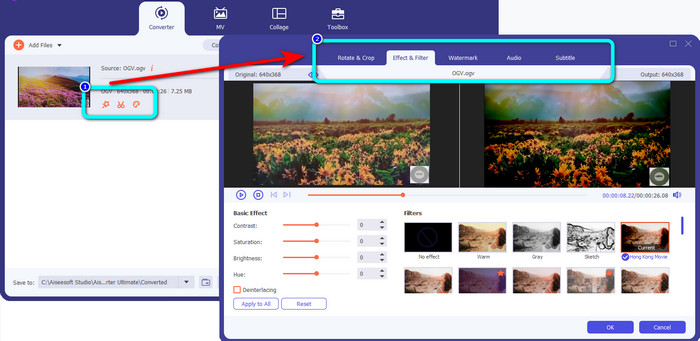
Krok 3: Jeśli chcesz edytować wideo OGV, kliknij ikony w pierwszym oknie. W ten sposób możesz przycinać i obracać wideo oraz dodawać filtry, znaki wodne i inne efekty. Po zakończeniu edycji wideo wybierz OK.
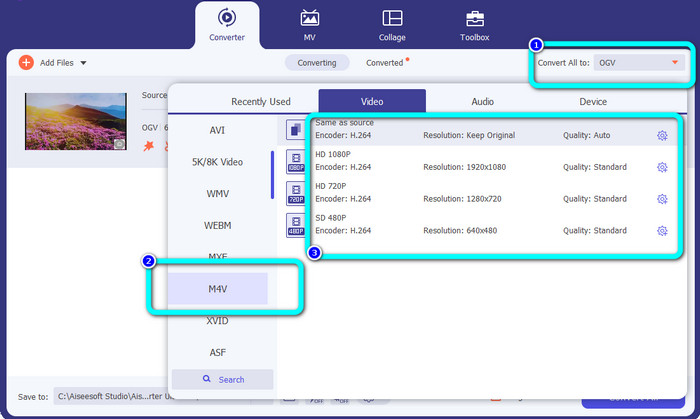
Krok 4: Następnie, aby przekonwertować OGV na M4V, przejdź do przycisku Convert All to, aby wyświetlić opcje formatów. Wybierz format pliku M4V i ustaw preferowaną rozdzielczość.
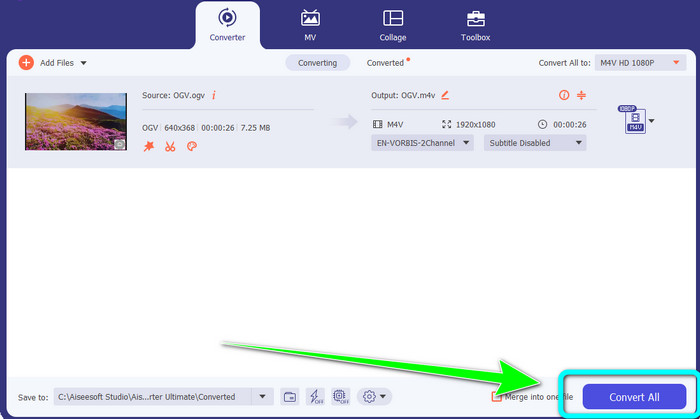
Krok 5: Na koniec kliknij przycisk Convert All, aby przekonwertować plik OGV do formatu M4V i zapisać wideo na swoim urządzeniu.
Dalsza lektura:
2 najlepsze sposoby konwersji M2TS do M4V
Poznaj najlepsze metody konwersji MXF do M4V
Część 4: Często zadawane pytania dotyczące konwersji OGV na M4V
Czy OGV jest stratny?
Tak. Format OGV w połączeniu ze standardem kompresji wideo typu open source, znanym jako rozszerzenie pliku .ogv, został stworzony głównie przez Xiph.org; jest blisko spokrewniony z OGG Vorbis i może być używany do przechowywania stratnego lub przesyłania strumieniowego online.
Ile czasu zajmuje konwersja OGV na MP4?
To zależy od używanego konwertera. Jeśli chcesz konwertera z szybkim procesem konwersji, użyj Video Converter Ultimate. Oferuje on prędkość konwersji wyższą nawet 30 razy.
Czy mogę otworzyć plik M4V na wszystkich urządzeniach?
Niestety nie. Dostęp do plików M4V można uzyskać tylko za pośrednictwem komputerów autoryzowanych przez Apple. Jeśli chcesz odtwarzać wideo na wszystkich urządzeniach, możesz przekonwertować je na plik MP4.
Wniosek
Łatwo jest przekonwertować OGV na M4V na komputerach Mac i z systemem Windows, o ile znasz praktyczne aplikacje, z których możesz skorzystać. W tym artykule przedstawiono dwa znakomite programy do łatwej i szybkiej konwersji OGV do M4V. Jeśli chodzi o konwerter online, możesz skorzystać z FVC Free Video Converter Online. Z kolei do konwersji plików offline możesz użyć Video Converter Ultimate.
-
 Wspaniały konwerter OGV na FLV, którego nie możesz przegapić [Sprawdzone]
 Jeśli zastanawiasz się, jak szybko przekonwertować pliki OGV na FLV, ten artykuł pokaże Ci jedyny konwerter, jakiego będziesz kiedykolwiek potrzebował.
-
 5 korzystnych konwerterów OGV na WMV do konwersji plików OGV
 Istnieje 5 różnych konwerterów OGV na WMV, których można użyć do konwersji plików OGV. Ten artykuł zawiera mocny fakt na temat dostępnych 5 konwerterów ogv.
-
 Zdumiewające sposoby konwersji OGV na MKV wydajnie i łatwo
 Ten drogowskaz zapewni bezproblemową procedurę bezstratnej konwersji OGV na MKV. Wypróbuj te najbardziej niezawodne konwertery i doświadcz ich wspaniałej funkcji.
