


 Video Converter Ultimate
 Nagrywarka ekranu
 Naprawa wideo
Jak łatwo przekonwertować F4V na MP4 za pomocą narzędzi offline i online
FLV file format is one of the standard formats used by Adobe Flash, but if you want to play a video with higher quality, you must convert your F4V file to other formats like MP4. You can play the MP4 format on almost all devices, such as iPhones, iPad, Androids, and computers. So, if you prefer a high-quality video, we will provide you with the most effective methods to convert F4V to MP4 with the help of offline and online tools.

Część 1: Podstawowa metoda konwersji F4V na MP4 na komputerach Mac i Windows
If you are a Mac user and like to convert video files, then you can use the Video Converter Ultimate. This offline converter is excellent at converting F4V to MP4 on Mac and Windows, which makes it convenient for all users. Also, it can convert almost all video files because it supports AVI, MP4, MOV, FLV, VOB, MTS, SWF, MKV, WMV, and more. In addition, converting F4V files in this application is easy because it has an easy-to-follow interface with basic conversion methods. This way, you can ensure that it is fit to use, especially for beginners. Moreover, in terms of conversion speed, you will always be satisfied. Video Converter Ultimate offers an ultra-speed conversion process, which is 30x faster than other converters. You can also convert multiple video files simultaneously because it enables batch conversion. Furthermore, you can do more in this application aside from converting videos. You can also create a music video from this tool if you desire. This application offers a Music Video creator and provides various themes, like simple, happy, snowy night, neat, and more. In addition, this video converter has a Collage maker feature, wherein you can make a collage with different templates and filters. You can experience more great features when using the FVC Video Converter Ultimate.
Funkcje
◆ Konwertuj ponad 100 formatów plików wideo, takich jak MP4, F4V, MOV, AVI, MKV, WMV, VOB itp.
◆ Utwórz kolaż z darmowymi szablonami i filtrami.
◆ Stwórz fantastyczny teledysk o różnej tematyce.
◆ Skompresuj wideo do żądanego rozmiaru pliku.
◆ Dostosuj szybkość wideo od 0,125x do 8x szybciej niż średnia prędkość wideo.
◆ Dodawaj i usuwaj znak wodny z filmu.
◆ Konwertuj formaty plików graficznych, takie jak BMP, PNG, JPG, TIF itp.
Postępuj zgodnie z poniższymi prostymi metodami, aby szybko przekonwertować F4V na MP4 za pomocą FVC Video Converter Ultimate.
Step 1: Download the Video Converter Ultimate on your desktop by clicking the Download button below. Then, proceed to the installation process and launch the application.
Bezpłatne pobieranieDla Windows 7 lub nowszegoBezpieczne pobieranie
Bezpłatne pobieranieDla MacOS 10.7 lub nowszegoBezpieczne pobieranie
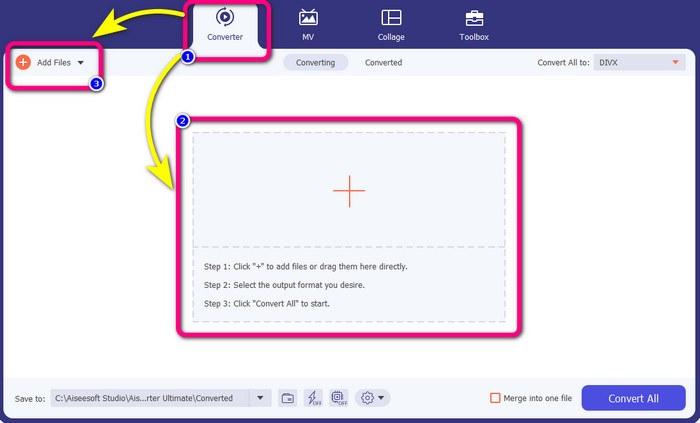
Step 2: To convert your F4V video, go to the Converter option and select the Plus icon or Add File button to insert your video with the F4V file format.
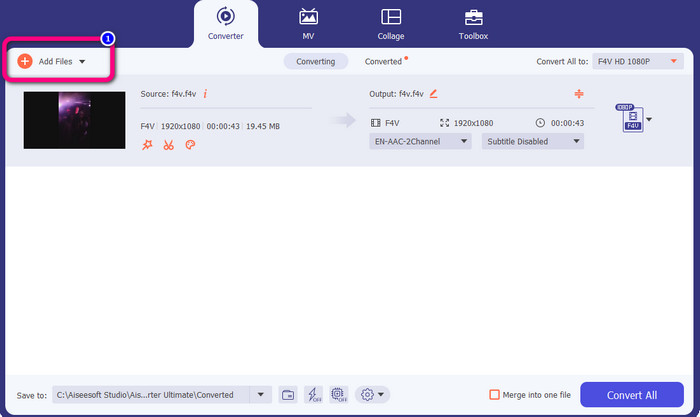
Step 3: If you desire to convert more F4V files simultaneously, press the Add Files button and insert another F4V file.
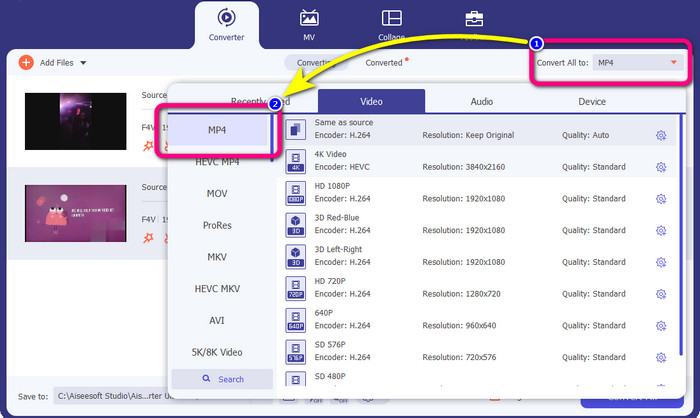
Step 4: Go to the Convert All to button to change the output format. You will see the format options and choose the MP4 format. You can also choose your preferred video quality.
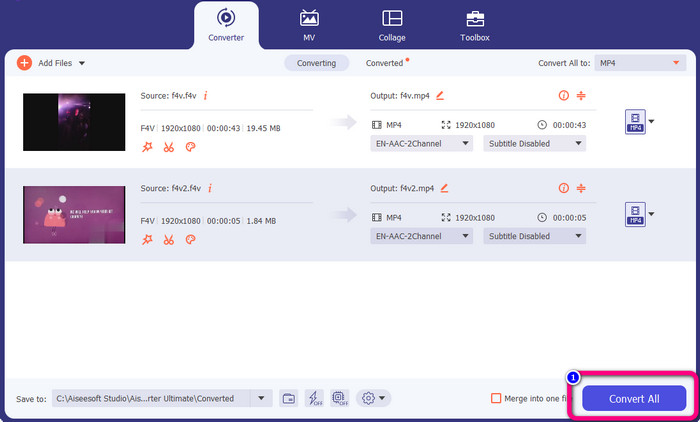
Step 5: If you are done changing their output format, you can convert the files by clicking the Convert All button. The conversion process will start, and your F4V video will turn into an MP4 file in just a few seconds.
Część 2: Proste kroki do konwersji F4V na MP4 za pomocą VLC
W tej części dowiesz się, jak przekonwertować F4V na MP4 za pomocą VLC Media Player. Tak! Dobrze przeczytałeś! Oprócz odtwarzania filmów VLC to kolejne narzędzie, którego można użyć do konwersji plików. Obsługuje również różne formaty plików, takie jak MP4, WEBM, OGG, TS, ASF i inne. Musisz jednak wiedzieć wystarczająco dużo o tym narzędziu, ponieważ ma mylący interfejs. Obejrzyj samouczki lub poproś zaawansowanych użytkowników, aby zorientowali się, jak konwertować pliki za pomocą VLC. Ponadto pobieranie tego konwertera jest czasochłonne. Postępuj zgodnie z poniższymi procedurami, aby przekonwertować F4V na MP4 za pomocą VLC Media Player.
Step 1: Download the VLC Media Player on your computer. Launch the application after the installation process.
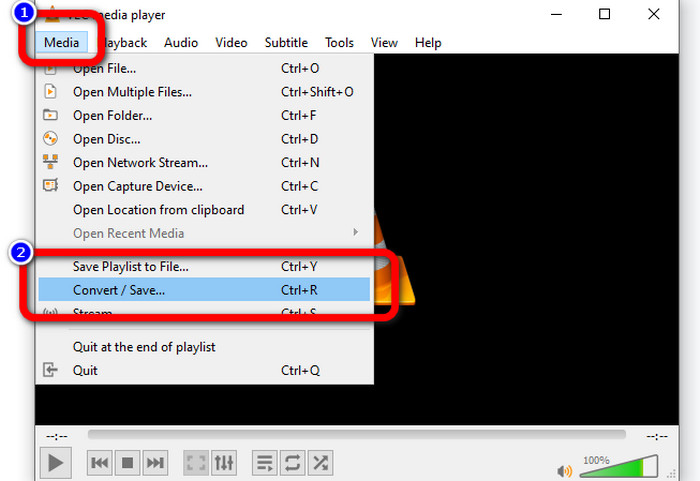
Step 2: Go to Media > Convert/Save button. Then, click the Add button to attach your F4V video.
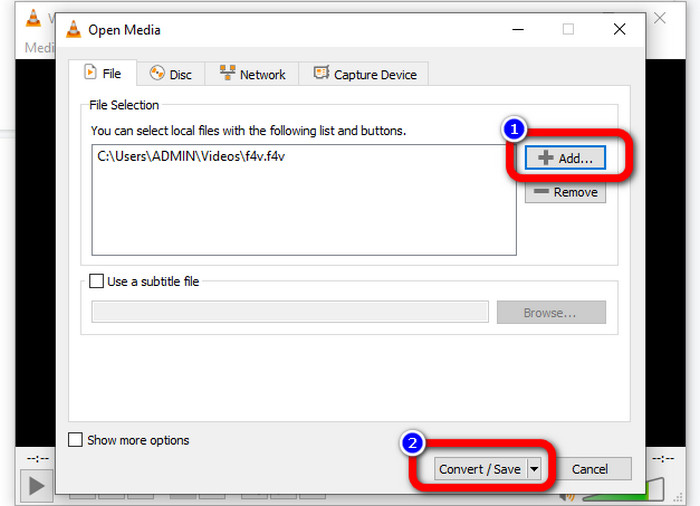
Step 3: After adding the F4V video, click the Convert/Save button on the lower part of the interface again.
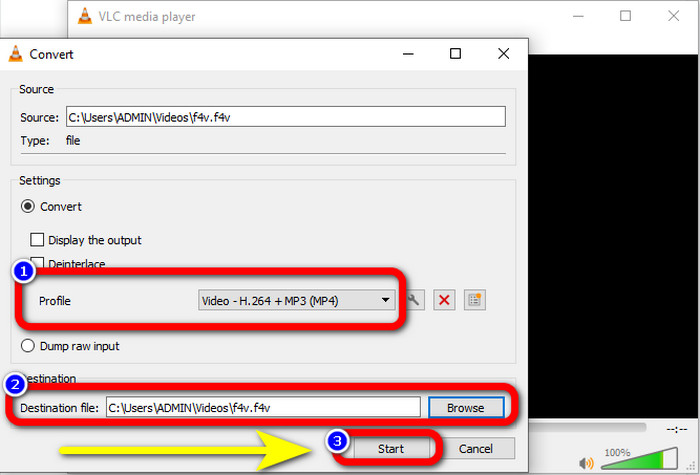
Step 4: Go to profile and choose the MP4 file format. Then, go to Browse to set a file location where you like to save your video. Hit the Start button to proceed with the conversion process.
Część 3: Łatwy sposób na konwersję F4V na MP4 za pomocą hamulca ręcznego
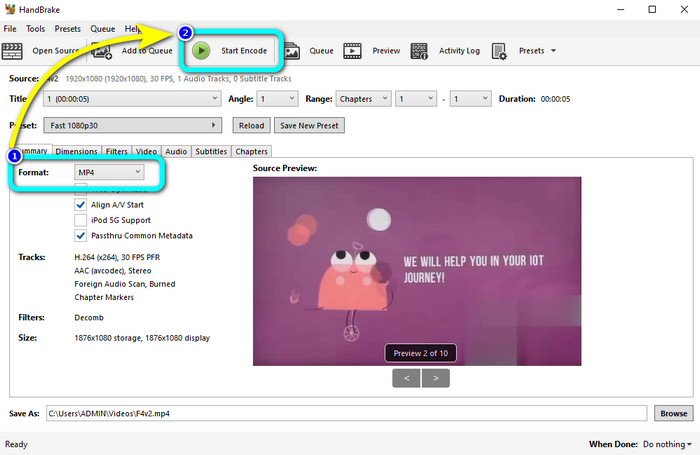
If you are still looking for another F4V to MP4 converter on Windows, you can use the Handbrake. It is an offline tool that supports several video formats, such as MP4, MKV, WEBM, etc. However, this tool is complicated because it has many options that must be clarified. Use the steps below to convert your F4V file to MP4 format.
Step 1: Download the Handbrake on your Windows computer. Then, launch the application when you are done installing it.
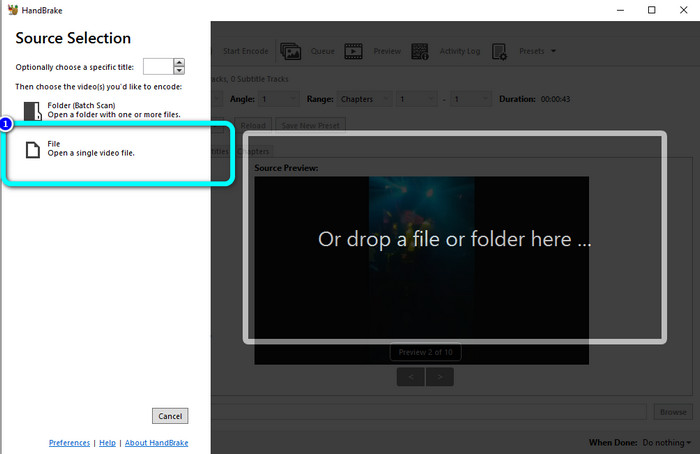
Step 2: Click the File button to add your F4V file.
Step 3: Go to format options and select the MP4 file format. Then, press the Start Encode button. Wait for the conversion process and save your formal video.
Część 4: Szczegółowe kroki konwersji F4V na MP4 za darmo online
Do you want to use an online application to convert F4V to MP4 for free? Use the FVC Free Video Converter Online. You can convert your F4V file without spending a single penny. Also, this converter has a straightforward interface, which is suitable for non-professional users. It supports various video formats, such as FLV, WMA, MOV, AVI, WMV, and more. The best part is that you can convert video files without losing quality. Follow the detailed steps below to convert F4V to MP4 easily.
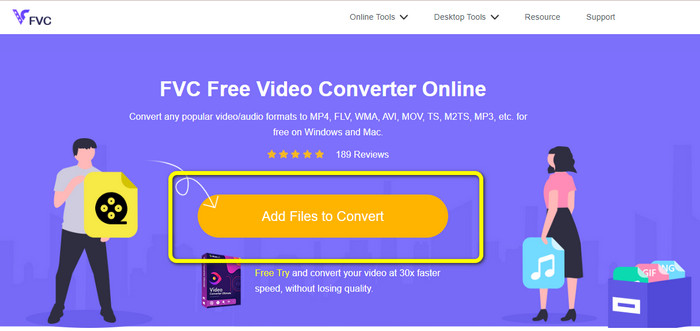
Step 1: Visit the website of FVC Free Video Converter Online. Press the Add Files to Convert button to upload your F4V video file.
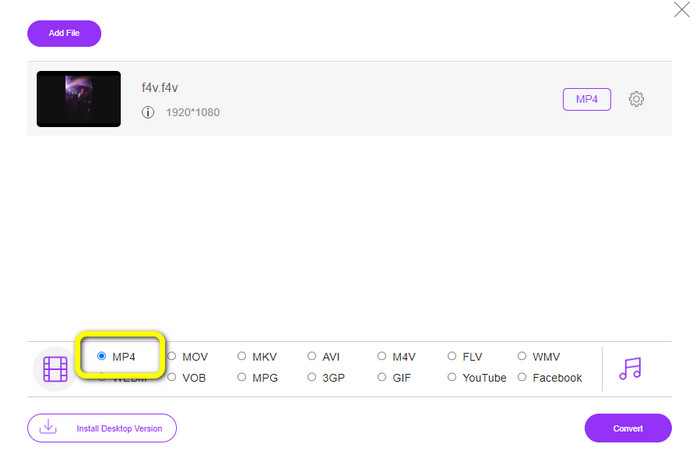
Step 2: After uploading the video, go to the lower part of the interface and click the MP4 file format
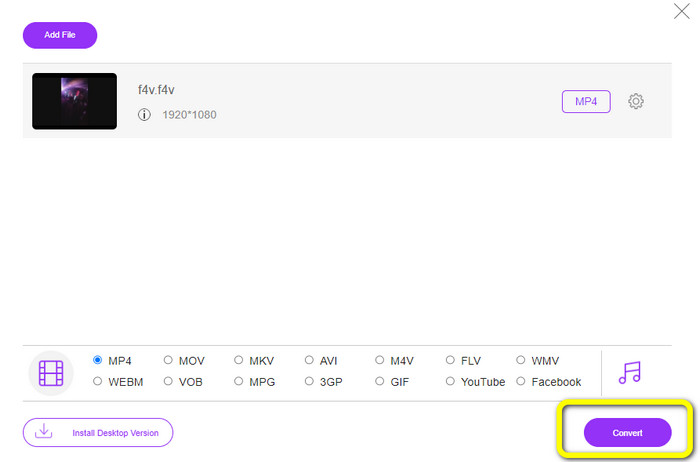
Step 3: Lastly, press the Convert button. Wait for the conversion process and save your file in your desired location
Część 5: F4V kontra MP4
Zobacz dodatkowe informacje o tych dwóch formatach plików poniżej.
| F4V | MP4 | |
| Rozszerzenie pliku | .f4v | .mp4 |
| Opracowany przez | jabłko | Grupa Ekspertów ds. Ruchomego Obrazu |
| Opis | To jest oryginalny format pliku flash. Jest również oparty na podstawowym formacie plików multimedialnych ISO, który obsługuje odtwarzacz Flash 9. Ponadto plików F4V nie można odtwarzać na urządzeniach z systemem iOS, ale można je odtwarzać w przeglądarkach obsługujących technologię Flash. | To jest plik multimedialny. Kontener może przechowywać dane napisów, audio i wideo. Ponadto, podobnie jak inne formaty kontenerów, MP4 umożliwia przesyłanie strumieniowe w Internecie. |
| Powiązane programy | Odtwarzacz multimedialny XVLC Sieć wideo Windows Media Player FFDShow Microsoft Windows Przeglądarka galerii zdjęć | Apple QuickTime Player Sieć wideo Vlc media player Apple iTunes Microsoft Windows Media Player |
Dalsza lektura:
2 of the Favorite Converter Choices to Convert F4V to WMV [2023]
2 of the Fastest Ways to Convert F4V to FLV [Online & Offline]
Część 6: Często zadawane pytania dotyczące konwersji F4V na MP4
1. Czy mogę przekonwertować MP4 na F4V?
Tak, możesz! Możesz użyć Video Converter Ultimate. Ta aplikacja może natychmiast przekonwertować plik MP4 do formatu F4V.
2. Jaka jest różnica między F4V a FLV?
Główną różnicą między tymi dwoma formatami jest to, że F4V obsługuje wysokiej jakości wideo zakodowane w H.264, ale format FLV generalnie używa H.263.
3. Jak używać FFmpeg do konwersji F4V na MP4?
Pobierz FFmpeg na swój komputer. Otwórz wiersz polecenia. Wpisz Pulpit, aby przełączyć wiersz poleceń. Polecenie konwersji zaczyna się od FFmpeg-i, a następnie wpisz nazwę wideo i jego format pliku. Również typ pliku wyjściowego. Naciśnij Enter i poczekaj na proces konwersji. Następnie możesz zobaczyć swój plik na pulpicie
Wniosek
This guidepost shows you detailed instructions to convert F4V to MP4 online and offline. Users prefer a more simple and faster way of converting videos. Then, you can use Video Converter Ultimate to convert your video files instantly because it has a 30x faster conversion speed than other converters. You can also use FVC Free Video Converter Online to convert video in a simple way, which only takes you a few clicks.
-
 4 najnowsze konwertery online i offline do konwersji F4V na format AVI
 Nie masz pojęcia, jakiego konwertera należy użyć do konwersji F4V na AVI lub inny format wideo? Następnie przeczytaj ten artykuł, ponieważ dowiadujemy się, jak konwertować za pomocą dostępnego narzędzia.
-
 Jak przekonwertować F4V na MOV bez utraty jakości [rozwiązane]
 Jeśli masz problemy z uznaniem niektórych formatów wideo, takich jak F4V. Przeczytaj ten artykuł, aby dowiedzieć się więcej o formacie wideo F4V i MOV oraz dowiedzieć się, jak przekonwertować F4V na MOV przy użyciu różnych metod.
-
 Skuteczne metody natychmiastowej konwersji DIVX na MP4
 Jak przekonwertować DIVX na MP4? Jeśli szukasz najlepszego rozwiązania, trafiłeś we właściwy artykuł. Pokażemy Ci, jak łatwo przekonwertować DIVX na MP4
