


 Video Converter Ultimate
 Nagrywarka ekranu
 Naprawa wideo
Najlepsze konwertery MP3 na M4A: szybka i łatwa konwersja audio
Czy czujesz niedosyt, gdy słuchasz niskiej jakości dźwięku, który nie oddaje sprawiedliwości Twoim ulubionym utworom? Czas ulepszyć swoje wrażenia audio dzięki mocy konwersji MP3 na M4A! Konwertując pliki audio do formatu M4A, możesz odblokować pełny potencjał swojej biblioteki muzycznej i samemu usłyszeć różnicę. W tym poradniku przedstawimy zalety konwersji MP3 na M4A oraz polecimy najlepsze programy konwertery, aby zapewnić bezproblemowy proces konwersji. Przygotuj się na całkowitą odmianę swoich wrażeń dźwiękowych i ciesz się muzyką jak nigdy dotąd.

Część 1. Najlepsze sposoby konwersji MP3 na M4A
Oto niektóre z najlepszych konwerterów audio z MP3 na M4a. Istnieje sposób offline, którym jest aplikacja komputerowa, oraz inne narzędzie online, które jest programem internetowym. Sprawdź je, aby dowiedzieć się więcej.
1. Konwerter wideo Ultimate
Video Converter Ultimate to wszechstronne oprogramowanie oferujące szereg funkcji do konwersji audio i wideo. Jeśli chodzi o konwersję MP3 na M4A, Video Converter Ultimate jest doskonałym wyborem, zapewniając użytkownikom prosty i przejrzysty proces zamiany plików audio. Narzędzie obsługuje szeroką gamę formatów audio, a zaawansowana technologia kodeków audio gwarantuje wysoką jakość wynikową. Niezależnie od tego, czy potrzebujesz konwertować pliki audio do zastosowań prywatnych, czy zawodowych, Video Converter Ultimate sprawia, że proces przebiega szybko, pozwalając Ci skupić się na tym, co najważniejsze – cieszeniu się wysokiej jakości plikami dźwiękowymi.
Krok 1. Pobierz program i zainstaluj go
Aby rozpocząć, wybierz jeden z przycisków Bezpłatne pobieranie, a następnie postępuj zgodnie z instrukcjami wyświetlanymi na ekranie, aby zapisać plik na komputerze. Kolejnym krokiem jest uruchomienie aplikacji i zapoznanie się z jej intuicyjnymi elementami sterującymi.
Bezpłatne pobieranieDla Windows 7 lub nowszegoBezpieczne pobieranie
Bezpłatne pobranieDla macOS 10.7 lub nowszegoBezpieczne pobieranie
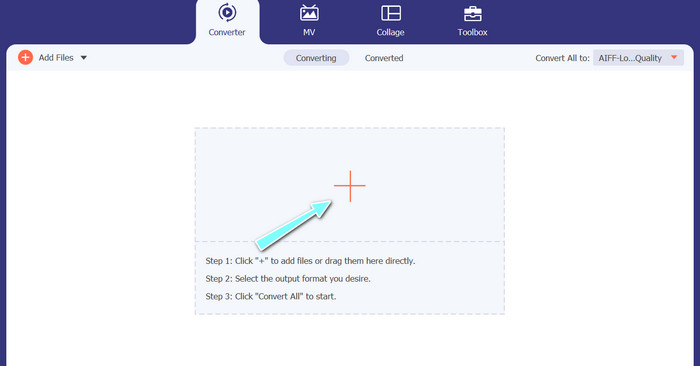
Krok 2. Dodaj pliki audio
Następnie wybierz znak plus z głównego interfejsu i przejdź do lokalizacji pliku audio, który chcesz przekonwertować. Po przesłaniu pliku jego podgląd pojawi się w interfejsie użytkownika. Jeśli chcesz masowo konwertować MP3 na M4A, możesz wczytać cały folder z plikami.
Krok 3. Wybierz format wyjściowy
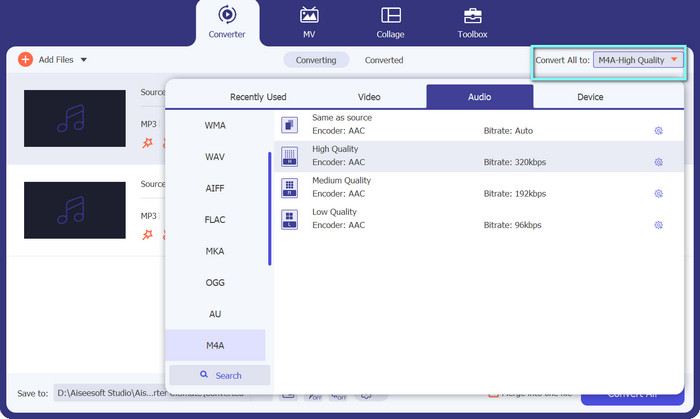
Następnie wybierz format wyjściowy, klikając kartę Audio w menu Profil (znajdującym się w prawym górnym rogu narzędzia). Możesz konwertować do lub z MP3, korzystając z formatu MP3 lub M4A.
Krok 4. Zapisz wynik
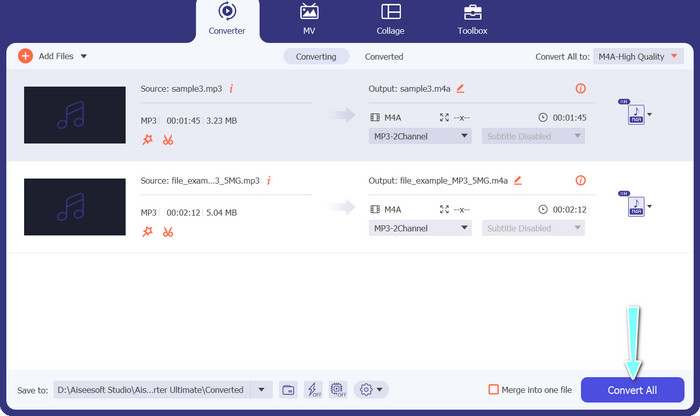
Na dole ekranu wybierz folder docelowy. Gdy będziesz gotów rozpocząć konwersję, kliknij przycisk Konwertuj wszystko.
2. Darmowy konwerter wideo online
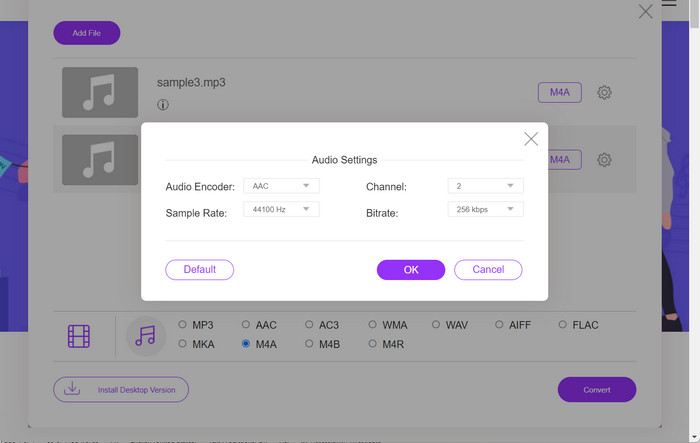
Brakuje miejsca na kolejny program? Nie martw się, ponieważ możesz skorzystać z narzędzia online, które pozwoli Ci konwertować pliki bez pobierania oprogramowania. Aplikacja internetowa Free Video Converter Online umożliwia konwersję bezpośrednio z poziomu przeglądarki. Co więcej, obsługuje wiele formatów zarówno dla plików wideo, jak i audio. Nie wspominając już o tym, że dzięki temu narzędziu możesz przeprowadzać konwersję wsadową. Dodatkowo kolejną świetną funkcją jest możliwość dostosowania parametrów wyjściowych pliku audio. Zobacz, jak działa ten internetowy konwerter MP3 na M4A.
Krok 1. Aby rozpocząć korzystanie z Free Video Converter Online, najpierw otwórz ulubioną przeglądarkę internetową i przejdź bezpośrednio na stronę narzędzia.
Krok 2. Następnie wybierz plik MP3, który chcesz przekonwertować na M4A, klikając przycisk Dodaj pliki do konwersji.
Krok 3. Z opcji formatu Audio wybierz M4A jako żądany format wyjściowy. Możesz również zmienić jakość wyjściową (bitrate) pliku M4A.
Krok 4. Kliknij przycisk Konwertuj, aby rozpocząć proces konwersji. W ten sposób konwertujesz MP3 na M4A online.
Część 2. Konwertuj MP3 na M4A w systemie Windows
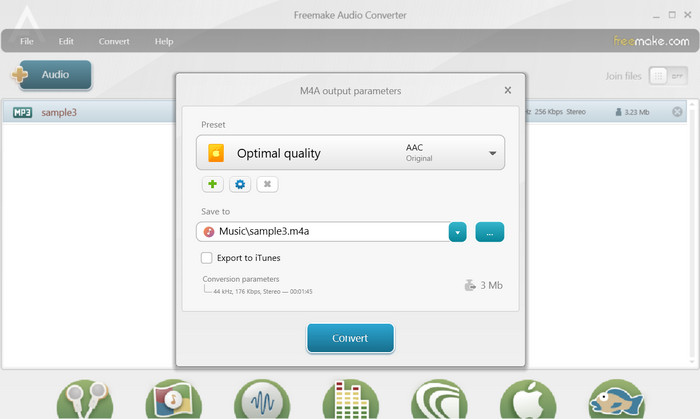
Freemake Audio Converter to darmowy i łatwy w użyciu program, który pozwala użytkownikom konwertować pliki audio do różnych formatów, w tym M4A, MP3, WAV i innych. Dzięki prostemu interfejsowi typu „przeciągnij i upuść” użytkownicy mogą łatwo dodawać swoje pliki MP3 i konwertować je do formatu M4A bez żadnych skomplikowanych ustawień lub konfiguracji. Narzędzie ma również szereg opcji dostosowywania, umożliwiając użytkownikom dostosowanie parametrów, takich jak szybkość transmisji i częstotliwość próbkowania, w celu uzyskania pożądanej jakości wyjściowej. Podsumowując, jest to jeden z najlepszych konwerterów MP3 na M4A, jakich możesz użyć.
Krok 1. Pobierz i zainstaluj Freemake Audio Converter na swoim komputerze z systemem Windows.
Krok 2. Uruchom program i kliknij przycisk +Audio, aby dodać plik(i) MP3 do programu.
Krok 3. Wybierz M4A z listy dostępnych formatów na dole okna programu. Skorzystaj z menu rozwijanego, aby dobrać odpowiednie ustawienia jakości dla pliku wynikowego.
Krok 4. Wybierz folder wyjściowy, w którym chcesz zapisać przekonwertowany plik. Na koniec zaznacz przycisk Konwertuj, aby rozpocząć proces konwersji.
Część 3. Konwertuj MP3 na M4A na Macu
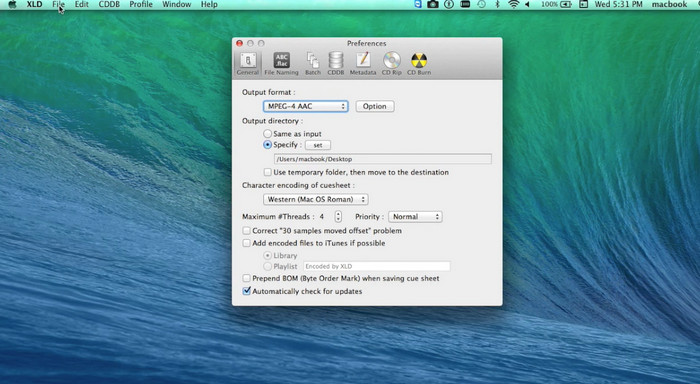
XLD to darmowy i łatwy w użyciu program, który pozwala użytkownikom komputerów Mac konwertować pliki audio do różnych formatów, w tym M4A, MP3, FLAC i innych. Dzięki prostemu interfejsowi typu „przeciągnij i upuść” użytkownicy mogą łatwo dodawać swoje pliki MP3 i konwertować je do formatu M4A bez żadnych skomplikowanych ustawień lub konfiguracji. XLD oferuje również szereg opcji dostosowywania, umożliwiając użytkownikom dostosowanie parametrów, takich jak szybkość transmisji i częstotliwość próbkowania, w celu uzyskania pożądanej jakości wyjściowej.
Krok 1. Pobierz i zainstaluj XLD na swoim komputerze Mac.
Krok 2. Uruchom program i kliknij przycisk Otwórz, aby dodać plik(i) MP3 do programu.
Krok 3. Wybierz M4A z listy dostępnych formatów w preferencjach programu. Możesz użyć menu rozwijanego, aby wybrać żądane ustawienia jakości dla pliku wyjściowego.
Krok 4. Następnie wybierz folder wyjściowy, w którym chcesz zapisać przekonwertowany plik. Na końcu kliknij przycisk Konwertuj, aby rozpocząć proces konwersji. Tak właśnie możesz za darmo konwertować MP3 na M4A na Macu.
Część 4. Konwertuj MP3 na M4A na Androida
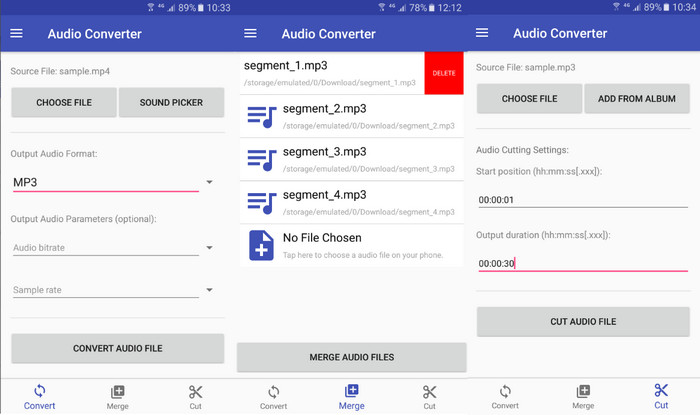
Jeśli chodzi o konwersję plików audio, darmowe i proste oprogramowanie Audio Converter na Androida firmy Online-Convert.com jest trudne do pokonania. Użytkownicy mogą po prostu przeciągnąć i upuścić swoje pliki MP3 do interfejsu programu, aby rozpocząć proces konwersji do M4A. Jakość wyjściową pliku audio można dostosować, zmieniając ustawienia, takie jak szybkość transmisji i częstotliwość próbkowania w Konwerterze audio. Oto kroki, aby zmienić MP3 na M4A na Androida:
Krok 1. Pobierz i zainstaluj aplikację Audio Converter by Online-Convert.com ze Sklepu Google Play na swoim urządzeniu z systemem Android. Uruchom aplikację i stuknij przycisk Convert Audio.
Krok 2. Następnie wybierz MP3 jako format wejściowy oraz M4A jako format wyjściowy.
Krok 3. Teraz stuknij przycisk Select Files, aby dodać plik(i) MP3 do aplikacji. Na końcu naciśnij przycisk Start Conversion, aby rozpocząć proces konwersji. To naprawdę proste! Teraz wiesz, jak konwertować MP3 na M4A na Androidzie.
Część 5. Konwertuj MP3 na M4A na iOS
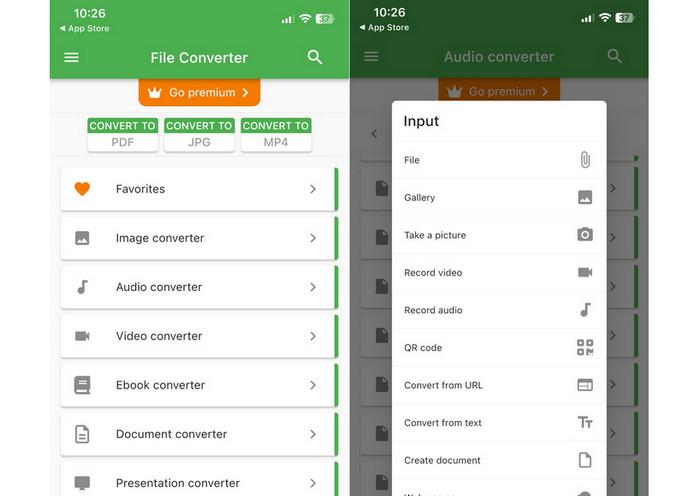
Pliki audio, takie jak MP3, można konwertować do bardziej przenośnego i bezstratnego formatu M4A za pomocą File Converter Free, bezpłatnego i prostego oprogramowania dla systemu iOS. Jego prosta konstrukcja ułatwia każdemu ładowanie plików MP3 i konwertowanie ich do formatu M4A bez konieczności majstrowania przy jakichkolwiek ustawieniach lub konfiguracjach.
Krok 1. Aplikację File Converter Free znajdziesz w App Store; można ją pobrać i używać bezpłatnie. Uruchom program i wybierz kartę Audio.
Krok 2. Wybierz MP3 jako format wejściowy i wyjściowy oraz M4A jako format AAC firmy Apple. Za pomocą menu rozwijanego wybierz żądaną jakość pliku wyjściowego. Aby zaimportować MP3 do programu, kliknij przycisk Add File.
Krok 3. Aby rozpocząć proces konwersji, kliknij przycisk Konwertuj.
Część 6. Często zadawane pytania dotyczące konwersji MP3 na M4A
Czy mogę przekonwertować MP3 na M4A za pomocą Windows Media Player?
Tak, możesz konwertować MP3 na M4A za pomocą Windows Media Player, ale wymaga to kilku dodatkowych kroków, ponieważ M4A nie jest natywnie obsługiwanym formatem w Windows Media Player. Możesz też po prostu skorzystać z alternatywy dla Windows Media Player.
Czy konwersja MP3 do M4A spowoduje utratę jakości dźwięku?
Konwersja MP3 do M4A może spowodować niewielką utratę jakości dźwięku ze względu na różnice w algorytmach kompresji używanych przez te dwa formaty.
Czy mogę przekonwertować M4A z powrotem na MP3?
Tak, wiele programów i narzędzi do konwersji audio umożliwia konwersję M4A na MP3, jeśli jest to potrzebne. Pamiętaj jednak, że wielokrotna konwersja między różnymi formatami może skutkować utratą jakości.
Wniosek
Konwersja MP3 na M4A jest wartościowym procesem dla każdego, kto chce poprawić jakość i kompatybilność swoich plików audio. Postępując zgodnie z krokami i wskazówkami przedstawionymi w tej instrukcji, możesz w prosty sposób przekonwertować pliki MP3 do formatu M4A i cieszyć się wysokiej jakości dźwiękiem na dowolnym urządzeniu.
-
 Bezpłatne i online | Jak przekonwertować MP4 na M4A w systemie Windows / Mac
 Jak przekonwertować MP4 na M4A online? Czy mogę wyodrębnić dźwięk z plików MP4? Przeczytaj ten post, a otrzymasz wszystkie odpowiedzi na temat konwersji z MP4 na M4A.
-
 Najlepsze narzędzia, których możesz użyć do zbiorczej konwersji plików MP3 na M4R
 Szukasz konwertera, który może przekształcić plik MP3 w dzwonek M4R na iPhone'a lub iPada wsadowo? Przeczytaj artykuł, aby odkryć jedne z najlepszych.
-
 5 frezów MP3 do łatwego wycinania dowolnego dźwięku [Aktualizacja 2023]
 Czy potrzebujesz przycinacza MP3 do przycinania dźwięku? W takim przypadku przeczytaj ten artykuł, ponieważ zapewniamy narzędzia, na których możesz polegać, które zapewniają łatwe przycinanie dźwięku.
