


 Video Converter Ultimate
 Nagrywarka ekranu
 Naprawa wideo
Najlepsze konwertery MKV na WAV: bezstronne recenzje i rekomendacje
Niezależnie od tego, czy jesteś audiofilem, fanem multimediów, czy profesjonalistą w branży audio, wiedząc, jak przekonwertować pliki MKV (Matroska Video) na WAV (Waveform Audio File Format), pliki mogą zapewnić Ci dostęp do zupełnie nowego świata Dźwięki. W tym przewodniku wyjaśnimy proces konwersji, przyjrzymy się, dlaczego WAV jest dobrym wyborem jako ostateczny format, a także porozmawiamy o korzyściach i rzeczach, o których warto pomyśleć.
Pod koniec lektury będziesz wiedzieć wszystko, co trzeba, aby podejmować mądre decyzje i poprawić komfort słuchania. Przygotuj się na podróż, w której cyfrowa muzyka wykracza poza granice, a jakość jest na pierwszym miejscu. Przyjrzyjmy się, jak konwertować MKV na WAV i odkryjmy, na co tak naprawdę stać Twoje pliki audio.

Część 1. Porównanie konwerterów MKV do WAV
Aby rzucić okiem na programy, które zamierzamy przejrzeć, oto tabela porównawcza, której możesz użyć jako odniesienia.
| Video Converter Ultimate | Darmowy konwerter wideo Ultimate | Darmowy konwerter audio | |
| Obsługiwane formaty | Szeroka gama formatów | Szeroka gama formatów | Szeroka gama formatów |
| Konwersja wsadowa | tak | tak | tak |
| Opcje dostosowywania | Rozbudowane ustawienia dźwięku | Ograniczone ustawienia dźwięku | Konfigurowalne ustawienia dźwięku |
| Jakość wyjściowa | Wysoka jakość konwersji | Jakość może się różnić | Wysoka jakość konwersji |
Część 2. Najlepsze konwertery MKV na WAV
1. Konwerter wideo Ultimate
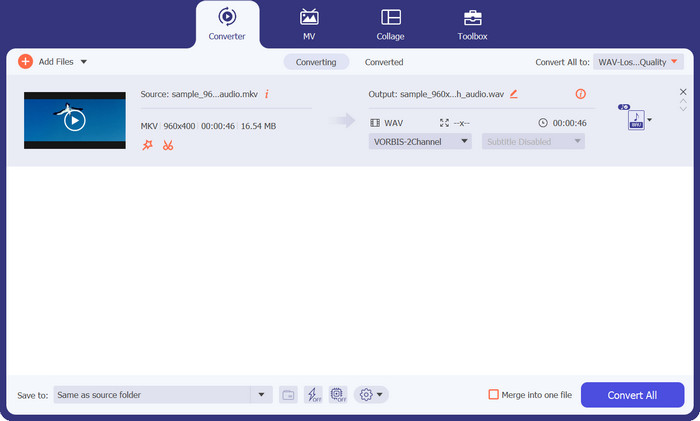
Video Converter Ultimate to idealne rozwiązanie, jeśli chcesz jednocześnie przekonwertować wiele plików MKV do MOV. Dzięki temu profesjonalnemu konwerterowi MKV możesz z łatwością zmienić format wideo MKV na MOV. Oprócz obsługi szerokiej gamy formatów audio narzędzie to pozwala również konwertować MKV na liczne inne formaty wideo. Choć pliki MKV są najczęściej konwertowane za pomocą Video Converter Ultimate, program jest również kompatybilny z AVI, MP4 itd.
Poniższe instrukcje przeprowadzą Cię przez proces korzystania z tego konwertera MKV na WAV:
Plusy
- Szybka i wydajna konwersja.
- Jest kompatybilny z głównymi systemami operacyjnymi.
- Szeroka gama obsługiwanych formatów wideo i audio.
Cons
- Tylko podstawowe możliwości edycji dla darmowej wersji aplikacji.
Krok 1. Aby rozpocząć, kliknij przycisk Free Download poniżej, aby pobrać instalator aplikacji. Następnie zainstaluj program na swoim komputerze.
Bezpłatne pobieranieDla Windows 7 lub nowszegoBezpieczne pobieranie
Bezpłatne pobranieDla macOS 10.7 lub nowszegoBezpieczne pobieranie
Krok 2. Po uruchomieniu narzędzia załaduj docelowe pliki, klikając przycisk z ikoną Plus na głównym panelu programu. Możesz też kliknąć przycisk Add Files w lewym górnym rogu, aby wgrać pliki w alternatywny sposób.
Krok 3. Następnie rozwiń opcję Profile. Zobaczysz tu zakładki konwersji. Teraz wybierz kartę Audio i ustaw WAV jako format wyjściowy. Opcjonalnie możesz edytować parametry zgodnie ze swoimi potrzebami.
Krok 4. Na koniec kliknij przycisk Convert All w prawym dolnym rogu, aby zainicjować proces konwersji. Poczekaj na zakończenie operacji.
2. Darmowy konwerter wideo online
To program działający w przeglądarce, który pozwala użytkownikom konwertować pliki MKV do WAV całkowicie za darmo. Proces konwersji wideo z Free Video Converter Online jest błyskawiczny. Co więcej, nie ma żadnego limitu liczby filmów, które możesz przetworzyć. Program obsługuje konwersję MKV do wielu formatów, w tym MP3, WMA, WAV i innych. Działa w każdej przeglądarce i nie wymaga żadnych specjalnych parametrów sprzętowych, w przeciwieństwie do typowego oprogramowania konwertera MKV na WAV.
Plusy
- Darmowy konwerter online MKV na WAV.
- Nie wymaga instalacji oprogramowania.
- Jest kompatybilny z wieloma systemami operacyjnymi.
Cons
- Zależy mi na stałym dostępie do internetu.
Możesz zobaczyć następujący przewodnik dotyczący korzystania z tego bezpłatnego programu konwertującego MKV na WAV:
Krok 1. W ulubionej przeglądarce odwiedź oficjalną stronę Free Video Converter Online, klikając odnośnik do programu. Następnie zostaniesz przekierowany na stronę główną.
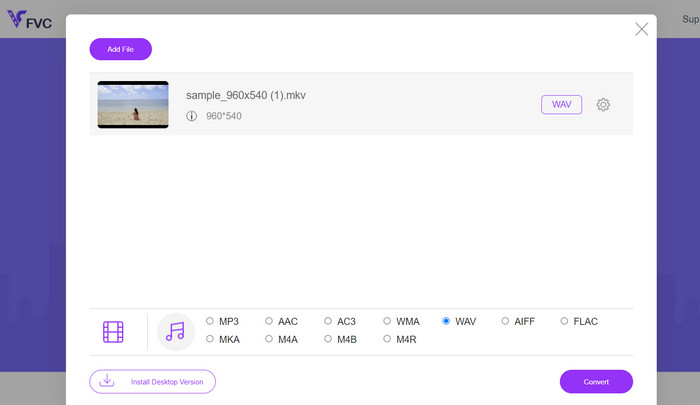
Krok 2. Teraz kliknij przycisk Add Files to Convert w głównym interfejsie i wybierz plik(i) MKV, które chcesz przekonwertować na WAV. Potem program wyświetli wgrane pliki.
Krok 3. Tym razem wybierz format wyjściowy. W sekcji formatu Audio zaznacz przycisk radiowy przy WAV i edytuj parametry. Na końcu kliknij przycisk Convert, aby rozpocząć konwersję MKV do WAV.
3. Darmowy konwerter audio
Freemake Audio Converter zapewnia wydajne rozwiązanie do przekształcania plików MKV w wysokiej jakości dźwięk WAV. Możesz łatwo dodawać swoje pliki MKV do programu, wybierając pojedyncze pliki lub całe foldery. Po załadowaniu plików możesz wybrać WAV jako format wyjściowy z dostępnych opcji. Ponadto zapewnia również kilka innych formatów wyjściowych, zapewniając kompatybilność z szeroką gamą urządzeń i odtwarzaczy multimedialnych.
Plusy
- Wyodrębnij ścieżki audio z plików wideo.
- Konwertuj wiele plików jednocześnie.
- Dostosuj ustawienia wyjściowe.
Cons
- Dostępne tylko dla systemu operacyjnego Windows.
- Ograniczone zaawansowane funkcje.
Krok 1. Aby przekonwertować MKV na WAV, zainstaluj program i uruchom go na swoim komputerze.
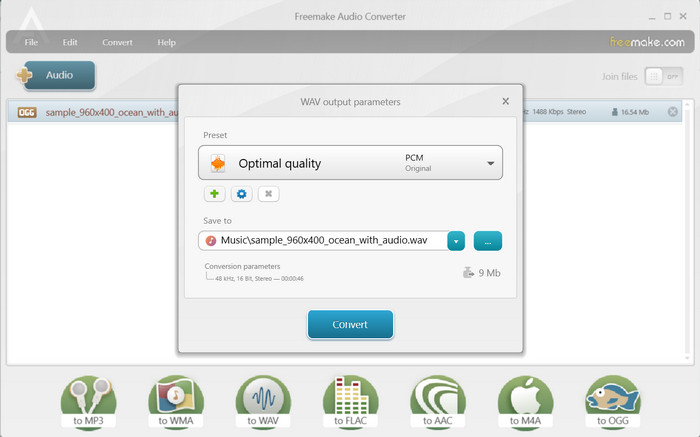
Krok 2. Następnie kliknij przycisk Audio, aby wgrać plik i upewnij się, że ładujesz plik MKV z ścieżką audio.
Krok 3. Teraz wybierz opcję do WAV na dole interfejsu, aby ustawić ją jako format wyjściowy. Na końcu kliknij przycisk Convert w wyświetlonym panelu.
Dalsza lektura:
Najlepszy konwerter do zmiany ASF na zabawne GIF‑y z memami
Prostsze sposoby na przyspieszenie filmów w formacie MP4 [offline i online]
Część 3. Często zadawane pytania dotyczące konwerterów MKV na WAV
Czy są jakieś ograniczenia podczas konwersji MKV na WAV?
Niektóre ograniczenia, które należy wziąć pod uwagę podczas konwersji MKV na WAV, obejmują rozmiar pliku, czas konwersji oraz możliwości oprogramowania lub narzędzia do konwersji. Konwersja dużych plików MKV może trwać dłużej, a niektóre narzędzia do konwersji mogą mieć ograniczenia dotyczące rozmiaru lub czasu trwania pliku.
Czy są jakieś alternatywy dla WAV do ekstrakcji dźwięku MKV?
Tak, istnieją alternatywne formaty audio, które należy wziąć pod uwagę przy ekstrakcji dźwięku MKV, w zależności od konkretnych potrzeb. Niektóre popularne alternatywy to MP3, FLAC, AAC i OGG.
Czy mogę przekonwertować MKV na WAV bez utraty jakości dźwięku?
Jakość dźwięku przekonwertowanego pliku WAV zależy od różnych czynników, w tym oryginalnego źródła dźwięku i ustawień użytych podczas procesu konwersji. Konwersja ze stratnego formatu audio (takiego jak dźwięk w pliku MKV) do formatu bezstratnego (takiego jak WAV) zasadniczo zachowuje oryginalną jakość dźwięku.
Wniosek
Rozumiejąc cały proces i używając niezawodnych narzędzi do konwersji, możesz sprawnie konwertować MKV na WAV i zyskać większą elastyczność w pracy z treściami audio zawartymi w plikach MKV.
-
 Doskonały wybór do konwersji MKV do formatu AVI
 Opanuj, jak konwertować filmy MKV za pomocą prostych kroków dostarczonych wyłącznie dla Ciebie. Chcesz wiedzieć jak? Następnie kliknij ten link, aby dowiedzieć się więcej.
-
 Najlepsze sposoby edycji metadanych MKV jak profesjonalista [Łatwy]
 Nie masz pomysłu, jak edytować metadane MKV? Niektórym użytkownikom trudno jest edytować tagi w MKV, jeśli jesteś jednym z nich, przeczytaj ten artykuł.
-
 Jak konwertować FLAC i WAV bez wysiłku (darmowe i płatne)
 Czy chcesz zmienić FLAC na WAV, ale potrzebujesz pomocy, wiedząc, od czego zacząć? Ten poradnik nauczy Cię, jak to zrobić szybko i łatwo.
