


 Video Converter Ultimate
 Nagrywarka ekranu
 Naprawa wideo
Czy przesyłanie filmów na Dysk Google obniża jakość? Sprawdź tutaj
Dysk Google to oparty na chmurze system depozytowy umożliwiający użytkownikom udostępnianie, przechowywanie, zapisywanie plików i uzyskiwanie do nich dostępu z różnych urządzeń wyposażonych w połączenie internetowe. Platforma ta umożliwia użytkownikom łatwą współpracę ze współpracownikami i przyjaciółmi podczas tworzenia dokumentów, arkuszy kalkulacyjnych i prezentacji w czasie rzeczywistym. Usługa oferuje 15 GB bezpłatnej przestrzeni dyskowej z możliwością uaktualnienia do dodatkowego planu przestrzeni dyskowej za opłatą.
Ogólnie rzecz biorąc, ta oparta na chmurze pamięć masowa to wszechstronne i przyjazne dla użytkownika rozwiązanie, które może przynieść korzyści zarówno osobom prywatnym, jak i firmom. Niezależnie od tego, czy musisz przechowywać ważne dokumenty, czy współpracować z innymi nad projektami, Google Drive oferuje wygodną i niezawodną platformę. Najczęściej przechowywanym typem plików na tej platformie są nagrania wideo. Jednak jak przy mniejszej pojemności magazynowej można zapisać wiele plików? Czy Google Drive kompresuje wideo? Na wszystkie te pytania odpowiemy w tym artykule.

Część 1. Czy przesyłanie filmów na Dysk Google obniża jakość?
Przesyłanie filmów na Dysk Google może obniżyć jakość Twoich filmów. Dzieje się tak dlatego, że Dysk Google kompresuje pliki wideo, aby zaoszczędzić miejsce na serwerze. Może także ułatwić udostępnianie filmu innym osobom. Podczas kompresji filmów część ich szczegółów zostaje utracona, a czasami ogólna jakość pliku może ulec pogorszeniu. Stopień utraty jakości zależy od różnych czynników, takich jak rozdzielczość oryginalnego filmu, format pliku i ustawienia kompresji używane przez Dysk Google. Na przykład po skompresowaniu wideo o wysokiej rozdzielczości może wystąpić większa utrata jakości niż wideo o niskiej rozdzielczości. Zaleca się stosowanie zalecanego formatu wideo i ustawień kompresji, aby zminimalizować utratę jakości podczas przesyłania filmów na Dysk Google. Można używać formatów wideo, takich jak MP4, które zawierają AVC (H.264) i HEVC (H.265), które kompresują rozmiar pliku wideo, zachowując jednocześnie jakość wideo.
Część 2. Czy mogę używać Dysku Google do kompresji filmów?
Tak, jak omówiliśmy powyżej, skompresowane filmy na Dysku Google, co umożliwia użytkownikom przechowywanie wielu filmów na serwerze. Jedyną wadą tego procesu jest to, że może znacznie obniżyć jakość wyglądu pliku, gdy użytkownicy przesyłają filmy o wyższej jakości, np. 4K. Oto, jak możesz kompresować wideo za pomocą Dysku Google.
Krok 1. Prześlij plik, który chcesz zmniejszyć, na swoje konto Google Drive. Możesz przeciągnąć wideo i upuścić plik na Dysku Google, aby zaimportować go na jego serwer.
Krok 2. Gdy plik wideo zostanie przesłany na Dysk Google, automatycznie go skompresuje zgodnie z zalecanymi ustawieniami pliku. Możesz odtworzyć wideo za pomocą wbudowanego odtwarzacza multimedialnego.
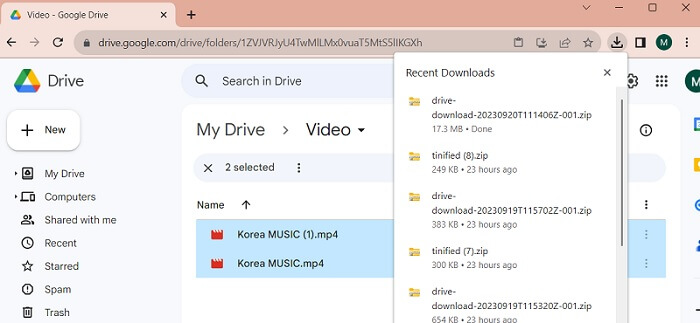
Krok 3. Na koniec możesz pobrać plik wideo lub spakować go do archiwum ZIP, aby uzyskać mniejszy rozmiar pliku. Możesz zaznaczyć jednocześnie wiele plików wideo i kliknąć prawym przyciskiem myszy. Zostanie wyświetlona lista menu. Wybierz przycisk Download, a Google Drive pobierze spakowane wideo i zapisze je na Twoim komputerze.
Część 3. Jak kompresować filmy na Dysk Google
Szukasz wydajnego narzędzia do kompresowania plików wideo na swoim urządzeniu? Zawsze możesz użyć programu Video Converter Ultimate, aby zmniejszać i modyfikować rozmiar plików wideo na komputerze. Aplikacja jest kompatybilna z systemami Mac i Windows, więc możesz zainstalować ją na laptopie, komputerze stacjonarnym i innych urządzeniach. Obsługuje szeroką gamę formatów wideo, w tym MP4, MOV, MKV, WebM, AVI i inne. Posiada suwak, za pomocą którego użytkownik może skompresować określony procent rozmiaru pliku wideo bez skracania czasu jego trwania. Co więcej, aplikacja bez problemu obsługuje wideo w 4K. Wykorzystuje zaawansowaną technologię do przetwarzania i kompresowania nagrań. Możliwość redukcji rozmiaru pliku bez ograniczeń i restrykcji sprawia, że to narzędzie wyróżnia się wśród kompresorów. Sprawdź szczegółową instrukcję korzystania z tego programu.
Krok 1. Zainstaluj aplikację
Najpierw musisz pobrać program Video Converter Ultimate na swój komputer lub laptop. Aby łatwo zainstalować tę aplikację, kliknij ikonę Free Download poniżej.
Bezpłatne pobieranieDla Windows 7 lub nowszegoBezpieczne pobieranie
Bezpłatne pobieranieDla macOS 10.7 lub nowszegoBezpieczne pobieranie
Krok 2. Importuj plik wideo
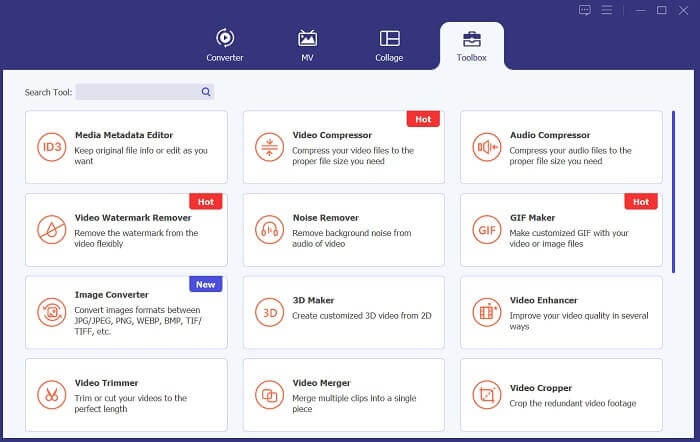
Następnym krokiem jest zaimportowanie wideo do interfejsu aplikacji. Możesz to zrobić, przechodząc do interfejsu narzędzia i klikając opcję Toolbox. Z listy wybierz funkcję Video Compressor i naciśnij ikonę +.
Krok 3. Skompresuj wideo
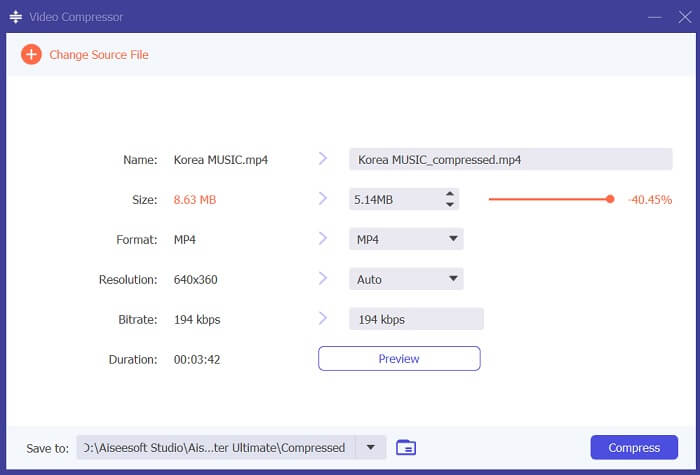
Następnie będziesz mógł przeglądać foldery na swoim komputerze. Wybierz wideo, które chcesz przekonwertować, i kliknij Open, aby je zaimportować. Pojawi się nowe okno, w którym możesz zmniejszyć rozmiar pliku. Przesuń slider lub zmień parametry wideo, takie jak Resolutions, Formats i Bitrate. Kliknij opcję Compress, aby rozpocząć proces.
Krok 4. Odtwórz plik wyjściowy
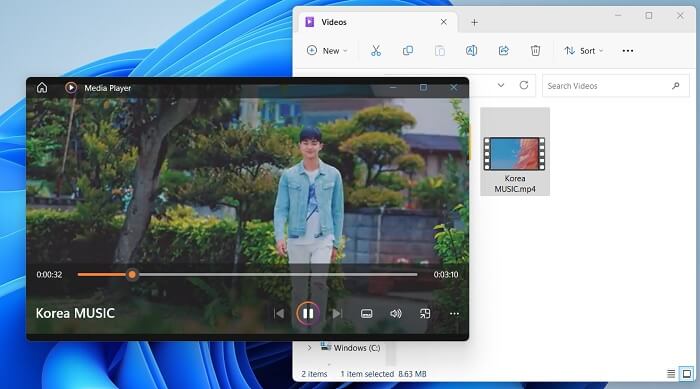
Ostatnim krokiem jest poczekanie na zakończenie procesu kompresji. Przejdź do folderu wyjściowego i wyświetl podgląd pliku. Możesz dwukrotnie dotknąć wideo, aby uruchomić je za pomocą odtwarzacza multimedialnego na komputerze.
Dalsza lektura:
[Rozwiązano] Jak odtwarzać pliki MP4 w Google Drive
Samouczek: Jak skompresować wideo do wysłania e‑mailem na iPhonie/Androidzie/online
Część 4. Często zadawane pytania dotyczące kompresji wideo na Dysku Google
Czy możesz przesłać film 4K na Dysk Google?
Tak, możesz przesłać film 4K na Dysk Google! To świetny sposób na przechowywanie i udostępnianie wysokiej jakości filmów innym osobom. Upewnij się, że masz wystarczająco dużo miejsca na dysku, ponieważ filmy 4K mogą zajmować dużo miejsca. Po przesłaniu filmu nie musisz udostępniać oryginalnej kopii pliku wideo. Wystarczy wysłać im link do dysku, aby uzyskać dostęp do pliku wideo. Dzięki tej platformie internetowej możesz łatwo udostępniać pliki wideo.
Jak zapisać film na Dysku Google bez utraty jakości?
Postępuj zgodnie z tymi wskazówkami, aby przesłać wideo na Dysk Google bez utraty jakości. Najpierw upewnij się, że Twoje wideo ma rozdzielczość 4K. Następnie zaloguj się na swoje konto Google Drive i kliknij przycisk New w lewym górnym rogu. Wybierz stamtąd File Upload i wskaż wideo, które chcesz przesłać. Gdy wysyłanie zostanie zakończone, możesz łatwo udostępnić wideo innym, wysyłając im link do pliku. Dzięki tym prostym krokom możesz mieć pewność, że Twoje wideo zostanie przesłane na Dysk Google bez rezygnowania z jego jakości.
Jaka jest maksymalna rozdzielczość wideo na Dysku Google?
Maksymalna rozdzielczość wideo na Dysku Google to 4K. Jeśli więc chcesz przesłać film bez utraty jakości, upewnij się, że jest on w rozdzielczości 4K. Możesz wykonać wcześniejsze kroki, aby łatwo przesłać pliki multimedialne na konto Dysku Google i udostępnić je innym.
Wniosek
Wideo to cenne dane cyfrowe, które przechowujemy na każdym posiadanym urządzeniu. Niezależnie od tego, czy jest to telefon komórkowy, aparat cyfrowy, komputer osobisty czy tablet, zawsze szukamy różnych opcji i rozwiązań awaryjnych do przechowywania i zapisywania naszych plików wideo. Na szczęście Google Drive jest jedną z najwygodniejszych platform do udostępniania i przechowywania multimediów. Dowiedzieliśmy się również, że usługa ta może zmniejszać i kompresować pliki wideo w sposób odpowiedni dla użytkowników. Jeśli więc wciąż się zastanawiasz, czy Google Drive kompresuje wideo? Przeanalizuj ponownie rozwiązania i informacje wymienione powyżej.
-
 Jak efektywnie kompresować wideo dla Internetu bez utraty jakości
 Kiedy wideo z Twojej witryny otrzymuje wiele skarg od klientów, że zawsze dużo buforuje, możesz spróbować skompresować wideo dla sieci na 2 wydajne sposoby, co pomoże Ci skrócić czas bufora witryny, aby zatrzymać klientów.
-
 [Szczegółowy przewodnik] Jak naprawić wideo z Dysku Google, które nie jest odtwarzane na komputerze
 Filmy na Dysku Google nie są odtwarzane z błędem „Wystąpił problem podczas odtwarzania tego filmu”. Może to być spowodowane przez sam Dysk Google lub problemy z Chrome. W tym artykule szczegółowo przedstawimy 6 rozwiązań.
-
 Najlepsze sposoby konwersji HEIC na JPG na Dysku Google
 Jeśli chcesz dowiedzieć się, jak przekonwertować HEIC na JPG na Dysku Google, przeczytaj ten przewodnik, aby dowiedzieć się, jak najłatwiej przekonwertować HEIC na JPG na Dysku Google na komputerze.
