


 Video Converter Ultimate
 Nagrywarka ekranu
 Naprawa wideo
2 szybkie sposoby na zmniejszenie dużych plików OGV [bezpłatne i online]
OGV files are often used for playing webpage video content using the HTML5 < video > tag. When you are going to send large OGV files to partners, clients, or friends, compressing those files becomes incredibly useful. Since there are many file size limitations of many email and file transfer platforms, compressed videos can greatly prevent the file transfer failure, at least in most cases. So, we’ll take a look at two online ways to compress your OGV files and make them smaller in this post.

Część 1. Sposób kompresji plików OGV w trybie online za pomocą kompresora OGV
Free Video Compressor is a popular and useful free online OGV compressor tool available for users. Unlike many other common free online tools, Free Video Compressor comes without restrictions on either the number or size of the files uploaded. More importantly, there will be no watermark on your exported video files. Also, it allows you to compress MP4, AVI, WMV, MOV, and many other common video files without destroying quality.
Jak kompresować pliki OGV za pomocą darmowego kompresora wideo
Step 1. Go to the online OGV video compressor website by entering https://www.free-videoconverter.net/free-video-compressor/.
Step 2. Locate and click Add Files to Compress button, and then download its launcher to activate the service. In the window that pops up, go and find your OGV files and hit Open to confirm.

Step 3. Next, you should define the compression settings to make the file smaller. You can set the size of your video, change the resolution, select the bitrate, and more.

Step 4. Hit on the Compress button to commence the process. After it’s finished, the file will be downloaded to your computer automatically.

Poza tym ten darmowy kompresor wideo może pomóc rozwiązać inne problemy z kompresją wideo. Wystarczy zapoznać się z następującymi artykułami:
How to Compress a Video for Email
How to Compress AVCHD Video Files for Free on Windows and Mac
Część 2. Jak skompresować i zoptymalizować plik OGV za pomocą Clideo
Clideo to darmowy zestaw narzędzi wideo typu „wszystko w jednym”. Działa ze wszystkimi popularnymi formatami i kompresuje się szybko i nie wymaga pobierania. Umożliwia bezpłatną kompresję pliku OGV do 500 MB, ale nie ma limitu ilościowego. Teraz możesz wykonać poniższe kroki, aby zmniejszyć rozmiar pliku OGV.
Step 1. Visit https://clideo.com/compress-video and then hit on the Choose file button.
Step 2. Upload an OGV file you want to compress from your computer. You can also select the file from Dropbox or Google Drive by clicking the blue downward arrow.
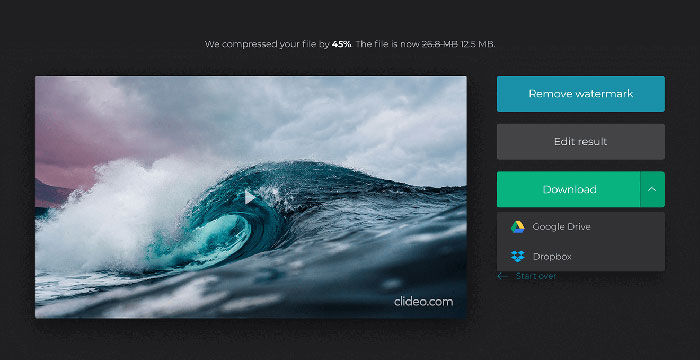
Step 3. When the file is uploaded, the tool will start processing the video. The processing time depends on the size of the video.
Step 4. Once the compression is over, you can see the initial file size and the compressed one. Now, you can preview the result to make sure it looks good. If you’re satisfied with it, you can click on the Download button to save it to your device or cloud storage.
Część 3. Często zadawane pytania dotyczące kompresji plików OGV
Co to jest plik OGV?
Plik OGV to plik wideo zapisany w formacie kontenera Ogg typu open source Xiph.Org. Zawiera strumienie wideo, które mogą wykorzystywać jeden lub więcej różnych kodeków, takich jak Theora, Dirac lub Daala. Pliki OGV można odtwarzać za pomocą różnych odtwarzaczy multimedialnych.
Jak działa kompresja OGV?
Jeśli chodzi o kompresję plików OGV, to kompresja międzyramkowa prowadzi do zmniejszenia rozmiaru pliku poprzez usunięcie podobieństw występujących między klatkami wideo.
Jak skompresować MP4 do formatu OGV?
Możesz użyć wyżej wymienionego narzędzia - Free Video Compressor, aby skompresować pliki MP4 do OGV. Możesz też wybrać aplikację konwertującą wideo, która pomoże Ci to zrobić.
Wniosek
Powyższe metody online mogą pomóc w skutecznym skompresowaniu pliku wideo OGV. Którego wolisz użyć? Możesz podzielić się swoimi rekomendacjami w komentarzach poniżej!
-
 Od 50 MB do 5 MB - Jak skompresować plik MP4 w kilka sekund
 Film MP4 jest za duży, aby go przesłać? Chcesz zmniejszyć rozmiar wideo? Oto wydajne sposoby 3 na skompresowanie pliku MP4 do mniejszego rozmiaru bez ograniczeń.
-
 Samouczek - 7 sposobów kompresji filmów za darmo bez utraty jakości
 Przeczytaj i uzyskaj 7 sposobów na bezpłatne kompresowanie filmów na komputerze lub telefonie. Możesz z łatwością zredukować duże filmy do małych rozmiarów plików na e-mail, Twitter, Instagram, YouTube, WhatsApp i nie tylko.
-
 Jak kompresować pliki MOV w systemie Windows, Mac, iPhone i Android
 W tym artykule pokazano, jak szczegółowo kompresować filmy QuickTime MOV na telefonie lub komputerze. Jeśli Twój film MOV jest zbyt duży, aby go wysłać, udostępnić lub zapisać, możesz uzyskać tutaj 4 praktyczne rozwiązania.
