


 Video Converter Ultimate
 Nagrywarka ekranu
 Naprawa wideo
Konwertuj MP4 do WebP online za pomocą najlepszych darmowych narzędzi
Wideo o długości zaledwie sekundy składa się z wielu oddzielnych obrazów. Te obrazy lub klatki zwykle pojawiają się, gdy pracujesz nad edycją wideo. A jeśli jesteś blogerem specjalizującym się w jedzeniu, dobrym sposobem na uczynienie treści wideo interesującą jest stworzenie dla niej miniatury. Nie tylko to, ale będziesz chciał wybrać idealną klatkę, której użyjesz jako miniatury dla swojego wideo. Aby to rozwiązać, możesz wybrać najlepszy obraz ze swojej treści wideo, aby był idealnym obrazem podglądu poprzez konwersję wideo na zdjęcie. A jeśli chcesz nas zapytać, WebP byłby dobrym formatem obrazu do wypróbowania.
Na szczęście w tym artykule pokażemy ci trzy różne sposoby na konwersję plików MP4 na WebP online. Zapoznaj się z poniższymi treściami i sprawdź, która metoda najlepiej sprawdzi się u ciebie, aby uzyskać zdjęcia ze swoich filmów.

Część 1. Dowiedz się więcej o WebP
Czym jest WebP?
WebP to rodzaj formatu obrazu, który został zaprojektowany przez Google. Został stworzony, aby obrazy internetowe były mniejsze i ładowały się szybciej. Ponadto ten typ formatu wykorzystuje zaawansowane metody kompresji, które pomagają zmniejszyć rozmiar pliku obrazów bez zbytniej zmiany jakości.
Jest to korzystne dla szybszego ładowania stron internetowych, a także ważne dla użytkowników korzystających z wolnych połączeń internetowych lub urządzeń mobilnych. Ponieważ pliki WebP obsługują zarówno kompresję stratną, jak i bezstratną, daje to również elastyczność w wyborze właściwej równowagi między rozmiarem pliku a jakością. Czy wiesz, że możesz przekonwertować MP4 na WebP online? Jest to wskazane tylko wtedy, gdy chcesz poprawić wrażenia z przeglądania stron internetowych, zwiększając wydajność obrazów i możliwość ich ładowania, zachowując jednocześnie przyzwoitą jakość plików wideo, które obecnie posiadasz. Mając to na uwadze, przejdźmy do przyzwoitych konwerterów wideo na obrazy, których proces konwersji przedstawiono poniżej.
Część 2. 3 najlepsze sposoby na konwersję MP4 do WebP online
1. MP4.do
Jeśli chcesz wykorzystać potencjał swojego filmu MP4 jako obrazu internetowego, to pierwszym konwerterem, którego musisz spróbować, jest MP4.to. Jest to internetowe narzędzie do konwersji plików, które zostało specjalnie zaprojektowane do konwersji różnych typów plików multimedialnych do formatu MP4. Dzięki temu niezwykłemu narzędziu możesz konwertować MP4 do WebP online i do innych różnych formatów, takich jak GIF, MOV, WAV, AVI, MP3, MPEG i inne. Z drugiej strony możesz przesyłać różne typy plików, takie jak filmy, klipy audio, a nawet obrazy, i konwertować je do formatu MP4. Może to być przydatne do przygotowywania filmów do strumieniowego przesyłania online i zapewniania zgodności na różnych urządzeniach i platformach obsługujących format MP4. Tymczasem poniżej znajdują się proste kroki, które możesz wykonać, używając MP4.to do konwersji filmów do WebP.
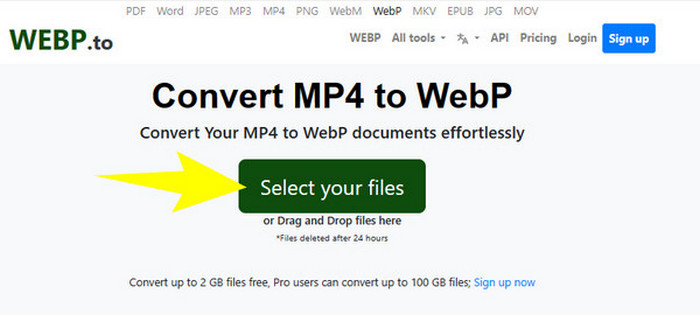
Krok 1. Na stronie narzędzia kliknij przycisk Select your files, aby przesłać swoje pliki MP4.
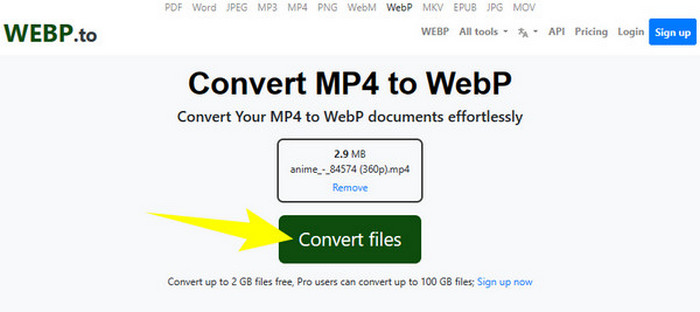
Krok 2. Gdy plik MP4 zostanie przesłany, narzędzie wyświetli przycisk Convert Files, który musisz kliknąć, aby rozpocząć konwersję.
Krok 3. Poczekaj, aż proces się zakończy. Następnie pobierz przekonwertowany plik i wyeksportuj go na swój komputer.
2. MKonwerter
Kolejnym darmowym konwerterem online z MP4 na WebP lub z WebP na MP4, którego koniecznie musisz spróbować, jest MConvert. Ten konwerter online zapewnia wygodne rozwiązanie dla osób, które muszą przekształcać pliki do różnych formatów, ponieważ obsługuje wiele rodzajów formatów wideo, audio i obrazów. Ponadto ten konwerter online oferuje przyjazny dla użytkownika interfejs i zazwyczaj nie wymaga instalacji oprogramowania, dzięki czemu jest dostępny dla każdego z dostępem do internetu. Jednak, jak w przypadku wielu narzędzi online, MConverter zawiera reklamy w swoim interfejsie. Jeśli jednak nie stanowi to dla ciebie problemu, przejdź do prostych kroków, które przygotowaliśmy poniżej.
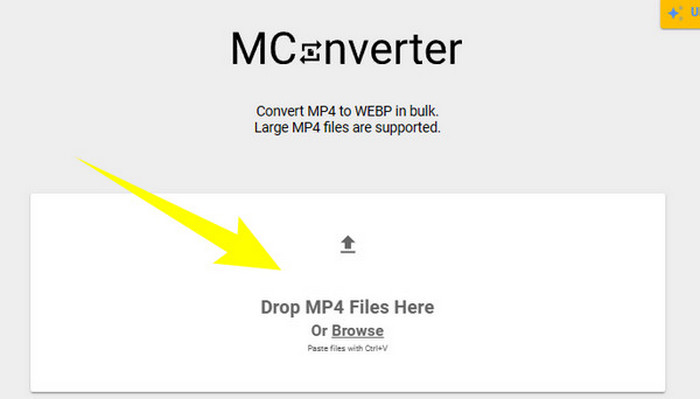
Krok 1. Gdy wejdziesz na stronę konwertera, przeciągnij i upuść tam pliki MP4, które chcesz przekonwertować.
Krok 2. Po upuszczeniu pliku kliknij WebP wśród opcji w żółtej sekcji jako format wyjściowy.
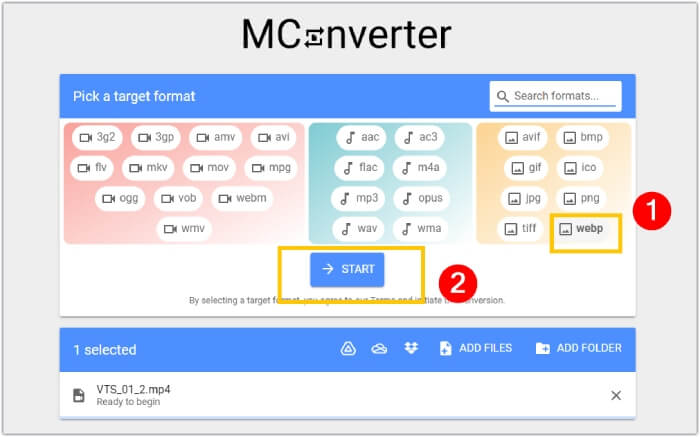
Krok 3. Następnie kliknij przycisk START, aby rozpocząć proces konwersji.
3. Ezgif.com
Dzięki narzędziu Video to WebP od Ezgif możesz łatwo i bezpłatnie konwertować swoje pliki MP4 do formatu WebP. Poza tym to narzędzie online pozwala wykonywać takie zadania jak zmiana rozmiaru, optymalizacja, kadrowanie oraz dodawanie efektów do plików multimedialnych. Co więcej, to oprogramowanie do konwersji z MP4 na WebP jest popularne ze względu na swoją prostotę i łatwość obsługi. Jest to wygodna opcja dla osób, które chcą edytować lub konwertować pliki multimedialne bez potrzeby korzystania ze skomplikowanego oprogramowania czy specjalistycznej wiedzy technicznej. Dzięki temu może służyć jednocześnie jako konwerter multimediów, edytor oraz kreator GIF-ów! Skupiając się jednak na naszym celu, poniżej przedstawiamy kroki przekształcania pliku wideo w obraz za pomocą Ezgif.
Krok 1. Na stronie głównej narzędzia wybierz zakładkę Video to WebP spośród dostępnych opcji. Prześlij plik MP4 za pomocą przycisku Upload File.
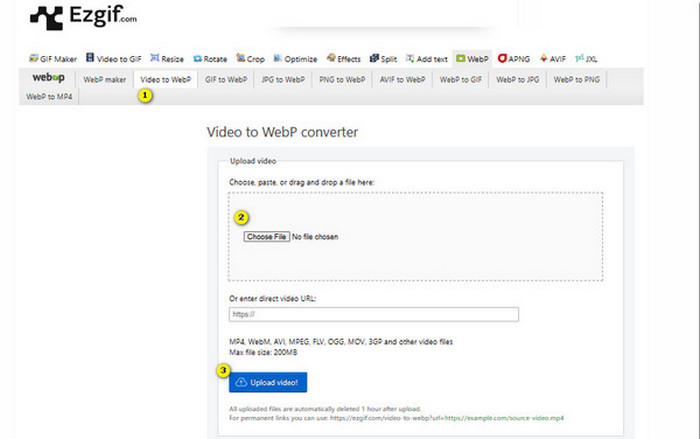
Krok 2. Następnie kliknij przycisk Upload Video, aby kontynuować.
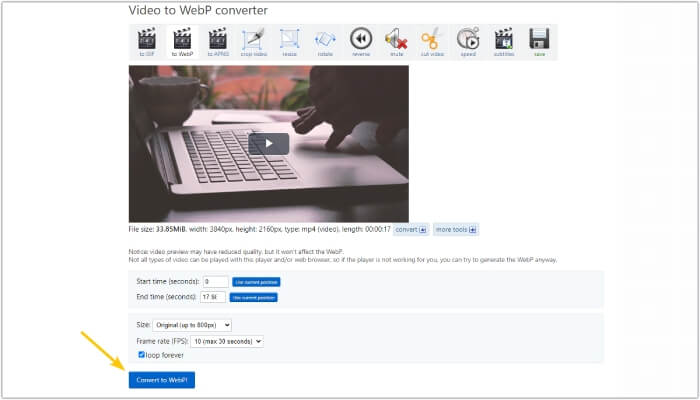
Krok 3. Gdy plik zostanie wczytany, kliknij przycisk Convert to WebP i poczekaj, aż proces się zakończy.
Część 3. Wskazówka bonusowa: Najlepszy sposób na konwersję MP4 do różnych formatów wideo i audio
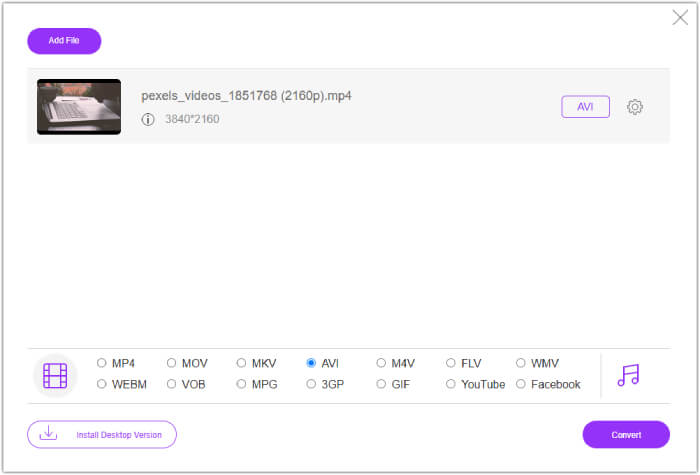
Teraz, gdy poznałeś już trzy powyższe konwertery MP4 na WebP, z przyjemnością przedstawiamy ci część dodatkową, w której znajdziesz najlepszy sposób na konwersję MP4 do formatów wideo lub audio. FVC Free Video Converter Online to również narzędzie działające w przeglądarce, które umożliwia błyskawiczną konwersję wielu plików naraz. Tak, w przeciwieństwie do powyższych konwerterów online, ten konwerter wideo oferuje ultrazaszybką konwersję, co przekłada się na bardzo sprawny proces przetwarzania. Co więcej, nie musisz ręcznie pobierać przekonwertowanych plików, ponieważ narzędzie automatycznie je eksportuje zaraz po zakończeniu konwersji. Co dodatkowo je wyróżnia, to brak reklam i znaków wodnych, dzięki czemu korzystanie z niego jest wyjątkowo wygodne i bezproblemowe.
Część 4. Często zadawane pytania dotyczące konwersji MP4 i WebP
Czy naprawdę mogę przekonwertować MP4 na obraz, taki jak WebP?
Konwersja wideo do obrazu nie może być wykonana bezpośrednio. Zamiast tego odbywa się poprzez ekstrakcję klatek.
Jakie korzyści uzyskam konwertując plik wideo do formatu WebP?
W porównaniu z tradycyjnymi formatami, takimi jak JPEG i PNG, konwertowanie filmów do formatu WebP oferuje kilka zalet. Obejmuje to mniejsze rozmiary plików, co może przyczynić się do poprawy szybkości ładowania stron internetowych.
Czy mogę używać wyłącznie formatu WebP we wszystkich przeglądarkach internetowych?
Format WebP nie jest w pełni obsługiwany w niektórych starych przeglądarkach. Jednak większość nowoczesnych przeglądarek internetowych obsługuje obrazy WebP, w tym Google Chrome, Opera, Firefox i Edge.
Wniosek
Ten wpis to wprowadzenie do trzech skutecznych konwerterów MP4 na WebP, z których możesz korzystać online. Dodatkowo uwzględniliśmy także internetowy konwerter wideo–wideo/audio, który z pewnością usprawni twój proces konwersji multimediów. Udostępnij więc ten materiał znajomym i korzystajcie wspólnie z konwersji na profesjonalnym poziomie!
-
 Poznaj najłatwiejsze metody szybkiej konwersji WebP na JPG
 Poznaj najłatwiejsze metody szybkiej konwersji WebP na JPG
-
 Doskonałe metody konwersji WebP do PNG bez wysiłku
 Zdobądź wiedzę na temat niezwykłych metod konwersji WebP do PNG. Ten przewodnik dostarczy Ci najbardziej pomocnych konwerterów obrazów, które możesz wypróbować.
-
 Przegląd najlepszych konwerterów MP4 online i offline
 Zmaksymalizuj zasięg i wpływ swoich treści wideo dzięki najlepszemu MP4
