


 Video Converter Ultimate
 Nagrywarka ekranu
 Naprawa wideo
Najlepsze sposoby 3 na konwersję FLV do MOV
Ze względu na brak obsługi niektórych formatów lub z innych powodów musisz przekonwertować FLV na MOV, zwłaszcza gdy korzystasz z Maca.
Powinieneś wiedzieć, że pliki FLV nie są natywnie obsługiwane przez QuickTime Player i iMovie. Dlatego nie możesz bezpośrednio otwierać ani edytować FLV na Macu. Niezależnie od powodu, ten artykuł pokaże ci, jak przekonwertować FLV na MOV.

Na szczęście istnieje wiele konwerterów wideo, w tym wiele darmowych narzędzi online, które pomogą ci z łatwością zmienić twoje pliki FLV na MOV. W tym artykule przedstawimy 3 znakomite konwertery FLV na MOV. Gdy pobierzesz filmy FLV z serwisów udostępniania wideo, możesz skorzystać z tych narzędzi, aby przeprowadzić konwersję z FLV na MOV.
Część 1. Konwertuj FLV na MOV Online za darmo
Jak wspomnieliśmy powyżej, na rynku dostępnych jest wiele darmowych internetowych konwerterów FLV na MOV. Jeśli nie wiesz, którego użyć, szczerze polecamy popularny FVC Free Online Video Converter, aby przekonwertować FLV na QuickTime MOV.
Krok 1: Otwórz przeglądarkę i przejdź na stronę tego internetowego konwertera FLV na MOV. Możesz z niego korzystać w dowolnej przeglądarce, w tym Chrome, IE, Safari i Firefox.
Pobierz Wersję desktopową, aby konwertować pliki w trybie wsadowym.
Krok 2: Kliknij przycisk Add Files to Convert, aby szybko zainstalować program uruchamiający do konwersji FLV. Następnie pojawi się wyskakujące okno, w którym możesz przeglądać i przesłać swój plik FLV.

Krok 3: Po wejściu do głównego okna konwertera zobaczysz listę popularnych formatów wideo, takich jak MP4, MOV, AVI, FLV, M4V, MKV, VOB, MPG, WMV i inne. Tutaj powinieneś wybrać MOV jako format wyjściowy.
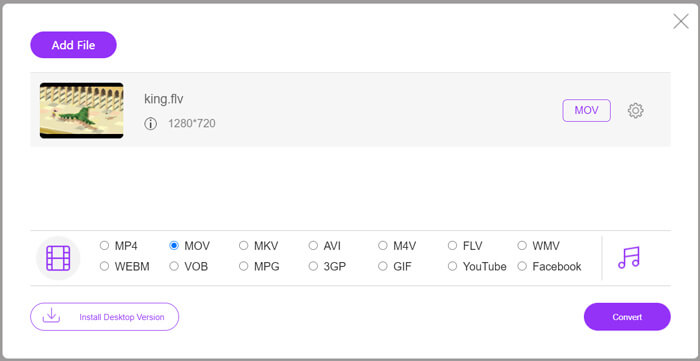
Krok 4: Przed ostateczną konwersją FLV na MOV możesz kliknąć ikonę Settings, aby dostosować więcej ustawień wideo i audio, takich jak rozdzielczość, koder, bitrate, liczba klatek na sekundę, głośność dźwięku, kanały audio i inne. Następnie możesz kliknąć przycisk Convert, aby rozpocząć konwersję FLV na MOV online.
Część 2. Zmień FLV na MOV za pomocą VLC
VLC to odtwarzacz multimedialny typu open source, który oferuje również podstawowe funkcje konwersji. Jeśli masz zainstalowany VLC Media Player na swoim Macu lub komputerze z systemem Windows, możesz na nim przekonwertować swoje pliki FLV.
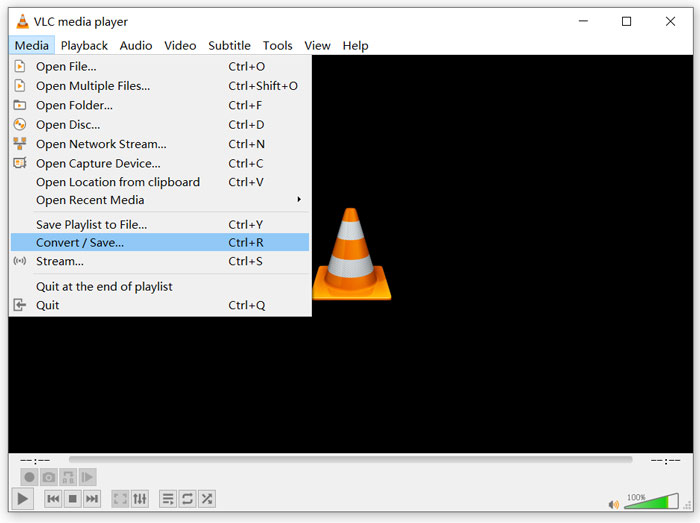
Krok 1: Otwórz VLC Media Player na komputerze i kliknij menu Media. Z rozwijanego menu wybierz opcję Convert/Save. Jeśli używasz VLC na Macu, kliknij menu File, a następnie wybierz opcję Convert/Stream.
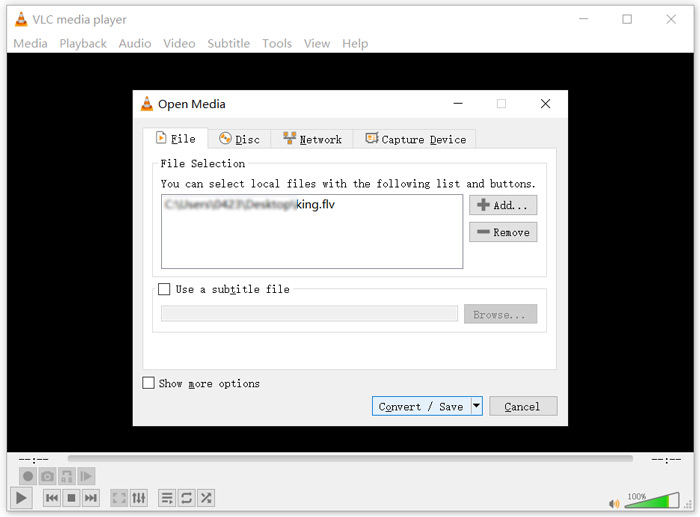
Krok 2: Teraz jesteś w oknie Open Media. Kliknij przycisk Add, aby zaimportować plik FLV, który chcesz przekonwertować. Następnie kliknij przycisk Convert/Save, aby przejść dalej.
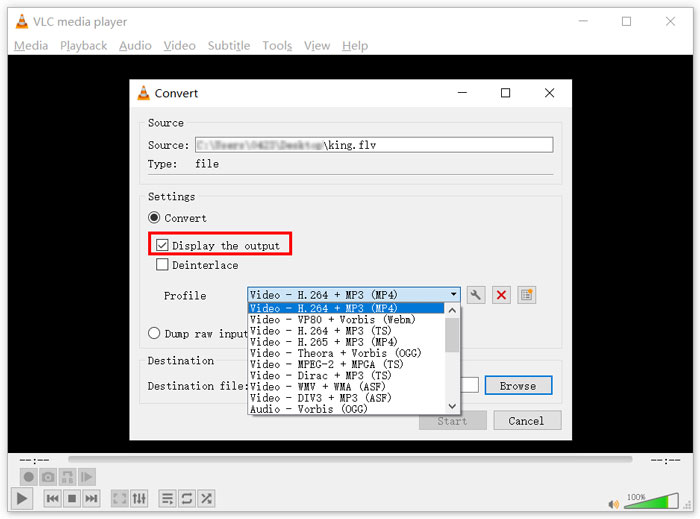
Krok 3: Z rozwijanej listy Profile wybierz odpowiedni format wyjściowy. Tutaj możesz przekonwertować FLV na MP4, TS, OGG, WebM, YouTube HD, MP3, FLAC i inne. Zaznacz pole przed opcją Display the output. Kliknij przycisk Browse, aby wybrać odpowiedni folder docelowy dla przekonwertowanego pliku FLV. Na tym etapie możesz nadać plikowi wyjściowemu rozszerzenie .mov.
Krok 4: Po wykonaniu wszystkich tych czynności możesz kliknąć przycisk Start, aby rozpocząć konwersję FLV.
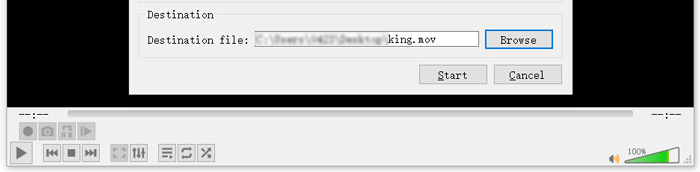
VLC Media Player automatycznie rozpocznie odtwarzanie pliku wynikowego. W górnej części VLC zobaczysz komunikat Converting file. Nie zamykaj całkowicie VLC, dopóki konwersja się nie zakończy.
Część 3. Najlepszy sposób na konwersję FLV do MOV bez utraty jakości
Gdy chcesz przekonwertować FLV na MOV, możesz sięgnąć także po rozwiązanie profesjonalne. Gorąco polecamy tu wszechstronne oprogramowanie do konwersji FLV na MOV, Video Converter Ultimate. W porównaniu z darmowym internetowym konwerterem FLV na MOV i VLC oferuje ono więcej funkcji i obsługuje więcej formatów. Co ważniejsze, potrafi konwertować FLV na MOV przy zachowaniu oryginalnej jakości.
- 1. Konwertuj dowolne wideo, takie jak MKV, AVI, MP4, WMV, FLV na MOV bez utraty jakości.
- 2. Konwertuj filmy 8K / 5K / 4K, 1080p / 720p HD i SD na ponad 500 formatów, takich jak MOV, MP4, AVI, MP3 i inne.
- 3. Edytuj wideo, takie jak wycinanie, obracanie, przycinanie, łączenie itp. oraz dodawanie filtrów i efektów oraz poprawianie jakości.
- 4. Toolbox może kompresować FLV, edytować informacje o metadanych FLV, tworzyć GIF-y z FLV i nie tylko.
Bezpłatne pobieranieDla Windows 7 lub nowszegoBezpieczne pobieranie
Bezpłatne pobieranieDla MacOS 10.7 lub nowszegoBezpieczne pobieranie
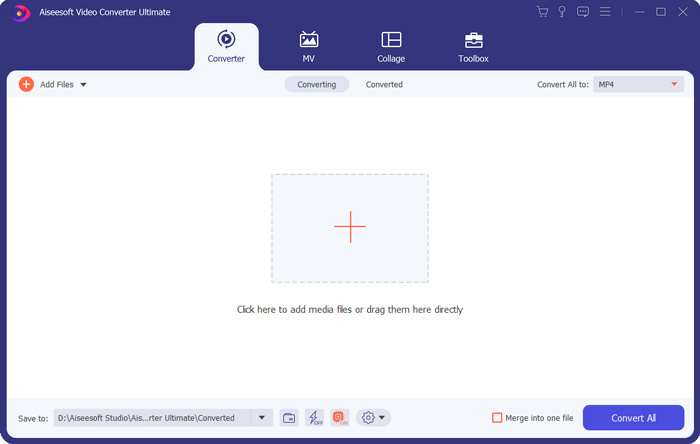
Krok 1: Bezpłatnie zainstaluj i uruchom ten konwerter FLV na MOV na swoim Macu lub komputerze z systemem Windows. Upewnij się, że używasz funkcji Converter. Następnie kliknij duży znak plus, aby dodać plik(i) FLV.
Krok 2: Kliknij ikonę format po prawej stronie zaimportowanego pliku FLV. Ustaw MOV jako format wyjściowy z rozwijanej listy.
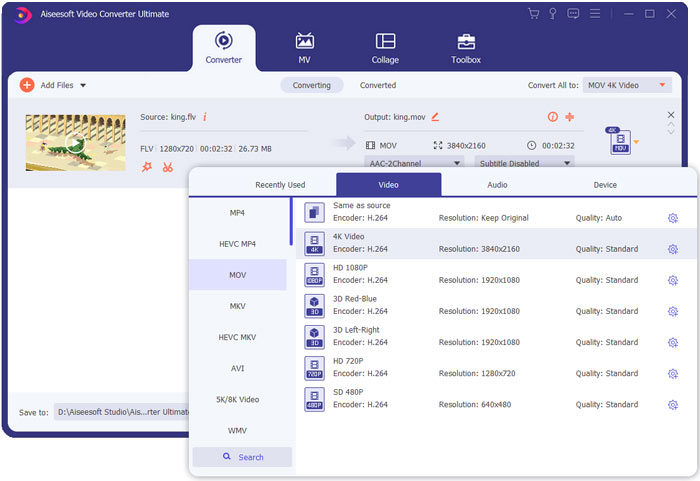
Krok 3: Jak widzisz powyżej, ten konwerter FLV jest wyposażony w wiele funkcji edycyjnych. Dlatego przed konwersją FLV na MOV możesz edytować wideo, dodawać filtry, efekty lub dostosować inne ustawienia zgodnie z potrzebami. Następnie możesz kliknąć przycisk Convert All, aby rozpocząć proces konwersji.
FLV kontra MOV
Adobe Flash Player używał FLV do dostarczania treści wideo, takich jak filmy i programy telewizyjne. Obecnie firma Adobe nie rozwija już odtwarzacza i zaleca użytkownikom odinstalowanie go ze względów bezpieczeństwa. Jednak nadal możesz używać formatu FLV w wielu programach firm innych niż Adobe/Macromedia.
Format MOV może być używany do przechowywania filmu, programu telewizyjnego, krótkiego klipu wideo lub filmu domowego. W rzeczywistości jest zapisany w formacie QuickTime File Format (QTFF), który został wprowadzony przez Apple w 1991 roku. Pliki MOV są często używane, gdy ludzie chcą zapisać wideo w wysokiej jakości.
Część 4. Często zadawane pytania dotyczące konwersji FLV do MOV
FLV vs MOV, Jaka jest różnica między FLV a MOV?
FLV, Flash Video File, to zgodny z Flashem format wideo opracowany przez Adobe Systems. Zawiera krótki nagłówek oraz przeplatane pakiety wideo, audio i metadanych. FLV został pierwotnie zaprojektowany do osadzania strumieni wideo w aplikacjach Adobe. Plik FLV zawiera strumień wideo 640x360 i strumień audio 44,1 KHz, 2 kanały, AAC.
MOV to domyślny format wideo dla urządzeń Apple i powiązanego oprogramowania, takiego jak QuickTime Player i iMovie. Jest podstawą formatu plików MPEG-4 według International Organization for Standardization. Plik MOV może przechowywać wideo, audio, tekst, napisy, obrazy i inne dane.
Formatu FLV nie obsługują urządzenia Apple, w tym Mac, iPhone, iPad oraz iPod touch. Ponadto w porównaniu z MOV, FLV oferuje niższą jakość wideo.
Czy iMovie może edytować FLV?
Nie. Jak możesz się dowiedzieć z powyższego, FLV nie może być obsługiwany przez urządzenia i oprogramowanie Apple. Jako domyślny edytor wideo urządzeń Mac i iOS, iMovie nie jest również kompatybilny z plikami FLV.
Czy Windows Media Player może otwierać pliki MOV?
Większość wersji programu Windows Media Player nie obsługuje formatu MOV. Ale najnowszy Windows Media Player 12.0 może otwierać pliki MOV.
Wniosek
Ten artykuł przedstawia 3 proste sposoby konwersji FLV na MOV. Gdy twoje pliki FLV nie mogą zostać odtworzone lub edytowane, możesz polegać na polecanych konwerterach, aby zmienić je na MOV lub MP4.
-
 Jak konwertować pliki wideo FLV do plików audio MP3 na komputerze i w Internecie
 Jak przekonwertować FLV do pliku MP3? Wszystko, co musisz zrobić, to uważnie przeczytać ten artykuł, znaleźć swoją ulubioną metodę i postępować zgodnie z naszym przewodnikiem krok po kroku, aby uzyskać to, czego chcesz.
-
 10 najlepszych odtwarzaczy wideo FLV dla Windows 10/8/7, Mac, iOS i Android, które musisz wypróbować (najnowsze 2021)
 Odtwarzacz FLV ułatwia dostęp do plików FLV na urządzeniach z systemem Windows, Mac, Android, iOS. Sprawdź najlepsze odtwarzacze plików FLV, które możesz teraz pobrać.
-
 Jak bezpłatnie przekonwertować MP4 na FLV Online / Mac / Windows
 Ten post jest szczegółowym przewodnikiem po konwersji MP4 na FLV. Możesz skorzystać z najlepszych darmowych konwerterów 3, aby z łatwością zmienić MP4 na FLV online, na komputerze z systemem Windows lub Mac.

