


 Video Converter Ultimate
 Nagrywarka ekranu
 Naprawa wideo
Jak konwertować pliki wideo FLV do formatu 3GP za darmo?
Ten artykuł pokaże ci najlepsze sposoby na konwersję FLV do 3GP. Według badań na rynku istnieje mnóstwo formatów plików wideo. Programiści wprowadzili je z myślą o różnych zastosowaniach. FLV, na przykład, czyli Flash Video, służy do przechowywania treści wizualnych odtwarzanych w Adobe Flash Player przez internet.
Z drugiej strony 3GP to format multimedialny stworzony przez Third Generation Partnership Project w celu oszczędzania przepustowości i zużycia danych na urządzeniach mobilnych. Innymi słowy, lepiej przekonwertuj FLV na 3GP i oglądaj filmy na słuchawce.

Część 1: Najlepszy sposób na konwersję FLV do 3GP na komputerze stacjonarnym
FVC Free FLV Converter to potężny konwerter wideo. Jak sama nazwa wskazuje, umożliwia konwersję FLV do 3GP bez żadnych opłat. Co więcej, oferuje wiele przydatnych funkcji, takich jak edycja wideo i audio. Co najważniejsze, przyjazny interfejs użytkownika pozwala szybko znaleźć to, czego potrzebujesz.
Kluczowe cechy najlepszego darmowego konwertera FLV
- 1. Konwertuj filmy FLV na dowolne formaty multimedialne, takie jak 3GP.
- 2. Batch obsługuje wiele plików wideo w tym samym czasie.
- 3. Transkoduj pliki FLV do odtwarzania na urządzeniach mobilnych.
Bezpłatne pobieranieDla Windows 7 lub nowszegoBezpieczne pobieranie
Bezpłatne pobieranieDla MacOS 10.7 lub nowszegoBezpieczne pobieranie
Jak przekonwertować FLV do 3GP za darmo?
Uruchom najlepszy darmowy konwerter FLV po zainstalowaniu go na swoim komputerze. Jest kompatybilny z Windows 10/8/7 oraz Mac OS X. Kliknij przycisk Add File(s), aby wywołać okno dialogowe otwierania pliku. Wybierz pliki FLV, które chcesz przekonwertować, i kliknij Open. Następnie wideo pojawi się w obszarze biblioteki.

Krok 2: Ustaw format wyjściowy
Kliknij i rozwiń menu rozwijane Profile format na dole, a zostanie wyświetlone okno profili. Wpisz 3GP w polu Search Profile i naciśnij klawisz Enter na klawiaturze. Następnie wybierz format wyjściowy. Jeśli chcesz odtwarzać filmy na swoim urządzeniu mobilnym, wybierz producenta i od razu wskaż odpowiedni model.

Krok 3: Konwertuj FLV do 3GP
Ustaw konkretny katalog do przechowywania plików wyjściowych, klikając przycisk Open Folder na dole. Na koniec kliknij przycisk Convert, aby rozpocząć konwertowanie FLV do 3GP. Po kilku minutach znajdziesz pliki 3GP na dysku twardym.

Część 2: Jak przekonwertować FLV do 3GP Online
Internetowe aplikacje do konwersji wideo to kolejny popularny sposób na darmową konwersję FLV do 3GP. Większość z nich ma jednak różne wady, takie jak ograniczenie rozmiaru pliku, znak wodny, problemy z bezpieczeństwem i inne. Na szczęście FVC Free Online Video Converter pomaga rozwiązać te problemy. Jest całkowicie bezpłatny i pozbawiony jakichkolwiek ograniczeń. Jakość wyjściowa jest znakomita.
Krok 1: Odwiedź https://www.free-videoconverter.net/free-online-video-converter/ w przeglądarce internetowej i kliknij przycisk Add Files to Convert, aby pobrać uruchamiacz. Nie zajmie on miejsca na dysku twojego komputera.
Pobierz Wersję desktopową, aby konwertować pliki w trybie wsadowym.
Krok 2: Kliknij menu Add File i prześlij pliki FLV, które chcesz przekonwertować. Aplikacja webowa umożliwia wsadową konwersję wielu filmów jednocześnie.
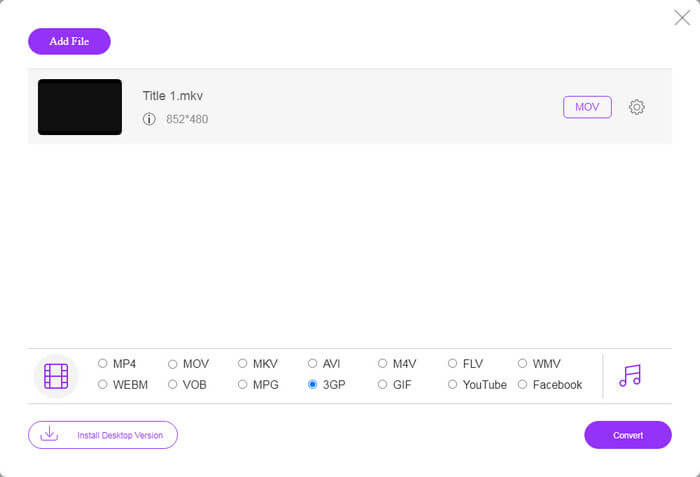
Krok 3: Przejdź na dół i wybierz 3GP w sekcji profilu. Kliknij przycisk Convert, aby rozpocząć konwersję FLV do 3GP online. Jeśli twoje połączenie internetowe jest szybkie, konwersja zakończy się w kilka sekund. Następnie pobierz pliki 3GP na dysk twardy.
Nie przegap:
Część 3: Jak przekonwertować FLV na 3GP za pomocą VLC
Czasami freeware jest tak samo potężny jak profesjonalne oprogramowanie. Na przykład VLC jest popularnym odtwarzaczem multimedialnym o otwartym kodzie źródłowym. Jest w stanie przekonwertować FLV do 3GP na Windows, Mac i Linux za darmo. Oczywiście wydatek jest oczywisty, np. trudny w użyciu. Dlatego dzielimy się poniższymi krokami:
Krok 1: Uruchom darmowy konwerter FLV na 3GP na swoim komputerze. Najpierw musisz go zainstalować. Oficjalna strona udostępnia bezpieczny instalator.
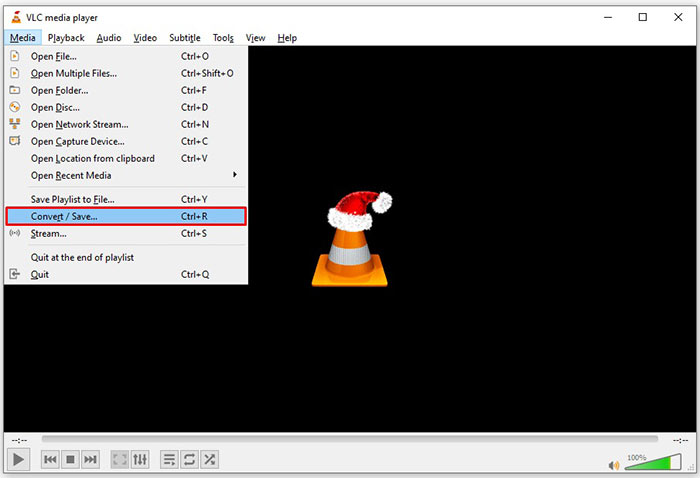
Krok 2: Przejdź do menu Media na górnym pasku i wybierz Convert/Save. Następnie pojawi się okno dialogowe otwierania multimediów.
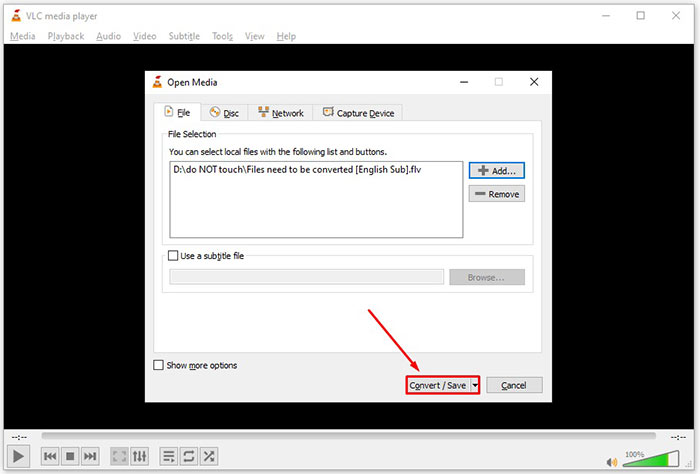
Krok 3: Kliknij przycisk Add, znajdź plik FLV, który chcesz przekonwertować, zaznacz go i kliknij Open. Naciśnij przycisk Convert/Save, aby przejść do następnego okna.
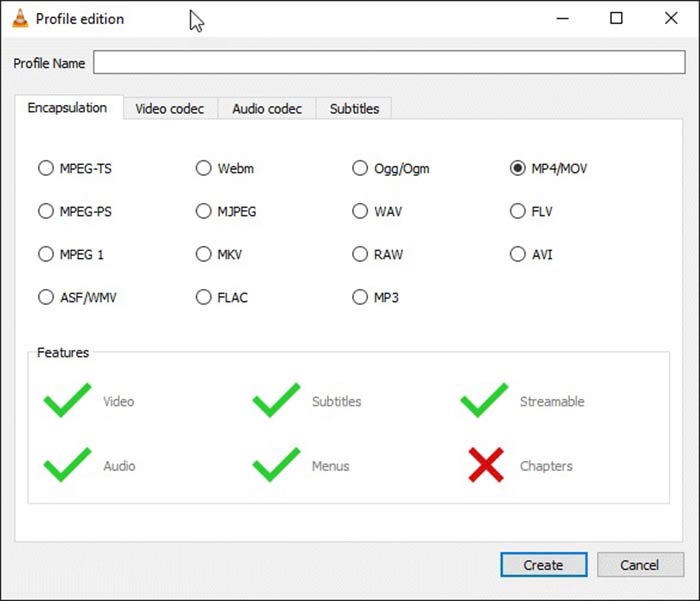
Krok 4: Rozwiń listę rozwijaną obok Profile i wybierz 3GP lub pokrewny format wideo. Jeśli chcesz zmienić kodek wideo lub inne parametry, kliknij przycisk Profile Edit obok listy rozwijanej i dodaj 3GP.
Krok 5: Kliknij przycisk Browse i wybierz konkretny folder do zapisania wyjściowego pliku 3GP w sekcji Destination.
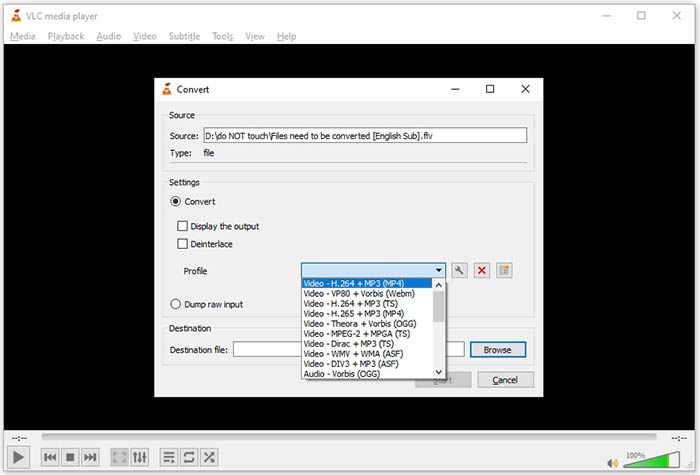
Krok 6: Gdy tylko klikniesz przycisk Start, VLC rozpocznie konwersję FLV do 3GP.
Zakończenie konwersji zajmuje chwilę, ponieważ VLC wykonuje pracę, nagrywając oryginalne wideo. Oznacza to, że proces trwa tak długo, jak długość twojego wideo FLV.
FLV kontra 3GP
Adobe Flash Player używał FLV do dostarczania treści wideo, takich jak filmy i programy telewizyjne. Obecnie firma Adobe nie rozwija już odtwarzacza i zaleca użytkownikom odinstalowanie go ze względów bezpieczeństwa. Jednak nadal możesz używać formatu FLV w wielu programach firm innych niż Adobe/Macromedia.
Projekt Partnerski Trzeciej Generacji (3GPP) stworzył format 3GP/3GPP jako format kontenera multimedialnego. W rzeczywistości jest oparty na formacie pliku multimedialnego ISO. Często używamy go do zapisywania strumieni wideo/audio, które są przesyłane między telefonami komórkowymi 3G i online.
Część 4: Często zadawane pytania dotyczące konwersji FLV do 3GP
Czy konwersja FLV do 3GP uszkodzi jakość wideo?
Ogólnie rzecz biorąc, konwersja wideo straci jakość. Jednak potężny program do konwersji wideo jest w stanie rozwiązać ten problem i zoptymalizować jakość wideo przy użyciu zaawansowanej technologii.
Jak długo trwa konwersja wideo FLV?
Zależy to od kilku czynników, takich jak długość wideo, używane oprogramowanie do konwersji wideo, wydajność sprzętu i inne. Jeśli korzystasz z internetowego konwertera wideo, Twoje połączenie internetowe jest niezbędnym elementem.
Dlaczego FLV nie gra na moim iPhonie?
iPhone obsługuje MOV, część MP4, ASF i AVI. Dlatego nie można bezpośrednio otworzyć FLV na iPhonie. Istnieją jednak sposoby na oglądanie FLV na urządzeniach mobilnych. Jeśli plik FLV jest hostowany przez usługi internetowe, takie jak Dysk Google, dostępny jest wbudowany odtwarzacz multimedialny. Dodatkowo możesz użyć innego odtwarzacza multimedialnego, takiego jak VLC.
Wniosek
W tym przewodniku opisano trzy bezpłatne sposoby konwertowania plików wideo FLV do formatu 3GP na komputerze lub w Internecie. Jeśli przygotowujesz się do oglądania filmów FLV na urządzeniach mobilnych, lepiej przekonwertuj je na 3GP lub inne formaty wideo przyjazne dla urządzeń mobilnych za pomocą FVC Free FLV Converter. Jest nie tylko łatwy w użyciu, ale także może chronić jakość wideo. Więcej pytań? Proszę zostawić wiadomość poniżej.
-
 Jak przekonwertować pliki wideo FLV na MP4 bez płacenia ani grosza
 W tym przewodniku udostępniono cztery bezpłatne metody konwersji plików wideo FLV do formatu MP4 w systemach Windows 10/8/7 / XP i Mac OS X, dzięki czemu możesz oglądać filmy na dowolnym urządzeniu.
-
 Jak konwertować pliki wideo FLV do plików audio MP3 na komputerze i w Internecie
 Jak przekonwertować FLV do pliku MP3? Wszystko, co musisz zrobić, to uważnie przeczytać ten artykuł, znaleźć swoją ulubioną metodę i postępować zgodnie z naszym przewodnikiem krok po kroku, aby uzyskać to, czego chcesz.
-
 Najlepsze sposoby 3 na konwersję FLV do MOV
 Jak przekonwertować FLV do MOV? Jak przekonwertować FLV na MOV na Macu? Czy istnieje darmowy sposób na konwersję FLV do MOV online? Ten post udostępnia 3 konwertery FLV na MOV, aby zmienić pliki FLV na MOV.

