


 Video Converter Ultimate
 Nagrywarka ekranu
 Naprawa wideo
Recenzja Canva AI Video Generator 2026: Zamień tekst w filmowe klipy
W szybko zmieniającym się świecie treści cyfrowych wideo przestało być jedynie "miłym dodatkiem" – stało się podstawą. Tradycyjna produkcja wideo jest jednak kosztowna i czasochłonna. Tu wkracza generator wideo Canva AI. Do 2026 roku Canva przekształciła się z prostego narzędzia do projektowania grafiki w potężną platformę generatywnej AI, pozwalając każdemu zamienić proste zdanie w wysokiej jakości klip wideo.
Niezależnie od tego, czy jesteś social media managerem szukającym treści "zatrzymujących scroll", czy właścicielem małej firmy z ograniczonym budżetem, zrozumienie, jak korzystać z generatora wideo Canva AI, zmienia zasady gry w Twoim kreatywnym workflow.

Jak testujemy i recenzujemy
- Wierność promptom: Jak dokładnie AI przekłada złożony prompt tekstowy na elementy wizualne?
- Jakość ruchu: Czy wideo wygląda płynnie i realistycznie, czy jest pełne "zniekształceń AI" i błędów?
- Szybkość i wydajność: Jak długo Canva AI Video Generator renderuje klip i czy interfejs pozostaje responsywny?
- Dostępność: Testujemy zarówno limity darmowej wersji generatora wideo Canva AI, jak i funkcje Pro, aby ocenić realną opłacalność.
Szczegółowa recenzja: Pakiet wideo AI w Canvie
Czy Canva potrafi generować wideo AI? Oczywiście. Ale jak daleko to sięga? O tym opowiemy w dalszej części artykułu.
1. Generator Canva AI Text to Video (Magic Media)
Sercem platformy jest Magic Media. Do 2026 roku narzędzie to zostało zintegrowane z zaawansowanym modelem Google Veo-3, co znacząco zmniejszyło dystans między Canvą a niezależnymi narzędziami takimi jak Sora czy Runway.
Doświadczenie: Wystarczy wpisać prompt w stylu: "Futurystyczne miasto cyberpunk w deszczu, neony odbijające się w kałużach, filmowy styl 4K". A ono przekształci tekst w wideo bez ręcznej ingerencji.
Werdykt: Spójność ruchu doczekała się ogromnej poprawy. AI generuje teraz 8‑sekundowe klipy z płynnym ruchem i zsynchronizowanym dźwiękiem otoczenia, praktycznie eliminując typowe dla wcześniejszych wersji "zniekształcenia AI".
2. Magic Design for Video
Jeśli masz folder pełen surowych nagrań, ale brak Ci czasu na montaż, Canva AI Video Generator będzie Twoim najlepszym sprzymierzeńcem.
Jak to działa: Wybierasz co najmniej trzy pliki multimedialne i opisujesz klimat (np. "Dynamiczne podsumowanie moich wakacji latem z energetyczną muzyką w tle").
Werdykt: To ogromna oszczędność czasu dla twórców na YouTube i TikToku. Narzędzie automatycznie zajmuje się funkcją "Beat Sync", zapewniając, że ujęcia zmieniają się dokładnie w momencie uderzeń w muzyce.
3. Awatary AI i aplikacje zewnętrzne
Marketplace Canvy oferuje teraz aplikacje takie jak Neiro AI oraz Hej, Gen, pozwalając Ci tworzyć generowane przez AI wideo typu "gadająca głowa" bezpośrednio w projekcie Canva. To idealne rozwiązanie do szkoleń korporacyjnych lub treści edukacyjnych, gdy nie chcesz samemu występować przed kamerą.
Generator wideo Canva AI: wersja Free vs. Pro
Częste pytanie początkujących brzmi: Czy istnieje darmowa wersja generatora wideo Canva AI? Tak, darmowa wersja trwa tylko 30 dni, po czym automatycznie naliczana jest opłata $20/miesiąc plus obowiązujące podatki.
| Funkcja | Canva Free | Canva Pro / Business |
| Dostęp | Ograniczone kredyty "lifetime" | Comiesięcznie odnawiane kredyty |
| Znaki wodne | Często obecne na klipach AI | Brak znaków wodnych |
| Jakość wyjściowa | Standardowa rozdzielczość | Wysoka rozdzielczość / 4K |
| Magic Media – zastosowania | ~5–10 użyć łącznie | Do 500+ użyć miesięcznie |
| Cena £ | Bezpłatny 30‑dniowy okres próbny z automatycznym naliczeniem opłaty $20/miesiąc plus obowiązujące podatki. |
Choć darmowy generator wideo Canva AI świetnie nadaje się do testów, poważniejsi twórcy uznają plan Pro za niezbędny ze względu na wyższe limity użycia i możliwość eksportu bez znaków wodnych.
Krok po kroku: jak korzystać z generatora wideo Canva AI
Gotowy, by tworzyć? Skorzystaj z tego prostego schematu pracy:
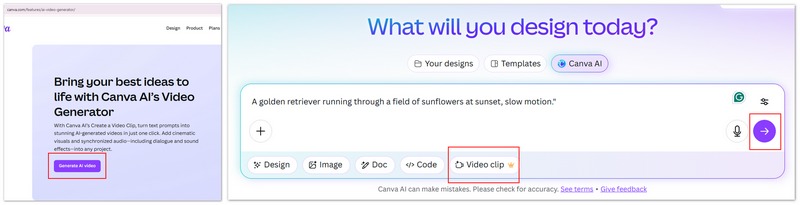
Krok 1. Wejdź na www.canva.com/features/ai-video-generator/ i kliknij "Generate AI video".
Krok 2. Wpisz swoje prompty – bądź konkretny! Zamiast "pies" użyj "Golden retriever biegnący przez pole słoneczników o zachodzie słońca, w zwolnionym tempie"."
Krok 3. Możesz kliknąć "Video clip", dostępne są też opcje generowania "Design", "Image", "Doc", "Code” itd.
Krok 4. Kliknij przycisk "Submit", aby wygenerować materiał.
Wady i zalety: wyważona recenzja
Narzędzia wideo AI Canvy robią wrażenie, ale nie są magią. Oto szczegółowe spojrzenie na to, co faktycznie działa, a co nadal potrafi przyprawić o ból głowy.
Plusy
- Niesamowita łatwość obsługi: nie są wymagane żadne umiejętności techniczne.
- Kompleksowy workflow: twórz, edytuj i publikuj w mediach społecznościowych bez wychodzenia z aplikacji.
- Ogromna biblioteka zasobów: łącz wideo generowane przez AI z milionami zdjęć stockowych i utworów muzycznych.
- Współpraca zespołowa: członkowie zespołu mogą edytować wideo wygenerowane przez AI w czasie rzeczywistym.
- Synchronizacja audio (Beat Sync): sposób, w jaki narzędzie automatycznie tnie materiał wideo do uderzeń perkusji w utworze, całkowicie zmienia zasady gry w TikToku i Reelsach.
Cons
- Ograniczenia rozdzielczości: niektóre wygenerowane klipy są ograniczone do 1366 x 768 pikseli przed wyostrzeniem/upscalingiem.
- Limity wykorzystania: nawet w planach Pro masz miesięczny limit "Premium AI" generacji.
- Kontrola kreatywna: nie możesz jeszcze "reżyserować" konkretnych ruchów w klipie; jesteś zdany na łaskę promptu.
- Problemy ze spójnością: jeśli chcesz, aby ta sama postać pojawiła się w trzech różnych klipach, powodzenia. AI ma trudności z utrzymaniem "stałej postaci", która wygląda dokładnie tak samo w wielu generacjach.
- Renderowanie tekstu: nie oczekuj, że AI poprawnie wygeneruje wideo kogoś trzymającego tabliczkę z napisem "Happy Birthday". Litery zazwyczaj wychodzą jako bełkot.
Szukasz większej mocy? Mocniejsza alternatywa
Jeśli uważasz, że oparte na chmurze kredyty Canvy zbyt Cię ograniczają albo potrzebujesz bardziej "hardkorowego" przetwarzania wideo, zdecydowanie polecam tę potężną alternatywę: FVC Video Converter Ultimate.
Zintegrowany zestaw narzędzi AI: To oprogramowanie wykracza daleko poza prostą konwersję. Oferuje rozbudowany silnik Text-to-Video, który zapewnia większą stabilność i szybkość, zwłaszcza przy wyjściu o wysokim bitrate.
Synergia z Picwand AI: Funkcja Text-to-Image płynnie łączy się z platformą Picwand. Możesz generować hiperrealistyczne obrazy AI (postacie, krajobrazy czy plakaty) w Picwand, a następnie użyć silnika FVC, by tchnąć w nie życie jako dynamiczne zasoby wideo.
Profesjonalny montaż i konwersja: Podczas gdy Canva świetnie sprawdza się przy "szybkich edycjach", FVC wykonuje ciężką pracę. Od konwersji do 8K po ulepszanie wideo AI i bezstratną kompresję – to narzędzie klasy profesjonalnej dla osób pracujących z ogromnymi plikami.
Wolność od subskrypcji: Jeśli wolisz narzędzie, które nie ogranicza Twojej kreatywności kredytami "na użycie", FVC zapewnia znacznie bardziej elastyczne środowisko do masowej produkcji treści.
Bezpłatne pobieranieDla Windows 7 lub nowszegoBezpieczne pobieranie
Bezpłatne pobieranieDla MacOS 10.7 lub nowszegoBezpieczne pobieranie
FAQ dotyczące generatora wideo Canva AI
Czy Canva może generować filmy AI z dźwiękiem?
Tak. Dzięki najnowszym aktualizacjom z 2026 roku generator wideo Canva AI (konkretnie narzędzie "Utwórz klip wideo") potrafi wygenerować do 8 sekund materiału filmowego z zsynchronizowanym dźwiękiem, w tym efektami dźwiękowymi i muzyką w tle.
Czy generator wideo Canva AI jest darmowy?
Canva oferuje ograniczoną liczbę kredytów dla użytkowników bezpłatnych, aby mogli wypróbować to narzędzie. Jednak do regularnego korzystania oraz pobierania plików w wysokiej rozdzielczości wymagane jest wykupienie subskrypcji Canva Pro lub Canva Business.
Jak mogę uzyskać lepsze rezultaty, korzystając z narzędzia do tworzenia wideo z tekstu?
Sekret tkwi w słowach kluczowych dotyczących "oświetlenia" i "kamery". Używaj określeń takich jak "Cinematic lighting", "Bokeh", "Drone shot" czy "Handheld camera", aby dać AI więcej kontekstu, jak wideo ma wyglądać i jak powinno się poruszać. Różne generatory wideo AI również różnie wypadają w poszczególnych obszarach, więc możesz wybrać ten najbardziej odpowiedni.
Wniosek
Generator wideo Canva AI zdemokratyzował produkcję wideo. Choć jeszcze nie zastąpi profesjonalnej ekipy filmowej przy reklamie na Super Bowl, jest najwydajniejszym narzędziem na rynku dla twórców, edukatorów i marketerów. Łącząc generator Canva AI text to video ze swoim światowej klasy zestawem narzędzi do edycji, Canva sprawiła, że jedynym ograniczeniem Twoich treści jest wyobraźnia.
-
 8 najlepszych programów do ulepszania wideo z wykorzystaniem sztucznej inteligencji (AI) do poprawy jakości wideo w 2026 roku (pełna recenzja)
 W tym przewodniku przedstawiamy najlepsze programy do ulepszania wideo oparte na sztucznej inteligencji. Porównaj profesjonalne oprogramowanie desktopowe z darmowymi programami online, aby przekształcić nagrania o niskiej rozdzielczości w oszałamiające arcydzieła 4K/8K.
-
 5 najlepszych narzędzi AI do podsumowywania filmów w YouTube do skracania treści
 Automatycznie kondensuj długie filmy z YouTube, aby generować podsumowania treści i wybierać najlepsze dostępne narzędzia AI YouTube Video Summarizer.
-
 Jak nakręcić teledysk za pomocą sztucznej inteligencji: przewodnik po tworzeniu
 Szukasz generatora wideoklipów IA, który podniesie poziom Twojego montażu jak profesjonalista? Cóż, w tym poście podamy rozwiązanie Twojego problemu. Naucz się ich teraz!
