


 Video Converter Ultimate
 Nagrywarka ekranu
 Naprawa wideo
3 najlepsze rejestratory rozmów na Facebooku - jak nagrywać rozmowy wideo na Facebooku
Jak nagrywać rozmowy wideo na Facebooku, aby zachować cenne chwile spędzone z przyjaciółmi i rodziną? Odkąd Facebook wyposażył się w funkcję rozmów wideo, coraz więcej użytkowników woli kontaktować się z innymi przez połączenia na Facebooku zamiast tradycyjnych rozmów telefonicznych. Jednak jako dodatkowa funkcja komunikacyjna platformy społecznościowej, nie oferuje ona nagrywania, jak w przypadku połączeń telefonicznych. Co więcej, oddzielna aplikacja – Facebook Messenger – również nie ma wbudowanego rejestratora. W takiej sytuacji możesz poznać 3 łatwe w użyciu rejestratory połączeń na Facebooku dla komputerów, urządzeń z iOS i telefonów z Androidem wraz ze szczegółowymi instrukcjami w tym artykule.

Część 1: Najlepszy internetowy rejestrator rozmów na Facebooku dla Windows / Mac
Bez pobierania żadnego oprogramowania firm trzecich możesz użyć FVC Free Screen Recorder, aby bezpłatnie nagrywać rozmowy wideo na Facebooku online. Jest to przyjazny dla użytkownika rejestrator połączeń na Facebooku z prostym interfejsem i wieloma potrzebnymi funkcjami.
- 1. Nagrywaj rozmowy i filmy z Facebooka online za darmo, wykonując proste czynności.
- 2. Bezstratne nagrywanie audio i wideo w celu zachowania wysokiej jakości filmów.
- 3. Brak znaku wodnego, aby chronić Twoją własność.
- 4. Nagrania zostaną automatycznie zapisane w bibliotece multimediów i możesz swobodnie usuwać, pobierać i udostępniać w SNS.
Krok 1: Przejdź do strony internetowej FVC Free Screen Recorder w dowolnej przeglądarce. Kliknij przycisk Start Recording, aby w kilka sekund zainstalować launcher, a następnie ponownie kliknij przycisk Start Recording, aby uruchomić rejestrator.

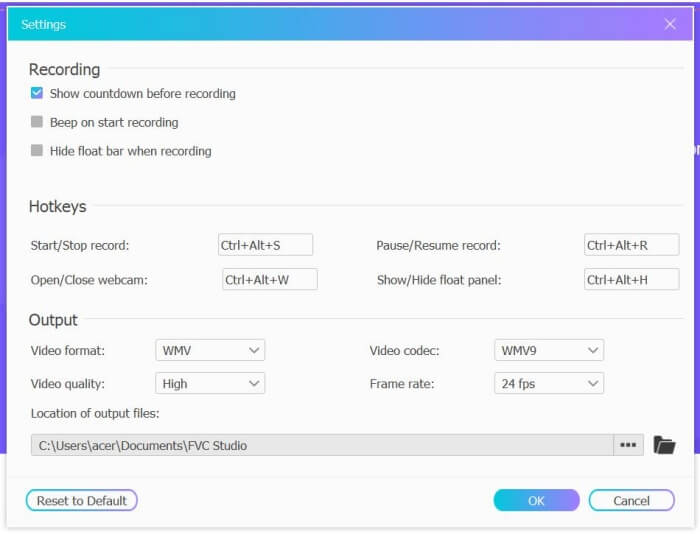
Krok 2: Kliknij menu Recording Area, aby wybrać pełny ekran lub dowolny obszar. Następnie włącz dźwięk z Microphone i Speaker. Aby dostosować ustawienia wideo, kliknij ikonę Setting. Możesz wybrać format MP4, wysoką jakość oraz 24 kl./s, aby zachować wysoką jakość nagrań. Następnie kliknij przycisk REC, aby rozpocząć nagrywanie połączeń na Facebooku.
Krok 3: Pojawi się pasek narzędzi z wieloma narzędziami do edycji. W razie potrzeby możesz dodać kształty, tekst i linie. Następnie kliknij ikonę Stop, aby zapisać nagranie w chmurze. Możesz kliknąć prawym przyciskiem myszy, aby pobrać je na swój komputer.
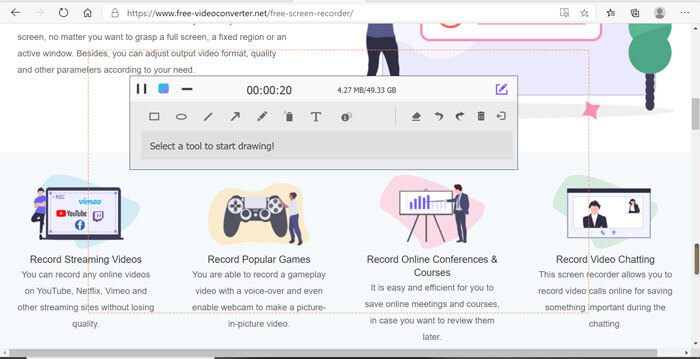
Korzystanie z tego bezpłatnego internetowego rejestratora rozmów wideo na Facebooku jest najlepszym sposobem dla użytkowników komputerów na nagrywanie rozmów wideo na Facebooku online. Dostosowując ustawienia nagrywania z wyprzedzeniem, może zapisywać rozmowy z Facebooka w formacie MP4 o małym rozmiarze i wysokiej jakości. Jeśli jesteś przyzwyczajony do rozmów na Facebooku z telefonu komórkowego, przeczytaj ten artykuł.
Część 2: Jak nagrywać rozmowy na Facebooku na iOS za pomocą domyślnego rejestratora
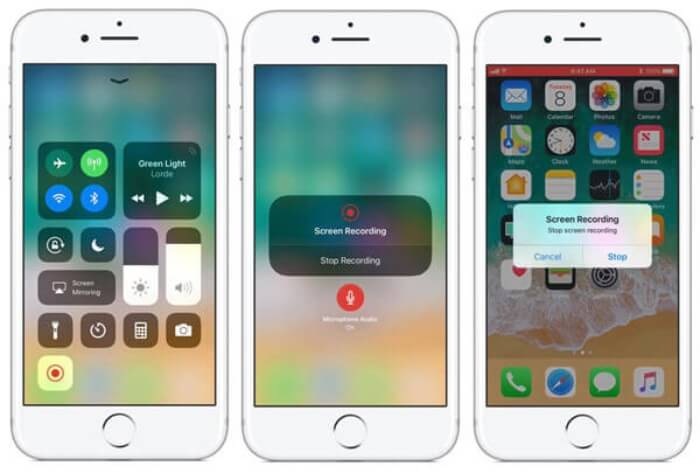
Zaktualizowana wersja iOS 11 lub nowsza ma nowy domyślny rejestrator na iPhonie i iPadzie, który jest najlepszym wyborem do przechwytywania rozmów wideo na Facebooku bez pobierania jakichkolwiek aplikacji. Tutaj dowiesz się, jak dodać rejestrator rozmów na Facebooku do skrótów w centrum sterowania i jak z niego korzystać.
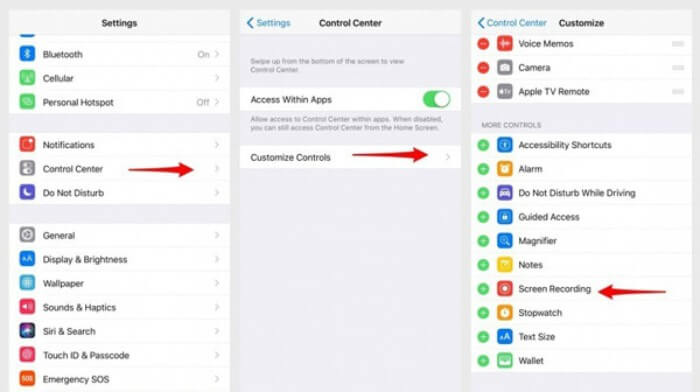
Krok 1: Stuknij aplikację Settings na iPhonie/iPadzie i przewiń w dół, aby wybrać opcję Control Center. Następnie stuknij zakładkę Customize Controls i znajdź funkcję Screen Recording. Stuknij ikonę Plus, aby dodać tę funkcję do Centrum sterowania.
Krok 2: Przeciągnij palcem w dół od górnej krawędzi ekranu, aby otworzyć Centrum sterowania i znajdziesz tam aplikację do nagrywania na dole. Stuknij ikonę Screen Recording, aby rozpocząć nagrywanie; możesz wybrać nagrywanie obrazu z dźwiękiem lub tylko ścieżki audio. Aby zakończyć nagrywanie, stuknij czerwony Status Bar u góry ekranu i wybierz opcję Stop w oknie podręcznym.
Część 3: Łatwy rejestrator Facebook Messenger dla Androida
Niektóre telefony z Androidem nie mają wbudowanych rejestratorów, a do wyboru jest zbyt wiele rejestratorów rozmów wideo na Facebooku. W ten sposób możesz nauczyć się jednego z najlepszych rejestratorów dla telefonów komórkowych z systemem Android ze szczegółowymi krokami w następnej części.
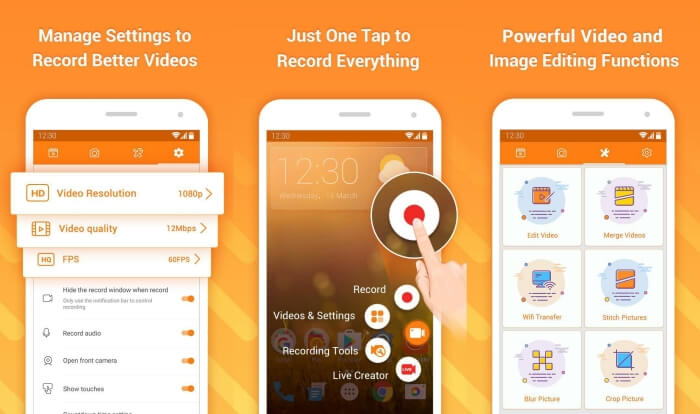
DU Recorder to prosty w obsłudze rejestrator połączeń na Facebooku dla Androida, znany z płynnego nagrywania. Bez roota każdy może za jego pomocą nagrywać połączenia w Facebook Messenger jednym stuknięciem.
Krok 1: Uruchom rejestrator; zobaczysz cztery menu: nagrania, zrzuty ekranu, narzędzia do edycji i ustawienia. Najpierw stuknij menu Settings, aby dostosować parametry wideo. Aby zachować wysoką jakość, możesz wybrać rozdzielczość 1080p i 30 klatek na sekundę.
Krok 2: Nie zamykaj rejestratora, tylko uruchom Facebook Messenger. Zobaczysz ikonę rejestratora. Stuknij ikonę i wybierz ikonę Recording, aby rozpocząć przechwytywanie ekranu i dźwięku. Ponownie stuknij ikonę, aby zatrzymać nagrywanie. Następnie możesz stuknąć ikonę Editing, aby przyciąć nagranie i dodać do niego muzykę.
Może Ci się też spodobać:
Recenzja Action Screen Recorder
Część 4: Często zadawane pytania dotyczące rejestratora rozmów na Facebooku
1. Czy Facebook ma domyślną nagrywarkę do nagrywania rozmów wideo na komputerze?
Nie, nie ma. Dlatego musisz polegać na innych profesjonalnych rejestratorach rozmów na Facebooku. Jeśli nie chcesz pobierać innego oprogramowania, które zajmie miejsce na komputerze, najlepszym wyborem będzie FVC Free Screen Recorder.
2. Jak rozpocząć czat ze znajomym w aplikacji Facebook Messager?
Najpierw otwórz Facebook Messenger na telefonie komórkowym, a następnie wybierz czat znajomego, z którym chcesz nawiązać połączenie na Facebooku. Teraz możesz zobaczyć ikonę Wideo, którą możesz kliknąć, aby rozpocząć rozmowę wideo.
3. W jakim formacie mam wybrać, aby nagrywać nagrania podczas korzystania z rejestratorów Facebook Messenger?
Niezależnie od tego, czy korzystasz z rejestratora rozmów na Facebooku na komputerze czy telefonie komórkowym, najlepszym formatem do zapisywania rozmów wideo na Facebooku jest MP4. Może zaoszczędzić więcej miejsca do przechowywania i jest kompatybilny ze wszystkimi urządzeniami.
Wniosek
Powyższy artykuł przedstawił 3 rejestratory rozmów wideo na Facebooku. W przypadku iPhone’a, iPada oraz niektórych telefonów z Androidem możesz łatwo użyć wbudowanego rejestratora w telefonie. W przeciwnym razie możesz wybrać dowolny rejestrator, w tym DU Recorder z Google Play. Na komputerze najlepszym wyborem do nagrywania połączeń na Facebooku jest FVC Free Screen Recorder. Jeśli napotkasz inne problemy podczas korzystania z rejestratorów połączeń na Facebooku, zostaw komentarz poniżej.
-
 Recenzja Snagit 2021 - wady, zalety i najlepsza alternatywa
 Jaka jest najlepsza alternatywa dla Snagita? Czy istnieje narzędzie do przechwytywania ekranu, takie jak Snagit? Ten post przejrzy Snagit i udostępni najlepszą alternatywę dla Snagita do przechwytywania ekranu.
-
 6 najlepszych rejestratorów WAV, których nie powinieneś przegapić na komputerze i w Internecie
 Najlepsze oprogramowanie do nagrywania WAV, które udostępniamy w tym artykule, ma wiele przydatnych funkcji, które pomagają rejestrować dźwięk i głos jak profesjonaliści.
-
 Najlepsze 4 bezpłatne rejestratory dźwięku AIFF, które wytwarzają dźwięk wysokiej jakości
 W tym artykule omówiono AIFF i niektóre z najpopularniejszych narzędzi, których można używać do tworzenia wysokiej jakości formatu AIFF.
