


 Video Converter Ultimate
 Nagrywarka ekranu
 Naprawa wideo
Czy można zrobić dzwonek z filmu i jak go zastosować
Ustawianie ulubionych dzwonków od zawsze było popularną czynnością wśród wielu użytkowników smartfonów. Za każdym razem, gdy słyszysz swoją ulubioną muzykę, korzystanie z telefonu staje się przyjemniejsze. Wraz z rozwojem technologii wybór dzwonków znacznie się poszerzył. Obecnie nie tylko możemy nagrywać własny dźwięk i pobierać ulubione piosenki, ale nawet wyodrębniać ścieżkę audio z filmów i ustawiać ją jako dzwonek połączeń przychodzących. Ta operacja jest prosta, a do dyspozycji mamy wiele narzędzi, które w tym pomagają. Jak spośród nich wybierać? Poniżej przedstawimy szczegółowy przewodnik po tym, jak ustawić wideo jako dzwonek. Niezależnie od tego, czy korzystasz z Androida, czy z iPhone’a, znajdziesz tu potrzebne informacje.

Część 1. Czy można ustawić film jako dzwonek?
Zanim zaczniemy, rozważmy najpierw wykonalność ustawienia filmu jako dzwonka. Odpowiedź brzmi oczywiście: tak. Ogólnie rzecz biorąc, musisz wyodrębnić dźwięk z filmu i przekonwertować go na format dzwonka obsługiwany przez Twój telefon, aby rozpocząć. Możesz również rozważyć istotę tego aktu jako konwersję pliku z formatu wideo na format audio. Profesjonalne oprogramowanie do edycji dźwięku i wideo oraz konwertery formatów mogą pomóc Ci bezpłatnie przekonwertować wideo na dzwonek. Ważne jest, aby pamiętać, że telefony komórkowe z różnymi systemami obsługują różne formaty dzwonków i musisz upewnić się, że sprawdziłeś informacje o formatach audio obsługiwanych przez Twoje urządzenie, zanim rozpoczniesz operację.
Część 2. Stwórz dzwonek z filmu
Gdy wiemy już, że można stworzyć dzwonek z filmu, musimy wybrać do tego odpowiednie narzędzie. Gorąco polecamy wypróbowanie wybranego przez FVC programu Video Converter Ultimate. To doskonały konwerter audio i wideo, który pozwala osobno edytować dźwięk w filmie oraz regulować głośność muzyki, efekty dźwiękowe, ścieżkę audio itd. Możesz też użyć go do korekty dźwięku, jeśli występuje opóźnienie. Obecnie obsługuje ponad sto formatów, co oznacza, że może przekonwertować Twoje wideo do formatu odpowiedniego dla dowolnego smartfona i nie napotkasz problemów z kompatybilnością. Dzięki technologii przyspieszenia sprzętowego jest w stanie konwertować pliki nawet 30 razy szybciej. W trakcie przetwarzania nie dochodzi do utraty jakości dźwięku, a Twoja prywatność pozostaje w pełni chroniona.
Bezpłatne pobieranieDla Windows 7 lub nowszegoBezpieczne pobieranie
Bezpłatne pobieranieDla MacOS 10.7 lub nowszegoBezpieczne pobieranie
Po zapoznaniu się z ogólnym pojęciem FVC Video Converter Ultimate, musimy zrozumieć, jak faktycznie zastosować go do przekształcenia filmu w dzwonek. Następnie szczegółowo omówimy kroki z perspektywy telefonów iPhone i Android.
Stwórz film jako dzwonek na iPhone'a
Najpierw omówmy, jak stworzyć dzwonek na iPhone’a. Przede wszystkim musimy wiedzieć, że iPhone obsługuje obecnie dzwonki w formacie M4R. Następnie możemy przejść do działania.
Krok 1. Pobierz na komputer wideo, które chcesz przekonwertować. Zainstaluj też na urządzeniu program FVC Video Converter Ultimate.
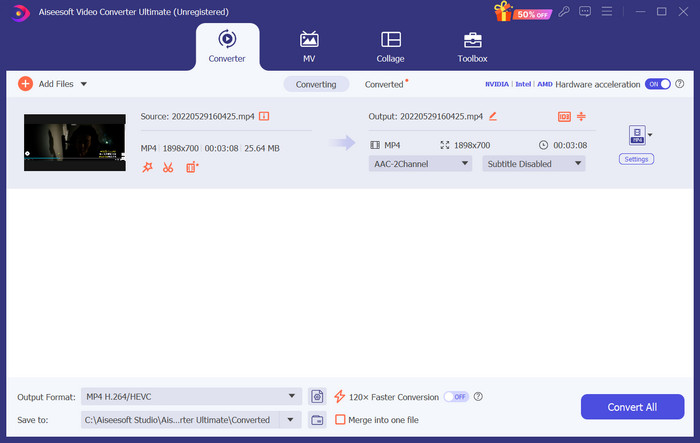
Krok 2. Przekonwertuj wideo do formatu M4R. Aby to zrobić, kliknij najpierw Add Files, aby wczytać swoje wideo.
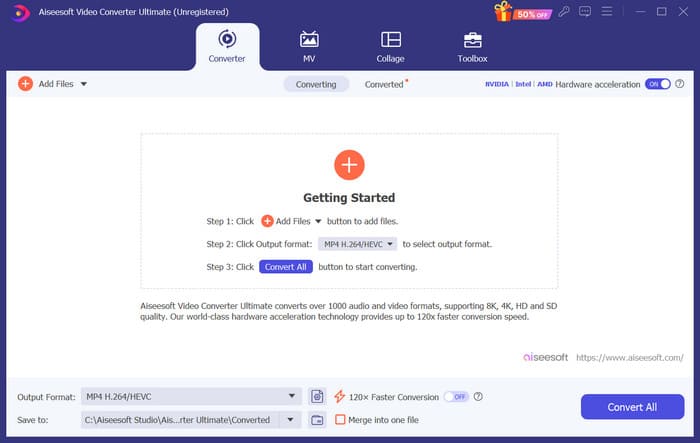
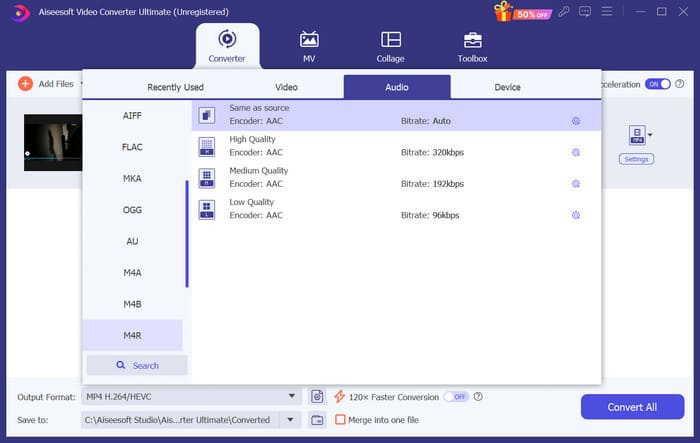
Krok 3. Rozwiń menu obok pozycji Output Format. Tutaj możesz wybrać potrzebny format.
Krok 4. Kliknij Audio i spośród wszystkich opcji wybierz M4R.
Krok 5. Następnie kliknij Convert All, aby wyeksportować dźwięk w formacie M4R.
Krok 6. Kolejno wgraj przekonwertowane wideo ponownie do programu. Jeśli chcesz przyciąć plik audio, kliknij Cut w interfejsie. Jeśli chcesz dostosować ścieżkę dźwiękową lub głośność, kliknij Edit.
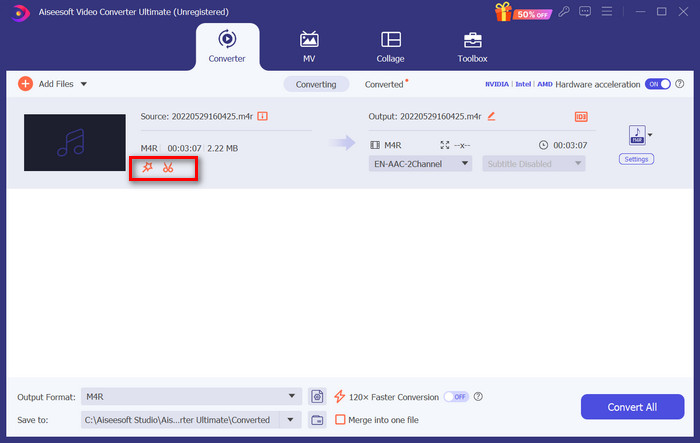
Krok 7. Na koniec ponownie kliknij Convert All, aby otrzymać swój edytowany dzwonek M4R.
Utwórz film jako dzwonek na Androida
Jeśli chcesz przekształcić film w dzwonek telefonu komórkowego z systemem Android, rozważ przekonwertowanie plików wideo do formatu MP3, M4A, WAV lub OGG.
Oto, co musisz zrobić, aby przekonwertować film na dzwonek.
Krok 1. Pobierz i zainstaluj na komputerze program FVC Converter Ultimate. Przygotuj wideo do konwersji.
Krok 2. Kliknij Add Files, aby wczytać docelowy plik wideo do programu.
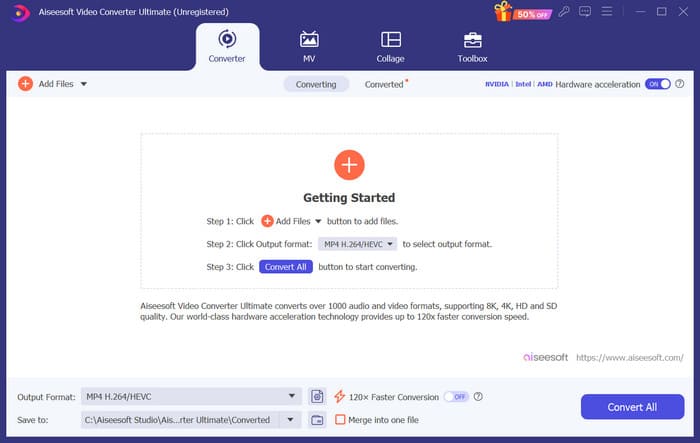
Krok 3. Rozwiń listę formatów obok Output Format.
Krok 4. Kliknij Audio. W zależności od potrzeb możesz przekonwertować wideo do formatu MP3, M4A, WAV lub OGG.
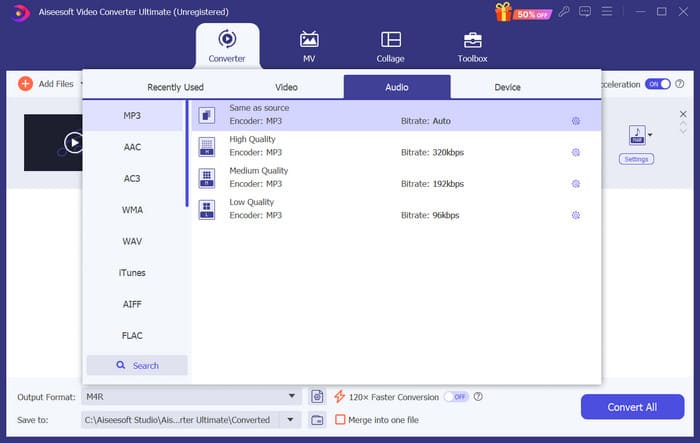
Krok 5. Wybierz Convert All, aby najpierw pobrać przekonwertowany plik audio.
Krok 6. Dodaj ponownie swój plik audio do programu. Następnie kliknij Cut, aby wybrać fragment, którego chcesz użyć jako dzwonka. Funkcje dostępne pod przyciskiem Edit pozwalają dodatkowo zmodyfikować niektóre elementy pliku.
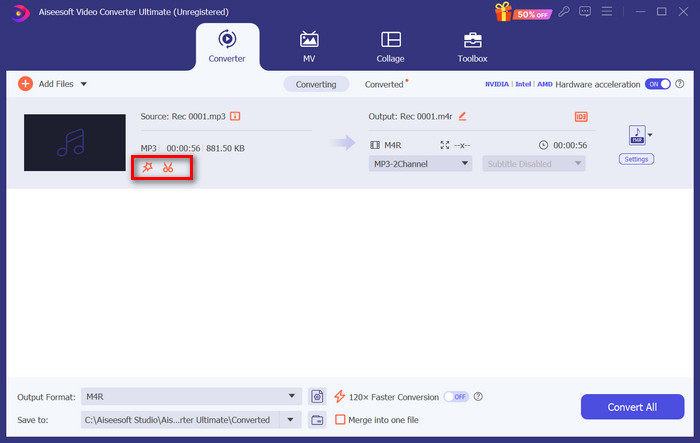
Krok 7. Po zakończeniu edycji kliknij Convert All.
Część 3. Ustaw przekonwertowany dźwięk jako dzwonek
Teraz, gdy edytowaliśmy plik audio, musimy przejść do ustawień telefonu, aby ustawić przekonwertowany film jako dzwonek.
Ustaw dzwonek na iPhonie
Jeśli korzystasz z iPhone’a, możesz potrzebować dodatkowego narzędzia, aby ustawić wybrany plik M4R jako dzwonek. Dobrym wyborem jest GarageBand.
Tutaj nauczysz się, jak stworzyć dzwonek w GarageBand, wykorzystując ścieżkę dźwiękową z filmu.
Krok 1. Upewnij się, że masz zapisany edytowany plik audio w pamięci iPhone’a. Następnie otwórz GarageBand.
Krok 2. Po uruchomieniu GarageBand przejdź do Loop i wybierz Files. Potem stuknij Browse items from the Files app, aby zlokalizować dźwięk, którego chcesz użyć.
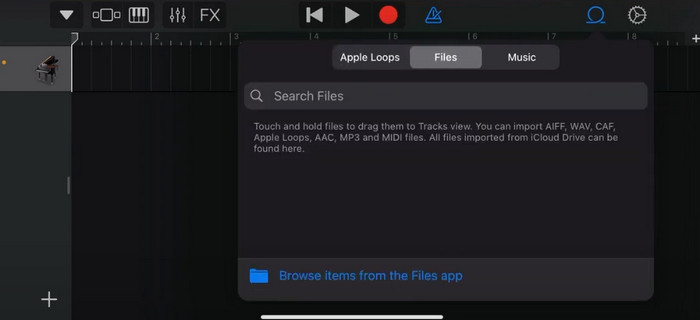
Krok 3. Przeciągnij wybrany plik audio M4R na oś czasu w GarageBand.
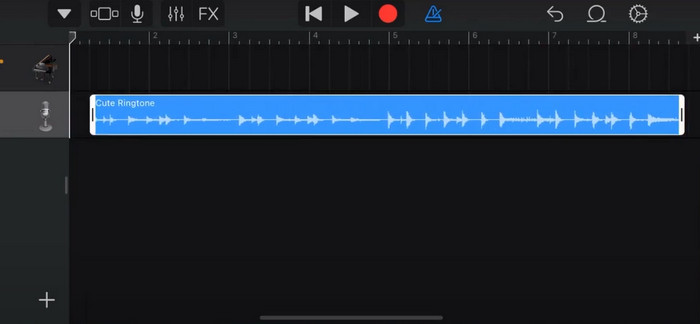
Krok 4. Stuknij ikonę Metronome, aby go wyłączyć. Następnie stuknij ikonę strzałki w dół > My Songs.
Krok 5. Przytrzymaj dłużej klip dźwiękowy i wybierz Share.
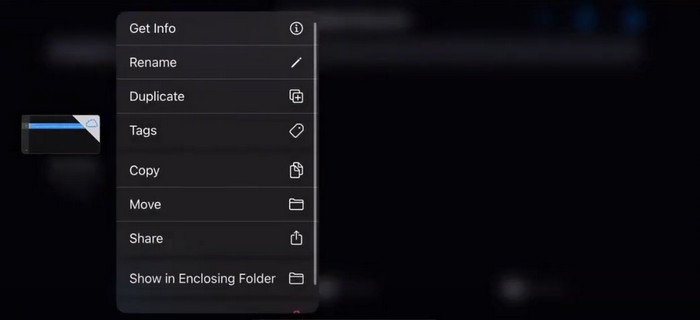
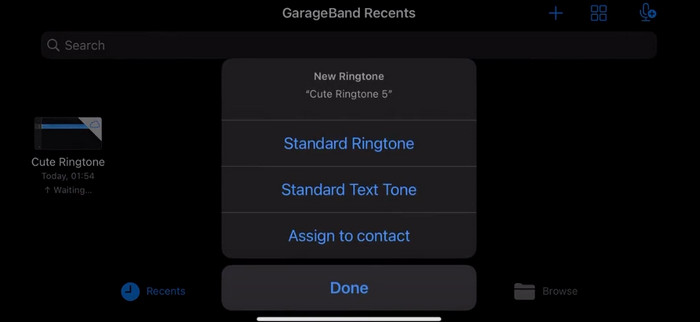
Krok 6. Wybierz Ringtone > Export. Gdy pojawi się okno Use sound as, stuknij Standard Ringtone.
Ustaw dzwonek na Androidzie
Jeśli chcesz, aby dźwięk wyodrębniony z filmów był dzwonkiem na urządzeniu z Androidem, zrób to bezpośrednio w aplikacji Ustawienia. Dokładne kroki są nieco łatwiejsze.
Weźmiemy za przykład telefon Samsung i wyjaśnimy szczegółowo, jak go zastosować.
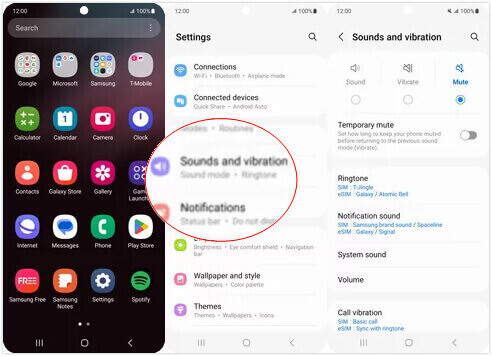
Krok 1. Przejdź do Settings w swoim urządzeniu z Androidem i stuknij Sounds and vibration.
Krok 2. W sekcji Sound mode wybierz Sound. Następnie stuknij Notification sound.
Krok 3. Wybierz plik audio, który przekonwertowałeś i edytowałeś. Ustawienie zostanie zastosowane po powrocie do poprzedniej strony.
Część 4. Często zadawane pytania dotyczące tworzenia filmu jako dzwonka
Jak dodać dzwonki do telefonu z systemem Android?
Na telefonie z Androidem przejdź do Ustawień i poszukaj opcji Dźwięk lub Dźwięki i wibracje. Wybierz Dzwonek telefonu lub Dzwonek, aby wybrać niestandardowy dzwonek. Twój niestandardowy dzwonek powinien teraz pojawić się na liście dostępnych dzwonków. Wybierz go, aby ustawić jako dzwonek.
Czy mogę pobrać dzwonek na iPhone'a na Androida?
Tak, możesz pobrać dzwonki z iPhone’a i używać ich na urządzeniu z Androidem. Dzwonki iPhone’a są jednak zazwyczaj w formacie M4R, który nie jest bezpośrednio obsługiwany przez system Android. Musisz przekonwertować dzwonek z iPhone’a do formatu obsługiwanego przez Androida, takiego jak MP3 lub AAC. Na przykład wybrany przez FVC konwerter może pomóc Ci przekonwertować M4R na MP3.
Dlaczego mój telefon nie dzwoni przy połączeniach przychodzących?
Jeśli Twój telefon nie dzwoni podczas połączeń przychodzących, może być kilka przyczyn tego problemu. Upewnij się, że głośność w telefonie jest zwiększona, a nie wyciszona. Sprawdź również, czy telefon jest w trybie Nie przeszkadzać. Ten tryb wycisza wszystkie połączenia i powiadomienia. Jeśli problem nadal nie został rozwiązany, spróbuj ponownie uruchomić telefon, aby odświeżyć system.
Wniosek
To kompletny przewodnik po tym, jak stworzyć wideo jako swój dzwonek. Polecamy jedno z najlepszych narzędzi – FVC Video Converter Ultimate – które pomoże Ci dopasować pliki wideo dokładnie do Twoich oczekiwań. Program jest dostępny zarówno dla iPhone’a, jak i telefonów z Androidem, więc niezależnie od systemu w Twoim urządzeniu możesz z jego pomocą stworzyć swój ulubiony dzwonek.
-
 3 najlepsze rozwiązania do kompresji plików WAV do mniejszego rozmiaru
 Jeśli szukasz również sposobów na kompresję rozmiaru plików audio WAV, przeczytaj nasze treści. Przedstawimy Ci różne narzędzia z trzech aspektów.
-
 Szczegółowy samouczek dotyczący kompresji dźwięku w 2024 r. (krok po kroku)
 Czy potrzebujesz skompresować dźwięk, ale potrzebujesz pomocy w ustaleniu, od czego zacząć? W tym poście przedstawimy najlepsze możliwości zmniejszenia rozmiaru plików utworów.
-
 Skuteczne kompresory audio dla użytkowników offline i online
 Masz problemy z dużymi plikami audio? Istnieje wiele kompresorów plików audio dostępnych dla użytkowników offline i online. Sprawdź je tutaj.
