


 Video Converter Ultimate
 Nagrywarka ekranu
 Naprawa wideo
Jak przekonwertować M2TS na WMV w systemie Windows / Mac / Online (całkowicie za darmo w użyciu)
Niektóre aparaty Canon i Sony używają M2TS jako domyślnego formatu wyjściowego. Filmy M2TS mają duże rozmiary plików. Kompatybilność formatu M2TS również nie jest dobra. Jeśli chcesz zaimportować pliki M2TS do programu Windows Movie Maker w celu dalszej edycji, musisz najpierw przekonwertować wideo M2TS na WMV.
Ten artykuł pokaże Ci krok po kroku sposoby online i offline, jak konwertować wideo z formatu M2TS na WMV. Dzięki temu możesz z łatwością zmienić format wideo M2TS na WMV w telefonie lub na komputerze.

Część 1: Jak przekonwertować M2TS na WMV w systemie Windows i Mac
Jeśli chcesz tylko zmienić format wideo, wystarczy darmowy konwerter wideo M2TS na WMV. Nie musisz płacić za dodatkowe funkcje, których nie potrzebujesz. Oto 2 darmowe konwertery M2TS na WMV, które możesz wybrać.
Konwertuj M2TS na WMV w systemie Windows za darmo
Aby konwertować pliki M2TS na WMV na komputerze z systemem Windows, możesz użyć programu FVC Free M2TS Converter. Jest to wsadowy konwerter M2TS, który umożliwia hurtową konwersję plików M2TS na WMV, MOV, MP4 oraz inne formaty wideo i audio. Wbudowane narzędzia do edycji wideo są również dostępne za darmo. Możesz edytować i dostosowywać wideo M2TS przed konwersją. Oto główne funkcje darmowego oprogramowania do konwersji M2TS na WMV.

Darmowy konwerter M2TS
112,356+ pliki do pobrania- Konwertuj M2TS na WMV w systemie Windows 10/8/7 / Vista / XP za darmo.
- Obsługa konwersji wsadowej M2TS na WMV.
- 50x szybsza konwersja.
- Kompresuj, łącz i stosuj inne efekty wideo do plików M2TS.
- Dodaj specjalne motywy do plików M2TS, takie jak rodzina, urodziny, święta itp.
Bezpłatne pobieranieDla Windows 7 lub nowszegoBezpieczne pobieranie
Bezpłatne pobieranieDla macOS 10.7 lub nowszegoBezpieczne pobieranie
Krok 1: Pobierz za darmo, zainstaluj i uruchom FVC Free M2TS Converter. Kliknij Add File(s), aby zaimportować więcej niż jeden plik wideo M2TS.

Krok 2: Na liście output format wyszukaj i ustaw WMV jako docelowy format wideo.

Krok 3: Jeśli chcesz edytować wideo M2TS, kliknij u góry Edit. Następnie możesz edytować tytuł M2TS, autora i czas na początku oraz na końcu wideo w programie FVC Free M2TS Converter.

Krok 4: Kliknij Convert, aby za darmo przekonwertować M2TS na WMV w systemie Windows.
Konwertuj M2TS na WMV na komputerze Mac za darmo
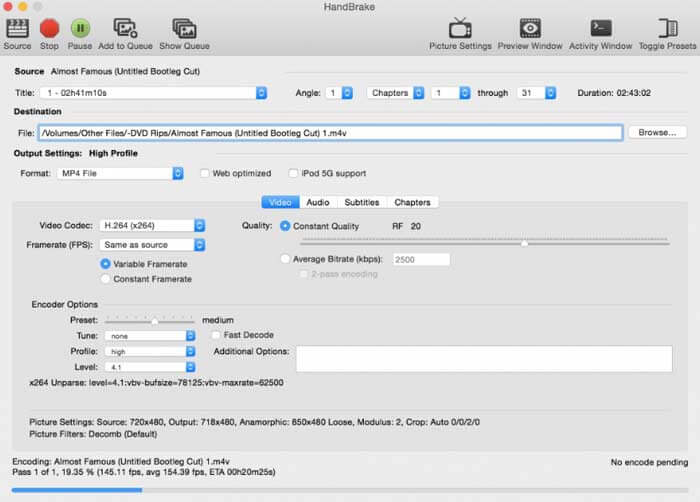
Użytkownicy komputerów Mac mogą używać HandBrake jako bezpłatnego konwertera M2TS na WMV. Oto szczegółowe kroki, aby przekonwertować M2TS na WMV za darmo na komputerze Mac za pomocą HandBrake.
Krok 1: Uruchom HandBrake. W oknie Source wybierz swój plik M2TS, a następnie kliknij Open.
Krok 2: Rozwiń listę Format. Wybierz jako format wideo WMV.
Krok 3: Kliknij Browse, aby zmienić folder docelowy.
Krok 4: Kliknij Start, aby zakończyć konwersję wideo z M2TS na WMV na Macu.
Część 2: Jak przekonwertować M2TS na WMV Online
Jeśli nie chcesz nic instalować na komputerze, możesz również skorzystać z internetowego konwertera wideo. W tej części jako przykład zostanie użyty FVC Free Online Video Converter.
Krok 1: Odwiedź FVC Free Online Video Converter w swojej przeglądarce.

Krok 2: Jeśli nie pobrałeś jeszcze FVC launcher, kliknij Add Files to Convert, aby najpierw go pobrać. Następnie zainstaluj launcher i zaktualizuj go.

Krok 3: Otwórz i dodaj plik M2TS. Następnie wybierz format WMV, zanim rozpoczniesz Convert.

Krok 4: Po potwierdzeniu folderu zapisu cierpliwie poczekaj na swój plik WMV.
Część 3: Często zadawane pytania dotyczące konwersji M2TS na WMV
Czy system Android może odtwarzać pliki M2TS?
Nie. Możesz używać VLC Media Player jako aplikacji odtwarzacza M2TS. Lub możesz przekonwertować M2TS na format WMV, aby ułatwić odtwarzanie na Androidzie i iPhonie.
Czy jest jakaś różnica między MTS a M2TS?
Właściwie odpowiedź brzmi: nie. Nie ma żadnych funkcjonalnych różnic między MTS a M2TS. Są to pliki wideo wysokiej rozdzielczości powiązane z AVCHD.
Czy M2TS jest lepszy niż WMV?
M2TS jest specjalnie zaprojektowany dla kamer. Więc pliki M2TS mają wysoką rozdzielczość i duży rozmiar pliku. Możesz zmniejszyć wideo, konwertując M2TS na WMV. W porównaniu z M2TS, WMV jest popularnym i szeroko obsługiwanym formatem wideo. Jeśli chcesz skompresować M2TS i zmienić na popularny format wideo, jest to dobry sposób na konwersję M2TS do formatu WMV.
To wszystko, jeśli chodzi o to, jak konwertować wideo z M2TS na WMV. Możesz zmieniać format wideo i stosować podstawowe efekty wideo za darmo w systemie Windows, na Macu oraz online. Jest to całkowicie darmowe i bezpieczne w użyciu. Brak ukrytego ryzyka czy zakupów w aplikacji, więc możesz bez obaw konwertować pliki M2TS do formatu WMV.
-
 Jak przekonwertować M2TS na MOV na Windows / Mac
 Chcesz przekonwertować M2TS na MOV, aby odtwarzać pliki wideo na wielu odtwarzaczach i platformach? Ten artykuł pomoże Ci znaleźć najlepszą metodę online / offline do konwersji M2TS na MOV na Windows / Mac.
-
 Jak konwertować pliki M2TS na MP3 za darmo
 Czy plik M2TS można przekonwertować na MP3? W tym poście wymieniliśmy 6 najlepszych bezpłatnych i online sposobów, które pomogą Ci przekonwertować M2TS na MP3, AAC, AIFF i inne formaty audio.
-
 5 prostych sposobów na konwersję TS do AVI / MKV / MOV / WMV na Windows / Mac
 Chcesz szybko przekonwertować pliki TS na AVI / MKV / MOV / WMV? W tym artykule przedstawiono konwertery wideo online i offline z pełnym przewodnikiem. Może tutaj znajdziesz najlepszy darmowy konwerter TS.
