


 Video Converter Ultimate
 Nagrywarka ekranu
 Naprawa wideo
Jak przekonwertować formaty M2TS na kompatybilne z iPadem w systemie Windows / Mac / Online
Czy można odtwarzać pliki M2TS bezpośrednio na iPadzie? Niestety odpowiedź brzmi: nie. M2TS nie jest kompatybilny z iPadem. Jeśli chcesz odtwarzać M2TS na iPadzie, musisz zainstalować na nim odtwarzacz obsługujący M2TS albo możesz przekonwertować M2TS na format iPada. W niniejszym artykule wybrano oczywiście to drugie rozwiązanie. Czytaj dalej i dowiedz się, jak zmienić format wideo z M2TS na taki, który działa na iPadzie.

Część 1: Jak przekonwertować M2TS na iPada w systemie Windows i Mac
Jakie formaty obsługuje iPad? W rzeczywistości iPad akceptuje popularne formaty wideo H.264, MP4, M4V, MOV, MPEG-4 i M-JPEG. Aby umieścić M2TS na iPadzie, musisz najpierw przekonwertować M2TS na format wideo iPada.
Jak przekonwertować M2TS na iPada w systemie Windows za darmo
FVC Free M2TS Converter to całkowicie darmowy konwerter wsadowy M2TS na iPada. Możesz hurtowo konwertować pliki M2TS do formatu iPada z prędkością nawet 50 razy większą niż w przypadku zwykłych konwerterów M2TS. Dlatego nie ma znaczenia, jeśli musisz przekonwertować duże pliki wideo M2TS do formatu iPada w dużych ilościach. Ten darmowy konwerter M2TS na iPada poradzi sobie z tym perfekcyjnie.
Co więcej, możesz scalić pliki M2TS i dodać motywy przed konwersją M2TS na format iPada. Okno podglądu w czasie rzeczywistym natychmiast pokazuje efekty wideo. Krótko mówiąc, możesz w jednym miejscu edytować i konwertować AVCHD M2TS na iPada w systemie Windows za darmo.

Darmowy konwerter M2TS
113,456+ pliki do pobrania- Konwertuj M2TS na iPada H.264, MP4, MOV, MPEG-4 i inne kompatybilne formaty.
- 50x większa prędkość dzięki obsłudze konwersji wsadowej.
- Zachowaj wysoki poziom jakości podczas konwersji na iPada ze wszystkich kamer HD.
- Konwerter M2TS na iPad współpracuje z komputerem z systemem Windows 10/8/7.
Bezpłatne pobieranieDla Windows 7 lub nowszegoBezpieczne pobieranie
Bezpłatne pobieranieDla macOS 10.7 lub nowszegoBezpieczne pobieranie
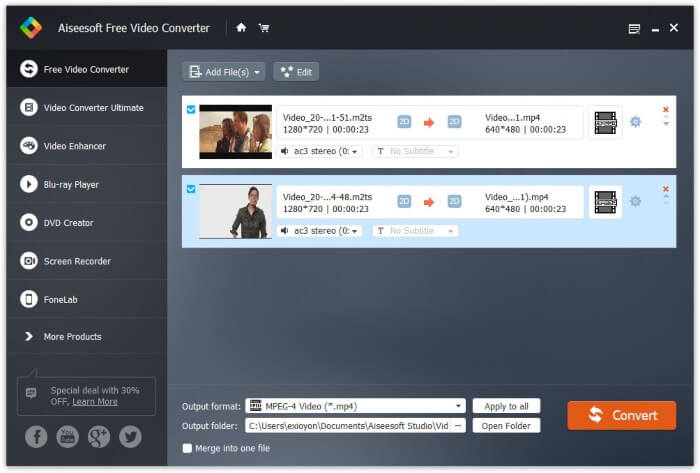
Krok 1: Pobierz za darmo, zainstaluj i uruchom FVC Free M2TS Converter. Przeciągnij i upuść pliki M2TS do głównego okna programu.

Krok 2: Rozwiń listę Format wyjściowy w dolnej części. Aby przekonwertować M2TS na iPada w systemie Windows, możesz po prostu wybrać format wyjściowy z kategorii Apple iPad.

Krok 3: Kliknij ikonę zębatki Ustawienia, aby dostosować koder wideo, liczbę klatek na sekundę i inne parametry. Na końcu kliknij Konwertuj, aby zmienić format wideo z M2TS na format iPada.
Jak przekonwertować M2TS na iPada na komputerze Mac za darmo
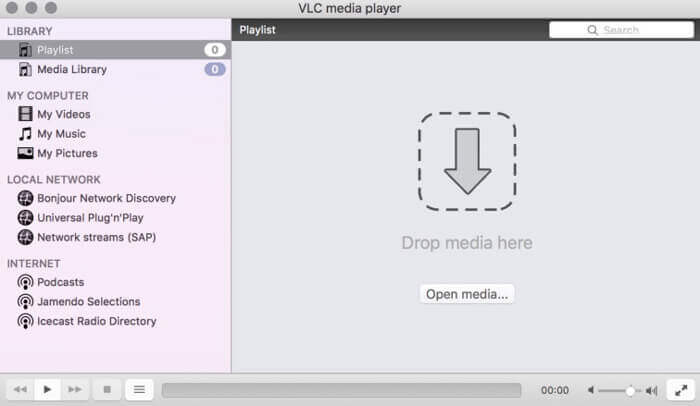
Jeśli chcesz bezpłatnie przekonwertować wideo M2TS na iPada na komputerze Mac, dobrym wyborem może być VLC Media Player. Jest to darmowy odtwarzacz i konwerter M2TS o otwartym kodzie źródłowym dla wielu platform.
Krok 1: Otwórz VLC Media Player na komputerze Mac. Wybierz Konwertuj/Zapisz z listy rozwijanej Media.
Krok 2: Kliknij Dodaj, aby zaimportować plik M2TS. Następnie zaznacz plik i kliknij poniżej Otwórz, aby kontynuować.
Krok 3: Kliknij Konwertuj/Zapisz na dole, aby przejść do następnego okna.
Krok 4: Wybierz format iPada z listy rozwijanej Profil. Możesz kliknąć ikonę Narzędzia obok, aby dostosować ustawienia wideo.
Krok 5: Kliknij Start, aby rozpocząć konwersję pliku M2TS na format iPada na Macu za pomocą VLC.
Część 2: Jak przekonwertować M2TS na iPada Online
Dla użytkowników mobilnych korzystanie z internetowego konwertera M2TS na iPada jest również dobrym wyborem. Możesz przekonwertować plik M2TS na iPada za darmo, bez konieczności pobierania, instalacji lub rejestracji.
Krok 1: Otwórz internetowy konwerter M2TS na iPada, taki jak FVC Free Online Video Converter.

Krok 2: Pobierz FVC launcher, klikając Add Files to Convert, a następnie zainstaluj go.

Krok 3: Wyszukaj na komputerze plik M2TS do konwersji. Nie zapomnij wybrać formatu wyjściowego.

Krok 4: Kliknij Start Converting, aby bezpłatnie przekonwertować M2TS na format iPada online.
Część 3: Często zadawane pytania dotyczące konwersji M2TS na iPada
Co się dzieje, że nagle nie ma dźwięku w plikach M2TS w iMovie?
M2TS nie jest natywnie obsługiwany przez urządzenia Apple. Aby rozwiązać problem, musisz przekonwertować M2TS na format Mac.
Jak otworzyć pliki M2TS na iPhonie i iPadzie?
AVCHD M2TS nie jest kompatybilny z urządzeniami iOS. Jeśli nalegasz na odtwarzanie filmów M2TS na iPadzie, możesz użyć aplikacji VLC Media Player, aby uzyskać odtwarzanie wideo.
Jakaś dobra aplikacja do odtwarzania wideo na iPada?
Możesz uzyskać większy ekran na iPadzie niż na iPhonie. Więc wrażenia z oglądania wideo również będą lepsze. Zalecane odtwarzacze wideo to PlayerXtreme Media Player, KMPlayer, VLC, AirPlayer i inne. Możesz wybrać dowolną, aby elastycznie sterować wideo.
To wszystko, jeśli chodzi o to, jak przekonwertować M2TS na iPada za pomocą narzędzi online i offline. Te konwertery wideo M2TS są darmowe i bezpieczne w użyciu. Niezależnie od tego, ile plików M2TS chcesz przekonwertować na formaty kompatybilne z iPadem, tutaj uzyskasz najszybszą prędkość.
-
 Jak przekonwertować M2TS na MP4 bez obniżania jakości
 Chcesz przekonwertować wideo z kamery HD na zwykły MP4? Oto 4 proste i bezpłatne sposoby zmiany pliku M2TS na MP4 na Windows i Mac.
-
 Jak przekonwertować M2TS na MKV bez utraty jakości
 Chcesz przekonwertować M2TS na MKV, zachowując oryginalną jakość? Ten post przedstawia bezpłatne i internetowe metody bezstratnej zmiany M2TS na MKV.
-
 Jaka jest różnica między MTS a M2TS
 Co to jest plik MTS lub M2TS? Jaka jest różnica między M2TS a MTS? Jak mogę obejrzeć nagrany przez kamerę plik MTS lub M2TS? Znajdź wszystkie odpowiedzi w tym poście.
