


 Video Converter Ultimate
 Nagrywarka ekranu
 Naprawa wideo
Jak przekonwertować M2TS na MKV bez utraty jakości
„Szukam dobrego konwertera. Potrzebuję go do konwersji plików m2ts na MKV, ale chcę zachować opcje napisów i opcje audio. Te pliki mają około 40 GB i chcę je przekonwertować na mniejsze pliki, ale bez utraty jakości. Czy istnieje zalecany konwerter? ”
Pliki M2TS zwykle zajmują dużo miejsca, więc możesz chcieć przekonwertować M2TS na MKV, aby odtwarzać je w niektórych odtwarzaczach multimedialnych. W tym artykule pokażemy najprostsze sposoby, aby bezstratnie przekonwertować plik M2TS na MKV w systemach Windows i Mac.

Część 1. Najlepszy sposób na konwersję M2TS do MKV za darmo
Choć na rynku jest wiele konwerterów, trudno znaleźć darmowe konwertery M2TS na MKV, które naprawdę działają. Warto jednak rzucić okiem na FVC Free M2TS Converter. To wszechstronny konwerter i edytor M2TS, który pozwala konwertować pliki M2TS do MKV, MP4, AVI, MOV, MP3 itp. w celu odtwarzania w popularnych odtwarzaczach multimedialnych.

Darmowy konwerter M2TS
112,345+ pliki do pobrania- Konwertuj M2TS na MKV, MP4, AVI, TS, VOB, WMV, FLV, SWF itp.
- Konwertuj pliki M2TS na formaty plików obsługiwane przez urządzenie i multimedia.
- Edytuj plik M2TS, taki jak scalanie, kompresowanie, dodawanie motywu i włączanie efektów 3D.
- W pełni kompatybilny z Windows 10/8/7 / Vista / XP (SP2 lub nowszy).
Bezpłatne pobieranieDla Windows 7 lub nowszegoBezpieczne pobieranie
Bezpłatne pobieranieDla macOS 10.7 lub nowszegoBezpieczne pobieranie
Krok 1. Dodaj plik M2TS
Po pobraniu tego bezpłatnego konwertera M2TS zainstaluj i uruchom go na komputerze z systemem Windows. Kliknij przycisk „Dodaj plik (i)”, aby zaimportować pliki M2TS. Jeśli masz kilka plików M2TS do dołączenia, możesz zaznaczyć opcję „Połącz w jeden plik” na dole.

Krok 2. Edytuj plik M2TS
Kliknij przycisk „Edytuj” w górnej części interfejsu i możesz dodać motyw, edytować tytuł, autora, czas i dostawcę na początku i na końcu.

Krok 3. Konwersja M2TS na MKV
Kliknij przycisk rozwijany pod „Format wyjściowy”, aby wybrać MKV jako format wyjściowy. Możesz także ustawić folder docelowy. Następnie kliknij przycisk „Konwertuj”, aby rozpocząć bezpłatną konwersję M2TS do MKV.

Część 2. Eksport MKV z M2TS Online za darmo
Chcesz znaleźć darmowe narzędzie online, które szybko przekonwertuje M2TS na MKV? FVC Free Online Video Converter udostępnia bezpłatną platformę do łatwej konwersji plików M2TS na MKV. Dodatkowo możesz wsadowo konwertować wiele plików M2TS do formatu MKV. Sprawdź szczegółowe kroki, aby za darmo przekonwertować plik M2TS na MKV online.
Krok 1. Przejdź na stronę, klikając powyższy link. Znajdź przycisk Add Files to Convert, pobierz i zainstaluj FVC launcher.

Krok 2. Po instalacji i aktualizacji dodaj wideo i wybierz format do Convert.

Krok 3. Wpisz lub otwórz folder, w którym chcesz zapisać swoje wideo. Odczekaj chwilę, a otrzymasz swoje wideo w formacie MKV.
Część 3. Przekształć M2TS na MKV za pomocą FreeConvert.com
Lub możesz po prostu wypróbować FreeConvert.com, bezpłatne narzędzie do konwersji plików online do konwersji plików (obrazu, wideo, dokumentu i muzyki) z jednego formatu na inny.
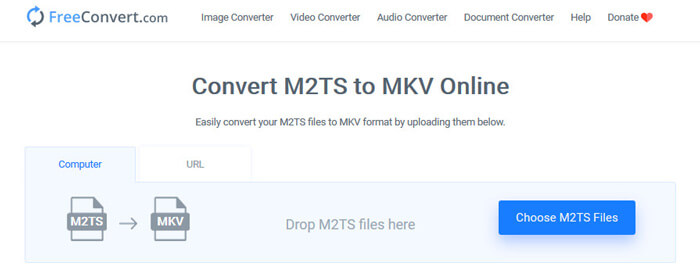
Krok 1. Przeciągnij i upuść plik M2TS w obszar przesyłania. Możesz też kliknąć przycisk “Choose M2TS Files”, aby zaimportować plik M2TS.
Krok 2. W sekcji Advanced Settings możesz dostosować kodek wideo, rozmiar ekranu, proporcje obrazu, liczbę klatek na sekundę, orientację wideo, kodek audio i bitrate.
Krok 3. Kliknij przycisk “Convert To MKV”, aby przekonwertować M2TS na MKV. To zajmie kilka sekund. Następnie kliknij przycisk “DOWNLOAD MKV”, aby zapisać plik MKV na komputerze.
Część 4. Konwersja M2TS do MKV za pomocą HandBrake
HandBrake to darmowy i otwarty konwerter M2TS na MKV, który konwertuje wideo z prawie wszystkich formatów wideo. Obsługuje wiele systemów operacyjnych, takich jak Windows, macOS i Linux OS. Postępuj zgodnie z naszym przewodnikiem krok po kroku, aby przekonwertować plik M2TS na MKV za pomocą HandBrake.
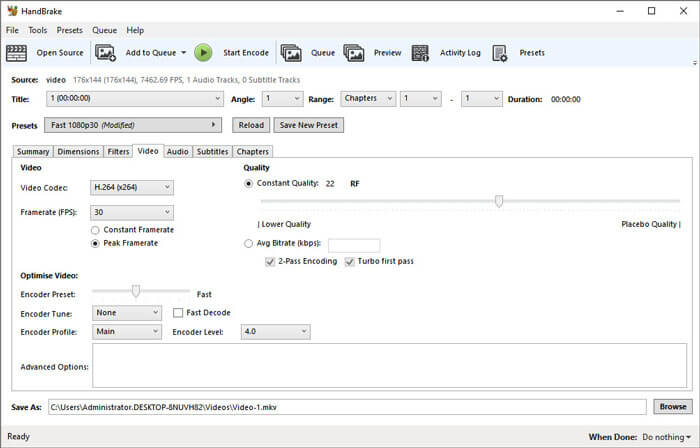
Krok 1. Pobierz Handbrake na swój komputer. Kliknij przycisk “Open Source”, aby wczytać plik M2TS do programu.
Krok 2. W zakładce Summary wybierz “MKV” jako format wyjściowy. W innych zakładkach, takich jak Dimensions, Filters, Video, Audio, Subtitles, Chapters, możesz dostosować filtry wideo, kodek, jakość, bitrate, napisy i inne ustawienia.
Krok 3. Kliknij przycisk “Start Encode”, aby rozpocząć konwersję plików M2TS do MKV.
Część 5. Zmień M2TS na MKV z MakeMKV
MakeMKV to rozwiązanie do darmowej konwersji M2TS na MKV za jednym kliknięciem. Możesz użyć MakeMKV do konwersji M2TS na MKV w systemie Windows 10 i Mac.
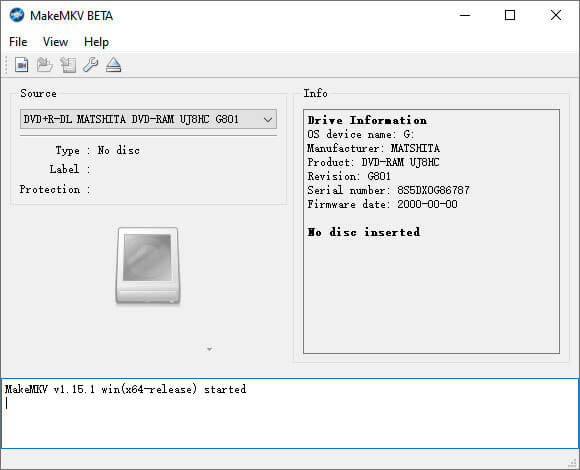
Krok 1. Otwórz MakeMKV na swoim komputerze. Wybierz “Open Files” z listy “File”, aby dodać plik M2TS do programu.
Krok 2. Wybierz dodany plik M2TS i kliknij ikonę folderu, aby wybrać folder wyjściowy.
Krok 3. Kliknij przycisk “Make MKV”, aby rozpocząć bezpłatną konwersję pliku M2TS do MKV.
Część 6. Często zadawane pytania dotyczące konwersji M2TS na MKV
Co to jest wideo w formacie M2TS?
M2TS to skrót od BDAV (Blu-ray Disc Audio-Video) MPEG-2 Transport Stream. Jest to format pliku kontenera dla Blu-ray i AVCHD (Advanced Video Coding High Definition), który zawiera wideo, audio i inne strumienie.
Czy Plex może odtwarzać pliki M2TS?
Nie. Plex Media Server nie może odtwarzać plików M2TS, ponieważ ma bardzo ograniczoną obsługę zewnętrznych kodeków. Jeśli chcesz odtwarzać pliki M2TS za pomocą Plex, możesz przekonwertować plik M2TS na format obsługiwany przez Plex za pomocą FVC Free M2TS Converter.
Czy YouTube obsługuje M2TS i MTS?
Nie. YouTube nie obsługuje plików M2TS ani MTS. Musisz przekonwertować plik M2TS lub MTS na obsługiwany format pliku, taki jak MP4, a następnie przesłać je do YouTube.
Wniosek
To wszystkie rozwiązania, jakie mamy, aby przekonwertować M2TS na MKV w systemach Windows i Mac. FVC Free Video Converter gwarantuje bezstratną jakość wyjściowych plików MKV. Możesz łatwo konwertować filmy M2TS ze wszystkich kamer HD na inne formaty wideo bez utraty jakości. Czas, abyś sam tego spróbował.
-
 Co to jest plik MTS i jak konwertować / odtwarzać plik MTS
 Co to jest plik MTS i jak mogę go odtworzyć? Ten post zawiera podstawowe instrukcje dotyczące pliku MTS. Co więcej, możesz uzyskać 3 proste sposoby konwersji pliku MTS na MP4, MOV, AVI, MPEG, MTS, MKV lub inne formaty o wysokiej jakości.
-
 2 proste sposoby bezpłatnej konwersji MTS na MP3
 Masz potrzebę wyodrębnienia dźwięku MP3 z pliku MTS, ale nie wiesz jak? Jaki jest najlepszy konwerter MTS na MP3? W tym poście są 2 proste sposoby, które pomogą Ci przekonwertować MTS / M2TS na MP3 z wysoką jakością dźwięku.
-
 Recenzja Snagita i jego najlepszej alternatywy
 Jaka jest najlepsza alternatywa dla Snagita? Czy istnieje narzędzie do przechwytywania ekranu, takie jak Snagit? Ten post przejrzy Snagit i udostępni najlepszą alternatywę dla Snagita do przechwytywania ekranu.
