


 Video Converter Ultimate
 Nagrywarka ekranu
 Naprawa wideo
Nadzwyczajne metody natychmiastowej konwersji MTS na M4V
Chcesz mieć skuteczny konwerter dla swojego urządzenia? W takim razie zyskasz rozeznanie, zapoznając się z informacjami zawartymi w tym artykule. Pokażemy ci różne sposoby, jak konwertować pliki MTS na M4V na Macu i w systemie Windows. Odkryjesz też narzędzie online, z którego możesz skorzystać, aby przekonwertować więcej plików.

Część 1: Różnice między MTS a M4V
Aby zobaczyć różnice między tymi dwoma formatami plików, zapoznaj się ze szczegółami w poniższej tabeli.
| MTS | M4V | |
| Rozszerzenie pliku | Rozszerzenie nazwy pliku wideo Advanced Video Coding High Definition (AVCHD) to MTS. Ma rozszerzenie nazwy pliku .mts i zawiera wideo HD MPEG nagrane za pomocą określonych marek i modeli kamer, w tym JVC, Sony, Canon i Sanyo. Może otwierać się na wielu programach i obsługiwać filmy HD do 1080i x 720p. | Firma Apple Inc. stworzyła format cyfrowego kontenera wideo M4V. Pod względem struktury jest dość porównywalny do dobrze znanego MP4, ale pliki M4V mogą być wyposażone w DRM. Obecnie głównym formatem wideo dla filmów w sklepie iTunes Store jest M4V, który może multipleksować razem wiele danych audio i wideo. |
| Opracowany przez | Sony/Panasonic | Apple Inc. |
| Powiązane programy | Vlc media player Apple Final Cut Pro X Roxio Creator NXT Pro 7 | Media Player Classic KMPlayer Vlc media player Zoom Player |
| Typ MIME | wideo/mp2t | wideo/x-m4v |
Część 2: Doskonałe metody konwersji wielu MTS na M4V przy użyciu komputera Mac
Jeśli chcesz przekonwertować MTS na M4V za pomocą Maca, możesz wypróbować FVC Video Converter Ultimate. To narzędzie offline może natychmiast konwertować pliki, ponieważ ma 30-krotnie większą szybkość konwersji. Ponadto narzędzie to oferuje konwersję wsadową, co umożliwia jednoczesną konwersję wielu formatów plików. Ponadto w tej aplikacji można przesyłać prawie wszystkie formaty wideo, ponieważ obsługuje ona wiele formatów plików, w tym MKV, MOV, MP4, FLV, AVI, SWF i inne. Możesz także edytować plik wideo MTS. Możesz polegać na tym narzędziu, jeśli masz wiele plików MTS i chcesz je połączyć, ponieważ oferuje narzędzie do łączenia wideo. W ten sposób możesz połączyć wiele filmów MTS w jeden element. Ponadto, jeśli chcesz dostosować głośność swojego wideo MTS, możesz użyć narzędzia do zwiększania głośności. Za pomocą tej aplikacji offline możesz łatwo zmienić głośność swojego filmu. Jest więcej funkcji, z których możesz korzystać za pomocą Video Converter Ultimate.
Funkcje
◆ Może konwertować ponad 100 formatów plików wideo.
◆ Oferuje twórcę teledysków z wieloma darmowymi motywami.
◆ Dostępne jest tworzenie kolaży z darmowymi szablonami i filtrami.
◆ Udostępnia narzędzia do edycji, takie jak kontroler prędkości wideo, kompresor i kadrowanie.
◆ Może usuwać znaki wodne z wideo.
Wykonaj poniższe podstawowe czynności, aby przekonwertować plik wideo MTS do formatu M4V za pomocą FVC Video Converter Ultimate na komputerze Mac.
Krok 1: Na Macu pobierz FVC Video Converter Ultimate, klikając poniższy przycisk Download. Następnie uruchom aplikację.
Bezpłatne pobieranieDla Windows 7 lub nowszegoBezpieczne pobieranie
Bezpłatne pobieranieDla MacOS 10.7 lub nowszegoBezpieczne pobieranie
Krok 2: Na środku interfejsu kliknij ikonę Plus, aby dodać swój plik wideo MTS. Możesz też przeciągnąć plik bezpośrednio do okna.
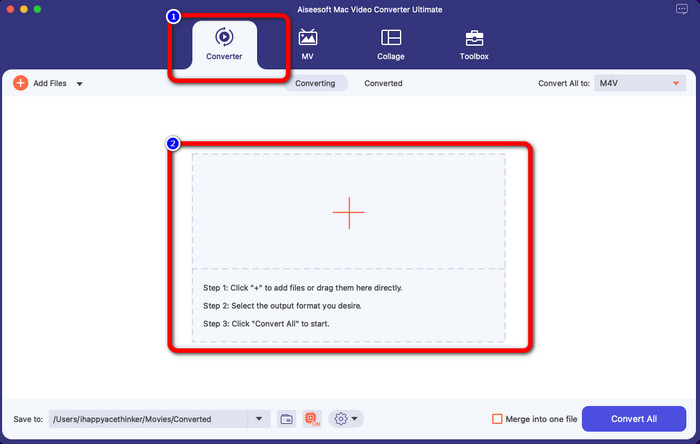
Krok 3: W kolejnym kroku zobaczysz przycisk Convert All to w prawym górnym rogu interfejsu. Kliknij go, aby wyświetlić dostępne formaty, a następnie wybierz format pliku M4V. Aby dodać wiele plików MTS, naciśnij przycisk Add Files w lewym górnym rogu interfejsu.
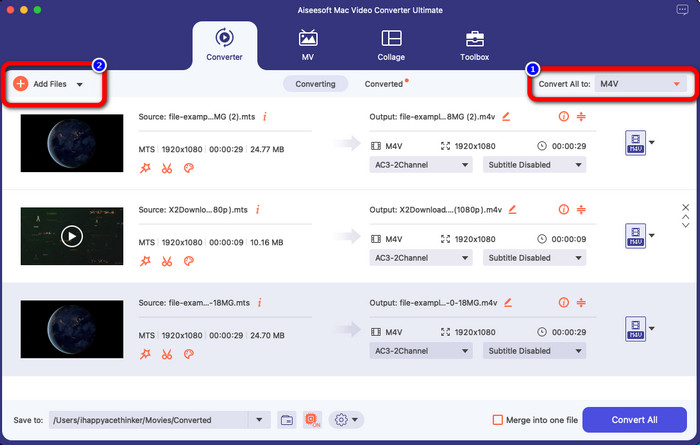
Krok 4: Po przekonwertowaniu wszystkich plików MTS do formatu M4V kliknij przycisk Convert All i zapisz wynik końcowy w wybranej przez siebie lokalizacji.
Część 3: Jak przekonwertować wiele plików MTS na M4V w systemie Windows za darmo
W tej części dowiesz się, jak przekonwertować wiele plików MTS do jednego pliku M4V w systemie Windows. Do konwersji plików MTS możesz użyć programu FVC Free TS Converter. Może on konwertować twoje pliki wideo 10 razy szybciej niż przeciętna prędkość konwersji. Oferuje konwersję wsadową, dzięki czemu możesz przekonwertować wiele plików za jednym razem. W ten sposób nie znudzisz się, konwertując pliki pojedynczo. Dodatkowo ma intuicyjny interfejs i proste funkcje, co czyni go bardziej odpowiednim dla użytkowników. Jeśli chcesz przekonwertować wiele plików MTS do formatu M4V za pomocą FVC Free TS Converter w systemie Windows, skorzystaj z prostych kroków poniżej.
Funkcje
◆ Konwertuj formaty plików wideo, takie jak AVI, MOV, MPEG, MP4, DIVX, XVID itp.
◆ Zapewnia ulepszanie wideo.
◆ Możliwość nagrywania ekranu.
◆ Może odtwarzać dowolne płyty Blu-ray.
◆ Oferuje konwersję wsadową.
Krok 1: Pobierz FVC Free TS Converter na swój komputer z systemem Windows, klikając poniższy przycisk Download. Po zakończeniu instalacji uruchom aplikację.
Bezpłatne pobieranieDla Windows 7 lub nowszegoBezpieczne pobieranie
Bezpłatne pobieranieDla MacOS 10.7 lub nowszegoBezpieczne pobieranie
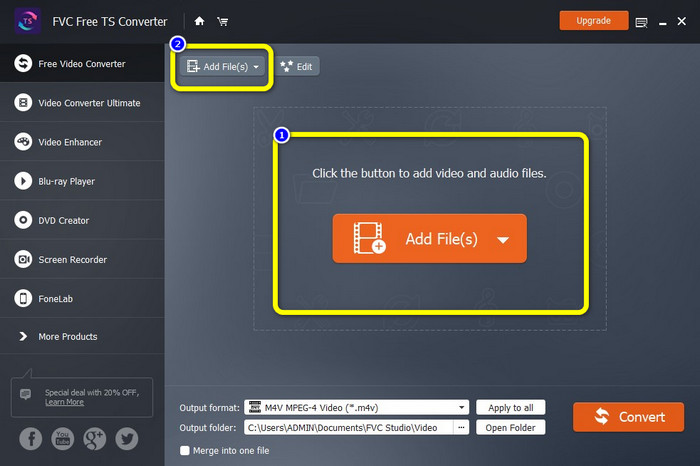
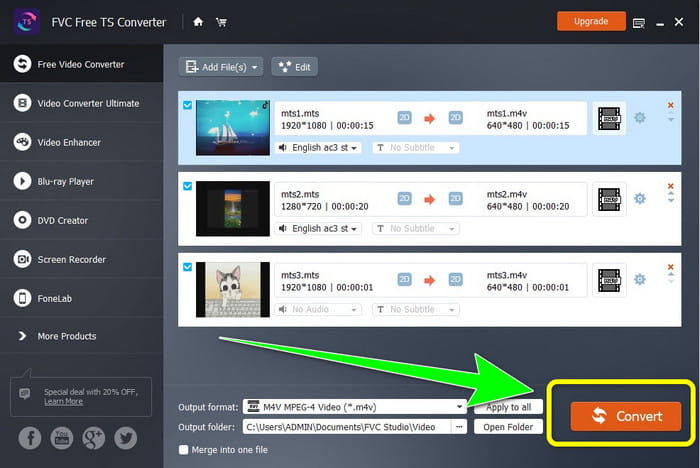
Krok 2: Po uruchomieniu aplikacji naciśnij przycisk Add Files na środku, aby wgrać pliki MTS. Możesz też kliknąć drugi przycisk Add Files w górnej części interfejsu, aby dodać więcej plików MTS do konwersji.
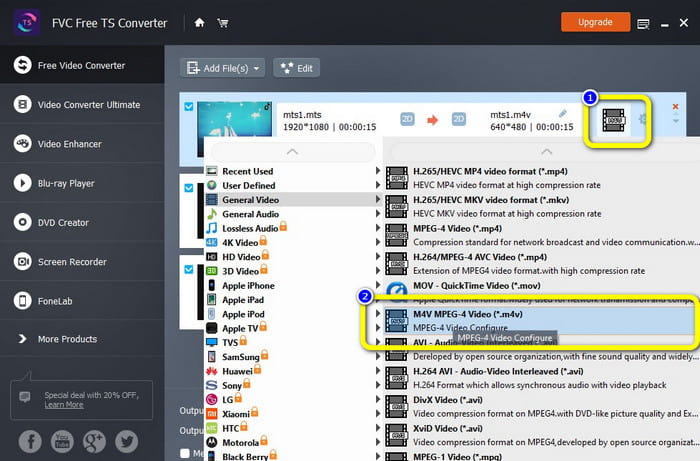
Krok 3: Kliknij opcje formatu po prawej stronie interfejsu. Następnie wybierz format pliku M4V jako format wyjściowy. Wykonaj tę samą procedurę dla pozostałych plików MTS.
Krok 4: Naciśnij przycisk Convert, aby przekonwertować wiele plików MTS do formatu M4V.
Część 4: Najlepsze sposoby konwersji MTS na M4V za pomocą aplikacji online
Podczas konwertowania MTS do M4V za pomocą narzędzia online najlepszym konwerterem, z którego możesz skorzystać, jest FVC Free Video Converter Online. Z pomocą tego narzędzia z łatwością przekonwertujesz swój plik MTS do formatu M4V. Konwersja wymaga tylko trzech kroków. Ponadto to narzędzie online jest w 100% darmowe. A zatem, bez dalszej zwłoki, przekonwertujmy twój plik MTS do formatu M4V. Postępuj zgodnie z podanymi przez nas krokami!
Funkcje
◆ Konwertuj wiele plików, takich jak MP4, FLV, WMA, MOV, MTS, M4V itp.
◆ Umożliwia konwersję wsadową.
◆ Dostępne zarówno na komputerach Mac, jak iw systemie Windows.
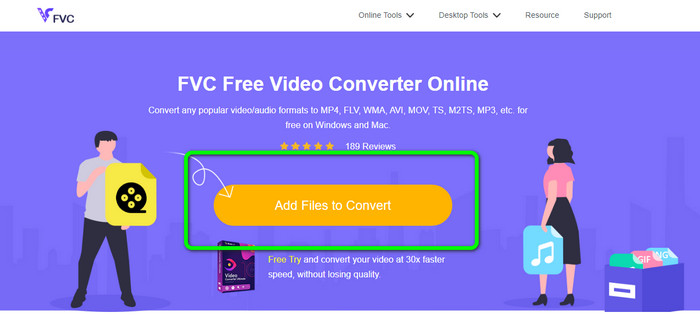
Krok 1: Odwiedź stronę internetową FVC Free Video Converter Online. Następnie kliknij przycisk Add Files to Convert, aby wgrać swoje wideo MTS.
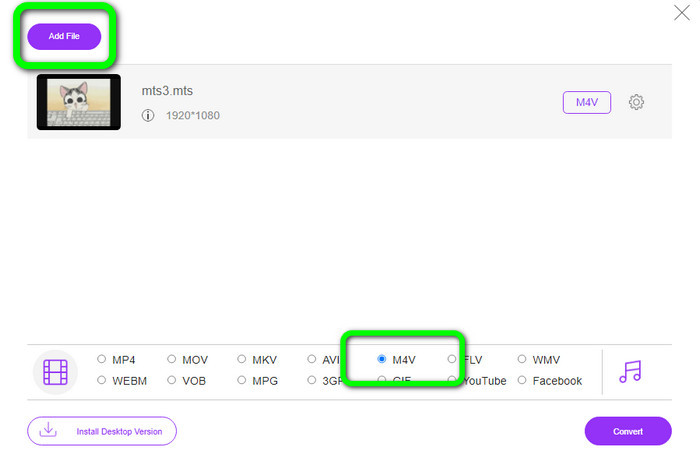
Krok 2: Następnie wybierz format M4V w opcjach formatu w dolnej części interfejsu. Możesz też kliknąć przycisk Add File, aby konwertować wiele plików.
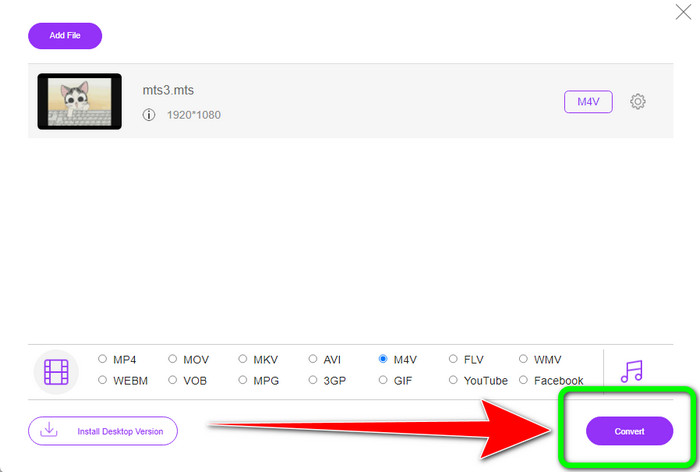
Krok 3: Po wybraniu żądanego formatu kliknij przycisk Convert, aby zapisać swoje wideo w formacie pliku M4V.
Część 5: Często zadawane pytania dotyczące konwersji MTS na M4V
1. Czy MTS to dobry format?
Tak. Kodeki wideo HD 720p i 1080i są obsługiwane przez MTS, format MPEG o wysokiej rozdzielczości i strumień wideo H.264. Ludzie często określają pliki MTS jako AVCHD, stworzone wspólnie przez Sony i Panasonic i wydane w formacie wysokiej jakości w 2006 roku.
2. Jak mogę przekonwertować MTS na MP4?
Możesz korzystać z wyżej wymienionych aplikacji. Te konwertery są skuteczne i przydatne przy konwersji MTS do MP4 oraz do innych formatów plików.
3. Dlaczego miałbyś używać M4V?
Pliki M4V mogą mieć miękkie napisy i ochronę DRM, aby powstrzymać piractwo i utrudnić konsumentom dystrybucję plików między urządzeniami.
Wniosek
Trzy powyższe aplikacje to najlepsze konwertery, z jakich możesz korzystać na swoich urządzeniach. Jeśli jesteś użytkownikiem systemu Windows, możesz użyć FVC Video Converter Ultimate. Jeśli korzystasz z Maca, możesz wypróbować FVC Free TS Converter. Na koniec, jeśli wolisz aplikację online, możesz użyć FVC Free Video Converter Online. Te konwertery mogą płynnie konwertować MTS do M4V.
-
 MTS VS M2TS - różnica między MTS i M2TS
 Co to jest plik MTS lub M2TS? Jaka jest różnica między M2TS a MTS? Jak mogę oglądać nagrany kamerą plik MTS lub M2TS? Wszystkie odpowiedzi znajdziesz w tym poście
-
 Najlepsze odtwarzacze 5 M4V na Windows / Mac / Android / iOS, które powinieneś wiedzieć
 Jeśli nie możesz odtwarzać filmów M4V w programie QuickTime Player, powinieneś dowiedzieć się więcej o 5 doskonałych odtwarzaczach M4V dla systemów Windows, Mac, Android i iOS z tego artykułu
-
 [Rozwiązany] Jak przekonwertować MTS na MKV w oryginalnej jakości
 Zastanawiasz się, jak przekonwertować MTS na MKV za darmo? W tym artykule wymieniliśmy najlepsze darmowe konwertery MTS na MKV
