


 Video Converter Ultimate
 Nagrywarka ekranu
 Naprawa wideo
Wybitne i pomocne sposoby konwersji 3GP na FLV [Sprawdzone]
Pliki audio i wideo można zapisywać w formacie 3GP, powszechnie używanym w telefonach 3G. Działa on także w telefonach 2G i 4G. W internecie ten kontener oparty na MP4 służy do wysyłania i odbierania plików multimedialnych. Wiele serwisów wideo online i usług strumieniowania audio korzysta jednak z FLV, kontenera wideo zgodnego z Flash. Oprócz Adobe Flash Playera wiele innych odtwarzaczy wideo potrafi odtwarzać pliki FLV. Aby pliki 3GP były bardziej dostępne i miały mniejszy rozmiar, można w prosty sposób przekonwertować je do FLV. Poniżej znajdziesz konwertery warte rozważenia, jeśli chcesz przekonwertować 3GP na FLV.

Część 1. Doskonałe metody konwersji 3GP na FLV [Offline]
Video Converter Ultimate to doskonałe narzędzie do konwersji plików 3GP do FLV bez poświęcania jakości. Korzystając z technologii SuperSpeed programu, użytkownicy mogą konwertować nawet duże pliki w ciągu kilku minut. Ponadto aplikacja umożliwia edycję plików według własnego uznania: przycinanie, obracanie i przycinanie filmów; dostosować parametry kolorów; zmienić rozdzielczość wideo i szybkość transmisji; lub dodaj napisy. Wszystkie najpopularniejsze urządzenia, w tym iPhone, iPad, urządzenia z systemem Android, Xbox i PlayStation, mogą być obsługiwane przez to oprogramowanie. Teraz, gdy znasz już krótkie wprowadzenie do tego oprogramowania, nadszedł czas, abyś zrozumiał, jak przekonwertować 3GP na FLV za pomocą tego oprogramowania.
Krok 1: Najpierw pobierz program, klikając przycisk Bezpłatne pobieranie znajdujący się poniżej. Możesz pobrać go na Windows lub Mac. Po pobraniu zainstaluj program na komputerze i uruchom go, klikając Rozpocznij teraz w oknie, które pojawi się na ekranie po instalacji.
Bezpłatne pobieranieDla Windows 7 lub nowszegoBezpieczne pobieranie
Bezpłatne pobieranieDla MacOS 10.7 lub nowszegoBezpieczne pobieranie
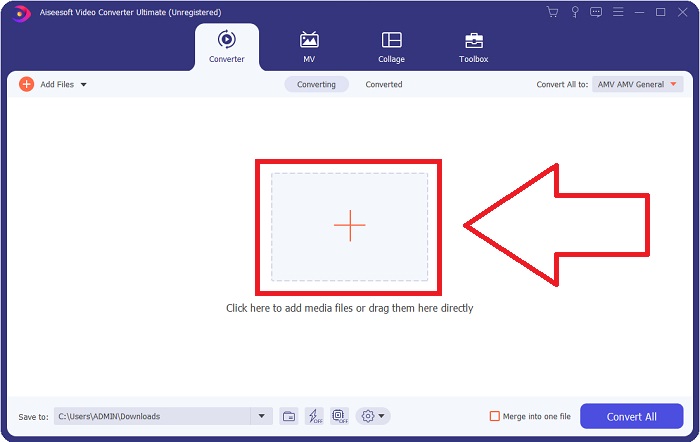
Krok 2: Aby rozpocząć konwersję, najpierw musisz wgrać plik. W tym celu kliknij przycisk + na środku interfejsu programu albo po prostu przeciągnij swoje pliki wideo z komputera.
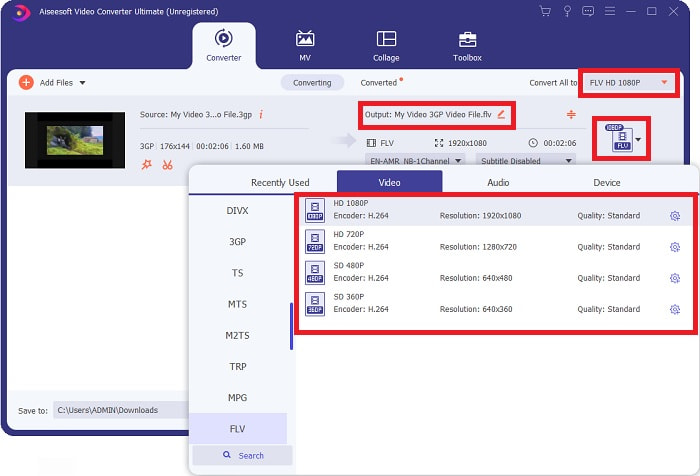
Krok 3: Po wgraniu pliku możesz teraz wybrać format FLV w sekcji wyboru formatu, znajdującej się w prawym rogu ekranu. Możesz wybrać jakość, jaką chcesz uzyskać, ponieważ wyświetlone zostaną wszystkie możliwe parametry, z których możesz skorzystać.
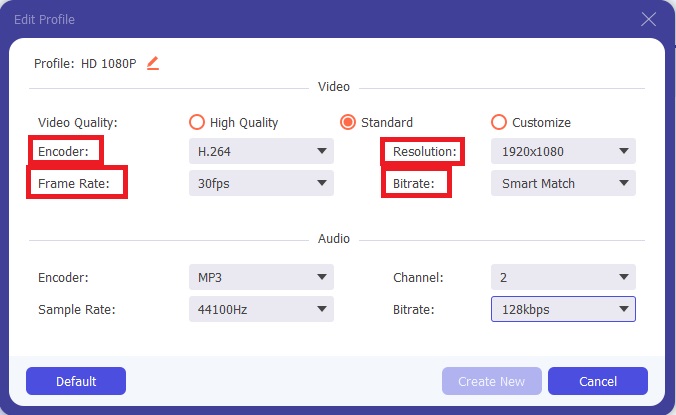
Krok 4: Niezależnie od dostępnych opcji jakości możesz utworzyć własny profil jakości, jeśli preferowana jakość nie widnieje na liście. Kliknij ikonę zębatki i dostosuj wszystkie ustawienia w oknie, które się pojawi. Rozdzielczość dotyczy jakości wyświetlania obrazu, liczba klatek na sekundę – częstotliwości odtwarzania wideo; bitrate określa ilość danych kodowanych w jednostce czasu. Na końcu, enkoder odpowiada za sposób kodowania formatu wideo.
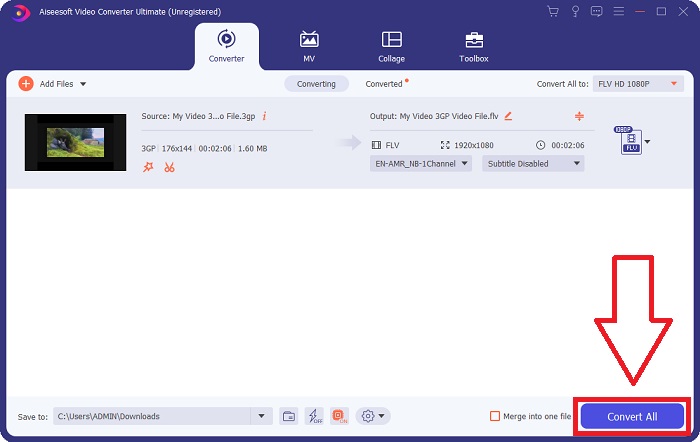
Krok 5: Gdy zakończysz wszystkie potrzebne modyfikacje dotyczące wyjściowego pliku wideo, możesz rozpocząć konwersję, klikając przycisk Konwertuj wszystko.
Część 2. Kolejna interesująca metoda konwersji 3GP na FLV [Online]
Dość o samym programie – porozmawiajmy teraz o narzędziu online, które z pewnością pomoże ci przekonwertować 3GP na FLV. Oto Darmowy Konwerter Wideo Online, który obsługuje wiele formatów, w tym 3GP i FLV. Możesz konwertować plik bezpośrednio z komputera, wgrywając go. Aby przesłać plik większy niż 500 MB, możesz skorzystać z tego narzędzia online do konwersji 3GP na FLV. Użytkownicy mogą zmienić wiele ustawień przed rozpoczęciem konwersji. Możesz na przykład zmienić kodek audio i głośność dźwięku. Możesz też dostosować rozdzielczość wideo. Po tym wprowadzeniu przejdźmy do wszystkich kroków, które musisz poznać.
Krok 1: Oto link do narzędzia online. Kliknij go, aby główna strona otworzyła się w twojej przeglądarce. Kliknij Dodaj pliki do konwersji, aby pobrać launcher, którego użyjesz do obsługi narzędzia online. Zainstaluj launcher i rozpocznij wgrywanie pliku.
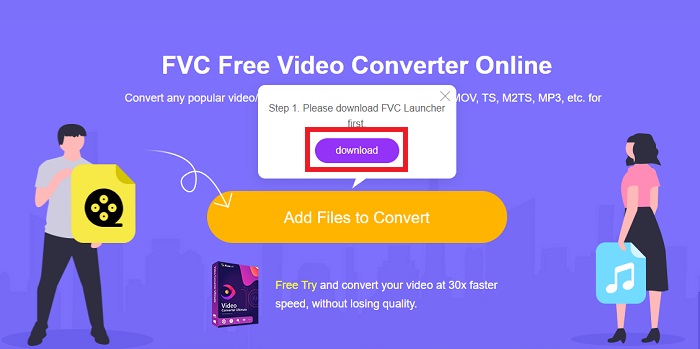
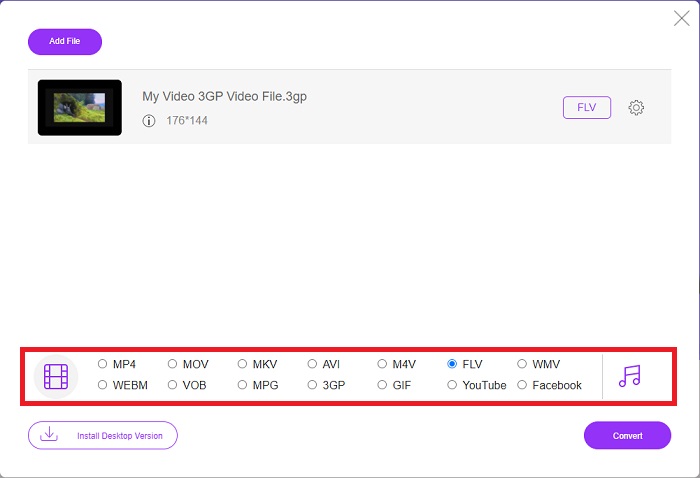
Krok 2: Aby wgrać plik, ponownie kliknij Dodaj pliki do konwersji. Po przesłaniu pliku możesz wybrać format wideo FLV z listy formatów wideo znajdującej się w dolnym rogu okna.
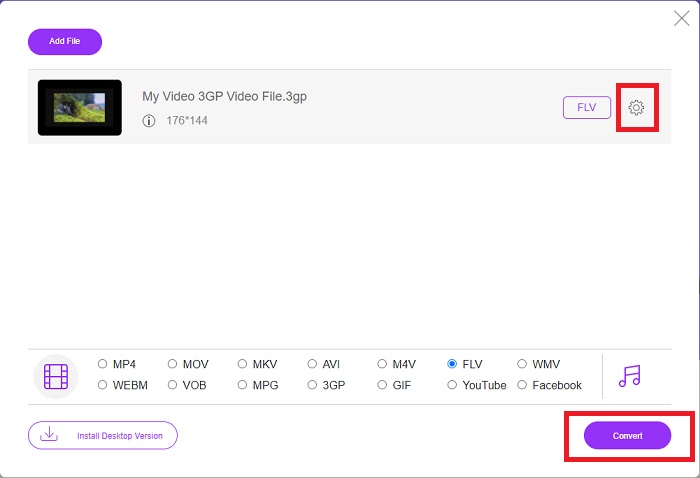
Krok 3: Możesz także edytować jakość wideo lub inne parametry, takie jak rozdzielczość, liczba klatek na sekundę czy bitrate, klikając ikonę zębatki obok wybranego formatu wideo, położoną w prawym rogu okna. Gdy dostosujesz wszystkie preferowane ustawienia swojego wyjściowego pliku, możesz rozpocząć konwersję, klikając Konwertuj.
Część 3. Przegląd: 3GP kontra FLV
Jeśli kiedykolwiek chciałeś zapisać klip audio i wideo w formacie 3GP, jesteś we właściwym miejscu! (3GPP). Format plików multimedialnych ISO służy jako podstawa dla 3GPP, formatu kontenera multimedialnego. Obsługiwane są strumienie wideo H.263 lub H.264 oraz strumienie audio AMR-WB, AMR-WB+, AMR-NB, HE-AAC v1, AAC-LC lub Enhanced aacPlus. Zazwyczaj pliki 3GP wykorzystują telefony komórkowe 3G do przechwytywania wideo, ale użytkownicy mogą również odtwarzać je na niektórych telefonach 2G i 4G. Chociaż pliki 3GP są nadal w użyciu, ich popularność spadła, ponieważ bardziej wydajne formaty wideo wyparły format 3GPP.
Jednak pliki wideo zapisane w formacie kontenera Adobe Flash Video (FLV) są dokumentami FLV. Strumienie audio i wideo mogą kodować w taki sam sposób, jak standardowy Flash. Format SWF i pakiety metadanych zawierają krótki nagłówek. Wtyczka Flash Video Exporter (dostępna w programie Adobe Animate) lub aplikacja obsługująca pliki FLV mogą tworzyć zawartość Flash Video i eksportować ją jako pliki FLV. Adobe Media Encoder może również kodować wideo w formatach QuickTime lub Windows Media. Teraz, gdy masz pomysł na 3GP i FLV, udostępniamy tabelę porównawczą, aby poznać szczegóły w konkretnych sprawach.
| Rozszerzenie pliku | 3GP | FLV |
| Typ pliku | Plik multimedialny ISO | Plik wideo Flash |
| Opracowany przez | Projekt Partnerski Trzeciej Generacji | System Adobe |
| Plusy | Użytkownicy mobilni mogą łatwiej udostępniać i przechowywać pliki wideo, ponieważ format pliku 3GP zmniejsza rozmiar wideo i komponenty audio. Chociaż zaprojektowany format plików 3GP wykorzystuje urządzenia obsługujące 3G, wiele urządzeń 2G i 4G może odtwarzać ten format. | W przypadku witryn, które chcą zawierać animacje i elementy interaktywne, Adobe Flash jest doskonałym wyborem. W dłuższej perspektywie może to mieć znaczący wpływ. W szczytowym okresie Flash wykorzystywał proste gry. |
| Cons | Mimo że strumienie wideo i audio można skompresować do jednego pliku, jakość i zmniejszoną rozdzielczość, użytkownicy mogą znacznie poprawić wrażenia użytkownika w porównaniu z innymi formatami, takimi jak jakość dźwięku, rozdzielczość ekranu, prędkość odtwarzania itp. | Wadą jest oczywiście to, że popularność FLV zmalała w ciągu ostatnich kilku lat. Tworzenie zawartości FLV zajmuje dużo czasu i pieniędzy. Kolejną wadą Flasha jest to, że nie można go oglądać na urządzeniach z systemem iOS, co poważnie ogranicza jego zdolność do przyciągania nowych fanów. |
| Programy otwierają format wideo | ◆Odtwarzacz QuickTime ◆Windows Media Player | ◆Odtwarzacz multimedialny VLC ◆Adobe Flash Player |
Część 4. Często zadawane pytania dotyczące konwersji 3GP na FLV
Czy 3GP jest dobrej jakości?
Zmienna szybkość transmisji i liczba klatek na sekundę obsługują 3GP, podobnie jak w MP4. 3GP był popularnym formatem telefonów z internetem, gdy były one nadal najpopularniejszą formą komunikacji. Potrzebujemy niewielkiego filmu, ponieważ w przeszłości przestrzeń była luksusem. Jakość jest na równi z aparatami o jakości ziemniaka, które mieliśmy w telefonach w tamtym czasie, więc nie jest to szokujące.
Dlaczego 3GP nie gra?
Spróbuj odtworzyć plik 3GP w VLC Media Player zamiast domyślnego odtwarzacza multimedialnego, jeśli ten nie obsługuje kodeków 3GP. VLC to znakomity odtwarzacz wideo typu open source, ponieważ potrafi odtwarzać praktycznie każdy plik wideo. Oprócz systemów Windows i iOS VLC jest dostępny także na Linuxa i Androida.
Czy FLV jest odpowiednim formatem nagrywania?
Adobe Flash Player korzysta z formatu plików FLV. Jako powszechnie obsługiwany format wideo jest jednym z najczęściej używanych. Z formatu FLV korzystają m.in. internetowe platformy streamingowe, takie jak YouTube. Jest on bardzo wygodny, ponieważ pliki mają niewielki rozmiar. Oto najlepsze rejestratory FLV, które możesz wypróbować.
Wniosek
Ogólnie rzecz biorąc, wszystkie dostarczone konwertery są najlepszym i najbardziej polecanym oprogramowaniem i konwerterami online, których powinieneś użyć. Ponieważ mają te profesjonalne i przyjazne dla użytkownika funkcje, nie można ich porównać z innym oprogramowaniem i narzędziami online. Ciesz się jego używaniem i nie zapomnij umieścić recenzji po jego użyciu.
-
 4 najskuteczniejsze sposoby konwersji 3GP do formatu AVI [2025]
 Czy mogę przekonwertować moje pliki 3GP do AVI? Cóż, możesz to łatwo przekonwertować, jeśli wypróbujesz te dostępne narzędzia, ponieważ zebraliśmy wszystkie możliwe rozwiązania Twojego problemu z konwersją 3GP do AVI.
-
 Najlepsze sposoby konwersji VOB na FLV [za darmo i online]
 Chcesz przekonwertować plik VOB na plik FLV? Możesz łatwo wykonać zadanie za pomocą konwerterów stacjonarnych lub online. Przeczytaj ten przewodnik i dowiedz się, jak łatwo i szybko przekształcić VOB na FLV.
-
 Najlepsze sposoby 3 na konwersję DAT do FLV na komputerze i w Internecie
 Chcesz przekonwertować DAT na FLV, ale nie wiesz jak? Sprawdź nasze zalecane konwertery wideo DAT na FLV i postępuj zgodnie z naszym konkretnym przewodnikiem, aby łatwo wykonać zadanie.
