


 Video Converter Ultimate
 Nagrywarka ekranu
 Naprawa wideo
Jak przekonwertować AMV na FLV w wiarygodne i niezawodne sposoby?
Dla osób, które nie wiedzą – AMV to skrót od Anime Music Video. Rozszerzenie pliku .amv wykorzystuje skompresowane pliki wideo. Przenośne odtwarzacze multimedialne produkowane w Chinach najczęściej korzystają z plików AMV. Niskorozdzielcze pliki wideo są dopasowane do ekranu odtwarzacza, na którym można je oglądać podczas odtwarzania. Natomiast firma Adobe Systems stworzyła format pliku FLV (Flash Video File), który zawiera krótki nagłówek, przeplatany dźwięk, wideo, pakiety metadanych oraz dane audio i wideo przechowywane w plikach SWF. Strumienie wideo mogą być osadzane za pomocą Flash Video w aplikacjach Adobe i wtyczkach Flash. Teraz, gdy poznałeś już podstawowe informacje o tych dwóch formatach, przygotuj się, aby zagłębić się w konwertery. Warto rozważyć konwersję AMV do FLV.

Część 1. Najbardziej doskonały konwerter do konwersji AMV na FLV
Video Converter Ultimate to profesjonalny program, który poradzi sobie z konwersją Twoich plików wideo. Obsługuje łatwą, bezstratną konwersję FLV do MOV zarówno na komputerach z systemem Windows, jak i Mac, a do tego jest dostępny za darmo. Ponadto narzędzie może konwertować między ponad 100 różnymi formatami, w tym plikami w wysokiej rozdzielczości. Oferuje też pełny edytor wideo, który pozwala przycinać, ciąć, kadrować, dodawać znaki wodne i efekty specjalne. Oprócz konwersji wideo Video Converter Ultimate obsługuje pobieranie filmów, ich transfer oraz inne funkcje. Aby nauczyć się obsługi tego oprogramowania, musisz zapoznać się z instrukcjami podanymi w tej części.
Krok 1: Aby uzyskać dostęp do oprogramowania, musisz najpierw pobrać je na swój komputer. Aby to zrobić, kliknij przycisk Free Download znajdujący się u dołu tego kroku. Jak widzisz, masz dwie możliwości pobrania programu: na Windows lub na Mac. Po pobraniu zainstaluj oprogramowanie na komputerze, a następnie je uruchom.
Bezpłatne pobieranieDla Windows 7 lub nowszegoBezpieczne pobieranie
Bezpłatne pobieranieDla MacOS 10.7 lub nowszegoBezpieczne pobieranie
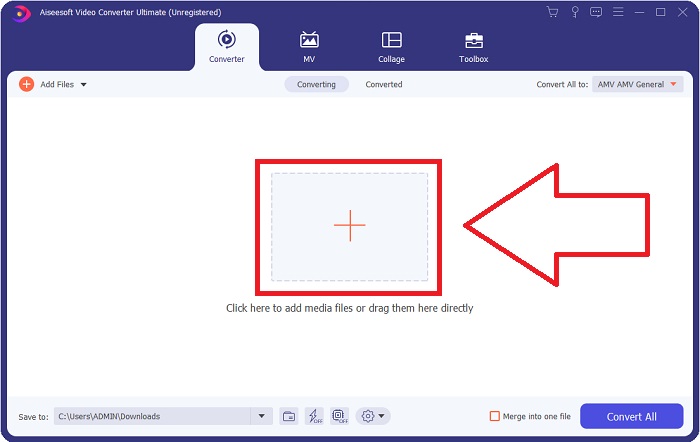
Krok 2: Po uruchomieniu programu pojawi się okno. Na ekranie wyświetli się interfejs Converter wraz z obszarem przesyłania. Kliknij przycisk + lub przeciągnij dowolne pliki wideo z pulpitu, aby przejść dalej.
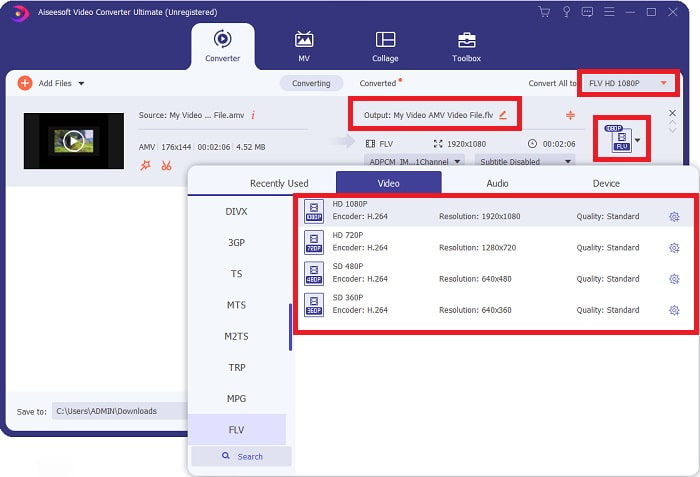
Krok 3: Aby przekonwertować format wideo AMV na FLV, po wgraniu pliku w programie musisz wybrać odpowiedni format wyjściowy i wskazać format FLV. Następnie możesz wybrać dowolną jakość wideo.
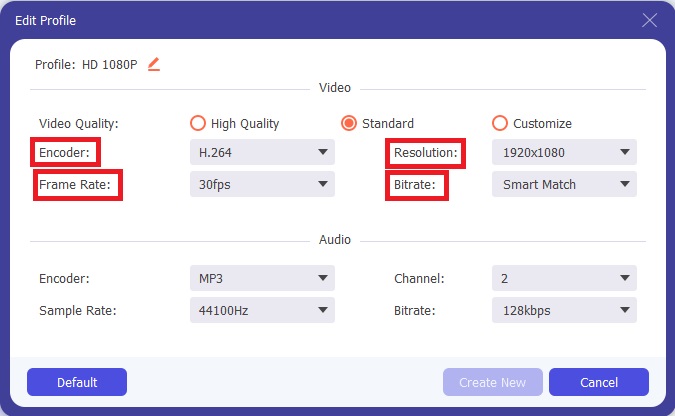
Krok 4: Jeśli chcesz dostosować lub utworzyć nowy, własny profil jakości wideo, kliknij ikonę koła zębatego obok listy dostępnych jakości.
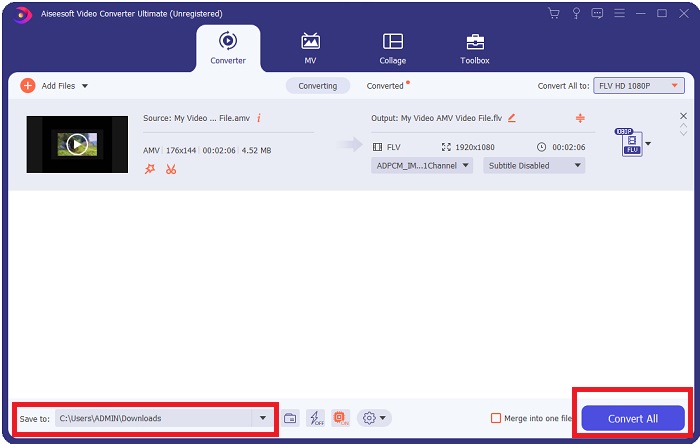
Krok 5: Już prawie gotowe! Gdy ustawisz wszystkie preferowane parametry i dostosowania, możesz wybrać lokalizację zapisywanego pliku, klikając ikonę folderu obok pola Save to w dolnym rogu okna. Teraz możesz rozpocząć konwersję, klikając przycisk Convert All.
Część 2. Narzędzie online do rozważenia przy konwersji AMV na FLV
Korzystanie z konwerterów online jest proste, ponieważ nie wymagają pobierania ani instalacji żadnego oprogramowania. Free Video Converter Online to doskonały przykład programu, który potrafi szybko i łatwo przekonwertować AMV na FLV. Za pomocą tego narzędzia możesz konwertować szeroką gamę formatów audio i wideo, a korzystanie z niego jest całkowicie darmowe. Możesz przesłać do programu dwa pliki do konwersji, a po zakończeniu procesu przekonwertowany plik zostanie automatycznie zapisany na dysku twardym. Poniżej przedstawię wszystkie procedury, które musisz znać, aby korzystać z tego świetnego narzędzia online.
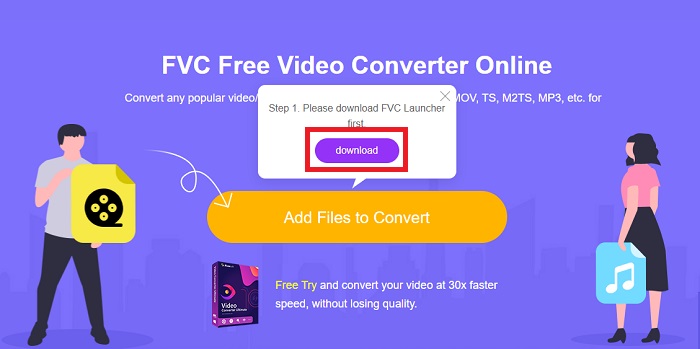
Krok 1: Kliknij ten link, aby przejść do głównej strony narzędzia online. Następnie rozpocznij konwersję pliku, klikając przycisk Add Files to Convert. Po chwili przycisk pobierania pojawi się w górnym rogu ekranu. Gdy instalacja uruchamiacza zostanie zakończona, możesz zacząć przesyłać plik z komputera do tego narzędzia.
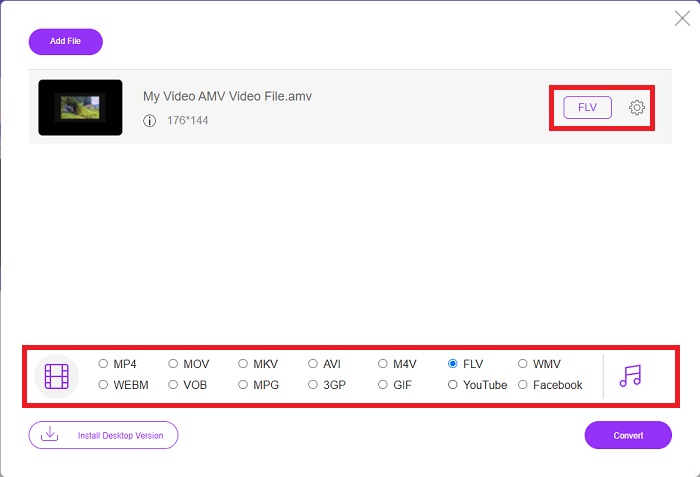
Krok 2: Gdy zaimportowany plik jest już gotowy, kliknij format wideo FLV znajdujący się poniżej. Podobnie jak w programie komputerowym, możesz także dostosować wszystkie parametry wyjściowego wideo, klikając ikonę koła zębatego.
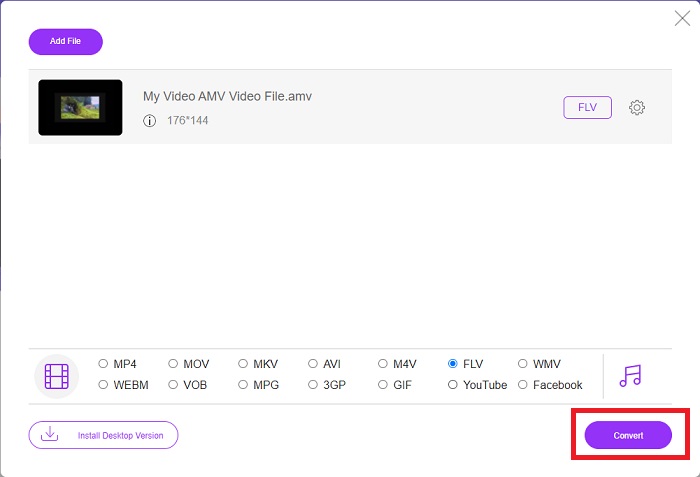
Krok 3: Na koniec kliknij przycisk Convert, aby zmienić swoje pliki AMV na format FLV.
Powiązane:
Część 3. Rozszerzona wiedza o AMV i FLV
AMV optymalizuje mało wszechstronne odtwarzacze multimedialne z wolnymi procesorami i małymi ekranami, takie jak odtwarzacz MP3 S1. Kodek wideo to Motion JPEG ze stałymi tabelami kwantyzacji. Kodek audio to IMA ADPCM, w którym pierwsze 8 bajtów każdej ramki to źródło (16 bitów), indeks (16 bitów) i ilość zaszyfrowanych 16-bitowych próbek (32 bity). Narzut dekodowania dla tych uproszczonych kodeków jest znikomy. Kompresja wideo jest niska (4 piksele/bajt vs. ponad 10 pikseli/bajt dla MPEG-2), ale rozmiary plików są małe ze względu na zmniejszoną rozdzielczość (96x96 wyższa lub równa 208x176) i fps (10, 12, lub 16 klatek/s). 30-minutowy film skompresowany do 128x96 pikseli i 12 klatek/s będzie miał 80 MB.
Jednak plik wideo z rozszerzeniem.flv, którego można użyć rozszerzenia pliku FLV, jeśli chcesz przesyłać strumieniowo wideo lub dźwięk z programu Adobe Flash Player lub Adobe Air przez Internet. Przez długi czas Flash Video był domyślnym formatem wideo dla prawie wszystkich filmów online, w tym w witrynach takich jak YouTube, Hulu i niezliczonych innych. Z tego powodu usługi przesyłania strumieniowego i twórcy oprogramowania nie używają już zastrzeżonego formatu Flash firmy Adobe. Biorąc pod uwagę wszystkie te porównania, oto mała pomoc dla ciebie, ten artykuł dostarczył ci tabelę porównawczą:
| Rozszerzenie pliku | AMV | FLV |
| Nazwa pliku | Teledysk do anime | Plik wideo Flash |
| Opracowany przez | Jim Kaposztas | Firma Adobe System Incorporated |
| Plusy | ◆ AMV to jeden z najpopularniejszych teledysków anime stworzonych przez fanów. ◆ Rozmiar pliku jest mały. | Adobe Flash dla dynamicznych i interaktywnych stron internetowych może być ogromną zaletą. Mimo że jest to prosty proces, wyniki mogą być znaczące. Flash był kiedyś popularnym wyborem również dla prostych gier wideo. |
| Cons | ◆ Niekompatybilny z większością odtwarzaczy multimedialnych i urządzeń; niska jakość. | Wadą był spadek popularności FLV. Tworzenie zawartości FLV może być czasochłonne i kosztowne. Brak obsługi Flasha na urządzeniach z systemem iOS poważnie ogranicza jego zdolność do przyciągania nowych użytkowników. |
| Programy obsługujące plik | ◆ Odtwarzacz multimedialny VLC ◆ Konwerter iOrgsoft AMV | ◆ RealPlayer ◆ Odtwarzacz Apple QuickTime ◆ Odtwarzacz multimedialny VLC ◆ MPlayer |
Część 4. Często zadawane pytania dotyczące konwersji AMV do FLV
Jaki jest cel AMV?
Synchronizacja i jedność w AMV pozwala osiągnąć różne style edycji wideo. Możliwe jest uzyskanie surowej edycji dzięki prostemu powiększaniu i pomniejszaniu „efektów” oraz prostym przejściom. Wśród wielu przykładów są następujące.
Jak powstają AMV?
Aby AMV odniosło sukces, musi użyć piosenki, która jest ściśle związana z tematem i prawie idealnie ją opisuje. Każdy, kto to czyta, może odpowiedzieć: „Wow, to jest niesamowite! Ta piosenka jest jego, jej piosenka przewodnia. Z tego powodu wybrałeś dobry kawałek.
Czy FLV jest lepszej jakości?
Format FLV i MP4 mogą przechowywać wysokiej jakości kodowanie cyfrowe wideo i audio. Jakość plików FLV jest przedmiotem debaty, ale zalety i wady FLV mogą omówić format pliku. Wyższe współczynniki kompresji w MP4 powodują mniejszą utratę jakości.
Wniosek
Podsumowując, będziesz wiedział, jak ważny jest wybór najlepszego konwertera w konwersji AMV na FLV. Inni będą tworzyć filmy o niskiej jakości i niezsynchronizowane po konwersji wideo. Ale dwa konwertery polecane w tym artykule to najwyższej klasy konwerter, którego nie musisz martwić się o jakość, jaką zapewni.
-
 Najlepsza metoda do użycia podczas konwersji AMV do AVI [Zatwierdzone]
 Czy masz trudności z konwersją pliku wideo w formacie AMV do AVI? Oto kilka wskazówek, które można znaleźć tylko w tym artykule.
-
 3 najnowsze konwertery AMV dostępne do konwersji formatu AMV na MOV [2022]
 Nie wiesz, jak przekonwertować pliki AMV do formatu MOV? Następnie w tym artykule omówiono konwertery 3 AMV na MOV, których można używać online lub offline.
-
 4 Zweryfikowane metody konwersji TS do FLV na komputerze stacjonarnym / online
 Domyślnie nie można otworzyć TS na komputerze lub telefonie komórkowym. Jedynym sposobem na obejrzenie plików wideo jest konwersja TS do FLV lub innych formatów za pomocą naszego konkretnego przewodnika.
