


 Video Converter Ultimate
 Nagrywarka ekranu
 Naprawa wideo
2 zalecane konwertery używane do zmiany F4V na FLV za pomocą samouczków
Odtwarzacz Adobe Flash Player obsługuje formaty F4V i FLV jako kontenery do odtwarzania multimediów strumieniowanych z internetu. Chociaż jest to format oparty na technologii Adobe, te dwa typy plików w wielu aspektach się różnią. Na przykład dane zakodowane w FLV nie są takie same jak w F4V, ponieważ FLV jest zbliżony do SWF. Co więcej, jeśli chcesz konwertować F4V na FLV i uzyskać plik podobny do SWF, przeczytaj ten artykuł, aby dowiedzieć się więcej.

Część 1. 2 konwertera najczęściej wybieranego do konwersji F4V na FLV
Pierwszy wybór. Konwerter wideo FVC Ultimate
FVC Video Converter Ultimate to wysoce polecany konwerter F4V na FLV, który możesz pobrać na Windows lub Mac. To narzędzie oferuje najszybszy i najbardziej niezawodny proces konwersji, z jakim kiedykolwiek się spotkasz, i zdążyło już zadowolić miliony użytkowników. Co więcej, konwersja formatów nie jest jego jedyną mocną stroną. Zgadnij co? Możesz tu także edytować materiał wideo, np. przycinać go, łączyć, wzmacniać dźwięk, kadrować i wiele więcej. Jeśli chcesz mieć wyjątkowy konwerter, który w pełni zaspokoi Twoje potrzeby, to będzie właściwy wybór. Poniżej znajdziesz kroki, jak w ciągu kilku minut przekonwertować pliki F4V na format FLV.
Jak konwertować F4V na FLV za pomocą FVC Video Converter Ultimate:
Krok 1. Aby pobrać oprogramowanie na dysk komputera, kliknij przycisk pobierania.
Bezpłatne pobieranieDla Windows 7 lub nowszegoBezpieczne pobieranie
Bezpłatne pobieranieDla MacOS 10.7 lub nowszegoBezpieczne pobieranie
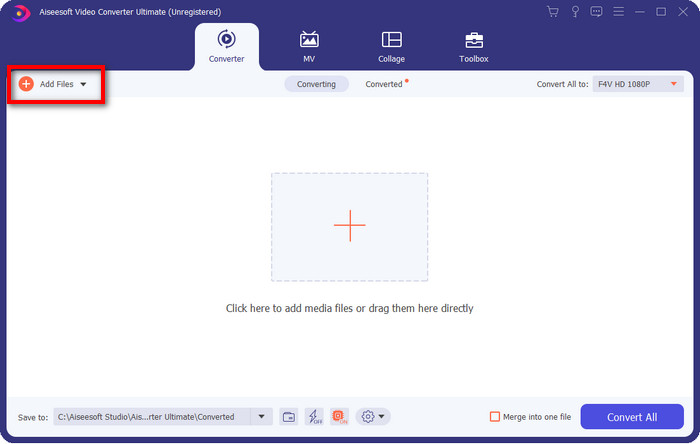
Krok 2. Kliknij oprogramowanie, aby je otworzyć, dodaj plik, klikając Add Files w prawej górnej części interfejsu, a po wybraniu pliku F4V, który chcesz konwertować, kliknij Open.
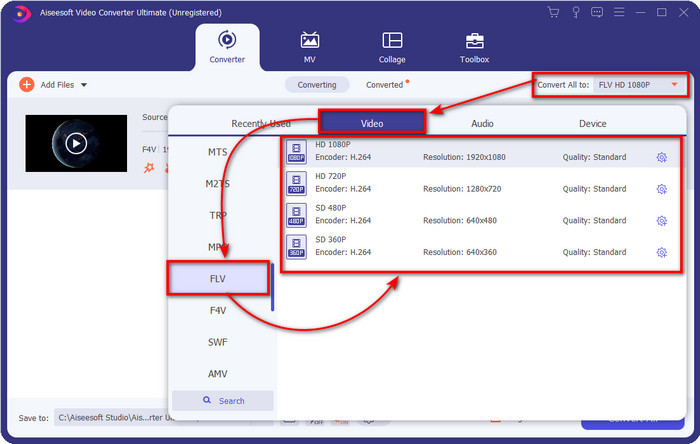
Krok 3. Naciśnij przycisk Convert All to i zmień format na FLV.
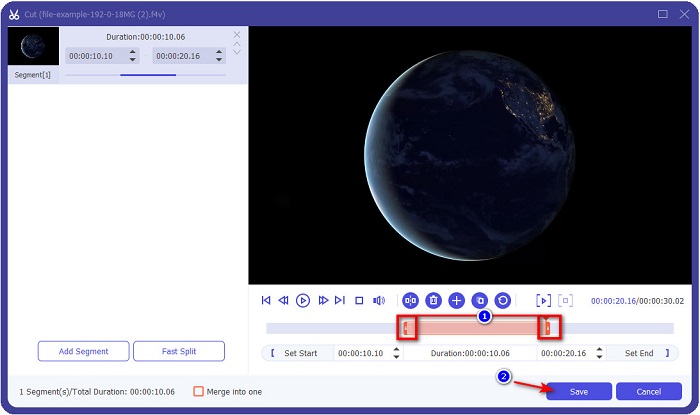
Chcesz skrócić wideo? Jeśli tak, kliknij ikonę scissors. Dostosuj handlebar do długości, którą chcesz uzyskać, a następnie kliknij Save, aby zapisać zmiany.
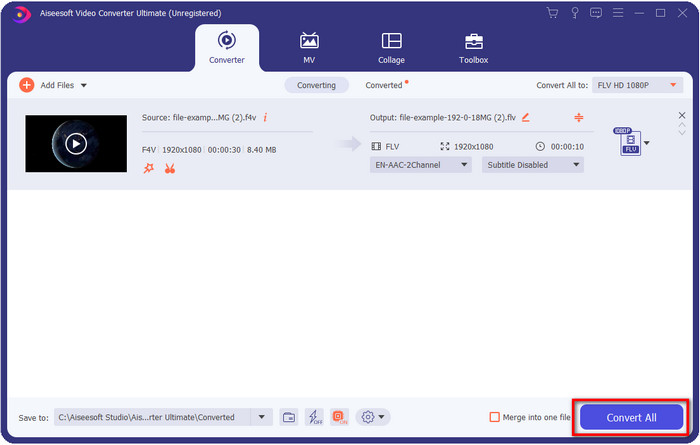
Krok 4. Aby zmienić F4V na FLV, kliknij Convert All, a proces szybko się rozpocznie. Pojawi się okno folderu komputera, w którym znajduje się Twój plik.
Plusy
- Bez wysiłku konwertuje wiele F4V do FLV, AVI, MOV, MKV i ponad 200 innych formatów.
- Przyspieszenie sprzętowe i szybka konwersja są dostępne tutaj, aby przyspieszyć konwersję.
- Jest dostępny we wszystkich systemach Windows i macOS.
- Wyjątkowe funkcje edycji wideo, które sprawią, że Twój film będzie wyglądał fenomenalnie, znajdziesz w Toolbox.
Cons
- Musisz go kupić, zanim będziesz mógł z niego korzystać.
- Pobranie konwertera na pulpit jest konieczne.
Drugi wybór. Darmowy konwerter wideo FVC online
FVC Free Video Converter Online umożliwia przeprowadzenie konwersji online. To narzędzie jest dostępne we wszystkich przeglądarkach i pozwala konwertować F4V na FLV online bez ograniczeń. Nie obsługuje jednak konwersji wsadowej. Mimo to, dzięki temu konwerterowi online możesz uzyskać żądany format. Chcesz wiedzieć jak? Wykonaj poniższe kroki.
Jak konwertować F4V na FLV za pomocą FVC Free Video Converter Online:
Krok 1. Aby otworzyć narzędzie webowe, musisz kliknąć ten link.
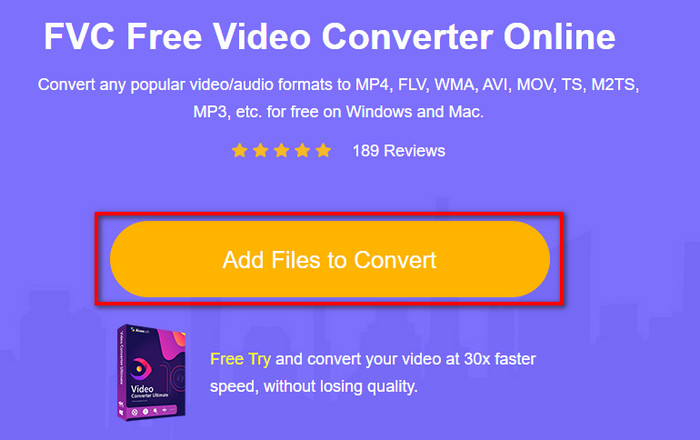
Krok 2. W głównym interfejsie konwertera online kliknij przycisk Add Files to Convert. Znajdź plik F4V w folderze, który się pojawi, i naciśnij Open.
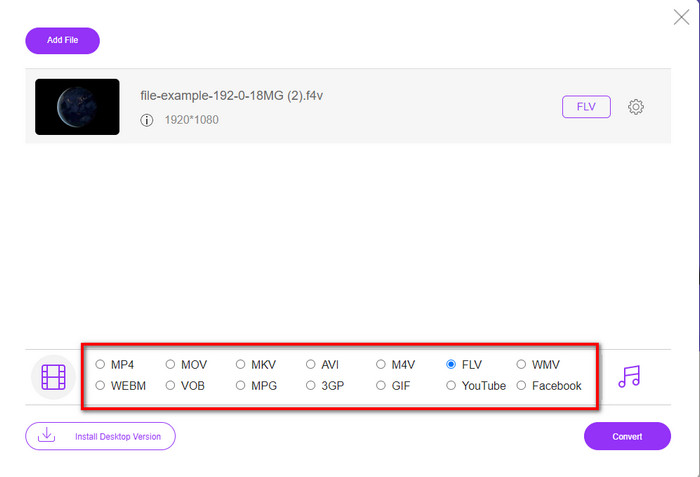
Krok 3. Na dole znajduje się wiele formatów do wyboru; kliknij FLV.
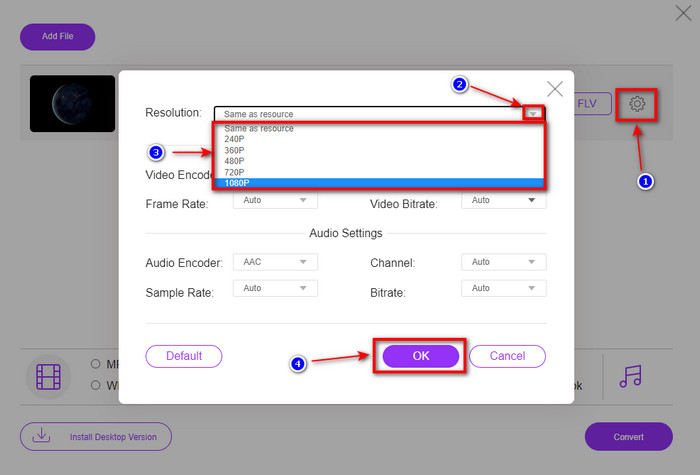
Chcesz zmienić rozdzielczość wideo? W takim razie kliknij ikonę cog, naciśnij drop-down i wybierz jakość wideo.
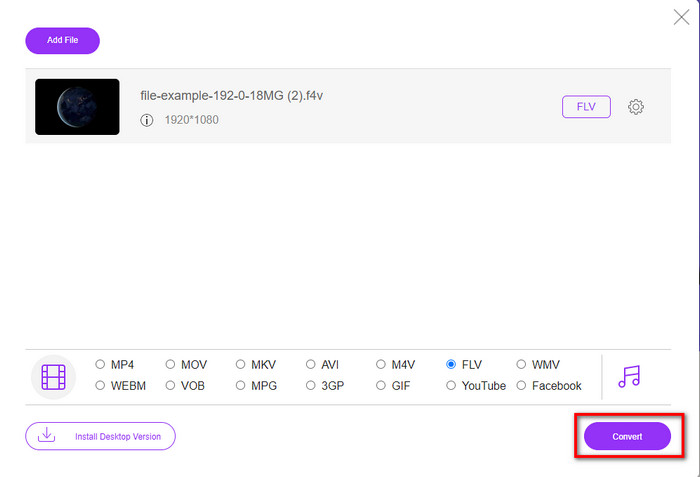
Krok 4. Rozpocznij proces konwersji F4V na FLV, klikając Convert.
Plusy
- Dostępne we wszystkich posiadanych przeglądarkach internetowych.
- Darmowy i łatwy w obsłudze konwerter online.
- Bez złośliwego oprogramowania i bez reklam na głównej stronie internetowej.
Cons
- Połączenie internetowe jest koniecznością.
- Nie obsługuje funkcji edycji wideo, takich jak FVC Video Converter Ultimate.
Część 2. F4V kontra FLV: który format jest najlepszy
Jak wspomniano na początku, te dwa formaty to kontenery Adobe, których można używać do rozpowszechniania ich w Internecie. Ale teraz porównajmy różnice między tymi dwoma formatami, czytając poniższe szczegóły.
Format F4V to kontener Quicktime, taki jak format MP4. Jest to podstawowy format plików multimedialnych ISO do przesyłania strumieniowego wideo przez Internet. Ponadto ten format jest ulepszoną wersją FLV. Mimo to istnieje wiele problemów z kodowaniem wideo i audio, które są na FLV. Ponadto nie możesz wygenerować strony internetowej HTML, jaką może zrobić dla Ciebie FLV.
FLV to pliki, które mają prawie taką samą strukturę jak SWF. Ten format jest bardziej obsługiwany w programie Adobe Flash Player i większości HTML 5. Obsługuje kompresję wideo i audio, taką jak kodeki Sorenson Spark lub VP6. Co więcej, jeśli rozważasz pobranie wideo z sieci, ten format jest najlepszym wyborem. W przeciwieństwie do F4V, jeśli chcesz wygenerować HTML na swojej stronie internetowej, jest to format dla Ciebie.
Najlepiej byłoby przekonwertować F4V na FLV, ponieważ korzyści, jakie uzyskasz na FLV, a które nie są dostępne w F4V. Chociaż mówi się, że F4V jest nową wersją FLV, wciąż unikatowość FLV jest jedyna w swoim rodzaju, której F4V nie może skopiować w wielu aspektach.
Część 3. Często zadawane pytania dotyczące konwersji F4V na FLV
Jak mogę odtwarzać filmy F4V?
Dzięki wydajnemu odtwarzaczowi multimedialnemu możesz to zrobić bez wysiłku, a najlepszym przykładem jest Aiseesoft Blu-ray Player. Wykonaj te proste kroki, aby dowiedzieć się, jak odtwarzać pliki F4V. Najpierw pobierz oprogramowanie na komputer i uruchom je. Załaduj plik do narzędzia, klikając Open File. Po wczytaniu plik zacznie się odtwarzać automatycznie.
Co jest lepsze? F4V czy MOV?
To zależy od celu, w jakim chcesz go używać. Na przykład F4V świetnie sprawdza się przy dystrybucji plików multimedialnych w sieci bez utraty jakości. Jeśli jednak chcesz edytować wideo na Macu, lepszym wyborem będzie MOV. Dlatego jeśli chcesz edytować swoje wideo F4V na Macu, musisz się dowiedzieć, jak konwertować F4V na MOV.
Czy F4V zawiera wysokiej jakości dane wyjściowe?
Pliki F4V mogą zawierać jakość wideo 1080 lub 720, ale rozmiar pliku pozostanie minimalny.
Wniosek
Teraz, gdy wiemy już, jak zmienić F4V na FLV za pomocą konwerterów, nadszedł czas, aby wybrać zaufany konwerter na podstawie recenzji. Jeśli chcesz skorzystać z darmowego procesu konwersji online, powinieneś użyć FVC Free Video Converter Online. Jednak to narzędzie webowe nie jest w stanie dorównać możliwościom najlepszego konwertera. Bez zbędnych wstępów – wolimy używać FVC Video Converter Ultimate, ponieważ znacznie ułatwia i przyspiesza konwersję. Ten fenomenalny konwerter jest jedyny w swoim rodzaju i imponuje wielu użytkownikom swoimi unikalnymi funkcjami. Możemy więc powiedzieć, że dzięki tym narzędziom jesteśmy o krok bliżej sukcesu.
-
 4 najnowsze konwertery online i offline do konwersji F4V na format AVI
 Nie masz pojęcia, jakiego konwertera należy użyć do konwersji F4V na AVI lub inny format wideo? Następnie przeczytaj ten artykuł, ponieważ dowiadujemy się, jak konwertować za pomocą dostępnego narzędzia.
-
 Jak przekonwertować F4V na MOV bez utraty jakości [rozwiązane]
 Jeśli masz problemy z uznaniem niektórych formatów wideo, takich jak F4V. Przeczytaj ten artykuł, aby dowiedzieć się więcej o formacie wideo F4V i MOV oraz dowiedzieć się, jak przekonwertować F4V na MOV przy użyciu różnych metod.
-
 Konwertuj TRP na FLV za pomocą najłatwiejszych metod offline i online
 Czy chcesz szybko i bezproblemowo przekonwertować plik wideo TRP na FLV? Przeczytaj ten artykuł, aby zapewnić najlepsze oprogramowanie i usługę online, które najlepiej pasują do sytuacji.
