


 Video Converter Ultimate
 Nagrywarka ekranu
 Naprawa wideo
Jak przekonwertować pliki wideo FLV do formatu AVI na komputerze PC / Mac
Ten przewodnik koncentruje się na tym, jak konwertować FLV na AVI za pomocą oprogramowania komputerowego i aplikacji online. Istnieje wiele powodów, dla których możesz potrzebować konwersji swoich filmów FLV. FLV został opracowany do dystrybucji treści wideo w internecie, ale nie do odtwarzania na urządzeniach cyfrowych. Gdy chcesz oglądać FLV na komputerze, musisz zmienić go na inny format wideo. Co więcej, dobrym pomysłem jest też konwersja FLV do nieskompresowanego formatu wideo, jeśli chcesz edytować swoje pliki wideo.

Część 1: Najlepsze bezpłatne sposoby 2 na konwersję FLV do AVI
Metoda 1: Konwertuj FLV na AVI za pomocą darmowego konwertera FLV
Podczas konwertowania FLV na AVI możesz martwić się kilkoma kwestiami, takimi jak jakość wyjściowa, łatwość obsługi i inne. FVC Free FLV Converter to najlepszy wybór. Choć jest bezpłatny, otrzymujesz wiele funkcji na poziomie profesjonalnym bez potrzeby posiadania dużej wiedzy technicznej. Dodatkowo zapewnia wiele narzędzi dodatkowych, takich jak edycja wideo.
Główne cechy najlepszego konwertera FLV
- 1. Łatwo konwertuj filmy FLV na inne formaty multimedialne.
- 2. Obsługuje prawie wszystkie formaty wideo, takie jak AVI, MP4, MKV itp.
- 3. Przetwarzaj wsadowo setki plików FLV na konwersję.
Bezpłatne pobieranieDla Windows 7 lub nowszegoBezpieczne pobieranie
Bezpłatne pobieranieDla MacOS 10.7 lub nowszegoBezpieczne pobieranie
Jak przekonwertować FLV do AVI na komputerze za darmo?
Krok 1: Dodaj pliki FLV
Po zainstalowaniu najlepszego darmowego konwertera FLV na swoim komputerze uruchom go. Jest kompatybilny zarówno z PC, jak i z Mac. Kliknij menu Add File(s) w lewym górnym rogu, aby otworzyć okno wyboru plików. Następnie znajdź i zaznacz filmy FLV na komputerze i kliknij przycisk Open, aby je dodać.

Krok 2: Edytuj wideo i ustaw format
Jeśli chcesz zmodyfikować swoje pliki wideo, zaznacz plik FLV i kliknij menu Edit. Następnie zostaniesz przeniesiony do okna edycji wideo. Postępuj zgodnie z instrukcjami wyświetlanymi na ekranie, aby go edytować, a potem wróć do głównego interfejsu.
Kliknij menu rozwijane Format wyjściowy u dołu głównego interfejsu, aby otworzyć okno dialogowe profilu. Następnie wyszukaj AVI i wybierz go w zakładce Ogólne wideo.

Krok 3: Konwertuj FLV na AVI
Kliknij ikonę z trzema kropkami obok pola Output folder i wybierz konkretny folder, w którym chcesz zapisać pliki AVI. Na końcu kliknij przycisk Convert, aby natychmiast rozpocząć konwersję FLV na AVI.

Metoda 2: Jak przekonwertować FLV na AVI za pomocą VLC
VLC to znacznie więcej niż zwykły odtwarzacz multimedialny. Możesz znaleźć wiele przydatnych funkcji, w tym konwersję wideo. Jako projekt o otwartym kodzie źródłowym, VLC umożliwia bezpłatną konwersję FLV do AVI. Co więcej, VLC jest w stanie naprawić uszkodzone filmy AVI.
Krok 1: Uruchom darmowy konwerter FLV. Jeśli nie masz VLC, pobierz go za darmo z oficjalnej strony.
Krok 2: Przejdź do menu Media na górnym pasku i wybierz Convert/Save. Na Macu wybierz Convert/Stream z menu File.
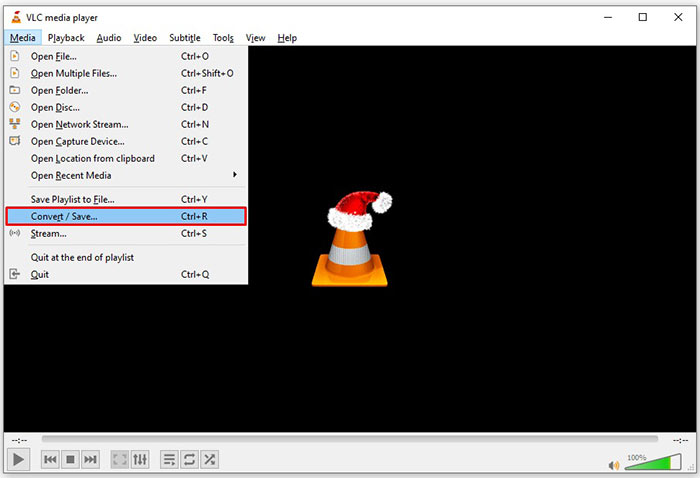
Krok 3: Kliknij przycisk Add w oknie Open Media i dodaj plik FLV, który chcesz przekonwertować.
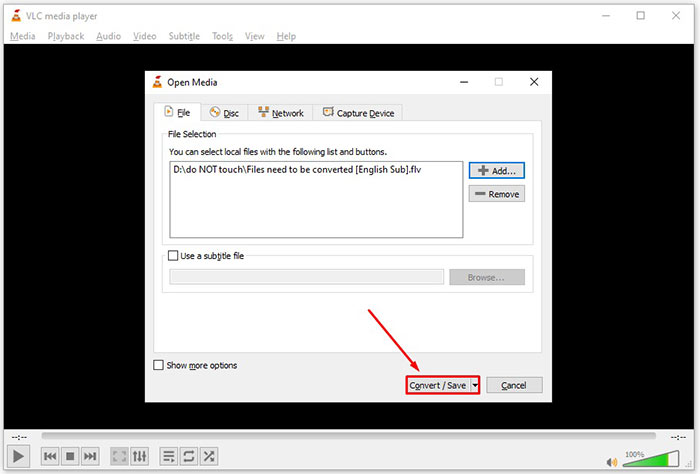
Krok 4: Następnie kliknij przycisk Convert/Save, aby przejść do kolejnego okna.
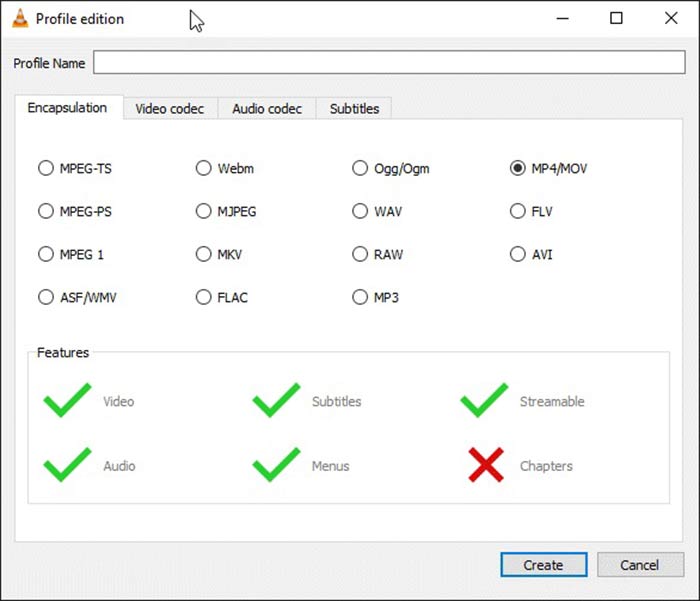
Krok 5: Rozwiń listę Profile i wybierz AVI. Jeśli nie możesz go znaleźć, kliknij trzeci przycisk obok Profile. Otworzy się okno Profile edition. Wybierz AVI i wpisz Profile Name. Kliknij Create, aby potwierdzić. Następnie wybierz nową pozycję z listy Profile.
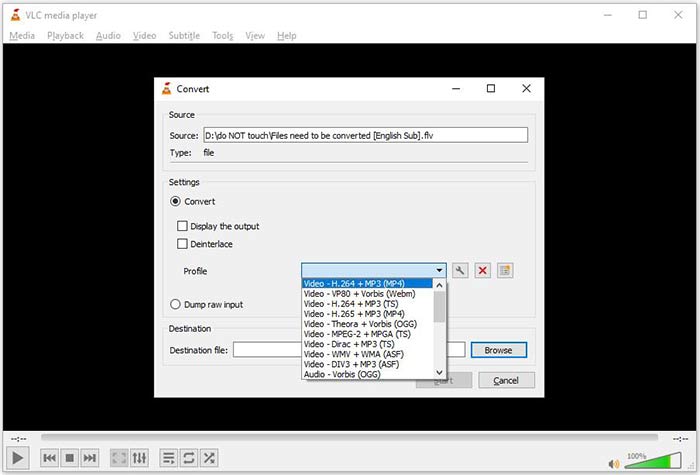
Krok 6: Ustaw folder wyjściowy, klikając przycisk Browse. Kliknij przycisk Start, a VLC przekonwertuje FLV na AVI.
Nie przegap:
- • Najlepsze sposoby 3 na konwersję FLV do MOV
- • Jak konwertować pliki wideo FLV do plików audio MP3 na komputerze i w Internecie
Część 2: Jak przekonwertować FLV do AVI Online
Czasami potrzebujesz przekonwertować FLV na AVI tylko od czasu do czasu. Poza tym niektórzy nie lubią instalować oprogramowania. FVC Free Online Video Converter może spełnić te wymagania. Działa online, ale w zupełności wystarczy do konwersji kilku plików FLV na AVI. W przeciwieństwie do innych aplikacji webowych nie narzuca limitu rozmiaru pliku, znaku wodnego i innych ograniczeń.
Step 1: Wejdź na stronę https://www.free-videoconverter.net/free-online-video-converter/ w przeglądarce, gdy potrzebujesz przekonwertować filmy. Kliknij przycisk Add Files to Convert i pobierz uruchamiacz (launcher).
Pobierz Wersję desktopową, aby konwertować pliki w trybie wsadowym.
Step 2: Po pobraniu uruchamiacz pojawi się automatycznie. Kliknij przycisk Add File w lewym górnym rogu i wgraj pliki FLV, które chcesz przekonwertować. Następnie wybierz AVI na dole.
Aby zmienić rozdzielczość, liczbę klatek na sekundę i inne parametry, kliknij ikonę Gear, aby otworzyć okno ustawień profilu.
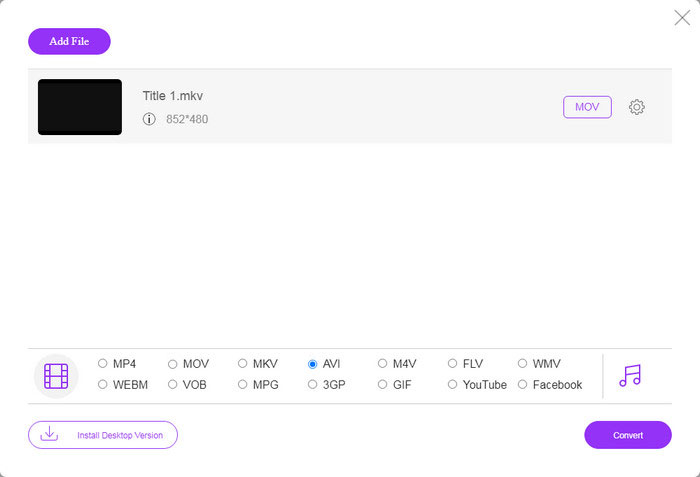
Step 3: Po kliknięciu przycisku Convert aplikacja webowa zacznie działać zgodnie z Twoimi ustawieniami. Gdy pojawi się odpowiedni komunikat, pobierz pliki wideo AVI na dysk twardy.
W porównaniu z innymi internetowymi konwerterami wideo, darmowy konwerter wideo online działa szybko, ale potrzebujesz również dobrego połączenia z Internetem.
FLV kontra AVI
Adobe Flash Player używał FLV do dostarczania treści wideo, takich jak filmy i programy telewizyjne. Obecnie firma Adobe nie rozwija już odtwarzacza i zaleca użytkownikom odinstalowanie go ze względów bezpieczeństwa. Jednak nadal możesz używać formatu FLV w wielu programach firm innych niż Adobe/Macromedia.
Oparty na formacie Resource Interchange File Format (RIFF), format AVI został wprowadzony przez firmę Microsoft w 1992 roku. Może zapisywać wysokiej jakości wideo/audio, ponieważ zużywa mniej kompresji. Ale to również powoduje duży rozmiar pliku AVI, co może stanowić problem, gdy ilość miejsca jest ograniczona.
Część 3: Często zadawane pytania dotyczące FLV do AVI
Jak długo powinienem czekać na konwersję FLV do AVI?
To zależy od twojej sytuacji. Ogólnie rzecz biorąc, konwersja filmów na komputerze jest bardzo szybka. W przypadku narzędzi online wydajność będzie określać Twoje połączenie internetowe.
Czy konwersja FLV do AVI online jest bezpieczna?
Większość internetowych aplikacji konwertujących FLV obiecuje usunąć Twoje filmy po konwersji. Nie należy jednak przesyłać prywatnych filmów online, chyba że masz pewność, że aplikacja internetowa jest bezpieczna w użyciu 100%.
Czy AVI jest lepszy niż FLV?
FLV to stratny format wideo, podczas gdy AVI to nieskompresowany format wideo. Oznacza to, że plik FLV jest mniejszy niż AVI w tym samym stanie. Jednak AVI zapewnia lepszą jakość wideo. FLV służy do udostępniania filmów online, a AVI to dobry wybór do edycji filmów.
Wniosek
W tym przewodniku udostępniono trzy sposoby konwertowania plików wideo FLV do formatu AVI za pomocą oprogramowania komputerowego i aplikacji internetowej. VLC jest zarówno darmowym odtwarzaczem multimedialnym, jak i konwerterem wideo, chociaż jest trudny w użyciu. Co więcej, możesz wykonać pracę online bez instalowania żadnego oprogramowania. Sugerujemy jednak wypróbowanie darmowego konwertera FLV FVC, ponieważ jakość wyjściowa jest niesamowita. Ponadto jest dość łatwy w użyciu i nawigacji. Jeśli masz inne pytania związane z konwersją FLV do AVI, zostaw wiadomość pod tym postem.
-
 3 darmowe sposoby konwersji FLV na WAV
 Jak przekonwertować plik FLV? Czy VLC może przekonwertować FLV na WAV? Ten post mówi 3 darmowe sposoby konwersji FLV do WAV bez utraty jakości.
-
 3 darmowe sposoby konwersji FLV na MPG
 Jak przekonwertować FLV na MPEG? Czy mogę bezpłatnie przekonwertować FLV na MPG? W tym poście udostępniono 3 bezpłatne konwertery wideo, które pomogą Ci przekonwertować FLV na MPG bez utraty jakości.
-
 3 darmowe sposoby na konwersję FLV do grania na Xbox
 Nie możesz odtwarzać plików FLV na Xbox One lub Xbox 360? Chcesz przekonwertować FLV na format obsługiwany przez Xbox, taki jak MP4, AVI, MOV lub WMV? Ten post zawiera listę 3 darmowych konwerterów FLV na Xbox, dzięki którym możesz grać w FLV na Xbox.

