


 Video Converter Ultimate
 Nagrywarka ekranu
 Naprawa wideo
3 darmowe sposoby konwersji FLV na WAV
Chcesz wyodrębnić dźwięk z pobranych filmów, ale nie wiesz jak? Szukasz łatwego sposobu na konwersję plików FLV na WAV lub MP3?
W niektórych przypadkach wystarczy ścieżka dźwiękowa lub podkład muzyczny jednego filmu. Musisz więc przekonwertować wideo na audio. Ten post będzie głównie mówił o tym, jak przekonwertować FLV na WAV.

Poniżej polecamy 3 świetne konwertery FLV na WAV, dzięki którym przekonwertujesz swoje pliki FLV. Możesz wybrać preferowaną metodę, aby zamienić FLV na dźwięk w formacie WAV.
Część 1. Konwertuj FLV na WAV Online
Gdy w internecie szukasz metody konwersji FLV na WAV, w wynikach pojawia się wiele darmowych konwerterów online. Jeśli nie wiesz, którego użyć, szczerze polecamy popularny Darmowy Konwerter Wideo Online. Jest on specjalnie zaprojektowany do konwersji FLV na dowolny, często używany format wideo i audio, taki jak MP4, MOV, AVI, MP3, AAC, M4A oraz WAV.
W porównaniu z innymi konwerterami FLV na WAV online, obsługuje więcej formatów wejściowych i wyjściowych oraz oferuje szybszą konwersję. Co więcej, nie wymaga rejestracji ani logowania. Pozwala konwertować dowolny plik FLV bez limitu rozmiaru pliku.
Krok 1: Wejdź na tę darmową stronę konwertera FLV na WAV online w swojej przeglądarce. Jest on kompatybilny z większością przeglądarek, w tym Safari, IE, Chrome, Firefox i Yahoo.
Krok 2: Kliknij Add Files to Convert, a następnie przycisk Download, aby zainstalować launcher do konwersji FLV. Po instalacji pojawi się okno podręczne, w którym możesz wczytać swój plik FLV.

Krok 3: Po przejściu do głównego okna konwertera zobaczysz listę popularnych formatów wideo, takich jak MP4, MOV, AVI, FLV, MKV, VOB, MPG, WMV i inne. Na tym etapie musisz kliknąć ikonę Audio, aby wyświetlić formaty audio. Wybierz WAV jako format wyjściowy.
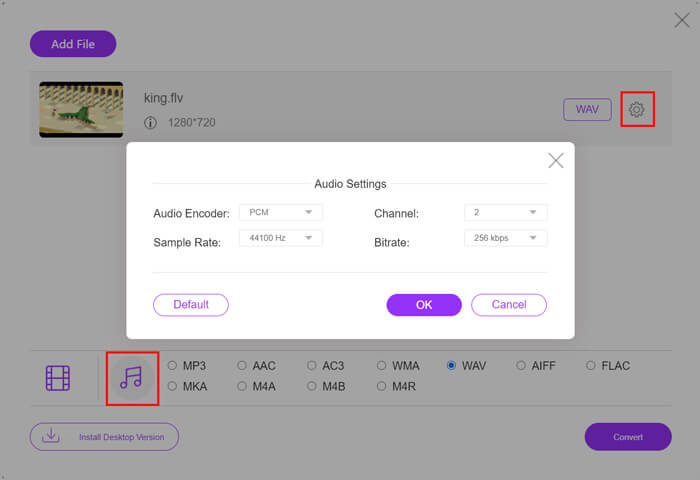
Krok 4: Przed konwersją FLV na WAV możesz kliknąć ikonę Settings obok formatu wyjściowego, aby dostosować więcej ustawień audio. Możesz tutaj zmienić koder audio, kanały, częstotliwość próbkowania i bitrate. Następnie kliknij przycisk Convert, aby zmienić swój plik FLV na dźwięk w formacie WAV.
Jeśli chcesz przekonwertować FLV na dźwięk, np. MP3, WMA, WAV itd., powinieneś kliknąć kartę audio, aby ją zaznaczyć.
Część 2. Bezpłatna konwersja FLV do WAV
Oprócz internetowych konwerterów FLV dostępne są także darmowe konwertery wideo, które pomogą ci z łatwością przekonwertować FLV na WAV. W tym celu możesz skorzystać z programu Free FLV Converter.

Darmowy konwerter FLV na WAV
155321+ pliki do pobrania- Konwertuj FLV na WAV, AAC, MP3, M4A, MP4, MOV, AVI i inne.
- Obsługuje wszystkie często używane formaty wideo i audio.
- Obsługa najnowszych wielordzeniowych procesorów CPU i akceleracji GPU.
- Konwertuj jeden lub więcej plików FLV bez utraty jakości.
Darmowe pobieranieDla Windows 7 lub nowszegoBezpieczne pobieranie
Darmowe pobieranieDla macOS 10.7 lub nowszegoBezpieczne pobieranie
Zawiera wszystkie potrzebne funkcje konwersji. Poniższy przewodnik pokaże Ci, jak za jego pomocą przekształcić FLV w WAV.
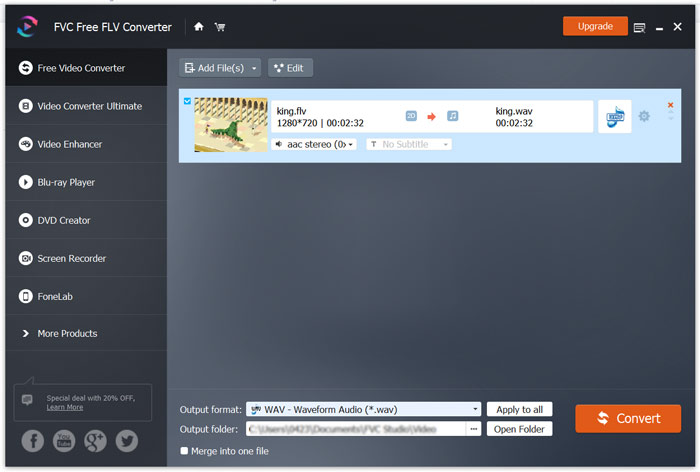
Krok 1: Pobierz za darmo, zainstaluj i uruchom ten darmowy konwerter FLV na WAV na swoim komputerze. Kliknij Add Files, aby zaimportować plik(i) FLV.

Krok 2: Kliknij Output format i wybierz WAV jako format docelowy. Następnie wybierz odpowiedni folder docelowy.
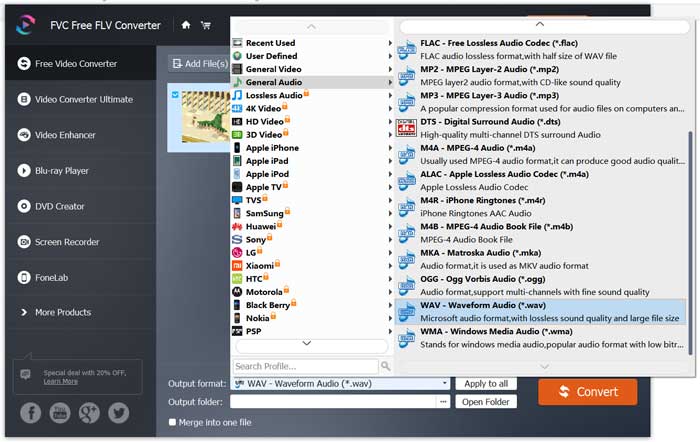
Krok 3: Kliknij przycisk Convert, aby rozpocząć konwersję FLV na WAV.
Część 3. Konwertuj FLV na WAV za pomocą VLC
Jeśli na komputerze masz zainstalowany VLC Media Player, możesz również skorzystać z VLC, aby przekonwertować FLV na WAV. Pamiętaj, że VLC to popularny odtwarzacz multimedialny, który oferuje także podstawowe funkcje konwersji i edycji.
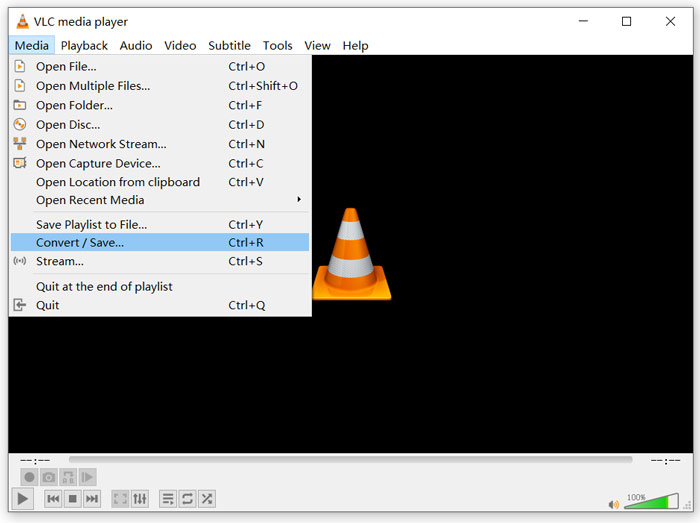
Krok 1: Otwórz VLC Media Player na swoim komputerze. Możesz go bezpłatnie pobrać ze strony VideoLAN. Kliknij Media, a następnie wybierz opcję Convert/Save z menu rozwijanego.
Krok 2: Teraz zostaniesz przeniesiony do okna Open Media. Kliknij przycisk Add, aby dodać plik FLV, który chcesz przekonwertować. Następnie kliknij przycisk Convert/Save, aby wyświetlić okno Convert.
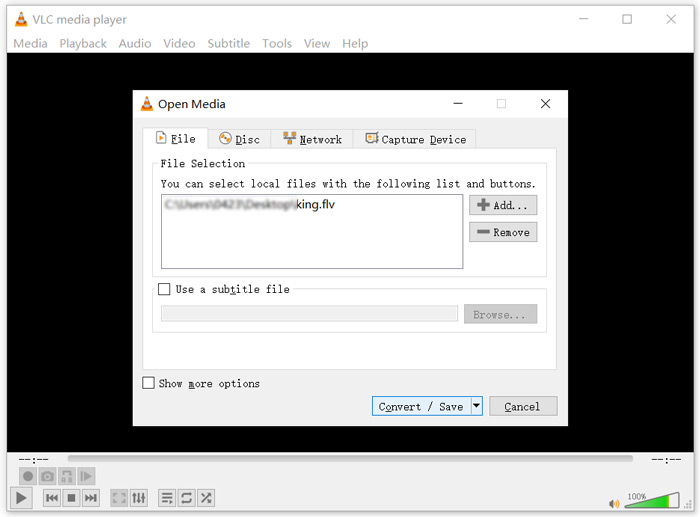
Krok 3: Zaznacz opcję Display the output w zakładce Convert. Następnie wybierz odpowiedni format wyjściowy z rozwijanej listy Profile. Kliknij przycisk Browse, aby wybrać odpowiedni folder docelowy. Na tym etapie możesz zmienić nazwę pliku wyjściowego.
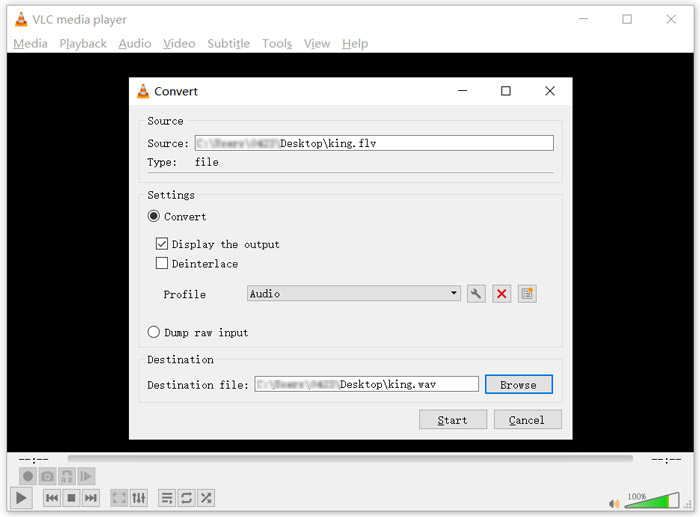
Krok 4: Kliknij przycisk Start, aby rozpocząć konwersję FLV na WAV. Po zakończeniu VLC automatycznie odtworzy przekonwertowany plik WAV. Podczas konwersji zobaczysz komunikat Converting file. Nie zamykaj całkowicie VLC Media Player, dopóki konwersja się nie zakończy.
Część 4. Często zadawane pytania dotyczące konwersji FLV do WAV
FLV vs WAV, Jaka jest różnica między FLV a WAV?
FLV, Flash Video File, to kompatybilny z Flashem format wideo opracowany przez firmę Adobe Systems. Zawiera krótki nagłówek oraz przeplatane pakiety wideo, audio i metadanych. FLV został pierwotnie zaprojektowany do osadzania strumieni wideo w aplikacjach Adobe. Plik FLV zazwyczaj zawiera strumień wideo 640x360 oraz strumień audio 44,1 kHz, 2 kanały, AAC.
Plik z rozszerzeniem WAV to format Waveform Audio File i jest kontenerem przechowującym dane w segmentach. Został pierwotnie opracowany przez Microsoft i IBM i przechowuje nieskompresowany, bezstratny dźwięk, co skutkuje bardzo dużymi rozmiarami plików. Format używa kontenerów do przechowywania danych audio, numerów ścieżek, częstotliwości próbkowania i bitrate’u.
Jak przekonwertować FLV do WAV bez oprogramowania?
Jeśli chcesz przekonwertować FLV na WAV bez żadnego oprogramowania konwertującego, możesz zmienić rozszerzenie pliku z .flv na .wav.
Jak pobrać FLV do WAV?
Na rynku dostępnych jest wiele rejestratorów ekranu, które mogą pomóc w zapisaniu wideo jako plików audio na komputerze lokalnym.
Wniosek
Po przeczytaniu tego artykułu poznasz 3 darmowe sposoby wyodrębniania dźwięku WAV z plików FLV. Gdy będziesz musiał przekonwertować FLV na WAV, możesz wybrać preferowany konwerter FLV i wykonać konwersję.
-
 5 najlepszych darmowych odtwarzaczy WAV na Androida, iOS i komputer
 Jak odtwarzać pliki WAV na telefonie z systemem Android? Jaki odtwarzacz może odtwarzać WAV? Ten post przedstawia 5 najlepszych darmowych odtwarzaczy WAV na Androida, iPhone'a, Maca i PC.
-
 10 najlepszych odtwarzaczy wideo FLV dla Windows 10/8/7, Mac, iOS i Android, które musisz wypróbować
 Odtwarzacz FLV ułatwia dostęp do plików FLV na urządzeniach z systemem Windows, Mac, Android, iOS. Sprawdź najlepsze odtwarzacze plików FLV, które możesz teraz pobrać.
-
 Jak przekonwertować WAV na MP3 za pomocą najlepszych darmowych konwerterów 5
 Ta strona to długa lista darmowych konwerterów WAV na MP3 (iTunes, Audacity, VLC, Windows Media Player i Free Audio Converter) do zmiany WAV na MP3 na komputerze.
