


 Video Converter Ultimate
 Nagrywarka ekranu
 Naprawa wideo
5 szybkich i bezproblemowych sposobów na zamianę MKV na FLV za darmo [Online i offline]
Nie możesz udostępniać plików MKV w internecie, bo ich rozmiar jest zbyt duży? Zamiast maksymalnie je kompresować kosztem jakości, dlaczego po prostu ich nie przekonwertujesz? Ten problem rozwiążesz, jeśli przed wysłaniem przeczytasz poniższe informacje. Nie musisz spędzać godziny na lekturze tego artykułu, więc bez zbędnych wstępów poznajmy sześć konwerterów, których możesz użyć, aby konwertować MKV do FLV.

Część 1. Najlepszy konwerter MKV na FLV do pobrania
FVC Video Converter Ultimate może pomóc ci łatwo i skutecznie zmienić MKV na FLV, bez najmniejszego wysiłku. Ten wyjątkowy konwerter znacznie różni się od narzędzi z tej listy oraz innych programów, których używasz lub nie. To najwyższej klasy koder i dekoder, który możesz pobrać na PC lub Mac; działa bezbłędnie w trybie offline, nawet jeśli nie masz mocnego komputera stacjonarnego.

FVC Video Converter Ultimate
4 987 355+ pobrań- Konwertuj MKV na FLV, AVI, MP4, MOV lub na ponad 200 formatów dostępnych w systemach Windows i Mac.
- Spraw, aby Twój format MKV był kompatybilny ze wszystkimi komputerami stacjonarnymi i urządzeniami.
- Może wykonywać konwersję wsadową dla formatów MKV lub innych formatów.
- Niezawodny konwerter do użytku przez każdego.
- Obsługuje wyjście w wysokiej rozdzielczości, a nawet jakość wideo do 4k.
Bezpłatne pobieranieDla Windows 7 lub nowszegoBezpieczne pobieranie
Bezpłatne pobieranieDla MacOS 10.7 lub nowszegoBezpieczne pobieranie
Kroki konwersji MKV do FLV za pomocą FVC Video Converter Ultimate
Krok 1. Pobierz aplikację na dysk, a następnie postępuj zgodnie z instrukcjami instalacji.
Bezpłatne pobieranieDla Windows 7 lub nowszegoBezpieczne pobieranie
Bezpłatne pobieranieDla MacOS 10.7 lub nowszegoBezpieczne pobieranie
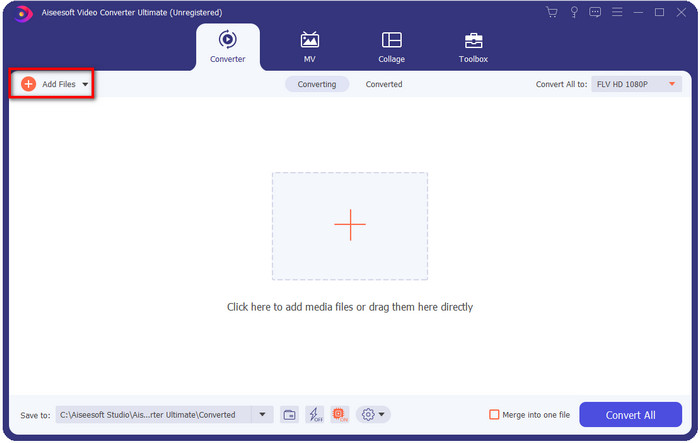
Krok 2. Po zakończeniu instalacji otwórz aplikację, aby dodać pliki MKV; możesz przeciągnąć i upuścić plik na interfejs lub kliknąć przycisk Add Files (Dodaj pliki).
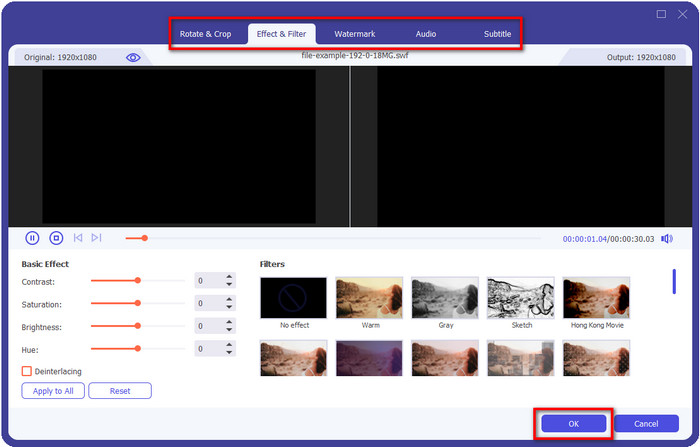
Jeśli chcesz edytować pliki MKV przed konwersją, kliknij przycisk z różdżką, aby dodać „magii” do swojego materiału, na przykład Efekty, Kadrowanie, Napisy i inne. Aby zapisać zmiany wprowadzone w wideo, kliknij OK.
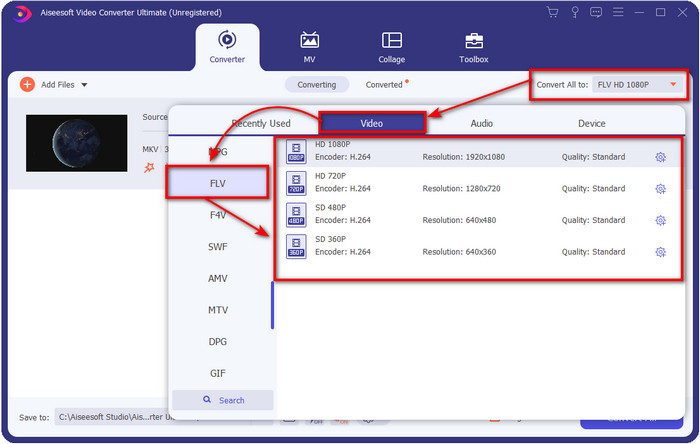
Krok 3. Kliknij przycisk rozwijany i na liście ustawień wybierz format FLV.
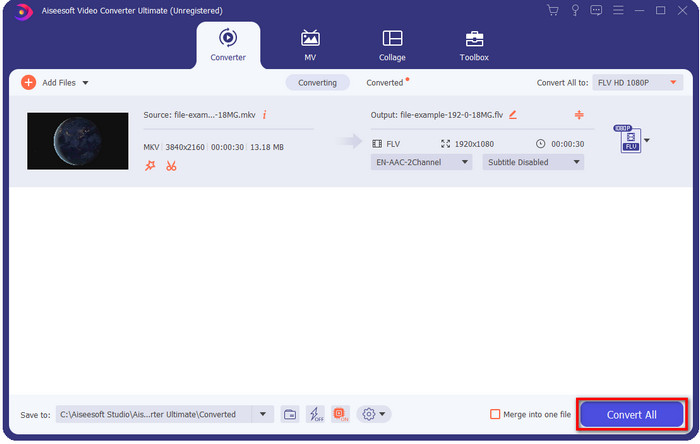
Krok 4. Kliknij przycisk Convert All, aby rozpocząć darmową konwersję MKV do FLV. Po zakończeniu procesu pojawi się folder z nowym plikiem FLV.
Część 2. 4 Najlepszy internetowy konwerter MKV na FLV
1. Darmowy konwerter wideo FVC online
FVC Free Video Converter Online oferuje prosty, ale imponujący darmowy internetowy konwerter MKV do FLV, dostępny we wszystkich przeglądarkach. Obsługuje także średnią liczbę formatów, do których możesz przesłać i przekonwertować pliki. Choć narzędzie wymaga połączenia z internetem, przesyłanie i konwersja plików są tu prostsze i szybsze. Chcesz wiedzieć, jak go używać? Wykonaj poniższe kroki.
Plusy
- Jest dostępny dla każdego, kto ma dostęp do Internetu.
- Przyjazny dla użytkownika i łatwy do zrozumienia interfejs.
- Brak ograniczeń rozmiaru pliku.
- Zaawansowane ustawienia wideo i audio.
Cons
- Format na średnią skalę.
Krok 1. Aby otworzyć konwerter online, kliknij ten link.
Krok 2. Naciśnij przycisk Add Files to Convert, aby dodać plik z folderu na komputerze, a następnie kliknij Open.
Pobierz Wersję desktopową, aby konwertować pliki w trybie wsadowym.
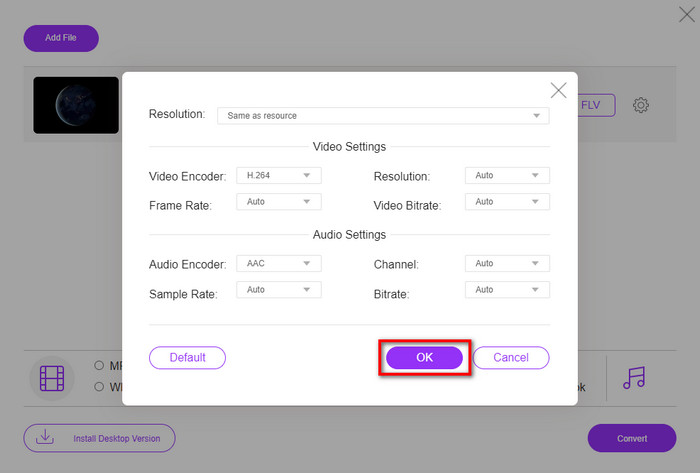
Chociaż nie możesz tu edytować wideo, możesz zmienić ustawienia obrazu i dźwięku, klikając przycisk z zębatką.
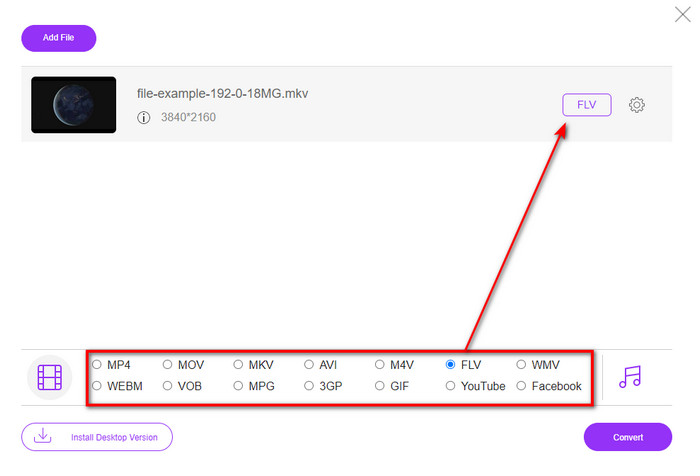
Krok 3. Wybierz format FLV z listy ustawień.
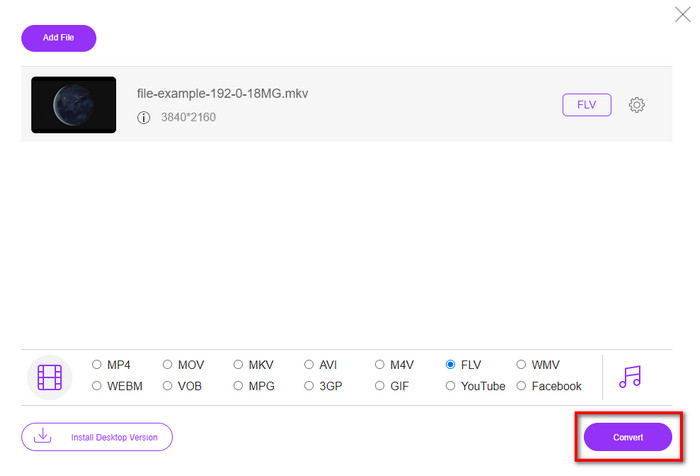
Krok 4. Kliknij Convert, aby rozpocząć proces konwersji.
2. Mkonwerter
Jednym z najbezpieczniejszych internetowych konwerterów MKV do FLV, z których możesz skorzystać, jest Mconverter. Oprócz konwersji formatów wideo i audio możesz tu również przetwarzać obrazy, archiwa, dokumenty i wiele innych formatów multimedialnych. Choć konwerter jest darmowy, istnieje limit rozmiaru każdego przesyłanego pliku.
Plusy
- Konwertuj wideo, audio, dokumenty i nie tylko online.
- Obsługuje wiele konwersji.
- Łatwy w użyciu.
Cons
- Rozmiar pliku nie może przekraczać 200 MB.
- Niektóre reklamy podczas konwersji pliku.
Krok 1. Otwórz Mconverter w przeglądarce, przeciągnij plik .mkv i upuść go w wyznaczonym polu.
Krok 2. Kliknij format FLV, a proces konwersji rozpocznie się automatycznie.
Krok 3. Po zakończeniu plik zostanie automatycznie pobrany na twój dysk.
3. Freeconvert.com
Serwis Freeconvert.com pomoże ci przekonwertować MKV na FLV online za darmo. Ten konwerter internetowy ma prosty w obsłudze interfejs, z którego każdy może korzystać. Trzeba jednak pamiętać, że obsługuje on jedynie ograniczoną liczbę formatów, a na stronie znajduje się sporo reklam.
Krok 1. Wyszukaj Freeconvert.com w swojej wyszukiwarce.
Krok 2. Kliknij Choose File, aby przesłać plik .mkv z folderu na komputerze, naciśnij przycisk rozwijany i wybierz format FLV.
Krok 3. Kliknij Convert FLV, aby rozpocząć konwersję, a następnie, aby pobrać plik, kliknij Download FLV.
Plusy
- Darmowy konwerter online, którego możesz użyć.
- Bezpieczny i prosty konwerter sieciowy.
- Obsługuje plik 1 GB do konwersji.
Cons
- Obsługuje format na małą skalę.
- Proces konwersji i pobierania zajmie dużo czasu.
4. Movavi Online Video Converter
Movavi Online Video Converter jest jednym z polecanych narzędzi do konwersji MKV do FLV online. To darmowa wersja online programu Movavi Video Converter, używana przez wielu internautów ze względu na wysoką skuteczność i profesjonalny wygląd narzędzia.
Krok 1. Otwórz ulubioną przeglądarkę i wyszukaj stronę internetową Movavi.
Krok 2. Kliknij +Add Your Media, aby dodać plik, który chcesz przekonwertować. Naciśnij przycisk rozwijany i wybierz Video; znajdź format FLV i kliknij go.
Krok 3. Naciśnij Convert, aby rozpocząć proces konwersji.
Plusy
- Brak interfejsu internetowego reklam.
- Prosty konwerter, z którego może korzystać każdy.
- Obsługuje format średniej skali.
Cons
- Proces konwersji formatu zajmuje więcej czasu.
- Zależne od Internetu, podobnie jak inne konwertery internetowe.
Część 3. Tabela porównawcza
| Cechy | FVC Video Converter Ultimate | Darmowy konwerter wideo FVC online | Mkonwerter | Freeconvert.com | Movavi Online Video Converter |
| Możliwości konwertowania formatu |  | | | | |
| uzależniony od internetu |  | | | | |
| Konwersja wsadowa | | | | | |
| Zaawansowane funkcje edycji | | | | | |
| Dostępne platformy | Narzędzie oparte na komputerze stacjonarnym | Narzędzie internetowe | Narzędzie internetowe | Narzędzie internetowe | Narzędzie internetowe |
MKV kontra FLV
Format kontenera multimedialnego Matroska, wydany w 2002 roku, jest formatem typu open source, który może zawierać wiele ścieżek wideo, audio, obrazów i napisów. Dzięki temu możesz go używać do łatwego przechowywania krótkich klipów wideo, programów telewizyjnych i filmów. Jest dość popularny wśród fanów anime.
Adobe Flash Player używał FLV do dostarczania treści wideo, takich jak filmy i programy telewizyjne. Obecnie firma Adobe nie rozwija już odtwarzacza i zaleca użytkownikom odinstalowanie go ze względów bezpieczeństwa. Jednak nadal możesz używać formatu FLV w wielu programach firm innych niż Adobe/Macromedia.
Część 4. Często zadawane pytania dotyczące konwersji MKV do FLV
Dlaczego pliki MKV są zbyt duże?
Istnieją dwa główne powody, dla których pliki MKV są tak duże. Po pierwsze, ten format może zawierać nieograniczoną liczbę treści i elementów wideo, audio oraz metadanych w jednym pliku. Po drugie, jeśli twoje wideo jest długie, możesz się spodziewać, że rozmiar pliku znacznie wzrośnie. Możesz jednak skompresować plik MKV za pomocą tego kompresora MKV. Jeśli jednak chcesz łatwiejszego rozwiązania, rozważ konwersję plików MKV do MP4, AVI, MOV, FLV itd.
Czy MKV jest lepszy niż AVI?
MKV i AVI to formaty, które są do siebie bardzo podobne, ponieważ mogą zawierać wideo w wysokiej rozdzielczości i zajmować dużo miejsca. Te kontenery mają jednak różne zastosowania i strukturę, co je wyróżnia. Na przykład AVI to nieskompresowany format, który najlepiej sprawdza się do przechowywania surowego materiału wideo do odtwarzania. Jest on także podstawą, na której opracowano format MKV. Choć pliki MKV korzystają z kompresji, przechowują znacznie więcej treści i elementów, niż jest w stanie pomieścić AVI. Jeśli więc zależy ci na zachowaniu najwyższej jakości wideo, wybierz format MKV. Jeśli natomiast priorytetem jest kompatybilność, lepszym wyborem będzie AVI. Jeśli chcesz wiedzieć, jak przekonwertować MKV na AVI, kliknij ten link.
Czy hamulec ręczny obsługuje konwersję MKV do FLV?
Hamulec ręczny może obsłużyć to zadanie, ale ten konwerter nie obsługuje programów macOS i Windows, które nie są wymienione powyżej.
Wniosek
Na zakończenie: wiesz już, jak konwertować MKV do FLV online i offline. Powyższe narzędzia nie zostały wybrane przypadkowo – dobraliśmy je na podstawie preferencji użytkowników. W trakcie poszukiwań i testów odkryliśmy, że te sześć narzędzi najlepiej sprawdza się jako konwertery. Jednak to FVC Video Converter Ultimate przewyższył nasze oczekiwania jako konwerter. Chcesz poznać inne możliwości tego niezwykłego programu? Na co więc czekasz? Pobierz go już teraz.
-
 MKV do MOV - Jak przekonwertować MKV na MOV
 Jak przekonwertować MKV na MOV na Macu? Czy iMovie może czytać MKV? Co oznacza format MOV? Ten post przedstawia 2 proste sposoby, które pomogą Ci przekonwertować MKV na MOV za pomocą bezpłatnych internetowych i profesjonalnych konwerterów wideo.
-
 Jak konwertować filmy MKV na animowane pliki GIF bez Photoshopa / FFmpeg
 Po pobraniu i obejrzeniu filmów MKV na komputerze możesz chcieć podzielić się wspaniałymi chwilami z przyjaciółmi lub w Internecie jako GIF-y. W tym artykule dowiesz się o 2 najłatwiejszych sposobach konwersji MKV na GIF.
-
 Porady i triki dotyczące konwersji plików MKV na MP3 [2025]
 Masz problem z wyborem odpowiedniego konwertera MKV na MP3? Następnie czytaj dalej ten post, ponieważ przedstawiliśmy różne rozwiązania jednego problemu.

