


 Video Converter Ultimate
 Nagrywarka ekranu
 Naprawa wideo
Jak bezpłatnie przekonwertować VOB na FLV za pomocą rozwiązań stacjonarnych i online w 2022 roku?
Pliki w formacie VOB są zwykle przechowywane w folderze VIDEO_TS w katalogu głównym płyty DVD. Wideo VOB zawiera większość danych zapisanych na dysku, w tym obraz, dźwięk, napisy, menu DVD oraz inne elementy nawigacyjne. Jeśli jednak chcesz przesłać pliki VOB do serwisów społecznościowych, takich jak YouTube, musisz zmienić format plików VOB na formaty obsługujące strumieniowanie wideo, na przykład FLV – standard przesyłania multimediów strumieniowo przez Internet. W tym artykule wyjaśnimy więc, jak przekonwertować VOB do FLV online lub za pomocą darmowego konwertera plików VOB na FLV, aby uzyskać lepsze możliwości streamingu.

Część 1. Jak przekonwertować VOB na FLV za pomocą bezpłatnego oprogramowania komputerowego?
Aby szybko zmienić format plików VOB na FLV, wypróbuj FVC Free FLV Converter. Dzięki temu darmowemu narzędziu możesz konwertować pliki wideo z VOB do FLV, MP4, AVI, WMV, MOV i wielu innych formatów. Ponadto program umożliwia wykonywanie podstawowych zadań edycji wideo, jeśli zajdzie taka potrzeba. Wystarczy pobrać konwerter plików VOB na FLV i postępować zgodnie z prostymi krokami opisanymi poniżej.
Bezpłatne pobieranieDla Windows 7 lub nowszegoBezpieczne pobieranie
Bezpłatne pobieranieDla MacOS 10.7 lub nowszegoBezpieczne pobieranie
Krok 1. Uruchom FVC Free FLV Converter
Najpierw pobierz konwerter VOB na FLV dla systemu Windows lub Mac. Po pobraniu pliku instalacyjnego kliknij go dwukrotnie i postępuj zgodnie z instrukcjami wyświetlanymi na ekranie. Następnie uruchom go na swoim komputerze, a zobaczysz jego interfejs jak poniżej.

Krok 2. Dodaj pliki VOB do programu
Kliknij przycisk Add File(s), wybierz swoje pliki VOB i naciśnij Next, aby kontynuować.

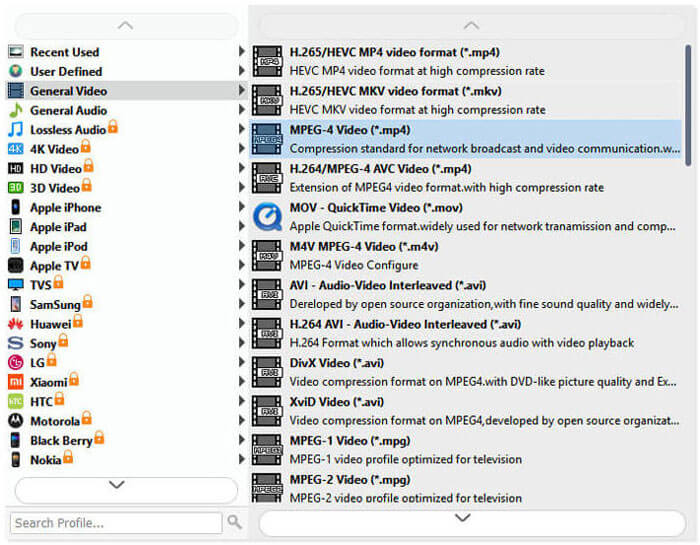
Krok 3. Wybierz FLV jako format wyjściowy
Następnie wybierz format pliku FLV z pola Output format.
Krok 4. Przekonwertuj VOB na FLV
Kliknij przycisk Open Folder i wybierz folder, w którym mają zostać zapisane przekonwertowane pliki. Aby rozpocząć konwersję plików VOB na FLV, kliknij przycisk Convert. Po zakończeniu konwersji folder zawierający przekonwertowane pliki otworzy się automatycznie.
Część 2. Jak przekonwertować VOB na FLV Online
Korzystanie z usług online w celu przekształcenia VOB w FLV jest również dobrym wyborem. Wybraliśmy dwa konwertery online VOB na FLV do wyboru. Wszystkie te narzędzia online są bezpłatne i często używane przez wielu użytkowników. Czytaj dalej, aby dowiedzieć się, jak przekonwertować VOB na FLV na komputerze za pomocą narzędzi online.
Darmowy internetowy konwerter wideo FVC
FVC Free Online Video Converter to w pełni funkcjonalne narzędzie online, które obsługuje najpopularniejsze formaty wideo i audio. Konwersja plików za pomocą tej usługi online jest bezpieczna, a przekonwertowane pliki zostaną usunięte z serwera natychmiast po pobraniu wyników. Konwersja nie wymaga instalacji żadnego oprogramowania, a cały proces jest prosty.
Możesz wykonać poniższe czynności, aby zmienić pliki VOB na FLV.
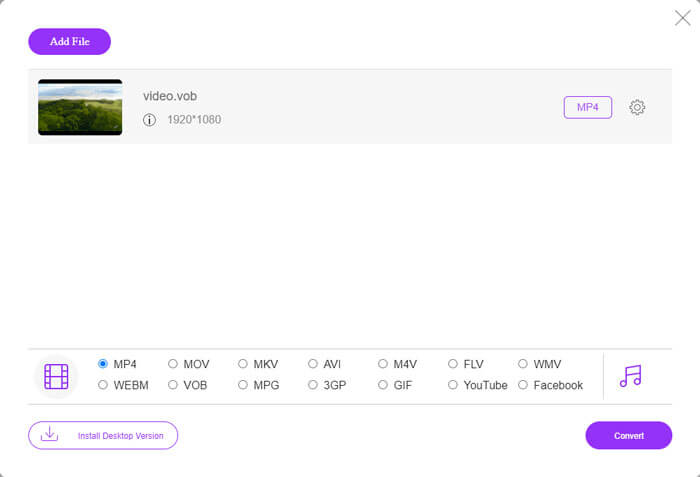
Krok 1. Na stronie FVC Free Online Video Converter kliknij przycisk Add Files to Convert, aby dodać swoje pliki VOB. Przy pierwszym użyciu tego narzędzia musisz najpierw pobrać i zainstalować launcher.
Krok 2. Upewnij się, że w kategorii Video w dolnej części okna jako format wyjściowy wybrano FLV.
Krok 3. Kliknij przycisk Convert, a następnie wybierz folder docelowy. Po zakończeniu procesu konwersji przekonwertowany plik zostanie pobrany automatycznie, a folder, w którym jest on zapisany, zostanie otwarty.
Skonwertuj pliki
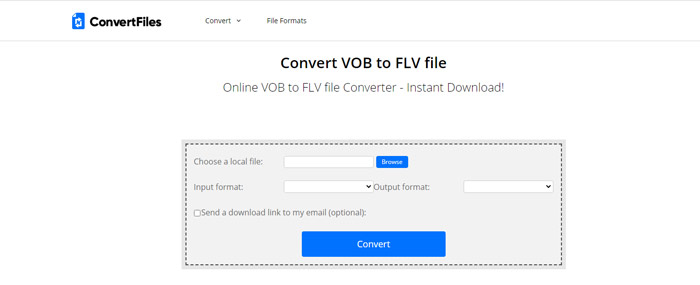
ConvertFiles to kolejny darmowy konwerter plików VOB na FLV online. Ta usługa może konwertować różne typy plików za darmo w ciągu kilku minut. Ta usługa może wysłać łącze pobierania do przekonwertowanego pliku na Twój adres e-mail, jeśli zajdzie taka potrzeba. Konwersja nie wymaga instalacji oprogramowania, a cały proces konwersji jest prosty. Pamiętaj jednak, że to narzędzie online może konwertować pliki o wielkości do 250 MB.
W ten sposób możesz korzystać z tego konwertera VOB-to-FLV online.
Krok 1. Odwiedź stronę internetową ConvertFiles, kliknij Browse i dodaj swoje pliki VOB do programu.
Krok 2. Następnie wybierz Flash Video File (.flv) z rozwijanej listy Output format.
Krok 3. Kliknij przycisk Convert, aby rozpocząć konwersję plików VOB do FLV. Gdy plik zostanie pomyślnie przekonwertowany, zobaczysz odnośnik; kliknij go, aby przejść do strony pobierania i ściągnąć przekonwertowane pliki.
Część 3. Porównanie formatów VOB i FLV
| Parametr porównania | VOB | FLV |
| Rozszerzenie pliku | .vob | .flv |
| Opracowany przez | Forum DVD | Systemy Adobe |
| Kodeki wideo 00 | MPEG-1, MPEG-2 | On2 VP6, Sorenson Spark, ekran wideo, ekran wideo 2, H.264 |
| Kodeki audio | MP1, MP2, PCM, AC-3, DTS | MP3, ADPCM, Nellymoser, Speex, AAC |
| Programy otwierające pliki VOB/FLV | Windows Media PlayerVLC Media Player | VLC Media PlayerAdobe Flash Player |
Część 4. Często zadawane pytania dotyczące konwersji VOB na FLV
Co to jest VOB?
VOB (skrót od video object) to format kontenera stosowany w nośnikach DVD-Video. VOB może zawierać wideo, audio, napisy, menu DVD z nawigacją po rozdziałach na płycie DVD. Format VOB jest zazwyczaj oparty na MPEG-2 i może być otwierany przez niemal każdy odtwarzacz multimedialny. Przeczytaj Top 5 VOB Players for Windows 10/8/7 PC and Mac, aby poznać więcej odtwarzaczy VOB.
Co to jest FLV?
FLV to audiowizualny format kontenera używany do strumieniowego przesyłania treści wideo przez Internet z wykorzystaniem Adobe Flash Player 6 lub nowszego. Pliki FLV możesz odtwarzać w programach Windows Media Player, VLC, Adobe Media Player, Winamp, RealPlayer lub innych odtwarzaczach FLV.
Czy pliki VOB zawierają dźwięk?
Tak. Plik VOB zawiera menu wideo, audio, napisy i DVD.
Wniosek
Jak widać, możesz łatwo przekształcić MP4 na FLV, zachowując jednocześnie wysoką jakość oryginalnego wideo za pomocą bezpłatnego konwertera plików VOB. Poza tym możesz również dokonać konwersji VOB na FLV online. Wyżej wymienione konwertery VOB na FLV dla komputerów stacjonarnych i online są bezpłatne. Mamy nadzieję, że znajdziesz satysfakcjonujące rozwiązanie, które najlepiej spełni Twoje potrzeby.
-
 Co to jest plik VOB i jak za darmo przekształcić plik VOB w GIF
 Czy chcesz dowiedzieć się więcej o plikach VOB i jak je udostępnić po zgraniu? lub Dlaczego musisz przekonwertować VOB na GIF? Przeczytaj uważnie ten artykuł.
-
 VOB na MP4 - 3 sposoby konwertowania plików VOB na MP4 za darmo luzem
 W tym artykule przedstawiono 3 bezpłatne konwertery VOB na MP4 i powiązane samouczki. Możesz bezpłatnie konwertować pliki VOB na MP4 za darmo w systemie Windows / Mac / online.
-
 Jak kompresować pliki VOB online i za darmo?
 Szukasz metod kompresji plików VOB? W tym artykule dowiesz się, jak najlepiej zmniejszyć rozmiar plików VOB.
