


 Nagrywarka ekranu
 Naprawa wideo
Jak usunąć tło z GIF-ów za pomocą skutecznych programów
GIF to skrót od Graphics Interchange Format i jest szeroko używany w komunikacji online, na przykład podczas wysyłania wiadomości do kogoś lub komentowania postów. Usuwanie tła z GIF‑ów lub obrazów może być trudne, jeśli nie masz odpowiedniego oprogramowania stworzonego do tego typu zadań! Ze względu na popularność GIF‑ów coraz więcej użytkowników interesuje się tym, jak je edytować i tworzyć własne. Na szczęście zebraliśmy niezawodne i łatwe w użyciu programy online, które mogą pomóc użytkownikom w usuwaniu tła z GIF‑ów.

Zalecane: Środek do usuwania tła bez FVC
FVC Free Background Remover to przydatne narzędzie do usuwania tła ze zdjęć. Wykorzystuje sztuczną inteligencję, aby obrysować i rozpoznać osobę znajdującą się na zdjęciu. Co więcej, narzędzie jest dostępne na Windows/Mac. Ogólnie rzecz biorąc, jest to wygodne i niezawodne rozwiązanie, z którego możesz korzystać zawsze i wszędzie.
Krok 1. Prześlij obraz/GIF
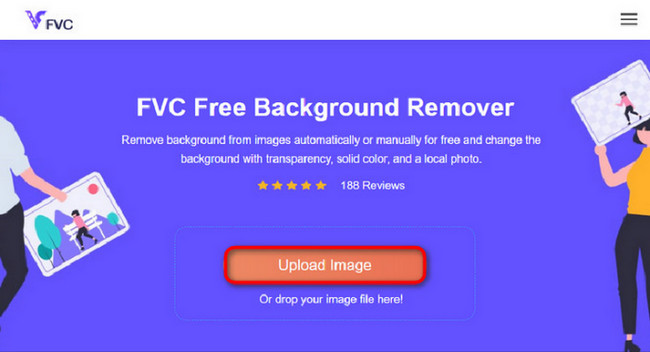
Pierwszym krokiem jest otwarcie przeglądarki na komputerze. Po uruchomieniu programu online zobaczysz opcję przesłania obrazu. Kliknij Upload Image, aby dodać GIF, z którego chcesz usunąć tło.
Krok 2. Edytuj obraz
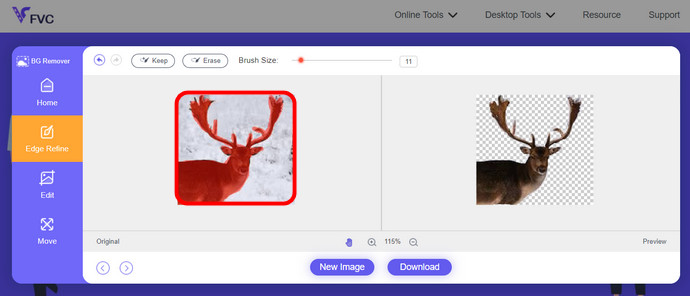
Po przesłaniu możesz teraz usunąć wszelkie nieprecyzyjne rozjaśnienia z rozpoznawania AI. Po prostu kliknij i przeciągnij myszą i zrób to według własnych upodobań.
Krok 3. Pobierz edytowany obraz
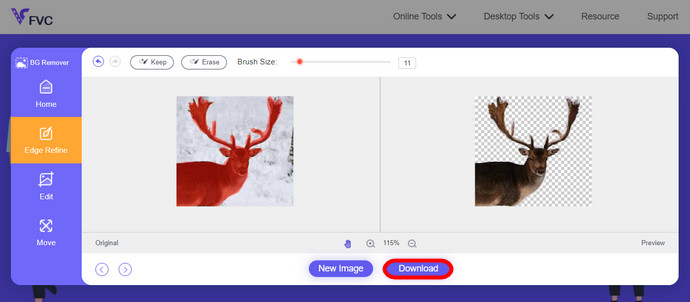
Na koniec kliknij przycisk Download. Udało Ci się pomyślnie usunąć tło ze swojego zdjęcia.
Część 1. Usuń tło GIF za pomocą EZGIF.com
To oprogramowanie online to oprogramowanie do edycji i konwersji zdjęć/gifów. Może edytować i konwertować formaty GIF, PNG, WEBP, IMG i wiele innych formatów. Tutaj możesz edytować swój GIF za pomocą oprogramowania do edycji dołączonego do oprogramowania.
Krok 1. Wejdź na stronę
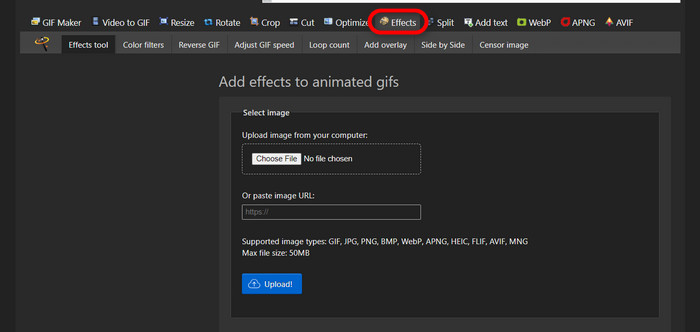
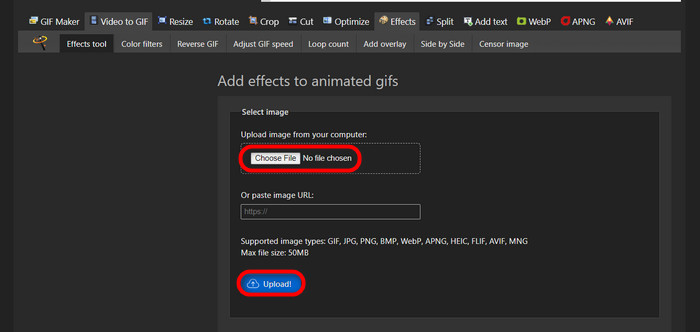
Aby skorzystać z tego narzędzia online, uruchom przeglądarkę i wpisz adres strony. Od razu otrzymasz do wyboru różne opcje zależnie od Twoich potrzeb. Serwis umożliwia usunięcie tła z Twojego GIF‑a. Kliknij Effects, aby rozpocząć.
Krok 2. Wybierz i prześlij obraz/GIF
Teraz wybierz plik, który chcesz przesłać. Kliknij Choose Files, odszukaj go w odpowiednim folderze i naciśnij Upload, aby wgrać wybrany plik.
Krok 3. Edytuj obraz
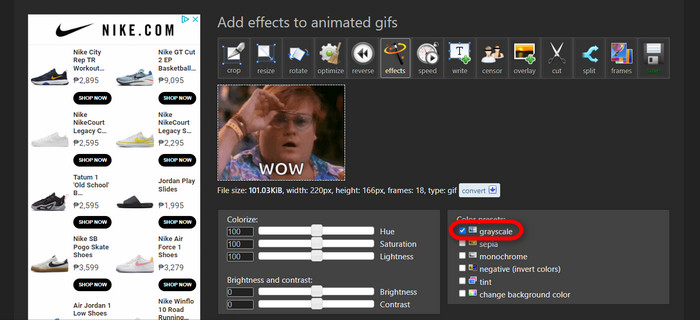
Po przesłaniu pliku jesteś już blisko usunięcia tła z GIF‑a lub sprawienia, by tło Twojego GIF‑a stało się czarne. Teraz kliknij grayscale, aby przyciemnić tło.
Krok 4. Podgląd i konwersja obrazu/GIF
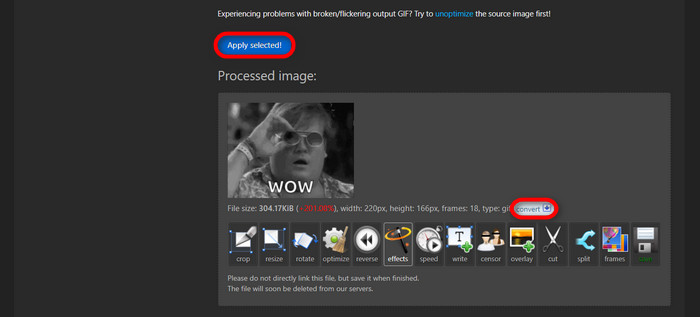
Po nałożeniu efektu, zmianie rozmiaru i przycięciu nowego GIF‑a kliknij Apply Selected, a zobaczysz podgląd edytowanego GIF‑a. Następnie kliknij przycisk convert, aby pobrać plik.
Część 2. Utwórz GIF bez tła w Remove.bg
Ta strona ma również na celu usuwanie tła z dowolnego zdjęcia. Tutaj możesz nadal edytować automatycznie usunięte zdjęcie tła. Jest zasilany przez umiejętną sztuczną inteligencję, która potrafi rozpoznać główny obiekt i bezbłędnie usunąć jego tło.
Krok 1. Prześlij obraz/GIF
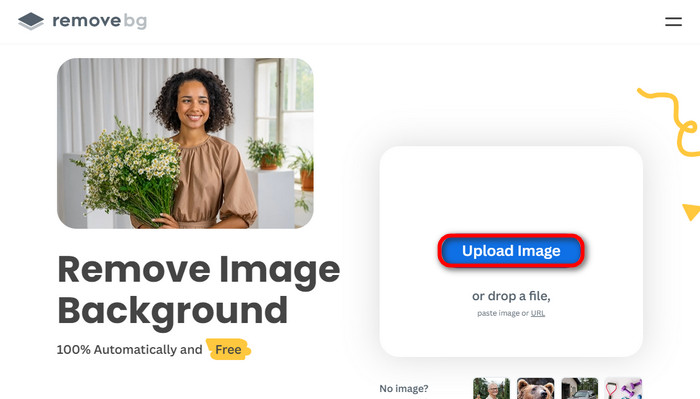
Zacznijmy od przesłania obrazu. Gdy jesteś już na stronie, otwórz program online w przeglądarce. Następnie kliknij Upload Image.
Krok 2. Sprawdź i edytuj obraz
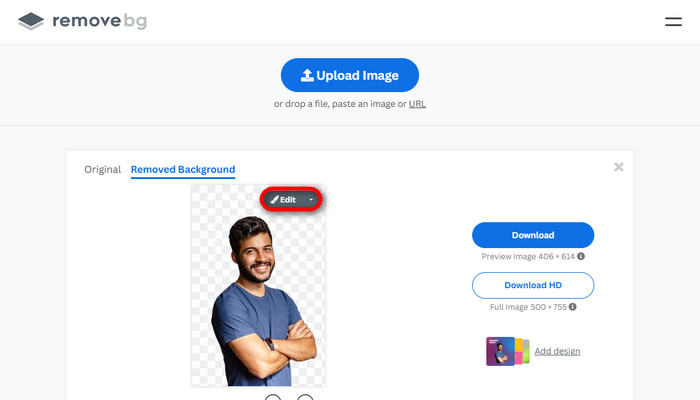
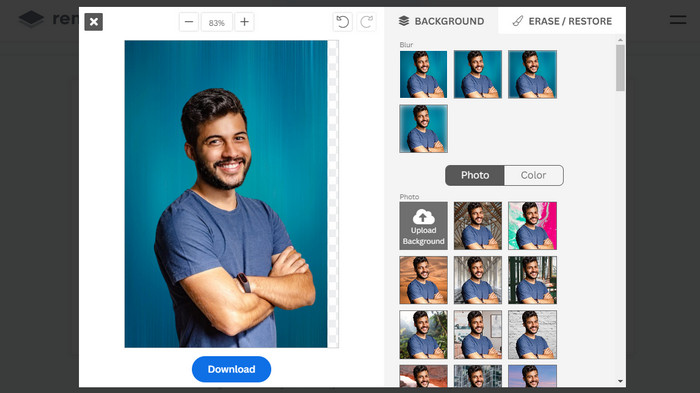
Gdy obraz zostanie przesłany, tło zdjęcia powinno zostać automatycznie usunięte, ale wciąż możesz je edytować. Oryginalne zdjęcie możesz zobaczyć, klikając przycisk Original obok przycisku Removed Background. Użytkownicy mogą bezproblemowo dodać do swojego obrazu czarne tło przy użyciu tego programu.
Krok 3. Pobierz edytowany obraz
W tej części zakończyłeś już edycję i możesz pobrać swoje zdjęcie. Po prostu kliknij przycisk Download znajdujący się pod zdjęciem.
Część 3. Wykorzystaj GIFMagic do usuwania tła GIF
W GIFMagic efekty specjalne, dodawanie tekstu, animacja i wiele więcej! Wszystko to jest możliwe dzięki temu programowi online. Edytowanie plików GIF w tym oprogramowaniu jest łatwe!
Krok 1. Prześlij obraz/GIF
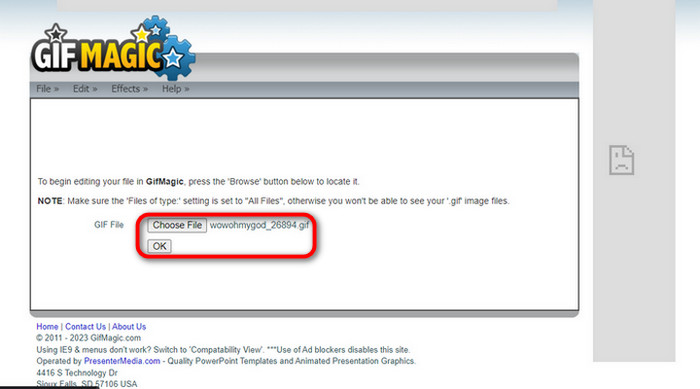
Po zalogowaniu strona pozwala na przesłanie wybranego pliku do programu. Możesz przesyłać pliki .gif lub .img, co jest bardzo przydatne dla użytkowników. Aby wybrać plik, kliknij Upload, a po jego wybraniu kliknij przycisk OK.
Krok 2. Edytuj obraz
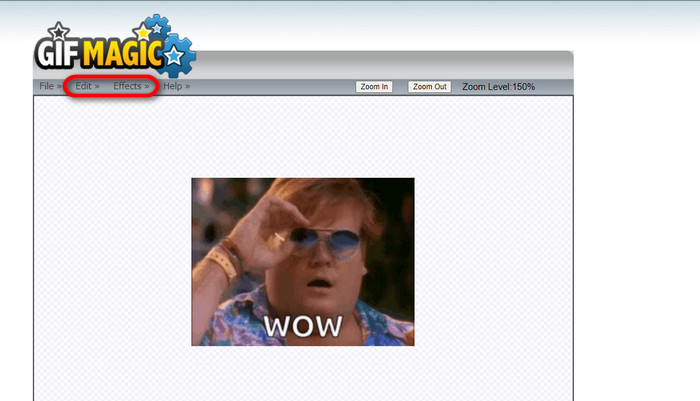
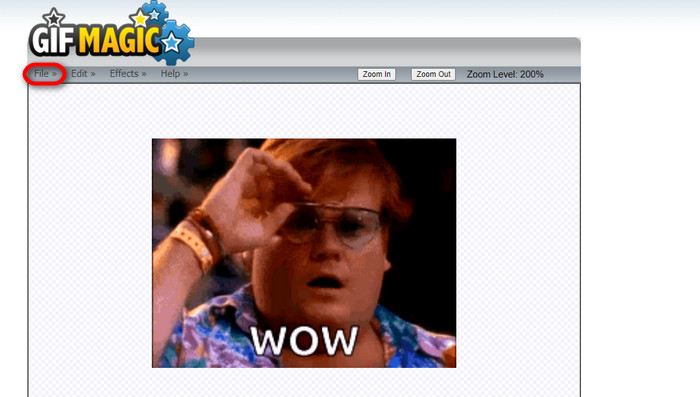
Gdy wejdziesz na stronę, zobaczysz przyciski Edit i Effects obok przycisku File. Twój plik można edytować właśnie w tej sekcji, więc działaj kreatywnie i ciesz się edycją.
Krok 3. Pobierz edytowany GIF
Gdy już uzyskasz przezroczyste tło GIF‑a, kliknij przycisk File, a następnie Save. Voila! Gotowe i pobrane.
Część 4. Ustaw przezroczyste tło GIF za pomocą LunaPic
LunaPic to bezpłatne narzędzie online, które umożliwia usuwanie plików GIF w tle w trybie online. Może oceniać i edytować obrazy PNG, GIF, JPG, JPEG i wiele innych typów obrazów. Jest to dobrze uziemione oprogramowanie, które służy do edycji na wielu platformach.
Krok 1. Prześlij obraz/GIF
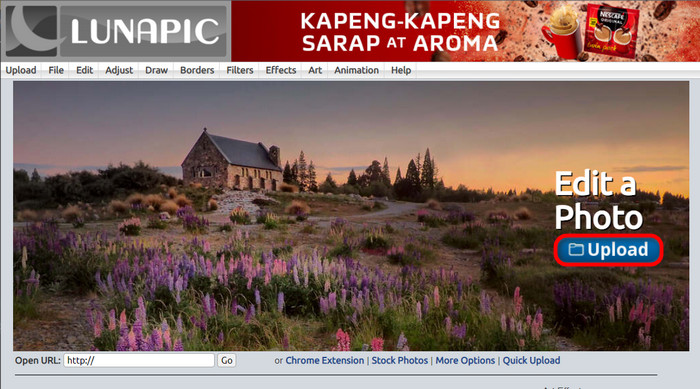
Po wejściu na stronę w domyślnej przeglądarce lub dowolnej innej przeglądarce przeslij na stronę plik .img lub .gif. Wystarczy kliknąć przycisk Upload.
Krok 2. Edytuj obraz/GIF
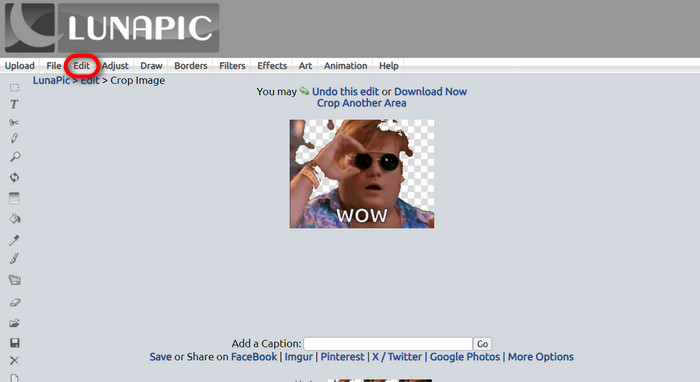
Następnie możesz edytować plik i sprawić, że tło GIF‑a będzie przezroczyste, klikając Edit, a potem przycisk narzędzia Crop Image. Zacznij przycinać tło obrazu.
Krok 3. Pobierz edytowany GIF
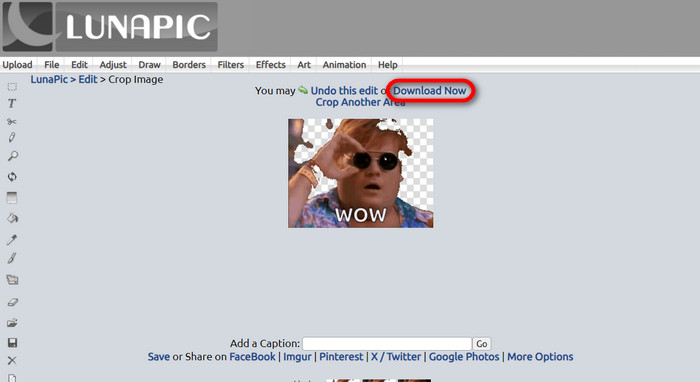
Po przycięciu tła lub jeśli spróbowałeś utworzyć GIF z białym tłem, możesz kliknąć przycisk Download now!, aby zapisać edytowany plik!
Dalsza lektura:
4 najlepsze sposoby na usunięcie znaku wodnego z GIF‑a [online i offline]
Odkryj najlepsze narzędzia na komputer, online i na urządzenia mobilne

Video Converter Ultimate
Ponad 345 pobrań- Ciesz się oglądaniem filmów bez irytujących znaków wodnych, które blokują zawartość.
- Twórz dobrej jakości filmy w wysokiej rozdzielczości, aby zapewnić lepszą oglądalność.
- Pozwala usunąć dowolny znak wodny z dowolnego typu wideo.
- Udostępnij niezliczone formaty do konwersji pliku.
Bezpłatne pobieranieDla Windows 7 lub nowszegoBezpieczne pobieranie
Bezpłatne pobranieDla macOS 10.7 lub nowszegoBezpieczne pobieranie
Część 5. Często zadawane pytania dotyczące usuwania tła
Czy mogę przekonwertować animowany plik PNG na GIF?
Tak, możliwa jest konwersja PNG na GIF. Istnieje jednak kilka typów danych, które można przekonwertować na kilka formatów, o ile masz odpowiedni program.
Czy mogę zmienić kolor tła mojego GIF-a po jego usunięciu?
Oczywiście, istnieje wiele programów, które oferują taką funkcję. Wypróbuj FVC Background Remover, aby łatwo usuwać tło.
Czy mogę ustawić przezroczyste tło GIF w programie Paint?
Nie, farba nie ma takich możliwości. Ale możesz poszukać innych programów oferujących tego rodzaju pracę.
Co to jest animowany GIF z przezroczystością?
Animowany GIF z przezroczystością to obraz, który po umieszczeniu na określonej stronie internetowej wyświetla tylko określoną część obrazu. Może wyświetlać wiele obrazów, jeśli zostaną umieszczone w innej witrynie internetowej.
Czy GIF zapewnia przezroczystość?
Tak, ale nie w pełni przejrzyste. Obsługuje tylko 1-bitową przezroczystość.
Wniosek
Obecnie rośnie znaczenie i zapotrzebowanie na programy umożliwiające edycję GIF‑ów, takie jak wymienione powyżej. Kadrowanie, edytowanie, warstwowanie i usuwanie elementów są dziś możliwe zaledwie kilkoma kliknięciami. Użytkownicy wciąż wprowadzają innowacje i wymyślają rzeczy, których nikt wcześniej nie zrobił, na przykład tworzenie GIF‑a z białym tłem. To właśnie tacy użytkownicy są powodem, dla którego powstają tak zaawansowane programy, jak FVC Background Remover.
-
 Wybierz najlepszy program do przycinania GIF-ów online i offline, aby przycinać pliki GIF [2023]
 Wybór najlepszego narzędzia do przycinania jest koniecznością, dopóki ta funkcja jest dostępna w twórcach GIF. Jaki jest więc najlepszy wybór przycinania plików i jak go używać?
-
 Poznaj 4 sposoby tworzenia GIF-ów z obrazów [Online i Offline]
 Czy chcesz wiedzieć, jak tworzyć GIF-y z kompilacji swoich obrazów? Następnie kliknij ten link i przeczytaj poniższe przykłady
-
 Zapętl GIF z najlepszym animowanym zapętlaniem GIF na Windows i Mac
 Chcesz poznać sekret najlepszego pętli GIF i stworzyć go? Jeśli tak, jesteś we właściwym miejscu. Dowiedz się, jak utworzyć pętlę za pomocą najlepszego dostępnego pętli.
