


 Video Converter Ultimate
 Nagrywarka ekranu
 Naprawa wideo
Najlepszy konwerter MPG na GIF do konwersji MPG na GIF [ Bezkosztowa i Premium wersja]
Najlepszym sposobem na wyrażenie swoich uczuć bliskim jest stworzenie sensownej wiadomości. Ale czy chcesz wiedzieć, co lepiej wyrazić w inny sposób? Możesz użyć GIF-a. Znany również jako Graphics Interchange Format, są to obrazy, które wysyłasz, ale są one uaktualnione. Te ruchome obrazy są tworzone, aby po prostu wyrazić swoje uczucia wobec kogoś bezpośrednio lub pośrednio. Czy wiesz, że większość aplikacji do przesyłania wiadomości obsługuje GIF, a także nasz wbudowany komunikator? Ale w niektórych starych wersjach telefonu nie zapewnia tego formatu. Chociaż GIF jest fajny, nie zawsze dostarcza emocji, które chcesz wyrazić.
Więc chcesz się dowiedzieć, jaki jest najlepszy sposób na zmianę formatu MPG na GIF. Czyż nie jest ekscytujące tworzyć własne GIF-y? Zamiast szukać, z czego skorzystać, spróbuj stworzyć własny GIF, dodając do niego osobisty akcent. Najlepszym sposobem, aby się tego nauczyć, jest przeczytanie tego artykułu, ponieważ zawiera on wystarczająco dużo informacji, kroków i narzędzi potrzebnych do wykonania zadania. Zatem, bez dalszego owijania w bawełnę, przejdźmy do najważniejszych szczegółów tego artykułu. Czytaj dalej, aby poznać listę tych konwerterów.

Część 1. 4 Najlepsze narzędzie do konwersji MPG na format GIF PC lub Mac
1. Konwerter wideo FVC Ultimate
Jeśli chcesz przekazać zabawną wiadomość bez wpisywania zbyt wielu szczegółów, to to narzędzie ci w tym pomoże. To narzędzie umożliwia ci konwersję mpg na animowany gif, a zostało opracowane przez FVC. FVC Video Converter Ultimate pozwala użytkownikowi konwertować każdy typ formatu na odtwarzalny format, którego chcesz używać. Być może zastanawiasz się, dlaczego wybrać akurat to narzędzie. Czy jest w nim coś szczególnego? Tak, to narzędzie jest wielofunkcyjne. Może być twoim najbardziej zaufanym ripperem, kreatorem MV, kolaży i wieloma innymi. Oznacza to po prostu, że to narzędzie potrafi więcej niż wiele innych dostępnych narzędzi. Kolejną niesamowitą jego cechą jest Ultrafast conversion, dzięki której konwersja wideo trwa dosłownie chwilę. Aby dowiedzieć się, jak z niego korzystać, postępuj dokładnie według poniższych kroków, aby uzyskać udaną konwersję z zachowaniem jakości formatu.
Krok 1. Zainstaluj narzędzie na swoim komputerze PC lub Mac. Postępuj zgodnie z instrukcjami po instalacji i kliknij Zakończ, aby uruchomić program.
Bezpłatne pobieranieDla Windows 7 lub nowszegoBezpieczne pobieranie
Bezpłatne pobieranieDla MacOS 10.7 lub nowszegoBezpieczne pobieranie
Krok 2. Po zakończeniu całego procesu instalacji na ekranie pojawi się taki mini–interfejs.
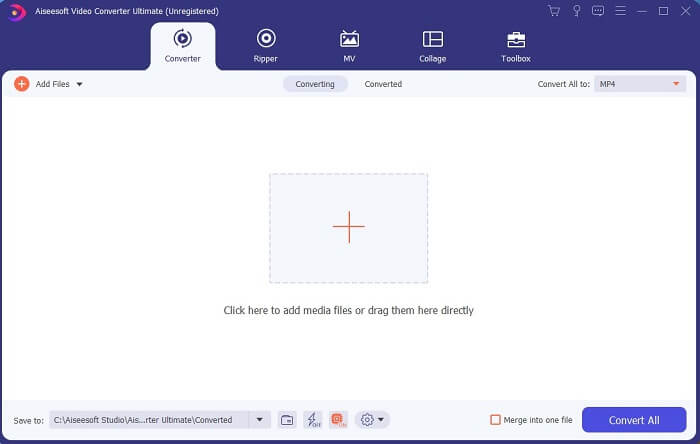
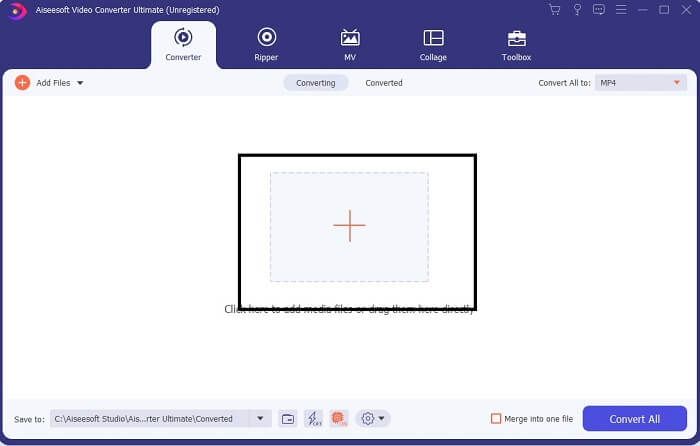
Krok 3. Kliknij znak plus, aby dodać plik, a następnie kliknij Otwórz, aby rozpocząć konwersję, albo po prostu przeciągnij i upuść plik wideo do programu. Liczba filmów wideo nie ma tu żadnego znaczenia.
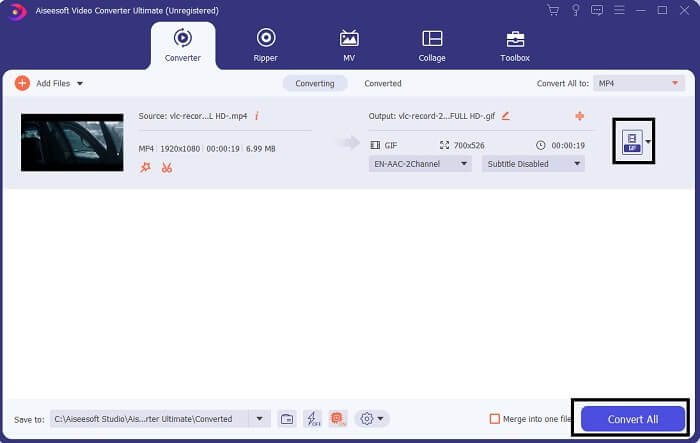
Krok 4. Kliknij przycisk rozwijany w prawym górnym rogu interfejsu, przewiń listę w dół i wybierz format GIF. Wybierz żądaną rozdzielczość: może to być Large, Medium lub Small. Jeśli wszystko jest już gotowe, kliknij Convert All, aby rozpocząć konwersję.
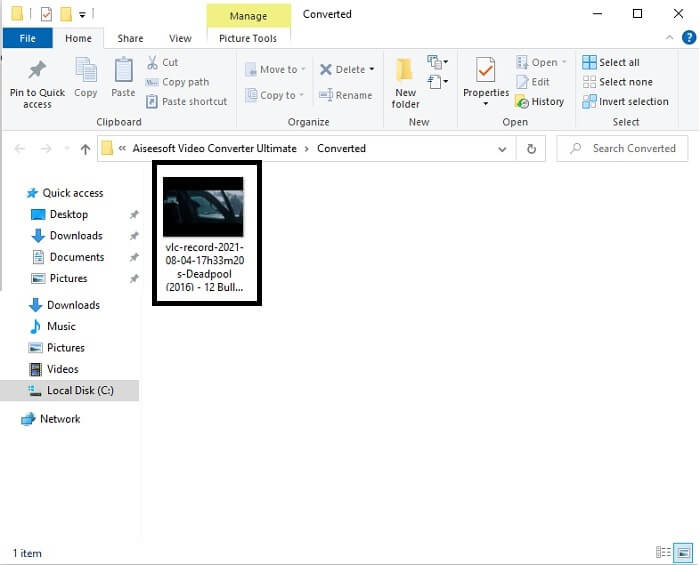
Krok 5. Po zakończeniu konwersji pojawi się menedżer plików, w którym zobaczysz swój finalny plik i będziesz mógł cieszyć się formatem GIF. W ten sam sposób możesz także przekonwertować plik .gif na .mpg, zmieniając jedynie docelowy format.
2. Darmowy internetowy konwerter wideo FVC
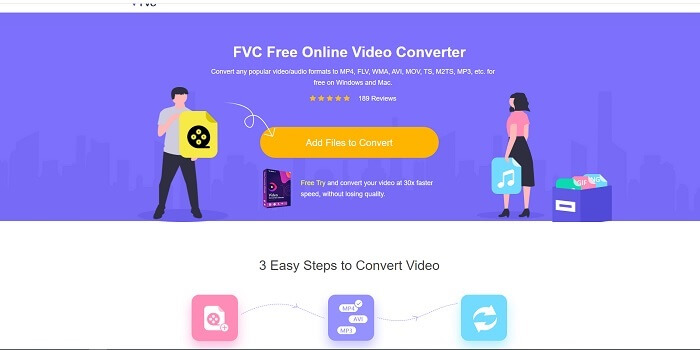
Może zastanawiasz się, co jeśli nie masz pieniędzy, czy nadal mogę doświadczyć tej samej konwersji, co pierwsza? Odpowiedź brzmi: wielkie TAK. FVC zawsze zapewnia najlepsze wrażenia swoim klientom, którzy nie mają pieniędzy, a także tym, którzy chcą wypróbować swoje narzędzie. Chociaż to narzędzie wykonuje tylko prostą konwersję, więc nie oczekuj zbyt wiele, jak może zapewnić wersja premium. I nie może szybciej konwertować wielu formatów wideo i audio.
Proces konwersji, jaki oferuje to narzędzie, jest znacznie lepszy niż w przypadku innych płatnych i darmowych konwerterów. FVC Free Online Video Converter jest tu po to, by uratować sytuację. Jak wskazuje nazwa, jest to darmowe narzędzie online, które pozwala konwertować pliki na maksymalnym poziomie. W przeciwieństwie do innych konwerterów, to narzędzie nie zawiera reklam ani złośliwego oprogramowania, nie wymaga rejestracji, logowania ani podawania danych osobowych przed użyciem. Jeśli szukasz prostego konwertera, to jest to odpowiednie narzędzie dla ciebie. Postępuj zgodnie z tymi krokami, aby dowiedzieć się, jak działa ten konwerter.
Krok 1. Przejdź na oficjalną stronę internetową, klikając ten link.
Krok 2. Strona powinna wyglądać następująco. Następnie kliknij Add Files to Convert, aby uruchomić to narzędzie online.
Pobierz Wersję desktopową, aby konwertować pliki w trybie wsadowym.
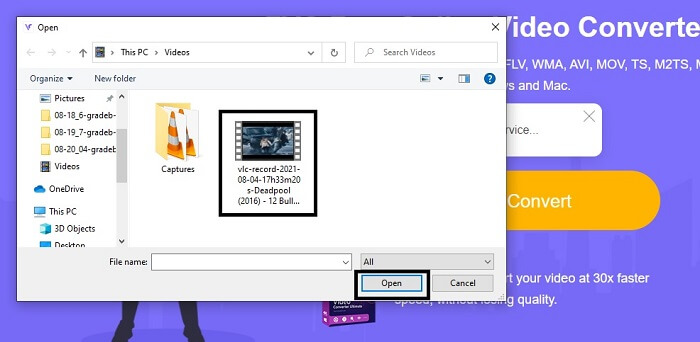
Krok 3. Wybierz wideo, które chcesz przekonwertować. Po wybraniu wideo zaznacz format pliku GIF. Dodatkowo możesz również wybrać inne formaty wideo i audio – możesz je sprawdzić później, jeśli zechcesz.
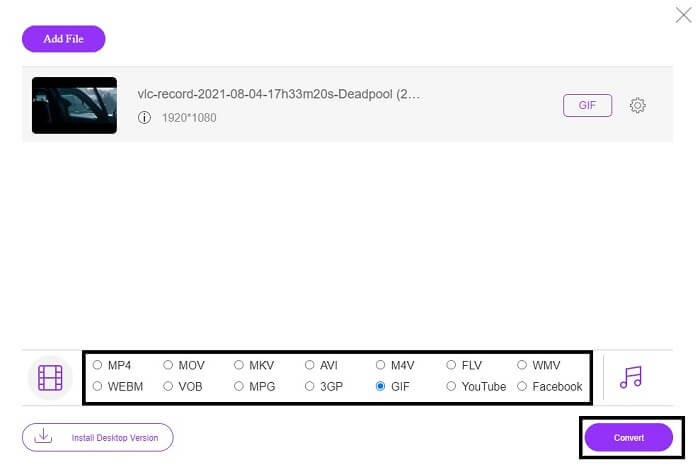
Krok 4. Wybierz miejsce zapisu finalnego pliku. Jeśli wszystko jest już ustawione, kliknij Convert, aby rozpocząć konwersję. Zakończenie procesu potrwa zaledwie kilka sekund.
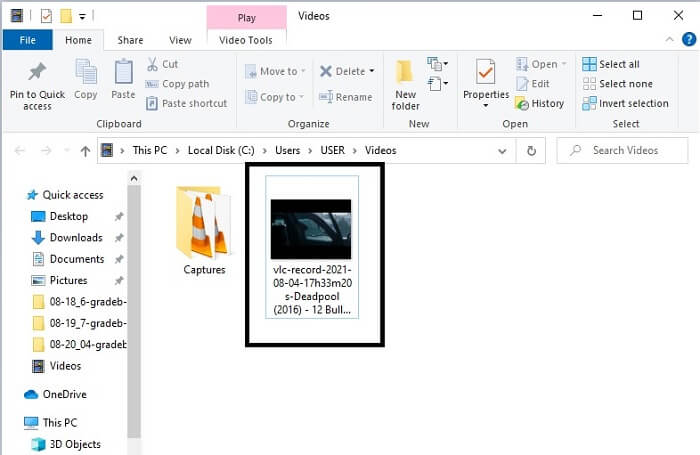
Krok 5. Aby sprawdzić, czy konwersja przebiegła pomyślnie, zlokalizuj przekonwertowany plik GIF w swoim menedżerze plików lub eksploratorze. Kliknij go i ciesz się efektem.
3. VLC Media Player
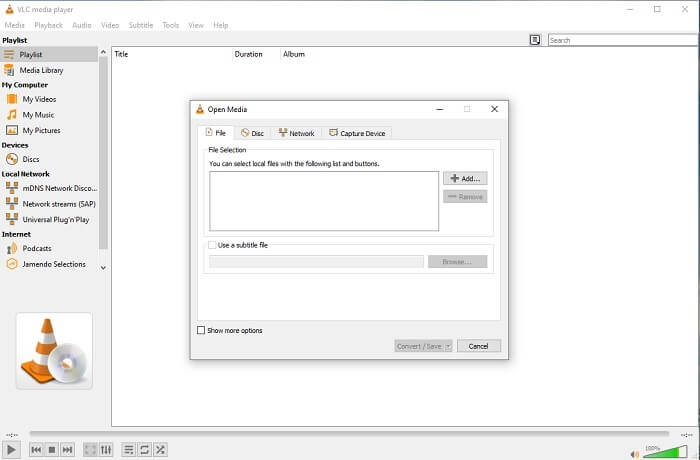
To narzędzie jest znane jako jeden z najpotężniejszych odtwarzaczy multimedialnych. Czy wiesz jednak, że odtwarzacz VLC może także konwertować MPG na GIF? Formatów wyjściowych jest jednak niewiele i ograniczają się do najbardziej znanych. Pomimo renomy najlepszego odtwarzacza multimedialnego, jego funkcja konwertowania nie jest dla ciebie najlepszym wyborem. Jeśli potrzebujesz lepszego konwertera, powinieneś wybrać opisane wyżej narzędzie online, a nie VLC. Natomiast jeśli chcesz tylko oglądać wideo, VLC Media Player będzie właściwym wyborem, ponieważ inne narzędzia nie oferują odtwarzacza wideo – ich głównym celem jest konwersja.
4. Zamzar
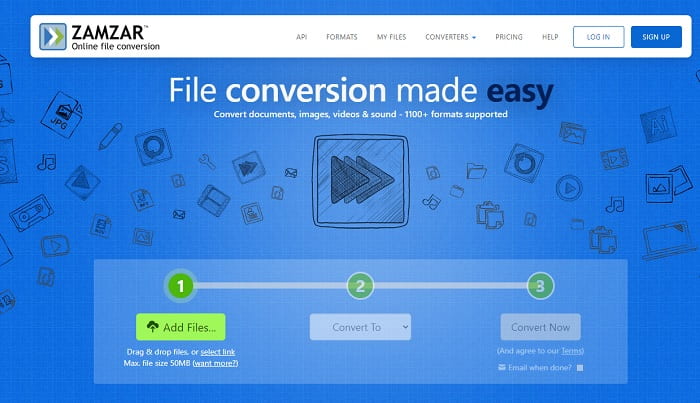
Innym narzędziem online, które zapewnia świetną konwersję, jest Zamzar. Jak każdy inny konwerter online, mają ten sam interfejs, a także zapewniają instrukcje na miejscu, jak go przekonwertować. Ale proces konwersji i pobierania jest inny. Chociaż darmowa wersja, możesz przekonwertować maksymalnie rozmiar pliku 50 MB. Ponieważ po przekonwertowaniu wideo musisz przejść do fazy jego pobierania. Jest to dużo kłopotów dla tych, którzy opuszczają konwersję i po prostu czekają na odtworzenie produktu.
Część 2. Tabela porównawcza
| Funkcja/e narzędzia | FVC Video Converter Ultimate | Darmowy konwerter online FVC | Vlc media player | Zamzar |
| Przetwornik |  | | | |
| Narzędzie do edycji | |  | | |
| Potężny konwerter | | | | |
| Wymagana rejestracja | | | | |
| Platformy | Aplikacja na komputery stacjonarne | Aplikacja internetowa | Aplikacja na komputery stacjonarne | Aplikacja internetowa |
| Przedział cenowy | $25,00 1 miesiąc/1 szt. $55.20 Jednorazowy zakup za 1 komputer $119.00 Żywotność 5 szt. | Jest to bezpłatne narzędzie online | Jest to bezpłatne narzędzie online | Darmowe narzędzie online Ale zapewnia również miesięczną premię. Dla podstawowego: $9 Dla zawodowca: $16 Dla biznesu: $25 |
MPG kontra GIF
Stworzony przez Moving Picture Experts Group (MPEG), MPG jest popularnym cyfrowym formatem wideo do przechowywania informacji wideo, audio i metadanych. Jest to bardzo przydatne przy tworzeniu filmów do udostępniania w Internecie. Te pliki w MPG zwykle zawierają kompresję wideo/audio MPEG-1 lub MPEG-2.
GIF jest popularnym formatem graficznym grafiki internetowej. Oprócz zapisywania małych obrazów i obrazów zawierających tekst, GIF może również zawierać i wyświetlać podstawowe animacje na stronach internetowych. Jest to format bezstratny, a kompresja GIF nie pogarsza klarowności obrazu.
Część 3. Często zadawane pytania dotyczące MPG do GIF
Czy istnieje sposób na użycie Photoshopa i przekonwertowanie wideo na GIF?
Tak, możesz konwertować MPG na GIF w Photoshopie. Co więcej, nie dotyczy to wyłącznie plików MPG – możesz wybrać także inne formaty i również przekonwertować je na GIF. Kolejną szczególną cechą Photoshopa jest możliwość ulepszania GIF-ów. Kliknij tutaj, aby dowiedzieć się, jak konwertować MP4 na GIF.
Jakie jest najlepsze narzędzie do nagrywania ekranu do nagrywania GIF-ów?
Najlepszym narzędziem do nagrywania ekranu, którego możesz użyć do tego zadania, jest FVC Screen Recorder. To narzędzie nadaje się nie tylko do nagrywania wideo. Posiada także wbudowany rejestrator dźwięku oraz rejestrator rozgrywki, dzięki czemu zapewnia lepszą jakość nagrań z gier. Trzeba jednak za nie zapłacić przed użyciem. Nie martw się, ponieważ dostępne jest także narzędzie online, które potrafi nagrywać ekran.
Dlaczego powstał GIF?
GIF został stworzony, aby wyświetlać obraz przy jednoczesnym oszczędzaniu miejsca na dysku. Twórcą formatu GIF jest Steve Wilhite, amerykański informatyk, który opracował go pod koniec 1987 roku przy wsparciu technologicznego giganta CompuServe. Kliknij tutaj, aby dowiedzieć się więcej o GIF-ach.
Wniosek
Teraz, kiedy już wiesz, jak zrobić sobie GIF-a, lepiej spróbuj i ciesz się. Tylko za pomocą tego prostego narzędzia możesz coś zmienić. Zamiast szukać w Internecie, jesteś teraz certyfikowanym twórcą GIF-ów. Co więcej, możesz teraz wyrażać swoje uczucia na swój własny sposób dzięki osobistemu kontaktowi i wiedzy opracowanej tylko po przeczytaniu tego artykułu. Mam nadzieję, że możesz cieszyć się życiem lepszego GIF-a, który tworzysz i udostępniasz swój najlepszy GIF światu.
-
 [Poradnik] Jak konwertować filmy M4V na animowane pliki GIF w systemie Windows / Mac?
 Jeśli chcesz tworzyć animowane pliki GIF ze swoich ulubionych filmów M4V, możesz dowiedzieć się o 2 łatwych i wydajnych sposobach konwersji filmów M4V na pliki GIF z niestandardowymi ustawieniami.
-
 WebM na GIF – 3 darmowe konwertery WebM na GIF do tworzenia własnych GIF-ów
 Czy WebM to GIF? Jak zamienić wideo w GIF? Czy jest jakiś darmowy konwerter WebM na GIF? Ten post udostępnia 3 bezpłatne sposoby, które pomogą Ci przekonwertować WebM na GIF.
-
 Jak konwertować filmy MKV na animowane pliki GIF bez Photoshopa / FFmpeg
 Po pobraniu i obejrzeniu filmów MKV na komputerze możesz chcieć podzielić się wspaniałymi chwilami z przyjaciółmi lub w Internecie jako GIF-y. W tym artykule dowiesz się o 2 najłatwiejszych sposobach konwersji MKV na GIF.

