


 Video Converter Ultimate
 Nagrywarka ekranu
 Naprawa wideo
Jak przekonwertować BMP na PNG i JPGU za pomocą konwerterów online i offline
Format bitmap lub BMP nie jest optymalny dla kolorowych obrazów z przejściami tonalnymi lub gradientami. Obecnie nie zobaczysz w nim już tak wielu fotografii. Technicznie rzecz biorąc, BMP to przestarzały format z praktycznie zerową kompresją. Dlatego jeśli chcesz otwierać obrazy BMP bez ograniczeń, musisz przekonwertować BMP na popularne formaty graficzne. Możesz konwertować między różnymi formatami obrazów na wiele sposobów. W tym artykule omówimy najprostsze i najbardziej bezpośrednie metody. Jeśli więc chcesz się dowiedzieć, jak przekonwertować BMP na JPG lub PNG, przeczytaj ten tekst do końca. Przedstawimy wyjątkowe konwertery obrazów, które mogą ci w tym pomóc.

Część 1. BMP vs JPG vs PNG
| Format pliku | BMP | JPG | PNG |
| Rozszerzenie nazwy pliku | .bmp | jpg | png |
| Opracowany przez | Microsoft | Wspólna Grupa Ekspertów Fotograficznych | Grupa Rozwoju PNG |
| Opis | ZA BMP plik jest skrótem od bitmap i jest wymawiany jako wypukłość. Microsoft stworzył format pliku BMP dla swojego systemu operacyjnego Windows. Ma zachować rozdzielczość obrazów cyfrowych na różnych ekranach i gadżetach. Można przechowywać zarówno kolorowe, jak i czarno-białe zdjęcia dwuwymiarowe. Pliki BMP nie są już kompatybilne tylko z urządzeniami z systemem Windows w dzisiejszych czasach. Są teraz kompatybilne z dużą liczbą urządzeń Mac i Android. | Plik JPG format pliku obrazu jest najbardziej efektywnym formatem kompresji obrazu. Użytkownicy powszechnie korzystają z plików JPG. Jest również określany jako pliki JPEG lub JPG. Joint Experts Group to pełna nazwa JPEG. Ponadto większość obrazów bitmapowych ma rozszerzenie pliku .jpg. Głównym celem jest zmniejszenie rozmiaru plików. Ponieważ JPG jest formatem stratnym, nadmierna kompresja ma wpływ na jakość obrazów. | Przenośna grafika sieciowa, a PNG rozszerzenie rodziny rastrowej, które wykonuje bezstratną kompresję. Został opracowany w celu zastąpienia GIF, Graphics Interchange Format i nie jest opatentowany. Mogą być oparte na palecie i zazwyczaj obrazach w skali szarości, które zapewniają przezroczystość. PNG to kompresja bezstratna. Oznacza to, że przechowuje informacje, specyfikę i jakość. |
Część 2. Metody online do konwersji BMP na JPG/PNG
Konwertuj BMP na JPG/PNG za pomocą FVC Free Image Converter
Aby bezpłatnie przekonwertować BMP na JPG online, możesz użyć narzędzia FVC Free Image Converter. To narzędzie internetowe oferuje najprostszy sposób konwersji BMP do PNG lub JPG. Dzięki intuicyjnemu interfejsowi mogą z niego korzystać zarówno zaawansowani, jak i początkujący użytkownicy. Obrazy można przekonwertować w zaledwie trzech krokach. Dodatkowo możesz wgrywać dowolne obrazy w różnych formatach plików. Obsługuje formaty wejściowe takie jak PNG, JPG, BMP, GIF, TIFF i inne. Co więcej, konwerter plików graficznych FVC obsługuje konwersję wsadową. Umożliwia to jednoczesne konwertowanie wielu obrazów. Jest to znacznie bardziej efektywne i praktyczne niż w przypadku innych konwerterów dostępnych na rynku. Jest wygodne dla wszystkich użytkowników, ponieważ możesz konwertować do 40 plików graficznych jednocześnie.
FVC Free Image Converter gwarantuje wysoką jakość obrazu. Po konwersji obraz nadal będzie wyglądał tak samo jak oryginał. Co więcej, nie zobaczysz niepokojących reklam na ekranie, nawet jeśli jest to internetowy konwerter obrazów. W ten sposób możesz bardziej skoncentrować się na konwersji obrazów. Ten konwerter jest dostępny w prawie wszystkich przeglądarkach. Obejmuje Chrome, Safari, Edge, Firefox i inne. Możesz wykonać poniższe proste kroki, aby przekonwertować BMP na format JPG i PNG.
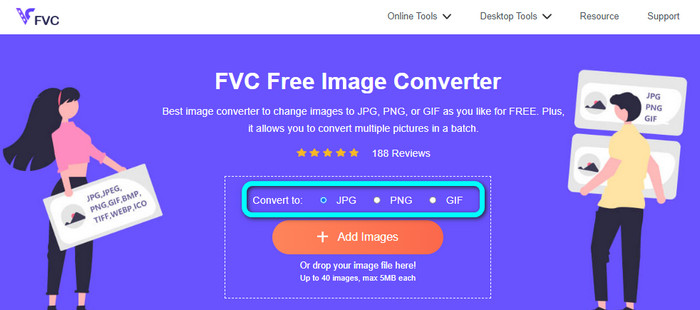
Krok 1: Otwórz przeglądarkę i przejdź na stronę FVC Free Image Converter. Znajdź opcję Convert to i wybierz preferowany format. Możesz kliknąć JPG lub PNG.
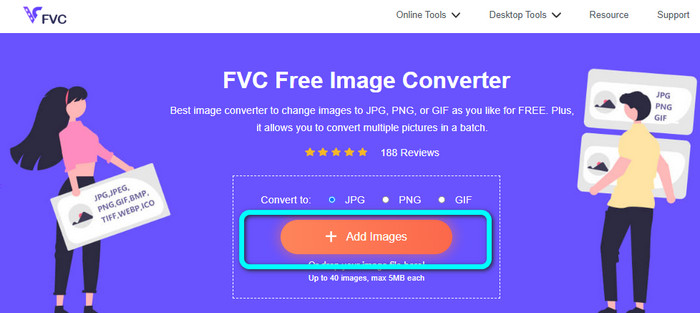
Krok 2: Dodaj obraz BMP, klikając przycisk Add Images. Na ekranie pojawi się okno z plikami z komputera. Wybierz plik obrazu MBP, który chcesz przekonwertować.
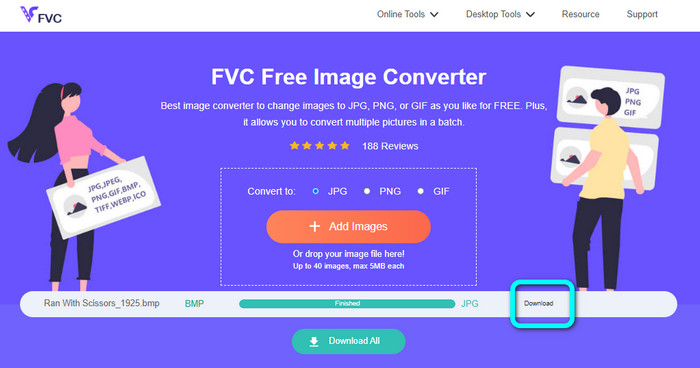
Krok 3: Po wgraniu zdjęcie zostanie automatycznie przekonwertowane. Na ostatnim etapie kliknij przycisk Download, aby zapisać obraz na komputerze.
Konwertuj BMP na JPG/PNG za pomocą Convertio
Convertio to kolejne narzędzie online do konwersji BMP na JPG lub PNG. Jest to konwerter plików, który umożliwia przekształcanie różnych formatów. Obejmuje BMP, JPG, PNG, GIF, SVG i inne. Dzięki temu narzędziu konwersja wielu obrazów jest prosta. Oferuje ono również konwersję wsadową. W ten sposób możesz konwertować BMP na JPG partiami, aby zaoszczędzić czas. Ponadto Convertio gwarantuje prywatność – po konwersji obrazów twoje dane zostaną automatycznie usunięte po 24 godzinach. Z konwertera można korzystać w różnych przeglądarkach, takich jak Google, Mozilla, Edge itd.
Jednak Convertio ma wady. Możesz przesłać obraz do 100 MB. Jeśli chcesz przesyłać nieograniczony rozmiar plików, kup plan subskrypcji. Do obsługi tego konwertera potrzebne jest również połączenie internetowe.
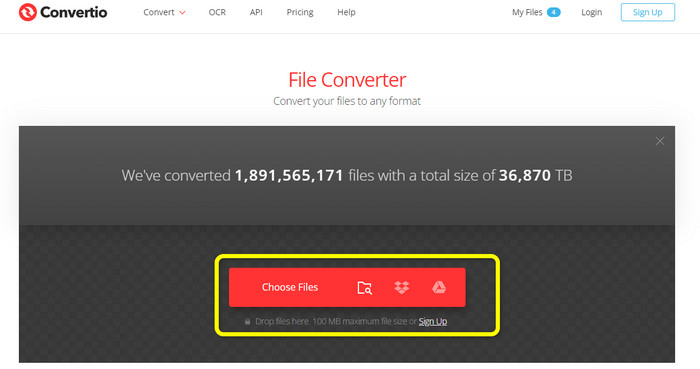
Krok 1: Wejdź na stronę Convertio. Kliknij przycisk Choose Files, aby dodać plik obrazu BMP.
Krok 2: Z dostępnych opcji wybierz format JPG lub PNG. Jeśli chcesz dodać więcej obrazów, kliknij przycisk Add more files.
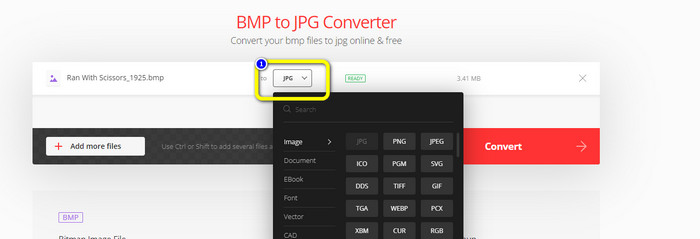
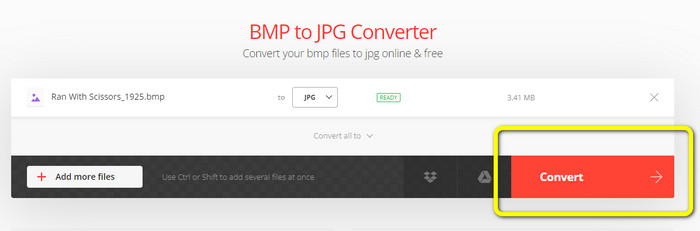
Krok 3: Po wybraniu docelowego formatu pliku kliknij przycisk Convert. Poczekaj na zakończenie procesu konwersji i pobierz obrazy na swój komputer.
Część 3. Metody offline do konwersji BMP na JPG/PNG
Możesz także skorzystać z programu Video Converter Ultimate, aby przekonwertować BMP na JPG. Ten konwerter offline ma prostą i zrozumiałą procedurę konwersji. Posiada również intuicyjny interfejs, dzięki czemu nadaje się dla wszystkich użytkowników, zwłaszcza początkujących. Video Converter Ultimate oferuje konwersję wsadową, co oznacza, że możesz jednocześnie konwertować wiele obrazów. Zapewnia też szybki proces konwersji, dzięki czemu możesz błyskawicznie przekształcić wiele plików. Ponadto obsługuje różne formaty obrazów, w tym JPG, BMP, PNG, GIF, TIFF i inne. Poza samą konwersją możesz również zmieniać jakość zdjęcia w ustawieniach wyjściowych. W ten sposób dopasujesz jakość obrazu do własnych preferencji. Dodatkowo z tego konwertera do pobrania możesz korzystać zarówno na komputerach Mac, jak i z systemem Windows. Postępuj zgodnie z poniższymi instrukcjami, aby przekonwertować plik BMP do formatu JPG lub PNG.
Krok 1: Pobierz program Video Converter Ultimate na komputer Mac lub z systemem Windows. Uruchom program po zakończeniu instalacji. Udostępniliśmy ci również konwerter – możesz go pobrać, klikając poniżej przycisk Download.
Bezpłatne pobieranieDla Windows 7 lub nowszegoBezpieczne pobieranie
Bezpłatne pobieranieDla MacOS 10.7 lub nowszegoBezpieczne pobieranie
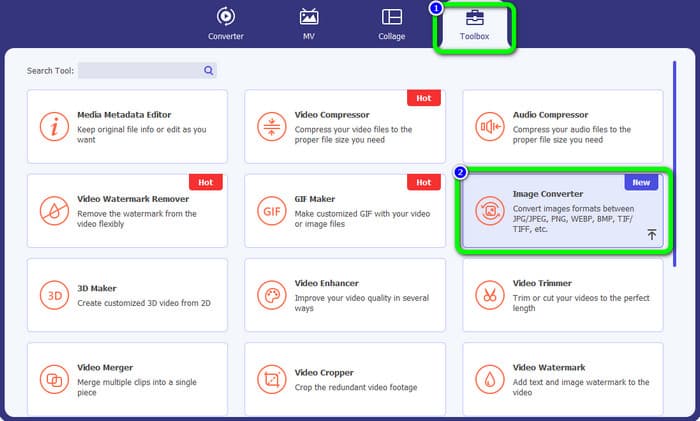
Krok 2: Przejdź do zakładki Toolbox i wybierz narzędzie Image Converter. Pojawi się nowe okno.
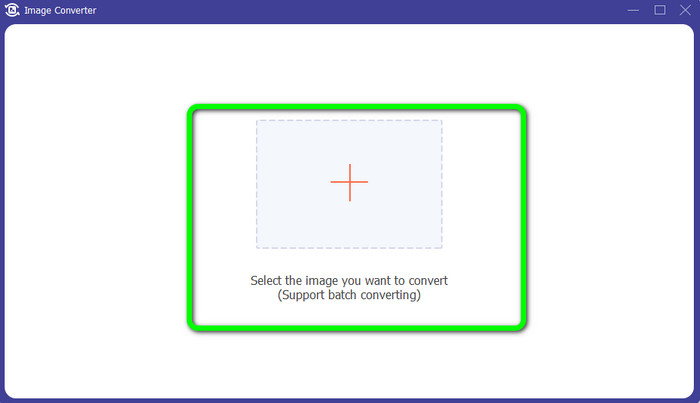
Krok 3: Kliknij symbol Plus. Następnie z folderu wybierz zdjęcie BMP, które chcesz przekonwertować.
Krok 4: Kliknij przycisk Add Source File, aby dodać więcej plików. Następnie przejdź do opcji formatu, aby wybrać żądany format wyjściowy. Możesz wybrać formaty PNG i JPG.
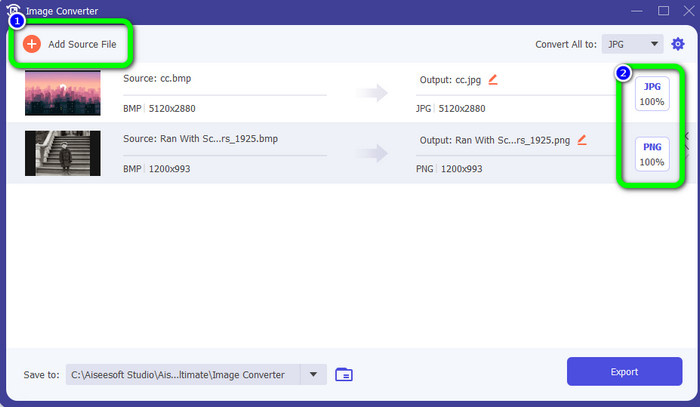
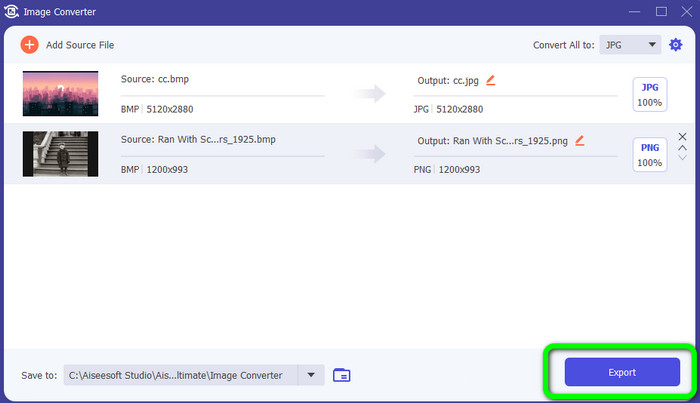
Krok 5: Na koniec kliknij przycisk Export. Poczekaj na zakończenie procesu konwersji, a następnie otwórz przekonwertowane obrazy w swoim folderze.
Część 4. Często zadawane pytania dotyczące konwersji BMP na JPG/PNG
1. Jak wsadowo przekonwertować BMP na PNG?
Jeśli chcesz przeprowadzić konwersję wsadową, skorzystaj z narzędzia FVC Free Image Converter. Najpierw wybierz format PNG w opcji Convert to. Następnie kliknij przycisk Add Images. Możesz dodać wiele plików graficznych – narzędzie umożliwia wgranie nawet 40 obrazów jednocześnie. Po zakończeniu wgrywania pliki zostaną automatycznie przekonwertowane. Aby zakończyć proces, kliknij przycisk Download All, aby zapisać je na komputerze.
2. Czy plik BMP może być animowany?
Niestety nie. Animacja często nie jest kompatybilna z plikami BMP. Zamiast używać Flasha, pomyśl o użyciu formatu pliku GIF. Może tworzyć krótkie, proste animacje, które można udostępniać i zapisywać.
3. Co jest większe, plik BMP czy plik JPEG?
BMP będzie większy przy porównywalnych zdjęciach. Ale BMP może mieć tylko 4 GB ze względu na ograniczenia rozmiaru. Rozmiar pliku JPEG jest nieograniczony. Na przykład niektóre zdjęcia satelitarne są dostępne w formacie JPEG.
Wniosek
Ponieważ plik BMP ma duży rozmiar, warto przekonwertować go na inne formaty, takie jak JPG i PNG. Możesz się cieszyć, ponieważ ten artykuł przedstawił świetne metody, jak przekonwertować BMP na formaty JPG i PNG. Jeśli jednak wolisz prosty i bezpłatny sposób konwersji obrazów, skorzystaj z narzędzia FVC Free Image Converter.
-
 Pełnowymiarowe sposoby konwersji JPG na PNG online i offline
 Szukasz przydatnych metod konwersji JPG na format pliku PNG? Ten przewodnik zawiera odpowiedź, której potrzebujesz. Aby odkryć te metody, przeczytaj artykuł
-
 Skutecznie konwertuj JPEG na JPG [Wymienione pięć metod]
 Przyjdź i uzyskaj najprostsze samouczki dotyczące konwersji formatu JPEG na JPG. Kliknij ten drogowskaz i zacznij uczyć się preferowanych metod
-
 Top 5 wiodących samouczków do szybkiej konwersji PNG na JPG
 Jeśli chcesz przekonwertować plik PNG do formatu JPG, tutaj możesz poznać najlepsze sposoby. Dowiesz się również, jaka jest różnica między formatami plików PNG i JPG
