


 Video Converter Ultimate
 Nagrywarka ekranu
 Naprawa wideo
Popraw rozdzielczość zdjęć iPhone'a, korzystając z najlepszych sposobów, które musisz znać [Najnowsze]
Jeśli potrzebujesz urządzenia mobilnego, które potrafi rejestrować obrazy w wysokiej rozdzielczości, rozsądnym wyborem będzie iPhone ze względu na jego nowoczesne, zaawansowane aparaty przednie i tylne. Wybaczcie, użytkownicy Androida, ale musimy zmierzyć się z faktem, że aparat w najnowszym iPhonie jest zdecydowanie lepszy. Większość osób robi zdjęcia właśnie iPhone’em, ale nie wszystkie uchwycone obrazy są idealne; niektóre wymagają dostosowania, edycji, poprawy lub podbicia rozdzielczości. Jeśli chcesz poprawić swoją rozdzielczość zdjęć z iPhone’a, zapoznaj się z tym artykułem – zebraliśmy w nim wszystkie informacje, które musisz znać!

Część 1. Zalecany sposób: Jak zwiększyć rozdzielczość zdjęć online za pomocą najlepszego skalera obrazu
Jak zmienić rozdzielczość zdjęcia na iPhonie 13? Jeśli to jest Twój problem, powinieneś skorzystać z narzędzia FVC Free Image Upscaler. Każde zdjęcie, które tu prześlesz, zostanie natychmiast powiększone dzięki dumnej technologii AI zastosowanej w tym narzędziu. Możesz usiąść i się zrelaksować po przesłaniu obrazu, ponieważ narzędzie automatycznie zwiększy rozdzielczość wgranego zdjęcia. W przeciwieństwie do innego oprogramowania, z którego możesz korzystać, tutaj nie musisz pobierać instalatora. Co więcej, FVC nie wymaga logowania się na konto, więc Twoje dane są bezpieczne, nic nie wycieka i nie otrzymujesz plików cookie. Jeśli więc to narzędzie Cię zainteresowało, możesz od razu skorzystać z kroków, które podaliśmy poniżej, aby rozwiązać problem.
Krok 1. Otwórz narzędzie online, klikając jego nazwę powyżej, a automatycznie otworzy się nowa karta prowadząca do oficjalnej strony internetowej.
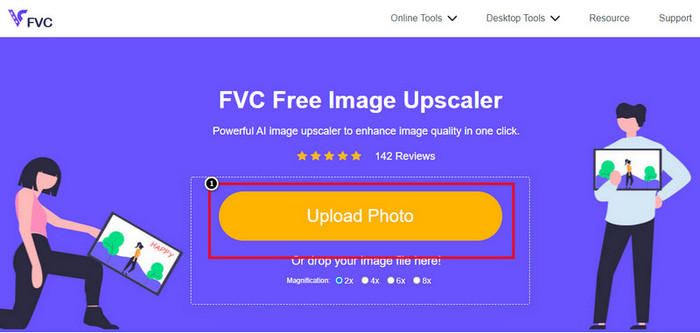
Krok 2. Zaznacz Upload Photo, aby wczytać obraz, który chcesz tutaj powiększyć. Po kliknięciu pojawi się na ekranie okno z folderami – wybierz zdjęcie i naciśnij Open.
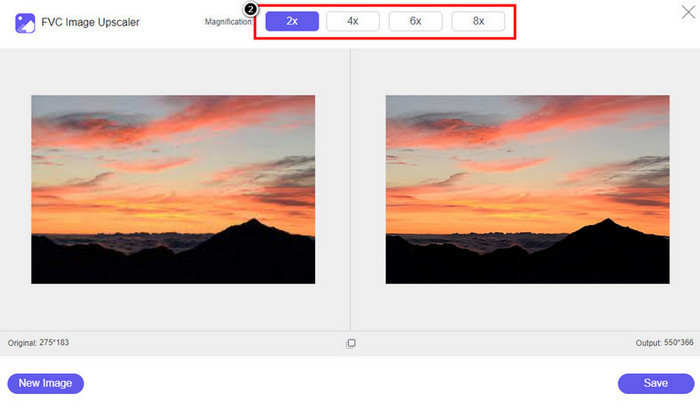
Krok 3. Wybierz rodzaj powiększenia (Magnification), który ma zostać zastosowany do ulepszonej wersji obrazu; możesz przetestować wszystkie opcje, aby sprawdzić, która sprawi, że Twoje zdjęcie będzie wyglądało najlepiej.
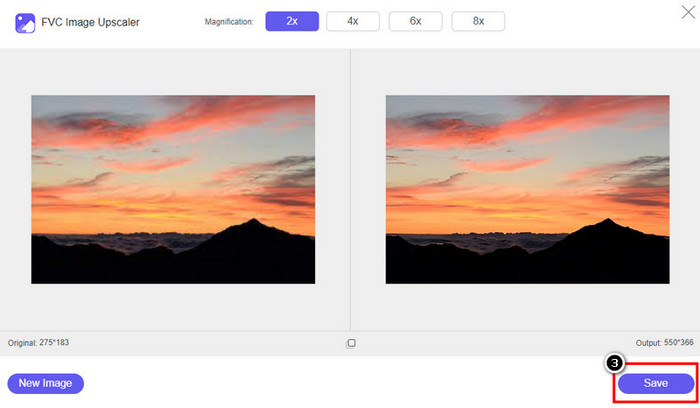
Krok 4. Kliknij przycisk Save, aby pobrać obraz, który tutaj ulepszyłeś; narzędzie zapisze go bezpośrednio w Twoim lokalnym folderze. Sprawdź powiększoną wersję zdjęcia, które tu edytowałeś.
Część 2. Jak zmienić rozdzielczość zdjęcia na iPhonie [Łatwo popraw swój obraz i zapisz]
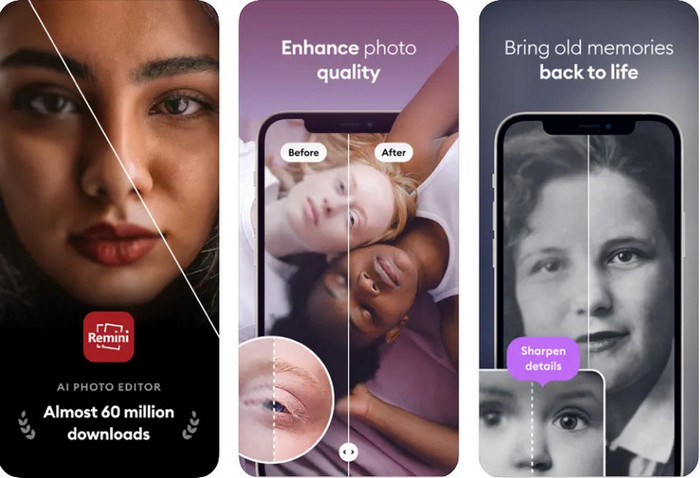
Aplikacja Remini App pozwala zmienić rozdzielczość zdjęć na iPhonie, aby wyglądały jeszcze lepiej. Możesz pobrać ją z App Store, gdy tylko tam wejdziesz. Jest to kompleksowy edytor zdjęć, który potrafi ulepszać obrazy oraz jednym ruchem zamieniać fotografie czarno-białe w kolorowe. Dzięki tej aplikacji możesz powiększyć dowolne zdjęcie nawet do 4x z pomocą technologii AI. Jeśli chcesz z niej skorzystać, możesz skopiować kolejne, podane niżej instrukcje krok po kroku.
Krok 1. Pobierz aplikację na swojego iPhone’a, aby móc zacząć z niej korzystać.
Krok 2. Otwórz aplikację i naciśnij Enhance. Wybierz zdjęcie, które chcesz poprawić, z albumu Zdjęcia (Photos).
Krok 3. Poczekaj, aż aplikacja przetworzy i ulepszy wgrany obraz; możesz przeciągnąć suwak, aby zobaczyć wygląd zdjęcia przed i po obróbce.
Krok 4. Gdy przetwarzanie obrazu się zakończy, kliknij przycisk Save, aby pobrać ulepszone zdjęcie.
Część 3. Jak zmienić rozdzielczość zdjęcia na Androidzie [Efektywnie poprawiaj obrazy]
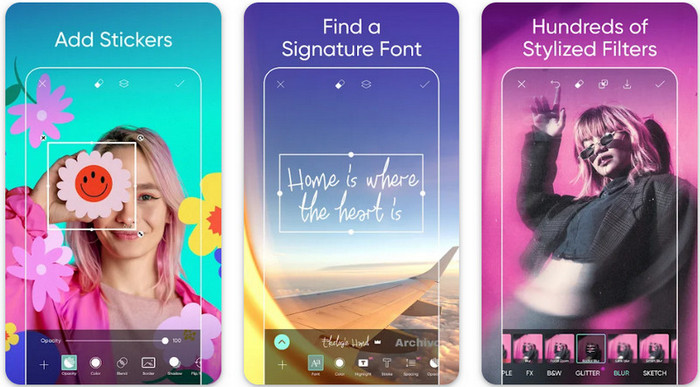
Jak zmienić rozdzielczość zdjęcia na Androidzie? Jeśli chcesz podnieść rozdzielczość zdjęcia zrobionego telefonem z Androidem, możesz wypróbować aplikację Picsart. To dobrze znana aplikacja do edycji zdjęć, którą możesz pobrać na swój telefon z Androidem, aby poprawić wygląd fotografii. Aplikacja oferuje wiele funkcji, z których możesz korzystać. Ulepszenie, które Ci pokażemy, nie jest typową metodą, jaką możesz sobie wyobrażać, ale faktycznie potrafi poprawić jakość obrazu. Zapoznaj się z poniższymi szczegółowymi informacjami, aby dowiedzieć się więcej!
Krok 1. Pobierz aplikację ze Sklepu Play, a następnie ją uruchom. Wybierz zdjęcie, które chcesz poprawić, i je wgraj.
Krok 2. Przejdź do Effects, kliknij Blur, przesuń suwak rozmycia, ustawiając go na 5 do 10, a następnie naciśnij ikonę check, aby zapisać ustawienie.
Krok 3. Otwórz Tools (Narzędzia) i przejdź do Curve (Krzywe).
Krok 4. Dostosuj krzywą, przeciągając ją w górę i w dół, aby poprawić wizualną jakość i „rozdzielczość” obrazu.
Krok 5. Naciśnij ikonę check, aby zapisać zmiany wprowadzone poprzez modyfikację krzywej, a następnie Export, aby wyeksportować zdjęcie.
Część 4. Jak dostosować ustawienia aparatu, aby robić lepsze zdjęcia! [Porady & Triki]
Jak zwiększyć rozdzielczość zdjęcia na iPhonie, aby uchwycić lepszy portret obrazu? Nie wszystkie funkcje są dostępne w aplikacji Aparat na telefonie iPhone. Niektóre z elementów poprawiających jakość obrazu to ustawienia. Jesteś zainteresowany tym, jak sobie z tym problemem poradzić? Następnie przejdź do przeczytania informacji, które dodaliśmy poniżej.
Krok 1. Wejdź w Ustawienia (Setting) i otwórz aplikację Aparat (Camera).
Krok 2. Kliknij Formats (Formaty).
Krok 3. Ustaw format końcowy na Most Compatible, czyli JPEG. Za każdym razem, gdy zrobisz zdjęcie, będzie ono zapisane w formacie JPEG, który – jak wiadomo – wykorzystuje stratną kompresję obrazu, ale zapewnia wysoką jakość wynikową.
Powiązane:
Jak naprawić zdjęcia HEIC za pomocą najlepszych narzędzi
Część 5. Często zadawane pytania dotyczące zmiany rozdzielczości zdjęć na iPhonie
Co powoduje, że jakość obrazu na iPhonie jest zła?
Istnieje wiele czynników, które należy wziąć pod uwagę, co może być problemem. Przed zrobieniem zdjęcia upewnij się, że wyczyściłeś obiektyw swojego iPhone'a i masz stabilną rękę lub możesz użyć stojaka na aparat i użyć wysokiej czułości ISO do poruszania się obiektów. Jeśli to zrobiłeś i nadal masz złą jakość, możesz skorzystać z narzędzi, które wymieniliśmy w tym artykule.
Czy zmiana jakości obrazu powoduje duży rozmiar pliku?
Rzeczywiście, jakość obrazu poprawi się po jego ulepszeniu. Gdy dodasz piksele do obrazu, po jego ulepszeniu, rozmiar pliku ulepszonej wersji również się powiększy.
Czy zmiana rozdzielczości zdjęć na iPhonie jest łatwa?
Tak, nie musisz mieć wieloletniego doświadczenia, aby poprawić rozdzielczość zdjęć na swoim iPhonie, więc jeśli chcesz wiedzieć, jak to zrobić, możesz skopiować kroki, które dodaliśmy powyżej, oraz narzędzia, które wprowadzamy, z których możesz korzystać.
Wniosek
Podsumowując, wiemy już dokładnie, jak sprawić, by rozdzielczość zdjęć z iPhone’a była jeszcze lepsza niż dotychczas, z pomocą tych dedykowanych aplikacji! Mamy nadzieję, że ten artykuł pomógł Ci uporać się z problemem, oferując różne rozwiązania zarówno na iPhone’a, jak i Androida. Nikt nie lubi zdjęć słabej jakości, dlatego jesteśmy tu po to, by to naprawić. Postępuj zgodnie z krokami, które podaliśmy powyżej, aby szybko i skutecznie zakończyć cały proces!
-
 Jak przekonwertować obraz o niskiej rozdzielczości do wysokiej rozdzielczości online
 Jeśli chcesz dowiedzieć się, jak konwertować obrazy o niskiej rozdzielczości na obrazy o wysokiej rozdzielczości online, ten artykuł jest dla Ciebie. Przeczytaj w całości, aby dowiedzieć się, jak to zrobić.
-
 Top 6 usuwania skaz, które musisz mieć teraz [2022]
 Potrzebujesz środka do usuwania skaz, aby mieć gładką skórę? Nie martw się więcej! Tutaj przedstawimy różne narzędzia, które mogą pomóc Twojemu urządzeniu.
-
 Usuń znak wodny StarUML, korzystając z bezpłatnej i płatnej wersji, której możesz użyć
 Chcesz usunąć znak wodny StarUML z końcowego wyniku? Cóż, są dwa sposoby, jak to zrobić, i omówmy je tutaj.
