


 Video Converter Ultimate
 Nagrywarka ekranu
 Naprawa wideo
Dowiedz się, jak sprawić, by obraz był wyraźniejszy dzięki tym prostym metodom
Kiedy zrobisz zdjęcie, które okazuje się rozmazane, uważa się to za wadę. I jest to bardzo niezadowalające, gdy masz nieostre zdjęcie. Na szczęście obecnie istnieje mnóstwo aplikacji, które mogą pomóc wyostrzyć i odblokować obraz. Adobe Photoshop należy do najbardziej znanych programów do edycji zdjęć. Nie jest jednak narzędziem przyjaznym dla początkujących. Dlatego przedstawimy prostsze metody, których możesz użyć, aby Twoje rozmazane zdjęcie zyskało doskonałą jakość. Przeczytaj poniższy tekst, aby dowiedzieć się, jak sprawić, by zdjęcie było wyraźniejsze, w kilku łatwych krokach.

Część 1. Jak sprawić, by obraz był wyraźniejszy w Internecie
Dzięki wykorzystaniu technologii sztucznej inteligencji istnieje obecnie wiele narzędzi do skalowania obrazu online, które mogą automatycznie wyostrzać obraz. Korzystanie z aplikacji online w celu uzyskania wyraźniejszego obrazu jest wygodne, ponieważ nie trzeba niczego pobierać na urządzenie. Pozwoli to również zaoszczędzić miejsce na Twoim urządzeniu, ponieważ możesz uzyskać do niego dostęp w przeglądarce.
FVC Free Image Upscaler to jedna z najbardziej znanych aplikacji online, jeśli chcesz wyostrzyć lub uczynić swój obraz bardziej przejrzystym. To narzędzie jest łatwe w użyciu, ponieważ ma prosty interfejs użytkownika. Dodatkowo możesz poprawić jakość obrazu przy powiększeniu 2x, 4x, 6x i 8x. Co więcej, FVC Free Image Upscaler wykorzystuje technologię SI (sztucznej inteligencji), która automatycznie wykrywa rozmazane części obrazu, a następnie je poprawia. Umożliwia to precyzyjne naprawienie utraconych pikseli, tekstur kolorów i innych szczegółów.
Ponadto obsługuje wiele formatów obrazów, takich jak PNG, JPG, JPEG i WebP. Najlepsze w tym narzędziu online jest to, że nie potrzebujesz żadnych kont, aby uzyskać do niego dostęp. Jest również darmowy i bezpieczny w użyciu. I pomimo tego, że jest to aplikacja internetowa, nie zawiera żadnych irytujących reklam, które mogłyby Cię rozpraszać, a korzystanie z niej jest szybkie i wydajne. Jeśli więc szukasz wygodnego narzędzia, FVC Free Image Upscaler jest najlepszym narzędziem.
Jak sprawić, by obraz był wyraźniejszy online za pomocą FVC Free Image Upscaler:
Krok 1. Na komputerze otwórz przeglądarkę i wyszukaj w polu wyszukiwania FVC Free Image Upscaler. Możesz też kliknąć podany link, aby przejść bezpośrednio na stronę główną aplikacji. Kliknij przycisk Upload Photo, aby uruchomić aplikację.
Krok 2.0 Po uruchomieniu aplikacji ponownie kliknij Upload Photo, aby dodać obraz, który chcesz powiększyć/wyostrzyć. Pojawi się okno z plikami na komputerze, w którym zlokalizujesz swój obraz i go otworzysz.
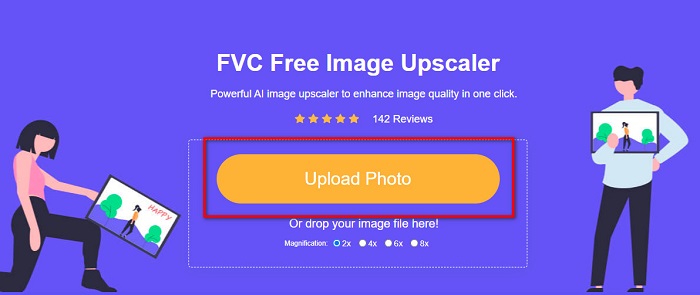
Krok 3. Następnie wybierz ustawienie wstępne magnification, które wolisz. Im wyższe powiększenie, tym większa ostrość Twojego obrazu. Pamiętaj jednak, że rozmiar pliku również wzrośnie wraz ze wzrostem jakości. Możesz wybrać magnification pomiędzy 2x, 4x, 6x i 8x.
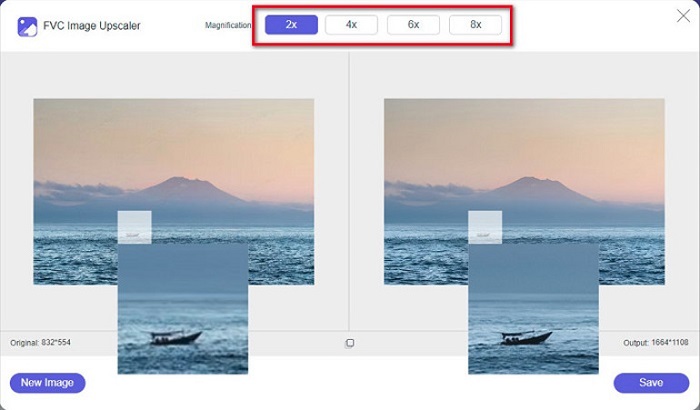
Krok 4. Wyniki zobaczysz po prawej stronie interfejsu. Jeśli jesteś zadowolony z efektu, kliknij przycisk Save, aby zapisać obraz wyjściowy na swoim urządzeniu.
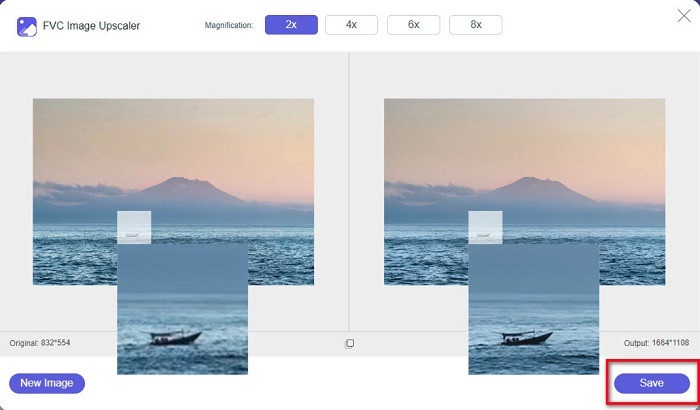
Po prostu poczekaj, aż obraz się zapisze i voila! Możesz teraz udostępniać swoje niesamowite zdjęcia znajomym lub na innych platformach społecznościowych.
Część 2. Jak sprawić, by obraz był wyraźniejszy w trybie offline
Dobrze jest też skorzystać z aplikacji offline, gdy chcemy wyostrzyć lub edytować zdjęcie. Wiele aplikacji do edycji zdjęć jest offline; należy je kupić przed użyciem. Ale nie martw się; w tej części udostępnimy bezpłatne narzędzie offline, którego możesz używać na swoim komputerze.
Paint.net to jedna z najczęściej używanych aplikacji do edycji zdjęć, która jest darmowa i bezpieczna. To narzędzie offline ma prostszy interfejs użytkownika niż Adobe Photoshop, z którego korzysta wielu profesjonalistów. Chociaż jego interfejs jest prosty, wciąż może tworzyć znakomite efekty i pozwala wyostrzyć rozmazane zdjęcie. Dodatkowo zawiera inne funkcje edycyjne, które mogą pomóc Ci ulepszyć obraz. Dzięki Paint.net możesz wyostrzać, korygować kolory i dodawać tło do swojego zdjęcia.
Co więcej, przesuwając suwak, możesz wybrać ostrość obrazu i usunąć jego rozmyte części. Jest jednak dostępny tylko na urządzeniach z systemem Windows. Jeśli jednak chcesz powiększyć obraz podczas jego wyostrzania, możesz użyć Paint.net.
Jak powiększyć i wyraźniej obraz za pomocą Paint.net:
Krok 1. Najpierw pobierz i zainstaluj Paint.net na komputerze stacjonarnym, a po zakończeniu instalacji otwórz program. Następnie wgraj zdjęcie, klikając File > Open.
Krok 2. Następnie przejdź do Effects > Photo > Sharpen. Pojawi się kolejne okno, w którym ustawisz ostrość obrazu, aby go odszumić i wyostrzyć.
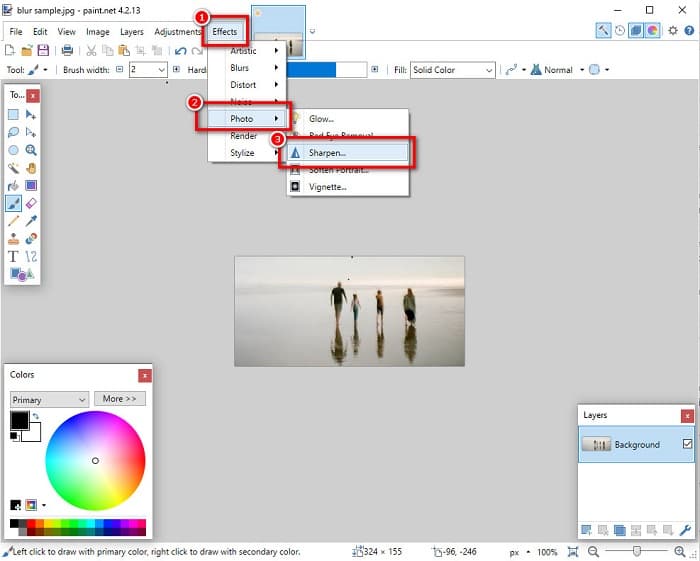
Krok 3. W zakładce Sharpen przesuń suwak, aby wybrać preferowany poziom ostrości obrazu. Możesz też kliknąć strzałki góra/dół, aby numerycznie ustawić wartość ostrości.
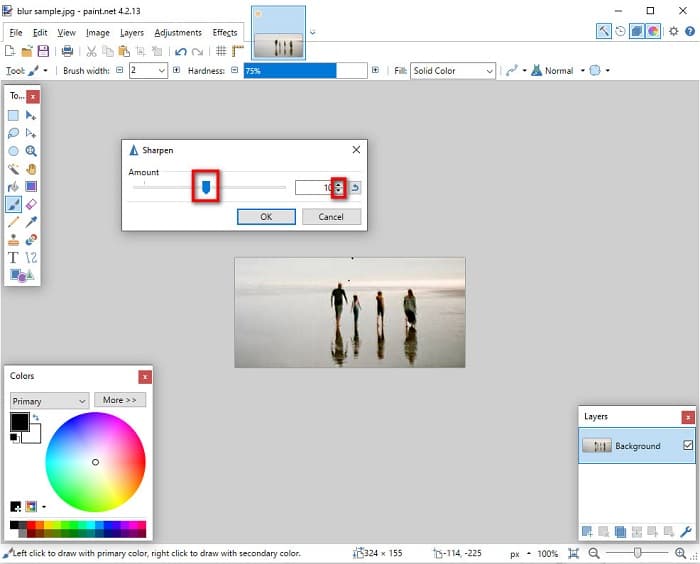
Krok 4. Na koniec kliknij przycisk OK i przejdź do File > Save, aby zapisać efekt końcowy na komputerze.
Część 3. Jak sprawić, by obraz na iPhonie był wyraźniejszy
A jeśli masz rozmyty obraz przechwycony za pomocą iPhone'a, możesz również użyć aplikacji do usuwania rozmycia na urządzeniu iPhone. Liczne aplikacje do edycji obrazów, które można pobrać ze sklepu AppStore, mogą pomóc usunąć rozmycie obrazu. Jednak nie ze wszystkich aplikacji można korzystać bezpłatnie; należy je kupić przed użyciem. Na szczęście znaleźliśmy aplikację do usuwania rozmycia obrazu, z której można korzystać bezpłatnie w AppStore. Przeczytaj całą tę sekcję, aby dowiedzieć się, jak sprawić, by obraz na urządzeniu iPhone był wyraźniejszy.
Jeśli zastanawiasz się, jaka darmowa aplikacja do edycji zdjęć może pomóc odszumić i wyostrzyć obraz, aplikacja VSCO jest tym, czego szukasz. VSCO to znany program do edycji zdjęć dostępny do pobrania w App Store. Ponadto podczas usuwania rozmycia w VSCO są pewne ustawienia, na których musisz się skupić. Aby odblokować zdjęcie w VSCO, musisz dostosować przejrzystość (clarity), ostrość (sharpness), klarowność oraz ekspozycję obrazu. VSCO ma także inne narzędzia edycyjne, których możesz użyć do obróbki zdjęć. Co więcej, obsługuje najpopularniejsze formaty obrazów w iPhonie, takie jak HEIC i HEIF. Niewielką wadą tej aplikacji jest to, że obsługuje tylko kilka formatów plików graficznych i trzeba wykupić wersję płatną, aby korzystać z innych funkcji edycyjnych.
Jak sprawić, by obraz na iPhonie był wyraźniejszy za pomocą VSCO:
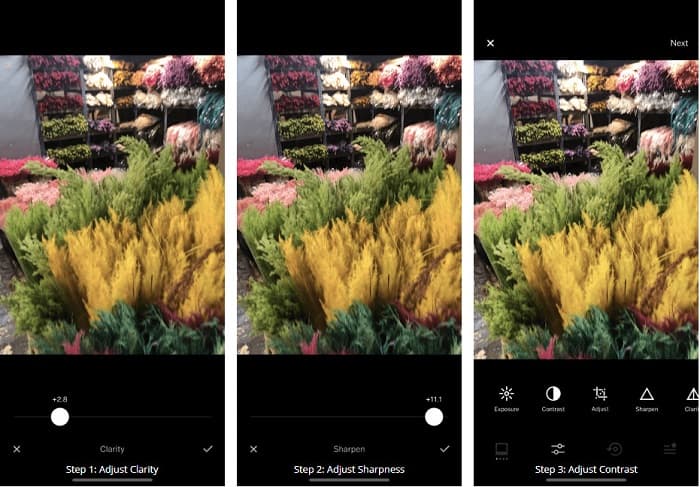
Krok 1. Zainstaluj VSCO z App Store, a następnie otwórz aplikację na iPhonie.
Krok 2. Otwórz swoje zdjęcie, a następnie przejdź do opcji Clarity. Ustawienie Clarity pomoże usunąć zakłócenia o dużej skali na obrazie. Po prostu poruszaj suwakiem Clarity tuż poniżej interfejsu.
Krok 3. Następnie dostosujemy ostrość Twojego zdjęcia. Funkcja Sharpen pomoże uzyskać pożądaną „chrupkość” obrazu. Przesuwając slider, możesz wybrać poziom ostrości, jaki chcesz dla swojego zdjęcia.
Krok 4. Gdy skończysz edytować przejrzystość i ostrość obrazu, przejdź do regulacji Kontrastu. Przesuń opcję Contrast oraz Contrast slider, aby wybrać poziom jasności i ciemności zdjęcia.
Krok 5. Na koniec wyregulujemy Exposure zdjęcia, aby je nieco rozjaśnić. Zwiększenie ekspozycji obrazu pomoże zrównoważyć ciemne partie z ustawionym Kontrastem. I to wszystko! Dzięki dostosowaniu tych parametrów możesz usunąć rozmycie z nieostrego zdjęcia. Kliknij tutaj, aby dowiedzieć się, jak zmienić rozmiar zdjęcia na iPhonie.
Część 4. Jak sprawić, by obraz na Androidzie był wyraźniejszy
Istnieją również aplikacje na Androida, których możesz użyć, aby obraz był wyraźniejszy. Tak więc, jeśli chcesz zapisać rozmyte zdjęcie w swojej Galerii, ta aplikacja może pomóc Ci ulepszyć Twój obraz. Przeczytaj tę część, aby dowiedzieć się, jak usunąć rozmycie obrazu na urządzeniu z Androidem.
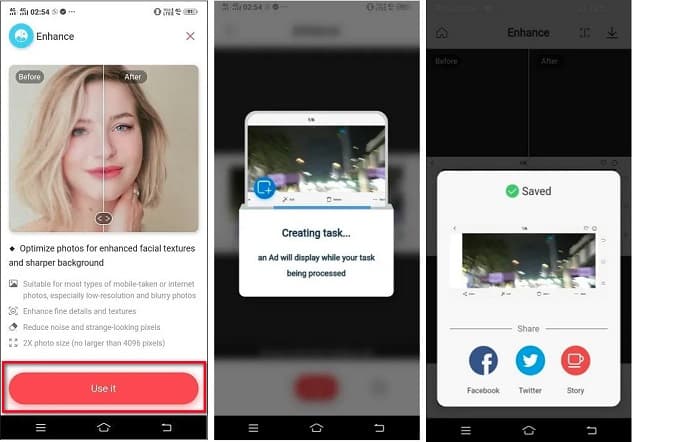
Aplikacja Remini (na Androida) jest prawdopodobnie jednym z najlepszych programów do edycji zdjęć, których możesz używać na swoim urządzeniu z Androidem. Ta aplikacja pozwala edytować, a nawet wyostrzyć rozmazany obraz. Co więcej, jest łatwa w użyciu i darmowa. Korzystając z opcji Enhance, możesz sprawić, że Twoje zdjęcie będzie wyraźniejsze. Musisz jednak najpierw założyć konto, zanim zaczniesz korzystać z aplikacji. W wersji Pro uzyskasz dostęp do zaawansowanych funkcji usuwania rozmycia.
Jak odblokować obraz za pomocą Remini na Androida:
Krok 1. Zainstaluj Remini na swoim urządzeniu z Androidem. Po instalacji od razu otwórz aplikację. W głównym interfejsie dotknij przycisku Use it, aby przejść do odszumiania i wyostrzania zdjęcia.
Krok 2. Następnie wybierz obraz i kliknij czerwony przycisk na dole interfejsu. Aplikacja utworzy zadanie i podczas przetwarzania wyświetli reklamę.
Krok 3. Po zakończeniu pojawi się efekt końcowy, w którym możesz porównać wygląd zdjęcia przed i po obróbce. Jeśli jesteś już zadowolony z rezultatu, zapisz obraz.
Część 5. Często zadawane pytania dotyczące uzyskiwania wyraźniejszego obrazu
Czy mogę użyć GIMP-a do usunięcia rozmycia obrazu?
Tak. GIMP to niesamowite oprogramowanie do edycji zdjęć, którego możesz użyć do usunięcia rozmycia obrazu. Możesz także pobrać tę aplikację na swoje urządzenie z systemem Windows.
Czy usuwanie rozmycia obrazu zwiększa rozmiar pliku?
Tak. Usuwanie rozmycia obrazu oznacza zwiększenie jakości i rozdzielczości obrazu. Wraz ze wzrostem rozdzielczości zwiększa się również rozmiar pliku obrazu.
Jakiej aplikacji mogę użyć do rozmycia obrazu?
YouCam Perfect to aplikacja, która może pomóc w rozmyciu obrazu. Dzięki technologii sztucznej inteligencji możesz natychmiast rozmyć swój obraz.
Wniosek
W tym poście opisaliśmy, czego musisz się dowiedzieć na temat jak sprawić, by zdjęcie było wyraźniejsze. Jeśli więc szukasz aplikacji, które umożliwią usunięcie rozmycia ze zdjęcia, powyższe metody pomogą Ci osiągnąć cel. Jednak jeśli wolisz korzystać z narzędzia online z prostym w obsłudze interfejsem, użyj FVC Free Image Upscaler.
-
 Rzeczywista recenzja PicResize, którą musisz znać 2022
 Czy chcesz wiedzieć, czy PicResize to najlepsza opcja do edycji obrazu? Przeczytaj ten artykuł, gdy przeglądamy ogólne narzędzie.
-
 Wszystko, co musisz wiedzieć o Waifu2x i Alternative
 Chcesz dowiedzieć się więcej o Waifu2x? Ten artykuł zawiera informacje, które należy podkreślić w tej aplikacji i jej alternatywie.
-
 Jak zoptymalizować obraz do Internetu przy użyciu najlepszych rozwiązań [Szybko]
 Jak zoptymalizować obraz pod kątem sieci? Będziesz potrzebować niezawodnego oprogramowania i samouczka; wszystkie informacje są tutaj.
