


 Video Converter Ultimate
 Nagrywarka ekranu
 Naprawa wideo
Aplikacje do powiększania zdjęć online i offline, których nie możesz przegapić
Zmiana rozmiaru obrazu może być nieco ryzykowna, ponieważ gdy powiększasz obraz, możesz stracić jego jakość. Niektórzy chcą zmieniać rozmiar swoich zdjęć, aby poprawić ich jakość. Obraz składa się z tysięcy pikseli i kiedy próbujesz go powiększyć, może to spowodować pogorszenie jakości, ponieważ przy zwiększaniu rozmiaru poszczególne piksele stają się widoczne. Jeśli więc chcesz powiększyć swój obraz, ale nie chcesz utracić jego jakości, mamy dla ciebie świetne narzędzia. Aby poznać najlepsze narzędzia typu photo enlarger (powiększanie zdjęć), przeczytaj dokładnie ten artykuł.

Część 1. Najlepsze powiększacze zdjęć online
To najlepszy wybór, aby skorzystać z powiększalnika zdjęć online, ponieważ zaoszczędzisz miejsce na swoim urządzeniu. Narzędzie online nie będzie wymagało pobierania niczego na urządzenie, o ile masz szybkie łącze internetowe. Ponadto większość aplikacji internetowych jest dostępna bezpłatnie. Mając to na uwadze, oto trzy najlepsze narzędzia do zmiany rozmiaru obrazu online.
Bezpłatna skalowarka obrazu FVC
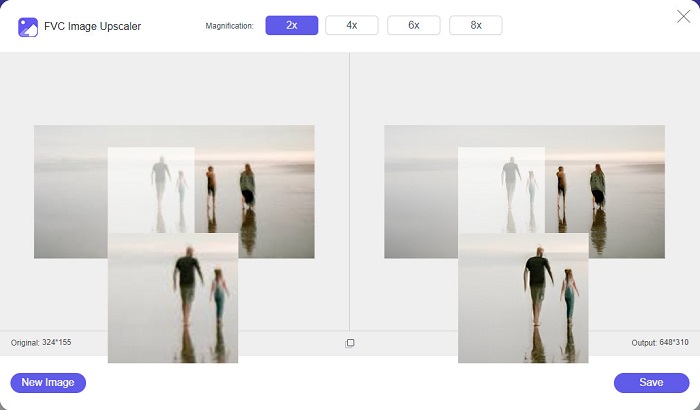
FVC Free Image Upscaler jest pierwszym na liście najlepszych internetowych narzędzi do zmiany rozmiaru zdjęć. Ta aplikacja online jest darmowa i bezpieczna w użyciu. Możesz ulepszyć lub powiększyć swój obraz 2x, 4x, 6x i 8x bez utraty jakości. Ponadto obsługuje prawie wszystkie formaty obrazów, takie jak PNG, JPG, JPEG i BMP. Co więcej, narzędzie to wykorzystuje technologię AI (sztuczna inteligencja), która automatycznie wykrywa rozmyte fragmenty obrazu i je poprawia. Dodatkowo możesz korzystać z niego we wszystkich popularnych przeglądarkach internetowych, w tym Google Chrome, Firefox i Safari. FVC Free Image Upscaler jest narzędziem przyjaznym dla początkujących, więc jeśli dopiero zaczynasz, może to być dla ciebie najlepsza opcja.
Plusy
- Bezstratnie powiększa obraz.
- Ma szybki proces skalowania.
- Pozwala naprawić utracone piksele, tekstury kolorów i nie tylko.
- Możesz go używać na urządzeniu z systemem Windows lub Mac.
Cons
- Jest to narzędzie zależne od Internetu.
Photo Powiększalnik.com
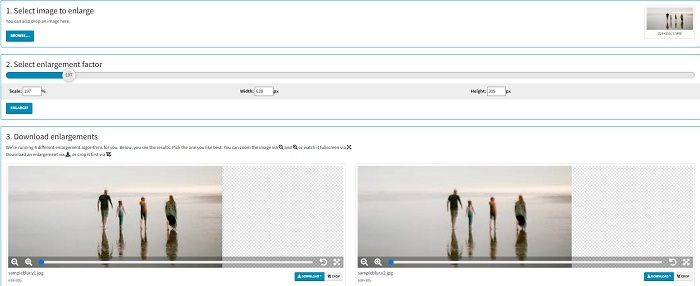
Photo Enlarger.com to internetowy powiększacz zdjęć, z którego korzysta wielu początkujących ze względu na prosty interfejs. To narzędzie online pozwala powiększyć obraz, wybierając współczynnik powiększenia. Dodatkowo możesz dostosować skalę oraz procentową szerokość i wysokość obrazu. Photo Enlarger.com wygeneruje cztery wyniki o różnych rozdzielczościach i współczynnikach powiększenia. Możesz także łatwo pobrać te obrazy.
Co więcej, możesz przyciąć powiększone wyjścia obrazu, aby usunąć niepotrzebne części obrazu. Zawiera jednak wiele nieznośnych reklam, które mogą przeszkadzać podczas powiększania obrazu. Niemniej jest to skuteczne narzędzie do powiększania obrazu.
Plusy
- Obsługuje najpopularniejsze formaty obrazów, takie jak PNG i JPG.
- Jest bezpłatny i bezpieczny w użyciu.
- Możesz go używać w prawie wszystkich przeglądarkach internetowych, w tym w Google i Firefox.
Cons
- Jest zależny od Internetu.
- Ma wiele reklam.
Powiększ obraz.com
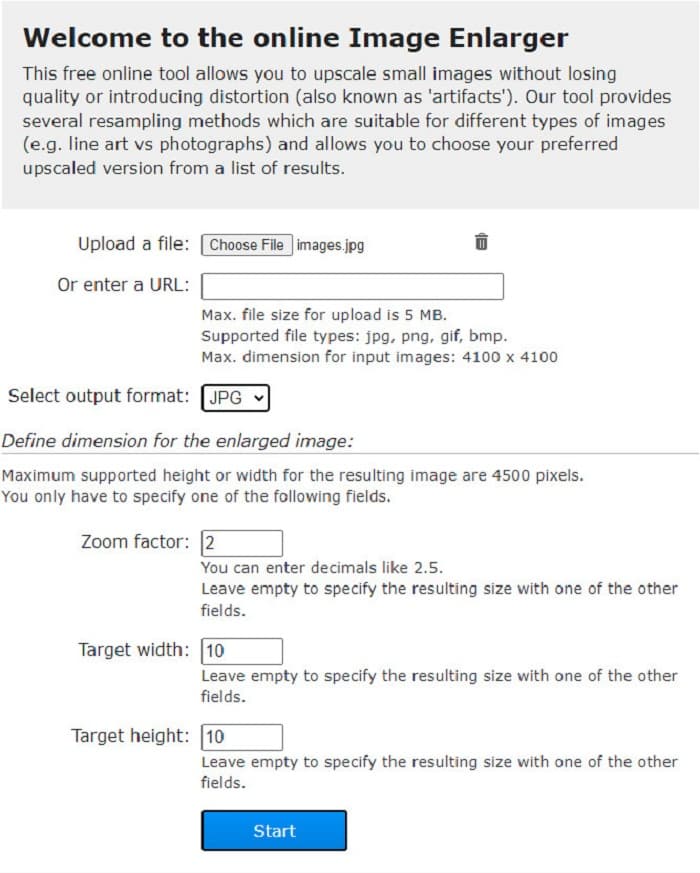
Kolejnym darmowym internetowym narzędziem do powiększania obrazów, którego możesz użyć, jest Image Enlarger.com. Ten internetowy resizer zdjęć pozwala dostosować współczynnik powiększenia, szerokość i wysokość obrazu. Ma także intuicyjny interfejs, dzięki czemu jest narzędziem przyjaznym dla użytkownika. Obsługuje najpopularniejsze formaty obrazów, takie jak PNG i JPG. Image Enlarger.com obsługuje maksymalną szerokość i wysokość do 4500 pikseli. Ponadto oferuje różne metody resamplingu dopasowane do różnych typów obrazów. Minusem tego narzędzia online jest to, że przy wolnym połączeniu z internetem powiększanie obrazów może być utrudnione.
Plusy
- Jest to narzędzie bezpieczne w użyciu.
- Jest darmowy.
Cons
- Zawiera reklamy, które mogą Cię rozpraszać.
- Nie możesz wyświetlić podglądu wyjściowego obrazu.
Część 2. Najlepsze powiększacze zdjęć w trybie offline
Ludzie czasami wolą używać oprogramowania do powiększania obrazów zamiast zwykłego edytora obrazów, ponieważ może to zepsuć jego jakość, gdy używasz standardowego edytora obrazów do powiększania obrazu. Dlatego wyszukaliśmy najlepsze na rynku powiększalniki offline i wybraliśmy najlepsze spośród nich. Te powiększalniki zdjęć, które przedstawimy, są dostępne do pobrania na urządzenia z systemem Windows lub Mac. Oto trzy najlepsze narzędzia do zmiany rozmiaru zdjęć w trybie offline bez zbędnych ceregieli.
Powiększalnik Smilla
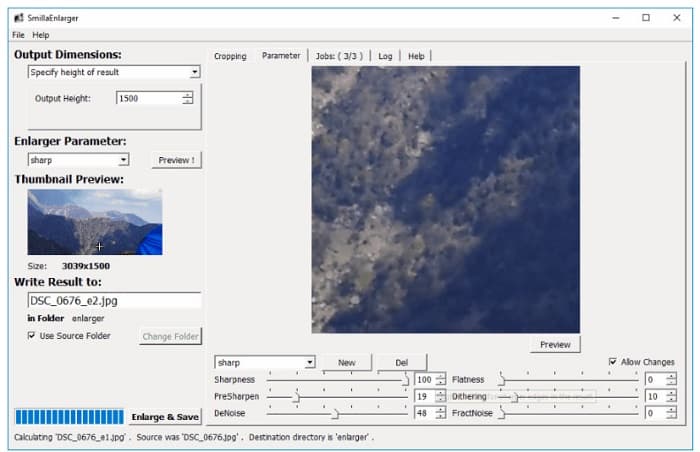
Smilla Enlarger to offline’owe narzędzie do powiększania obrazów, które pozwala łatwo zmieniać rozmiar grafik. Ta aplikacja jest darmowa i ma otwarty kod źródłowy dla komputerów z systemem Windows. Dodatkowo możesz używać opcji kadrowania, aby powiększyć dowolny obsługiwany przez to narzędzie obraz. Możesz też ustawić wymiary i parametry powiększenia, aby kontrolować ostrość i poziom szumu. Wszystkie te opcje pomogą ci uzyskać dokładnie takie powiększenie, jakiego potrzebujesz.
Co więcej, obsługuje prawie wszystkie formaty obrazów, takie jak PNG, JPEG, JPG i WebP. Możesz także przeglądać wyniki za pomocą tego narzędzia, ponieważ umożliwia ono podgląd obrazu. Wadą tej aplikacji jest to, że musisz ją kupić, zanim uzyskasz dostęp do jej innych unikalnych funkcji.
Plusy
- Jest to narzędzie przyjazne dla użytkownika.
- Można go bezpłatnie pobrać na komputer z systemem Windows.
- Posiada profile ulepszające, które poprawiają Twój wizerunek.
Cons
- Czasami ma powolny proces przesyłania.
Odcień powiększalnika obrazu
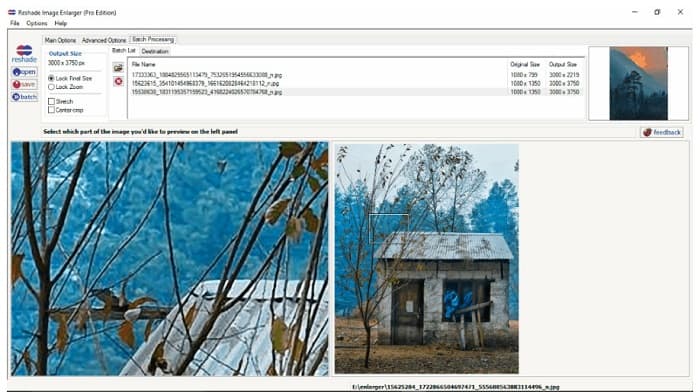
Reshade Image Enlarger to aplikacja do powiększania zdjęć, którą możesz pobrać, jeśli chcesz powiększać lub ulepszać swoje obrazy. Reshade Image Enlarger jest także narzędziem typu AI image enlarger, ponieważ automatycznie poprawia obraz, korzystając z technologii sztucznej inteligencji. Ponadto narzędzie to powiększa obraz poprzez ustawienie preferowanej, niestandardowej szerokości i wysokości, umożliwia kadrowanie, odszumianie, redukcję artefaktów i inne funkcje. Co jeszcze bardziej imponujące, zaawansowane opcje pozwalają kontrolować kompresję JPEG, dokładność przetwarzania oraz płynność przejść tonalnych w wynikowym obrazie. Aby skorzystać z funkcji przetwarzania wsadowego, przejdź do zakładki Batch Processing.
Plusy
- Możesz go pobrać na wszystkie platformy multimedialne, w tym Windows i Mac.
- Posiada proces powiększania partii.
- Posiada zaawansowane funkcje do wykorzystania.
Cons
- Posiada trudny w obsłudze interfejs użytkownika.
Ostrzejsze skalowanie
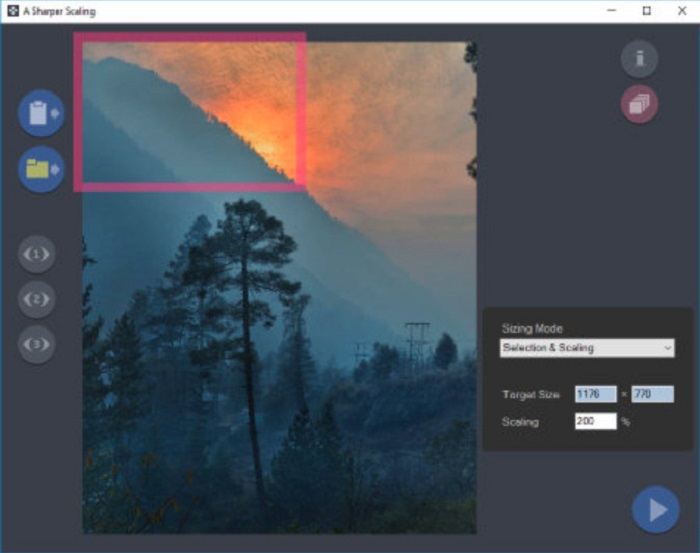
Innym powiększaczem zdjęć, który warto wypróbować, jest aplikacja A Sharper Scaling. Ten program to świetne narzędzie, jeśli chcesz zmieniać rozmiar swoich obrazów. Chociaż jest nieco bardziej zaawansowany niż inne opisane wyżej narzędzia offline, potrafi generować bardzo dobre rezultaty. A Sharper Scaling powiększa fragment obrazu i wyostrza go bez dodawania szumu, dzięki czemu grafika pozostaje klarowna i ostra. Co robi wrażenie, narzędzie to potrafi także szybko powiększać wiele obrazów jednocześnie bez utraty jakości. Ponadto ma prosty w obsłudze interfejs, dzięki czemu nadaje się także dla początkujących. Jeśli więc chcesz szybko zmienić rozmiar obrazu, A Sharper Scaling z pewnością ci w tym pomoże.
Plusy
- Możesz wybrać tryby powiększania obrazu.
- Może powiększać wiele obrazów jednocześnie
- Obsługuje standardowe formaty plików, takie jak PNG, JPG i JPEG.
Cons
- Ma kilka opcji edycji do użycia.
- Ma powolny proces eksportu.
Kneson Imagener
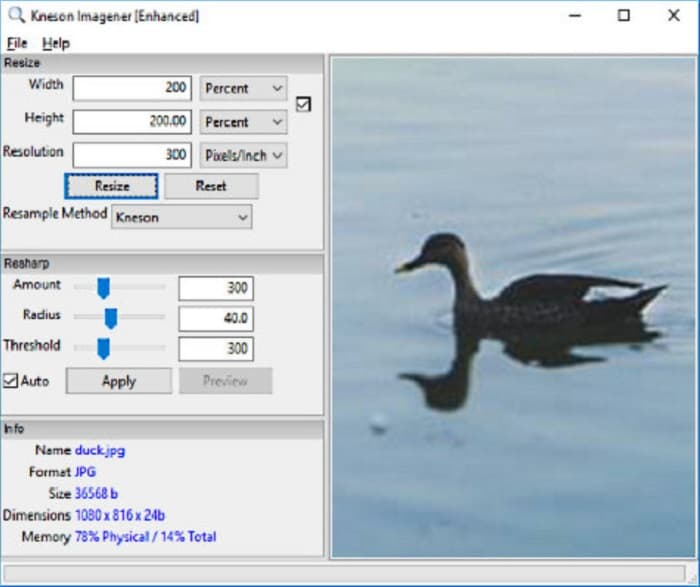
Kneson Imagener należy również do najlepszych programów typu photo enlarger na komputery PC. Ta świetna aplikacja jest dostępna za darmo do pobrania na większości platform. Umożliwia powiększanie obrazów na podstawie procentów, pikseli, cali lub centymetrów. Dodatkowo możesz zmienić rozdzielczość obrazu, aby poprawić jego jakość. Narzędzie to możesz wykorzystać także wtedy, gdy chcesz zmniejszyć rozmiar pliku graficznego, by zaoszczędzić miejsce w pamięci urządzenia.
Co więcej, oto dostępne metody resamplingu, których możesz użyć do powiększenia obrazu: Normal, Bilinear, Bicubic, Kenson i Kenson Progressive. Pamiętaj jednak, że jeśli chcesz pobrać tę aplikację, musisz zarejestrować działający identyfikator e-mail na swojej stronie internetowej, aby otrzymywać biuletyn. Następnie otrzymasz link do pobrania na swój e-mail, z którego możesz całkowicie pobrać aplikację.
Plusy
- Posiada funkcję przycinania.
- Możesz dostosować wielkość, promień i próg wyostrzania obrazu.
- Posiada prosty interfejs użytkownika.
Cons
- Aby go pobrać, musisz zarejestrować działający adres e-mail.
Powiązane z:
Najlepsze aplikacje do zmiany rozmiaru zdjęć online, offline, na Androida i iPhone’a
Część 3. Często zadawane pytania dotyczące aplikacji do powiększania zdjęć
Czy mogę zmniejszyć rozmiar mojego obrazu?
TAk. Dostosowując rozdzielczość, piksele i format obrazu. Rozdzielczość, piksele i format obrazu określają jego rozmiar. Jeśli więc chcesz skompresować rozmiar obrazu, użyj narzędzia do kompresji zdjęć.
Czy mogę powiększyć swoje zdjęcie w Adobe Photoshop?
Adobe Photoshop jest idealny dla wielu profesjonalistów, ponieważ możesz bezstratnie powiększać obraz w doskonałej jakości. Jednak wiele osób ma trudności z używaniem tego narzędzia do powiększania zdjęcia, ponieważ ma ono trudny w obsłudze interfejs.
Czy Kapwing Photo Resizer to doskonała aplikacja do powiększania zdjęć?
Kapwing Photo Resizer to darmowy program do powiększania obrazów online, który poleca wiele osób. Jest to również świetna aplikacja do bezstratnego ulepszania lub powiększania obrazu.
Wniosek
Wszystkie powyższe photo enlargers należą do najlepszych narzędzi do powiększania obrazów, jakie znajdziesz w internecie. Zapewniamy również, że opisane wyżej aplikacje są bezpieczne w użyciu, a podane informacje są rzetelne. Jeśli jednak wolisz korzystać z darmowego narzędzia online, polecamy najlepszy internetowy powiększacz obrazów, czyli FVC Free Image Upscaler.
-
 Przywracanie starych zdjęć online i offline [Łatwe kroki]
 Chcesz przywrócić stare zdjęcie? Dzięki tym narzędziom poznasz stary proces przywracania zdjęć. Przeczytaj ten post, aby poznać najprostsze metody.
-
 Jak naprawić jakość obrazu online i w Adobe Photoshop
 Jeśli masz obraz o niskiej jakości, musisz poprawić rozdzielczość zdjęcia. Jeśli chcesz dowiedzieć się, jak poprawić jakość obrazu, przeczytaj cały ten artykuł.
-
 Top 7 Pixels Enhancer dla wszystkich przeglądarek internetowych, których musisz użyć
 Jeśli chcesz poznać najlepsze wzmacniacze pikseli, lepiej sprawdź ten post. W tym artykule wymieniono siedem najlepszych wzmacniaczy pikseli zdjęć dla wszystkich przeglądarek internetowych.
